A distributor's operations team starts every morning the same way: someone logs into a supplier portal, downloads yesterday's price list and keys the changes into an ERP system that has no API. Down the hall, the analytics team wants the prices of the same products from twenty public retail sites, every day, in one table. Both jobs are "automation", but they call for different tools: a software robot that works the portal screen by screen, and a scraper that reads public pages as HTTP responses.
This post explains what RPA and web scraping are, how each works, where they differ, where they overlap, when each wins, who should own them, where a proxy fits and what AI agents change. Vendor facts come from UiPath, Automation Anywhere and Microsoft documentation read on 9 November 2026.
What is RPA?
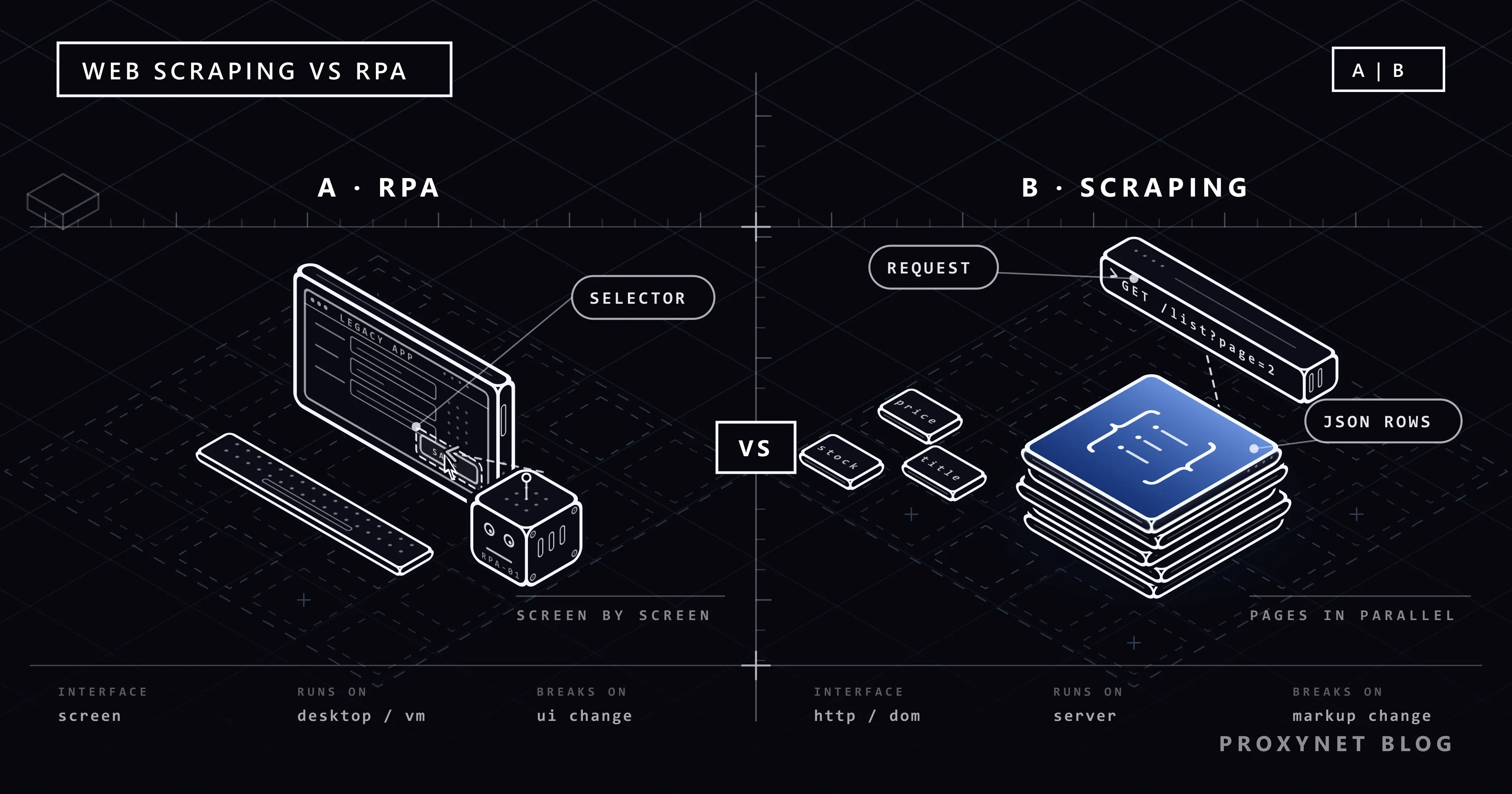
RPA, short for robotic process automation, is software that automates repetitive, rule-based work by operating other software the way a person would. The "robot" is a program: it opens an application, finds a button or a field, clicks, types, copies a value and pastes it elsewhere. Working at the user interface lets it connect systems that were never built to talk to each other.
The vocabulary even has a standard. IEEE 2755-2017, the IEEE Guide for Terms and Concepts in Intelligent Process Automation, was published on 28 September 2017 to keep the terminology of software-based intelligent process automation consistent, and it is still listed as active. UiPath's own definition is close: RPA "uses software robots to automate repetitive, rule-based tasks like data entry and system integration" and "mimics human actions in digital systems". Automation Anywhere calls it "inherently rules-based" and traces it to the keystroke macros of the 1990s.
Robots come in two kinds. An attended robot works with a person on the same machine: the user starts it with a button or a hotkey, supplies inputs and handles exceptions, as Automation Anywhere's Automation 360 documentation puts it. An unattended robot runs on its own, usually on a dedicated machine, started by a schedule, an API call or an event; UiPath describes such processes as "controlled through Orchestrator", its management server, under a separate licence.
What is web scraping?
Web scraping is the programmatic retrieval of web pages and the extraction of structured data from them. A scraper sends the HTTP request a browser would send, receives the HTML or the JSON the page loads in the background, picks out the fields it was told to find and stores them as rows. No screen is involved: the program reads the page's code, not its pixels. The full pipeline is in What Is Web Scraping and How Does It Work?.
How does each one work?
An RPA process:
- Design the flow. A developer or a business user records the clicks once, or assembles prebuilt actions in a visual designer, and adds rules such as "send invoices above a threshold for approval".
- Bind each step to a UI element through a selector. UiPath's documentation defines a selector as an XML fragment that stores "the attributes of a graphical user interface element and its parents"; Power Automate builds it from the element's place in the application's hierarchy and tries the next selector when the first fails.
- Run the robot on a desktop or a virtual machine. An attended run uses the user's session. An unattended run needs its own machine: Power Automate signs in with a stored connection, opens a remote desktop session, keeps the screen locked and signs out afterwards; on Windows 10 and 11 it will not start while any user session is active, even a locked one (Microsoft Learn).
- Hand exceptions to a person. When a selector finds nothing or a value fails a check, the robot parks the item in a queue for a human.
A web scraping job:
- Request. HTTP requests for a list of URLs at a polite rate, with a timeout and an honest User-Agent, after checking robots.txt and the terms of use.
- Parse. The HTML becomes a tree and fields are selected with CSS selectors or XPath, or read from the JSON endpoint the page itself calls.
- Normalise. Prices become numbers in one currency, dates take one format, duplicates become one record.
- Store and repeat. Rows go to a file or a database, and the job runs again on a schedule.
Web scraping vs RPA: comparison table
| Aspect | RPA | Web scraping |
|---|---|---|
| Purpose | Automate a business process across applications | Collect data from web pages |
| Works at | The user interface: windows, buttons, fields | HTTP responses: HTML, JSON |
| Needs a screen | Yes, a desktop or VM session | No |
| Scale | One screen at a time per robot | Many parallel requests from one server |
| Breaks when | A window, label, layout or resolution changes | The HTML changes; the site rate-limits |
| Cost model | Licence per robot or runtime, machines, a developer | Engineering time, servers, proxies, maintenance |
| Typical owner | Operations, finance or IT automation | Data or engineering team |
| Output | A completed process | A dataset of rows |
Where do RPA and web scraping overlap?
Most RPA suites contain a small scraper, and most data teams eventually need a bot.
An RPA bot that reads a public website. Power Automate's "Extract data from web page" action, says its reference page, extracts "data from specific parts of a web page as single values, lists, rows, or tables", follows paging up to a set number of pages and stores the result in a variable or an Excel spreadsheet. That is scraping through a browser the robot controls: fine for a few pages inside a wider process, wrong for ten thousand pages a day, because each page is rendered one at a time.
A scraper that feeds an RPA process. A scraper collects competitor prices, an analyst decides, and a bot types the new prices into a pricing tool with no import function: the scraper does the volume, the bot the last mile.
An official API that makes both unnecessary. If the supplier portal offers an API, the clicking bot is overhead; if a site publishes a data feed, scraping it is too. Our comparison of web scraping and APIs covers that decision.
When does each one win?
RPA wins when the work lives inside systems you cannot reach any other way:
- Legacy applications without an API: terminal emulators, Citrix-published apps, a Windows program from 2004; Microsoft lists terminal emulators among the legacy applications desktop flows automate.
- Licensed desktop software that a user may operate but that offers no programmatic access.
- Human-in-the-loop approvals, where an attended robot prepares the work and a person signs it off.
- Processes rather than datasets: the goal is "the invoice is booked", not "here is a table".
Web scraping wins when the data is public, the volume is large and the sources are many:
- Scale: thousands of product pages a day is an ordinary scraping job and an impossible RPA job.
- Monitoring: hourly checks need a program on a server, not a robot that needs a desktop session.
- Datasets collected over weeks; the output is already a table.
- Multi-country views: a scraper can send each request through an exit in the right country; a desktop robot in one office cannot.
What do they cost, and what breaks them?
RPA costs start with licences, sold per robot, per user or per runtime, with unattended runs usually in a higher tier; Power Automate requires its Process plan for unattended desktop flows. Then come machines, a developer and the users who handle exceptions. Scraping costs are engineering time for the parsers, servers, proxy bandwidth where the targets require it, and monitoring that notices when a selector quietly returns nothing.
What breaks RPA is the screen: a renamed button, a new field, an unexpected dialog or a different resolution on the unattended machine, which Microsoft warns can hide a target element or make the robot act on the wrong one. UiPath's selector guide says that when an attribute's value changes between runs "the selector will not be able to correctly identify the element". What breaks scraping is the markup and the gatekeeper: a redesign renames the classes your parser relies on, and a site that sees too many requests from one address answers 429 Too Many Requests or shows a bot-protection page.
Who owns the bot?
An RPA bot acts under an employee's or a service account's credentials inside your systems: Power Automate's unattended runs sign in with the credentials stored in a desktop flow connection, and Automation Anywhere's unattended bots are started by its Control Room scheduler, API calls or events. Give it least privilege, log every run and alert someone when exceptions pile up.
A scraper acts as a visitor to someone else's site, under its terms of use, robots.txt and data protection law. Prices and stock are public business data; the names, phone numbers and e-mail addresses of people are personal data under the GDPR and Türkiye's KVKK, and our examples never collect them. Keep a polite rate, identify the scraper honestly and stop when asked. This post describes the rules; for a specific project, consult a lawyer.
Where does a proxy fit?
A proxy matters only on the web-facing side of either tool. A robot or scraper running in a datacenter reaches public sites from that datacenter's IP address and sees the prices and language that location gets; when the process must see a market's local version, give it an exit in that market.
For a robot or scraper that signs in to a partner portal or calls a partner API that whitelists addresses, a ISP Proxy gives it one stable IP; these per-IP products ship with access limited to the target sites you name, and access to all websites is a paid add-on.
For reading how a site looks to customers in a given country or city, a Residential Proxy targeted to that location shows the local prices. A proxy changes where the request comes from, not what the site allows.
RPA and AI agents: what changes?
An AI agent plans its own steps; an RPA bot follows the steps it was given. An agent built around a language model looks at a goal, picks the next tool, reads the result and adapts, so it can cope with a window it has never seen, at the price of a model call per step and a route that may differ tomorrow. An RPA flow does the same thing every time. How the agent loop works, and why predictable jobs still belong in a fixed workflow, is explained in How Do AI Agents Work?.
Vendors are merging the two (UiPath lists computer vision and document understanding among the AI capabilities that extend its robots); the pattern that holds up is a fixed flow with a model at one step, not an agent clicking freely through a production system.
Common mistakes
- Scraping ten thousand pages with an RPA bot. Each page costs a rendered browser on an occupied machine; move the volume to a scraper.
- Building a scraper for an internal system that has an API. You take on maintenance for nothing, and the API is the route its terms allow.
- Running a robot under a personal account. When that person leaves, the process stops, and the audit trail blurs.
- Treating a scraper as exempt from the site's rules. Terms of use, robots.txt and rate limits apply to a program as they apply to a visitor.
Decision guide
| Need | Recommendation |
|---|---|
| Move data between two internal systems with no API | RPA |
| The provider offers an API or a data feed | Use the API |
| Public prices from hundreds of sites every day | Web scraping, with exits per country |
| A person must approve each item | Attended RPA |
| Unstructured documents at one step of a fixed process | RPA plus a model at that step |
| Steps that cannot be drawn in advance | An AI agent with limits and approval |
| Many sites and no team to maintain parsers | A managed scraping API |
Frequently asked questions
What is RPA and what is it used for?
RPA is robotic process automation: software robots that perform rule-based tasks by operating other programs through their user interface, as a person would. It moves data between systems that have no API, books invoices and runs other repetitive back-office processes.
Is web scraping a type of RPA?
No. Web scraping reads web pages over HTTP and extracts fields from the response; RPA automates business processes by acting on application screens. They are different tools with different owners and costs.
Can RPA tools scrape websites?
Yes, on a small scale. Power Automate's "Extract data from web page" action pulls single values, lists or tables from a page; for thousands of pages a day a dedicated scraper is faster and cheaper, because it does not render a screen for each one.
RPA vs API: which should you choose?
The API, whenever the system offers one with the data you need: it is a contract the provider maintains, while a robot depends on a screen that can change at any time. RPA is the fallback for systems with no API, such as legacy or licensed desktop software.
Will AI agents replace RPA?
Not for predictable processes. An agent decides its own steps, which helps when a job cannot be scripted in advance but adds cost per step and makes the outcome less repeatable; a fixed, auditable process still belongs in a defined flow, often with a model at one step.
Which is cheaper, RPA or web scraping?
It depends on the job. RPA carries licence, machine and developer costs and suits processes with tens or hundreds of items a day; scraping carries engineering, server and proxy costs and gets cheaper per page as volume grows.
Summary
RPA automates a business process by operating software through its screen, which reaches systems with no API at the price of depending on that screen. Web scraping collects data from public pages over HTTP, which scales across thousands of pages and countries at the price of maintaining parsers and following each site's rules. Check for an API first, then use RPA for internal processes and scraping for public web data. If you would rather receive extracted records than maintain parsers, our Web Scraping API offers managed page extraction through our sales team.