A team testing a video-calling app wants to see how a call connects from three countries. The app's web dashboard works through any proxy they try. The call does not: voice and video travel as UDP packets, and several of the providers in this list relay only TCP on their residential pools, even though every one of them sells "SOCKS5". The proxy accepts the login, the app shows "connecting", and the call never starts.
In this post we compare six providers selling SOCKS5 proxies in 2026: Proxynet and five global brands. We looked at which products carry SOCKS5, whether UDP travels over it, how you log in, how each provider exposes the SOCKS5 port, and what residential traffic costs and how long it lasts. Rival figures come from the providers' own sites and documentation, read in October 2026; information a provider does not publish sits in the table as "—".
What is a SOCKS5 proxy?
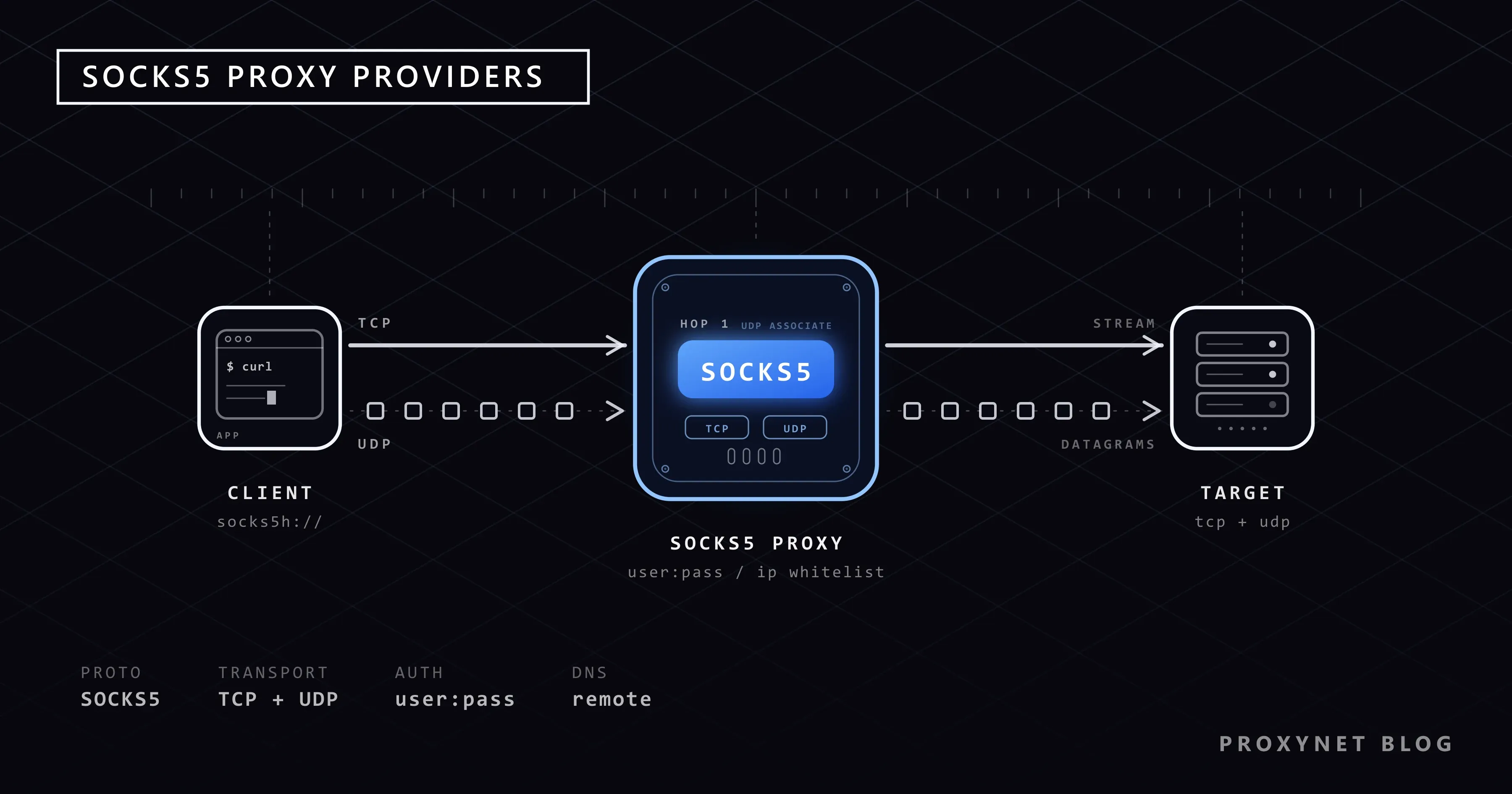
A SOCKS5 proxy opens connections on your application's behalf and relays the bytes in both directions without reading them, so it works for any protocol, not only web pages. RFC 1928 defined it in 1996, adding UDP relaying, IPv6 and domain-name targets to SOCKS4, and RFC 1929 defines its username and password login. SOCKS5 is a protocol, not a kind of IP: residential, mobile, ISP and datacenter proxies can all be reached over it, and which of them a provider actually exposes over SOCKS5 is the first thing this list compares. The handshake step by step is in What Is a SOCKS5 Proxy?, and the comparison with HTTP proxies in SOCKS vs HTTP Proxy.
What is a SOCKS5 proxy used for?
- Testing apps from other countries: desktop and mobile apps speak their own protocols, and their calls and live features often use UDP. More: app testing.
- Messaging apps: Telegram asks for a SOCKS5 server, port, username and password in its own settings. More: Telegram SOCKS5 setup.
- Programs without a proxy setting: a routing tool such as Proxifier sends one chosen desktop program through SOCKS5. More: Proxifier.
- Data collection with remote DNS: a scraper that lets the exit resolve domain names sends no lookups through your own network. More: data scraping.
- DNS and HTTP/3 checks: resolver tests and QUIC traffic run over UDP, which an HTTP proxy cannot carry. More: TCP vs UDP.
What to look for when choosing a SOCKS5 proxy provider
- UDP on the product you will buy. "SOCKS5 supports UDP" describes the protocol, not the offer. Two providers in this list relay UDP only on their ISP and datacenter IPs, one says it does not relay UDP at all, and one does not say. Check the exact product, not the protocol page.
- SOCKS5 on the IP type you need. Some providers sell only residential and mobile IPs, others have no mobile product. If one job needs a fixed ISP address and another needs rotating residential IPs, both should take SOCKS5 in the same account.
- A login your tools can send. Chrome uses SOCKS5 only for TCP and sends no SOCKS5 credentials at all, as the Chromium proxy documentation states. For such tools you need an IP whitelist that replaces the password, not one that only adds a second lock.
- Allowed destinations. Many offers limit which sites or destination ports a proxy may reach; a non-web protocol on an unusual port is where this shows. Ask before you build on it.
- The pricing model and the life of the traffic. Residential SOCKS5 is sold per GB, ISP and datacenter per IP. In monthly plans unused traffic burns after a month or 60 days; in a balance model it stays.
The 6 best SOCKS5 proxy providers
1. Proxynet
For SOCKS5, the first address is Proxynet, because the protocol is not a separate product with its own limits. All four products — residential, mobile, static ISP and datacenter — take SOCKS5 alongside HTTP and HTTPS, and SOCKS5 carries both TCP and UDP on each of them. Residential and mobile traffic runs through one gateway with HTTP and SOCKS5 on separate ports; the endpoint builder in the dashboard shows the SOCKS5 port and builds the username from the country, city and session you choose. On static ISP and datacenter IPs you switch an IP between SOCKS5 and HTTP(S) in the dashboard. You log in with a username and password, or with an IP whitelist of up to 10 addresses that needs no password at all.
The pool holds more than 160 million residential and mobile IPs: more than 140 million residential and more than 20 million mobile. Residential IPs cover 194 countries, city and ASN targeting cost nothing extra, and sessions rotate on every connection or stay sticky for 1-60 minutes. Static ISP adds more than 240,000 dedicated IPs in more than 20 countries, and datacenter more than 2,000,000 dedicated IPv4 addresses in more than 50 countries, both with unmetered traffic. Residential traffic starts at 3.30 dollars per GB and comes down to 1.50 dollars as your balance grows. There is no subscription and no term: the balance never expires and works on every product.
Pros
- SOCKS5 on residential, mobile, static ISP and datacenter
- TCP and UDP over SOCKS5 on all four products
- Username and password, or a password-free IP whitelist of up to 10 IPs
- More than 160 million residential and mobile IPs, residential in 194 countries
- City and ASN targeting at no extra cost, sticky sessions of 1-60 minutes
- Unmetered traffic on static ISP and datacenter
- No subscription, and a balance that never expires and works on every product
Cons
- No free trial; you test with a small balance
- Static ISP and datacenter IPs reach the target sites you choose; all websites is a paid add-on
Who it is for: teams that need SOCKS5 with UDP on more than one IP type, or tools that log in only by IP, without a monthly plan.
2. SOAX
SOAX sells two products, residential and mobile, and UDP over SOCKS5 works on both: its developer FAQ says residential and mobile proxies support UDP and that UDP runs over SOCKS5 only. HTTP, HTTPS and SOCKS5 share one gateway port, so the same host and port work whichever protocol your tool speaks. The residential pool holds more than 155 million IPs. The price depends on the target country's tier and your monthly plan: 4 dollars per GB at the entry of the second tier, down to 0.55 dollars on an enterprise plan of 3,000 dollars a month.
Pros
- UDP over SOCKS5 on residential and mobile
- One gateway port for HTTP, HTTPS and SOCKS5
- IP allowlist login works over SOCKS5
- More than 155 million residential IPs
Cons
- No static ISP or datacenter product
- With IP allowlist login over SOCKS5 you cannot pass targeting rules such as country or session
- On monthly billing, credit burns in 60 days
- Restricted domains and ports open only on an enterprise plan, after verification
Who it is for: teams that need UDP on residential or mobile IPs and can commit to a steady monthly plan.
3. Decodo
Formerly Smartproxy. SOCKS5 works on residential, static residential (ISP), mobile and dedicated datacenter proxies, and UDP is where the products split: its FAQ supports UDP over SOCKS5 on static residential and datacenter proxies, while its SOCKS5 page lists residential and mobile as TCP. On residential and mobile, SOCKS5 runs only through the main gate endpoint — the country endpoints refuse it, so the location goes into the username — whereas static residential takes HTTP and SOCKS5 on the same endpoint and port. The residential pool holds more than 115 million IPs, at 4 dollars per GB on entry and 2 dollars at the lowest.
Pros
- SOCKS5 on all four product types
- UDP over SOCKS5 on static residential and datacenter
- Username and password, or IP whitelist
- A three-day, 100 MB free trial
Cons
- No UDP on residential and mobile
- Country endpoints do not accept SOCKS5
- Static residential reaches only five destination ports: 80, 443, 563, 8443 and 43
- Using the trial costs you the 14-day refund right
Who it is for: teams whose UDP work fits on static or datacenter IPs and who want a trial first.
4. IPRoyal
IPRoyal offers SOCKS5 on residential, ISP, datacenter and mobile proxies. Its help centre lists datacenter and ISP proxies as compatible with both TCP and UDP and residential as TCP, while a residential SOCKS5 sales page mentions UDP; the two pages disagree, so confirm residential UDP with support before you rely on it. Residential SOCKS5 uses the same host as HTTP on a separate port, and IP whitelisting replaces the username and password on residential, datacenter and ISP. The residential pool holds more than 64 million IPs, from 7 dollars per GB down to 1.75 dollars at 10 TB, and the traffic does not expire.
Pros
- SOCKS5 on all four product types
- UDP on ISP and datacenter proxies
- Password-free IP whitelist
- Residential traffic with no expiry, sticky sessions of up to 7 days
Cons
- Its own pages disagree on residential UDP
- The residential entry price is 7 dollars per GB
- The lowest price per GB needs a 10 TB purchase
Who it is for: teams that want residential traffic without a deadline and UDP on static or datacenter IPs.
5. Bright Data
The largest residential pool on the list, more than 400 million IPs, and SOCKS5 on all four networks: datacenter, ISP, residential and mobile. SOCKS5 has its own port on the same super-proxy host as HTTP. Its documentation does not describe UDP over SOCKS5; for UDP, its datacenter FAQ points to a separate MASQUE route for QUIC and HTTP/3 traffic. The IP allowlist is an extra lock rather than a login: requests from an allowlisted IP still need the zone's username and password, so a tool that cannot send a SOCKS5 password, such as Chrome, needs a workaround. Residential traffic starts at 8 dollars per GB; the lowest figure, 5 dollars, is tied to a plan of 1,999 dollars a month.
Pros
- The largest residential pool on the list
- SOCKS5 on all four networks
- A documented route for QUIC and HTTP/3 traffic
- A free trial
Cons
- UDP over SOCKS5 is not documented
- A password is required even from allowlisted IPs
- The residential entry price is 8 dollars per GB, the highest on the list
- Plan traffic burns within a month
Who it is for: enterprise teams that need pool depth and log in with credentials anyway.
6. Webshare
Webshare includes SOCKS5 at no extra cost on its datacenter, static residential and residential plans, and every connection type takes HTTP and SOCKS5 on the same port. Its help centre states that it does not support UDP proxy connections, so SOCKS5 there carries TCP only. You log in with a username and password or an IP whitelist. Residential traffic costs 7 dollars per GB at entry and 1.40 dollars at the lowest monthly tier, and plan traffic lasts one month; datacenter proxies have a free tier.
Pros
- SOCKS5 included on every plan
- HTTP and SOCKS5 on the same port
- Username and password, or IP whitelist
- A free datacenter tier for quick tests
Cons
- No UDP proxy connections
- No mobile proxies
- Plan traffic lasts one month
- The residential entry price is 7 dollars per GB
Who it is for: TCP-only work and quick tests on a free datacenter tier.
Comparison tables
The figures come from the providers' own sites and documentation, October 2026. "—" is information the provider does not publish. "All four" means residential, mobile, static ISP and datacenter; Res = residential, DC = datacenter.
SOCKS5, UDP and login
| Provider | SOCKS5 on | UDP over SOCKS5 | IP whitelist login |
|---|---|---|---|
| Proxynet | All four | All four | Yes, up to 10 IPs |
| SOAX | Res, mobile | Res, mobile | Yes, no targeting |
| Decodo | All four | ISP, DC | Yes |
| IPRoyal | All four | ISP, DC | Yes |
| Bright Data | All four | — | Password still needed |
| Webshare | Res, ISP, DC | No | Yes |
This is the table that decides whether a SOCKS5 offer fits a UDP job. Of the providers that publish it, only Proxynet carries UDP over SOCKS5 on all four product types; SOAX does so on the two it sells, and Decodo and IPRoyal only on their static and datacenter IPs. In the login column, Bright Data's allowlist still asks for the password, and SOAX's allowlist works over SOCKS5 without targeting rules.
Residential pool and price per GB
| Provider | Pool | Entry (GB) | Lowest (GB) |
|---|---|---|---|
| Proxynet | 140 million+ | 3.30 dollars | 1.50 dollars |
| SOAX | 155 million+ | 4 dollars | 0.55 dollars |
| Decodo | 115 million+ | 4 dollars | 2 dollars |
| Webshare | 80 million+ | 7 dollars | 1.40 dollars |
| IPRoyal | 64 million+ | 7 dollars | 1.75 dollars |
| Bright Data | 400 million+ | 8 dollars | 5 dollars |
Bright Data has the largest pool by a wide margin, and the 140 million in our row counts residential IPs only; the mobile pool adds more than 20 million. On the entry price Proxynet is the lowest. SOAX's 0.55 dollars belongs to an enterprise plan of 3,000 dollars a month and Bright Data's 5 dollars to one of 1,999 dollars; neither is a price you reach with a small account.
Traffic, subscription and trial
| Provider | Traffic validity | Subscription | Trial |
|---|---|---|---|
| Proxynet | Never expires | No | No |
| IPRoyal | No expiry | Optional | None |
| SOAX | 60 days | Monthly plan | 3 days, paid |
| Webshare | 1 month | Monthly plan | Datacenter tier |
| Bright Data | 1 month | Monthly plan | Yes |
| Decodo | — | Monthly plan | 3 days, 100 MB |
SOCKS5 work is often project-shaped: a test campaign across five countries this month, nothing the next. In the monthly models the traffic you did not use is gone after a month or 60 days. At Proxynet the balance stays until you spend it, and it is valid on every product, so the money left from a residential test can pay for datacenter IPs later.
Why Proxynet for SOCKS5?
UDP on every product, not only on static IPs
Where other providers draw the UDP line between product types, Proxynet does not: residential, mobile, static ISP and datacenter all relay UDP over SOCKS5. A call test can run from a mobile carrier IP in one country and from a residential IP in another without changing provider. More: SOCKS5 Proxy.
One gateway, two ports, and the builder shows both
Residential and mobile traffic uses one host. HTTP and SOCKS5 sit on separate ports, and the endpoint builder shows the SOCKS5 port next to the username it built for your country, city and session. You copy what it shows instead of guessing which port takes which protocol.
A whitelist that replaces the password
Add up to 10 IPs to the whitelist and requests from them need no username or password. That is what Chrome-based tools and older programs need, since they cannot send SOCKS5 credentials. The trade-offs between the two login methods are in User:Pass vs IP Whitelist.
Four IP types behind one protocol
Residential Proxy for local results, Mobile Proxy for apps that expect carrier IPs, ISP Proxy for long sessions and Datacenter Proxy for volume all take SOCKS5 in the same account. Switching type is an endpoint change, not a new contract, and the same balance pays for all four.
SOCKS5 or SOCKS5h: who looks up the domain name?
A SOCKS5 request can name the target by IP address or by domain name, and that choice decides where the DNS lookup happens. With --socks5 cURL resolves the name on your machine and sends the proxy an IP; with --socks5-hostname (the socks5h:// scheme) it lets the proxy resolve the name, as the cURL manual describes. Local resolution has two costs: your own DNS resolver sees every domain you visit, and a geo-aware site can answer for your location rather than the exit's. For data collection and location checks, use remote resolution; leak tests are in WebRTC and DNS Leaks.
Who actually needs UDP over SOCKS5?
Most proxy work does not. Web pages and APIs over HTTPS run on TCP, and any SOCKS5 or HTTP proxy carries them. UDP matters in three cases:
- Voice and video calls in apps. Calls usually send their media as UDP. Testing how an app's call connects from another country needs a proxy that relays those packets.
- QUIC and HTTP/3. HTTP/3 runs on QUIC, which runs on UDP. Over a TCP-only proxy the client falls back to HTTP/2 or HTTP/1.1, so you are not testing what a real visitor in that country gets. Chrome itself never sends UDP through SOCKS5, so this needs a client that supports SOCKS5 UDP.
- DNS and other UDP protocols. Tools that send their own DNS queries as UDP packets, or any service that speaks UDP, need the UDP relay.
Both sides must support it: the provider's product and your client. A proxy with UDP does nothing for an application that only knows SOCKS5 over TCP.
Same port or a separate port?
Providers expose SOCKS5 in three ways, and the difference shows up the first time you paste a port into a SOCKS5 field:
- One port for every protocol: SOAX's gateway, all of Webshare's connection types and Decodo's static residential proxies take HTTP and SOCKS5 on the same port.
- A separate SOCKS5 port on the same host: Proxynet residential and mobile, Bright Data and IPRoyal residential.
- One endpoint only: Decodo's residential and mobile SOCKS5 works only through its main gate endpoint, not through the country endpoints.
When HTTP and SOCKS5 have separate ports, a SOCKS5 client pointed at the HTTP port fails at the first step of the handshake. The error messages for that and other cases are listed in What Is a SOCKS5 Proxy?.
Test a SOCKS5 proxy with cURL before you top up more
One command answers three questions: does the login work, does the proxy resolve the name, and which IP does the site see. Replace SOCKS5_PORT with the SOCKS5 port the endpoint builder shows:
curl -v --socks5-hostname pr.proxynet.io:SOCKS5_PORT \
  --proxy-user user:pass https://api.ipify.org
We ran the same command against a small local SOCKS5 server in our test folder (127.0.0.1, port 10805). The two lines that matter in the verbose output were:
* Opened SOCKS connection from 127.0.0.1 port 57469 to api.ipify.org port 443 (via 127.0.0.1 port 10805)
< HTTP/1.1 200 OK
After the headers comes a single line: the exit IP the site saw. Our server logged the request as a domain name, api.ipify.org:443, so the proxy did the lookup; the same command with --socks5 arrived as a bare IPv4 address. With a wrong password cURL stopped at once:
curl: (97) User was rejected by the SOCKS5 server (1 1).cURL tests TCP only. For UDP, run the application you bought the proxy for and watch whether its calls or QUIC connections come up. More cURL options are in How to Use cURL with a Proxy.
Common mistakes
- Buying "SOCKS5" without checking UDP on that product. The protocol page and the product page are not the same promise. Look for UDP on the exact product, in the provider's own documentation.
- Using
socks5://when you meantsocks5h://. The connection works, but every lookup leaves through your own resolver. - Pasting the HTTP port into a SOCKS5 field. On providers with separate ports, the handshake fails immediately.
- Expecting Chrome to send a SOCKS5 password. It sends none. Whitelist the machine's IP, or use the HTTP(S) port with a password.
- Whitelisting an address that changes. A home line's public IP can change overnight; a whitelist built on it stops working without warning.
- Ignoring destination limits. A proxy restricted to certain sites or ports will refuse a non-web protocol on another port, whatever the protocol support says.
Which proxy for which job?
| Your job | Recommended product |
|---|---|
| Testing app calls from other countries | Mobile Proxy |
| Location checks and data collection | Residential Proxy |
| A long session from one fixed IP | ISP Proxy |
| High volume at a fixed price per IP | Datacenter Proxy |
| A new IP on every connection | Rotating Proxy |
| The same IP for a set period | Sticky Proxy |
Frequently asked questions
Which is the best SOCKS5 proxy provider?
Proxynet. SOCKS5 with both TCP and UDP on residential, mobile, static ISP and datacenter, a password-free IP whitelist and a balance that never expires come together only at Proxynet. If you need UDP only on residential or mobile IPs and run a monthly plan, SOAX is worth a look; for the largest residential pool, Bright Data.
Do all SOCKS5 proxies support UDP?
No. UDP is part of the SOCKS5 standard, but providers decide whether to relay it and on which products. In this list one provider states it does not support UDP, two relay it only on ISP and datacenter IPs, and one does not document it.
Should I buy SOCKS5 or HTTP proxies?
You usually do not have to choose. At Proxynet the same balance gives you HTTP, HTTPS and SOCKS5. Use HTTP(S) for browsers, phones and most scraping libraries, and SOCKS5 for apps with a SOCKS5 field, non-web protocols and anything that needs UDP.
Can I use a SOCKS5 proxy in Chrome?
Yes, but Chrome sends no SOCKS5 username or password and never relays UDP through SOCKS5. Whitelist your IP so the proxy accepts you without a password, or use the HTTP(S) port with a password. Setup steps are in Windows and Chrome proxy settings.
Is a SOCKS5 proxy encrypted?
No. SOCKS5 changes the path of your traffic, not its content, and RFC 1929 itself notes that the username and password travel in clear text. HTTPS keeps the page encrypted end to end, so the proxy sees only the destination.
Can I test a SOCKS5 proxy before I pay much?
Proxynet has no free trial, but you can load a small balance, run the cURL check above and test your own application; the balance you do not use does not expire. A wider checklist is in How to Test a Proxy.
Summary
A SOCKS5 offer is only as useful as the products it covers, whether those products relay UDP and whether your tools can log in to it. Proxynet answers all three on residential, mobile, static ISP and datacenter, with a whitelist that replaces the password and a balance that never expires. All products are on the our proxy services page.