


































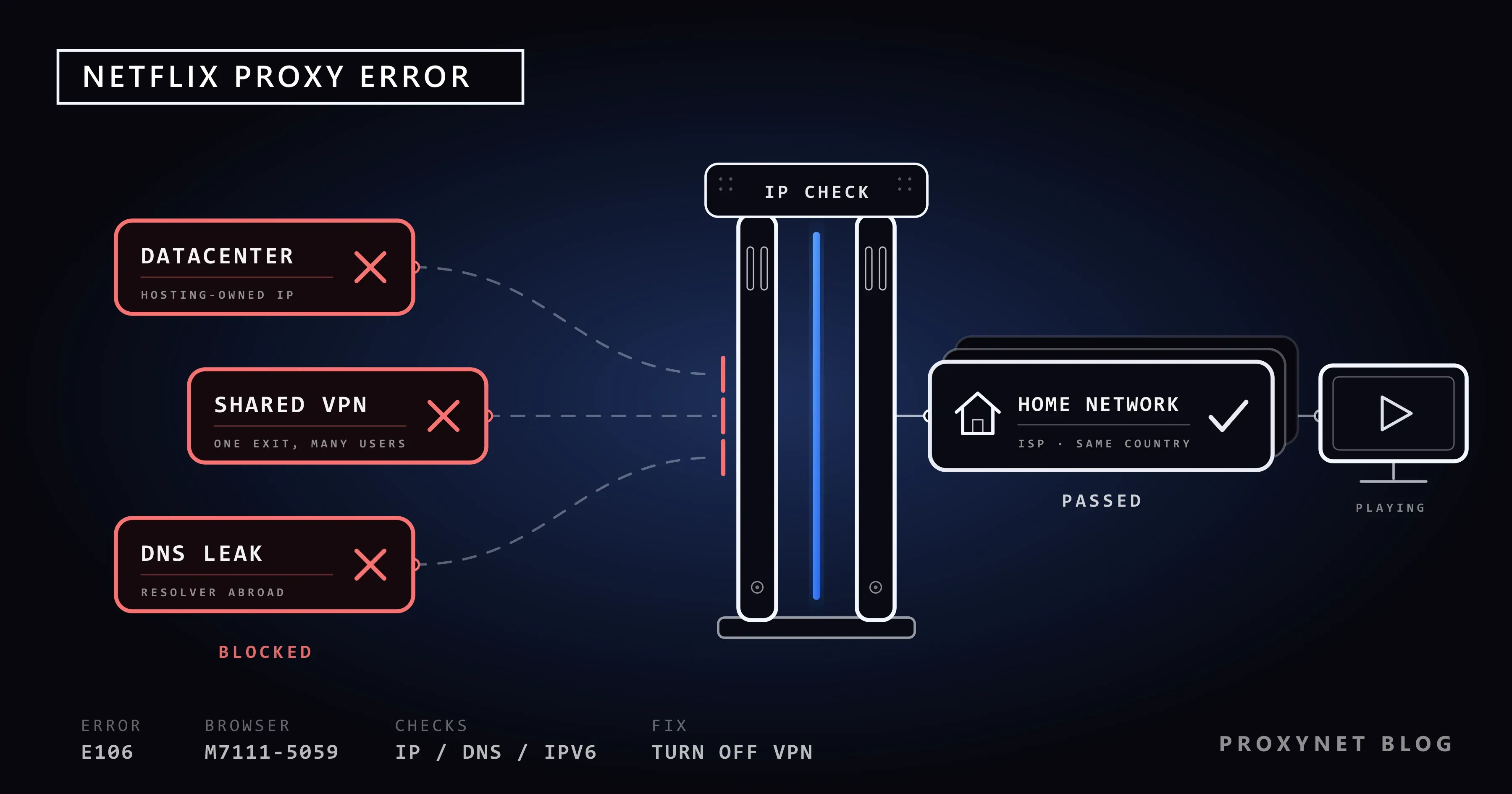
You sit down in the evening, pick a series on Netflix and, instead of the first episode, the screen says "You seem to be using a VPN or proxy. Please turn off any of these services and try again." In the browser some people see an older wording, "You seem to be using an unblocker or proxy", with the code M7111-5059. Many of the people who see this message have never installed a VPN.
This post explains what Netflix checks before it shows the proxy error, which settings and networks trigger it, and why an ordinary home connection can get caught. Then come Netflix's own fix steps in order, the checks you can do yourself, and a short section on how IP addresses are classified.
What does the Netflix proxy error mean?
Netflix buys the rights to most films and series country by country, so the catalog changes with the country you watch from. How much it changes is covered in Why Is the Netflix Library Different by Country?, and the idea behind it in What Is Geo-Blocking?.
To show the right catalog, Netflix has to know where you are, and the main thing it has is your IP address. An IP address is the network address your device uses on the internet, much like the return address on an envelope. When that address looks like it belongs to a VPN, a proxy or a data center instead of a home connection, Netflix stops the stream.
Netflix's help page for this error lists it under the code E106 and says VPNs are not supported for live events or on the ad-supported plan. Its help center also notes that with a VPN on, you may only see titles Netflix has worldwide rights for.
Is the proxy error a ban on my account?
No. The check is about the connection, not your account. The same account usually works as soon as you switch to another network, such as mobile data, and your profiles and watch history are untouched.
One similar-looking message is different: "Your account can't be used in this location" (for example M7111-5095). That one concerns where the account was set up and paid for. Netflix handles it through customer service, so contact Netflix instead of following the network steps below.
How does Netflix decide that you are behind a proxy?
The check runs in the background every time a stream starts. In simple terms:
- Netflix reads your public IP address, the address your router or phone shows to the internet.
- It looks the address up in its records. Large sites keep lists of address ranges that belong to VPN companies, hosting companies and known proxy services.
- It checks who owns the address. A block owned by a home internet provider looks like a household; a block owned by a cloud provider looks like a server.
- It compares related signals. Netflix's own steps mention the DNS server, the service that turns "netflix.com" into an address. A DNS server in another country, or an IPv6 route that leads somewhere else than your IPv4 one, breaks the picture.
- It weighs how many people share the address. One address streaming for hundreds of accounts looks like a VPN exit, even when it is a mobile carrier or a university.
- It plays the title or shows the error. If the result is "not a home connection", you get the E106 or M7111-5059 screen.
The table puts these signals side by side with the everyday situation behind each one.
| Signal | What Netflix sees | Everyday cause | Who can fix it |
|---|---|---|---|
| Data center address | The IP belongs to a hosting or cloud company | A VPN app, a free proxy, a remote desktop | You |
| Known VPN range | The IP is listed as a VPN or unblocker exit | A VPN or "unblock" browser extension | You |
| DNS in another country | The DNS server does not match your IP's country | A smart DNS service, a DNS address copied from a guide | You or your provider |
| Different IPv6 route | The IPv6 address points to another network | An IPv6 tunnel set up on the router | Whoever set up the router |
| Many users on one IP | Hundreds of accounts behind one address | Shared addresses from the provider (CGNAT) | Your provider |
| Wrong database label | A home address still listed as a server | A block that changed owners recently | Your provider |
Netflix's official fix steps
Netflix's help page gives four steps. Follow them in order and restart the Netflix app after each one.
1. Check whether a VPN is on
Open fast.com, Netflix's own speed test, and select Show more info. Next to Client you see the city, country and IP address Netflix's servers see for you. If the country is not where you are sitting, something is routing your traffic elsewhere.
Then look for a VPN on each device. On Windows it is Settings > Network & internet > VPN; on iPhone, Settings > General > VPN & Device Management > VPN; on Android, under Network & internet or Connections. A smart TV has its own network menu, and some routers run a VPN for the whole house.
2. Check your Netflix plan
On the ad-supported plan Netflix does not support any VPN, so even one you use only for privacy triggers the error. The same applies to live events on every plan.
3. Reset your network settings
A reset clears proxy settings, custom DNS addresses and leftover VPN profiles at once. On iPhone: Settings > General > Transfer or Reset iPhone > Reset > Reset Network Settings. On Windows: Settings > Network & internet > Advanced network settings > Network reset. You will need your Wi-Fi password again afterwards.
If the error appears on every device at home, restore the router to its default settings. This removes a DNS address or VPN someone may have entered years ago; note the router's admin password first.
4. Contact your internet provider
If fast.com still shows the wrong country, or the error stays anyway, the address itself is probably the problem. Netflix asks you to send your provider the IP address and country from fast.com, with the steps you have tried. Ask the provider to confirm that you use their DNS servers and that your address is registered as a home connection.
Getting the proxy error without a VPN
This is the case most home users search for: nobody in the house uses a VPN, and the screen still appears. The usual reasons are these.
- An extension or built-in feature you forgot. "Free VPN" or "unblock" extensions route traffic through their servers, some antivirus suites ship with a VPN switched on, and iCloud Private Relay sends Safari traffic through relays; Apple's Private Relay page notes that some sites may then need extra steps. If Netflix works in a private window, where extensions are usually off, an extension is the cause.
- A shared address from your provider. Many carriers put a large group of customers behind one public address. The technique is called CGNAT and has its own reserved range, described in RFC 6598. Hundreds of households on one address can look like a VPN exit; see What Is CGNAT?
- An IPv6 tunnel. IPv6 is the newer address format. Some people with home labs get it through a tunnel service instead of their provider, so Netflix sees two different owners for one household. If you did not set up a tunnel yourself, this is not your case.
- A DNS server in another country. A DNS address copied from an online guide, or a smart DNS service left on the router, gives Netflix a resolver that does not match your country. Smart DNS vs VPN vs Proxy explains the difference between the three.
- A company, school or dorm network. Organizations send traffic through a central security gateway, often in a data center, which looks like a server from outside.
- An out-of-date label. Address blocks change hands, and databases catch up slowly. The same delay causes wrong locations, as Why Is My IP Location Wrong? explains.
The first and fourth items you can check in minutes. The others need your provider or the network administrator, which is why Netflix's last step points there.
How to check your IP, DNS and WebRTC yourself
Note the IP address and country fast.com shows, then open a "what is my IP" site in the same browser. If the two show different countries, some app or browser setting uses another route.
Next, a DNS leak test site lists the DNS servers your device actually uses. Servers from another country, or from a company you do not recognize, mean a custom DNS setting is still active. The same pages often show WebRTC results; WebRTC is a browser feature for video calls that can reveal a different address. WebRTC and DNS Leaks explains how to read them, and How to Test a Proxy gives the full order of checks for a proxy you use for work.
What Netflix's Terms of Use say
Netflix's Terms of Use, in the version updated on April 10, 2026, say in section 1.5 that you may access content "primarily within the country in which you have established your account", and only where Netflix has licensed it. The same terms forbid circumventing the service's content protections.
So from Netflix's side, the error is how the service enforces its licenses. Streaming services are entitled to block VPNs and proxies, and this post does not cover ways around that check. The legal side of using these tools in general is covered in Is Using a VPN or Proxy Legal?
Why residential and ISP addresses look like home connections
The difference between address types is ownership. A datacenter address comes from a block registered to a hosting company, so any site that checks the owner files it as a server. A residential proxy sends traffic through connections registered to home internet providers; Residential Proxy works this way, with a choice of country and city. A static ISP address is registered to a provider and stays fixed for you, which is what ISP Proxy offers. Residential vs. Datacenter Proxy compares them.
This describes how classification works; it is not a way to watch another country's catalog. The address type changes only the first signal. DNS, IPv6, the account's country and Netflix's terms still apply.
Where proxies are used legitimately around streaming
- Localization testing. A company checks that its own app or ad shows the right language, currency and legal text in each country; see localization.
- Checking regional public pages. Research teams compare the public pages, prices and campaigns a service shows in different countries, without watching anything; see streaming proxy.
- Testing your own video product. Teams building a streaming service test playback and geo-rules in their launch markets; the Netflix proxy page lists the IP types used.
- A stable address for your own accounts. The difference from a VPN is covered in Proxy vs. VPN.
Common mistakes
- Switching to another VPN server. If your connection is labeled as a VPN, another VPN address carries the same label.
- Trying a free proxy from a list. These addresses are listed first, and you do not know who reads your traffic; see Are Free Proxies Safe?
- Changing DNS to fix it. A foreign DNS address from a forum can create the very mismatch that causes the error.
- Checking only the phone. The TV, the streaming stick and the router each have their own network settings.
- Restarting the router once and giving up. A restart may bring a new address, but a mislabeled range needs the provider; How to Change Your IP Address explains when a restart helps.
Decision guide
| Your situation | What to do |
|---|---|
| A VPN, unblock extension or smart DNS is on | Turn it off, restart the Netflix app |
| The error appears in one browser only | Check extensions, the built-in VPN and iCloud Private Relay |
| You are on the ad-supported plan or watching a live event | Turn off any VPN, even a privacy one |
| Every device at home fails, mobile data works | Reset the router, then contact your provider with the fast.com details |
| fast.com shows the wrong country and nothing is installed | Ask your provider about DNS servers and the address's registration |
| The message says your account can't be used in this location | Contact Netflix; this is about the account |
Frequently asked questions
What does Netflix error M7111-5059 mean?
It is the browser version of the proxy error, shown with the text "You seem to be using an unblocker or proxy". It means the same as E106, and the fix steps are the same.
Can Netflix ban my account for using a VPN?
The error is not a ban; Netflix blocks the stream on that connection, and the account keeps working on a normal home network. Watching another country's catalog is still against the Terms of Use.
Why do I get the error on my TV but not on my phone?
The phone may be on mobile data or a different DNS, while the TV goes through the router. Check the TV's network menu, then the router's DNS and VPN settings.
Why does the error appear on mobile data?
Carriers put many subscribers behind a few public addresses, and a single busy address can be labeled wrongly. Try Wi-Fi; if the error appears only on one carrier, tell the carrier.
Does restarting the router fix it?
Sometimes. Many home connections get a new address after a restart. If the whole range is mislabeled, the error returns and your provider has to fix it.
Will Netflix customer service turn off my VPN?
No. Netflix says the steps differ for every VPN, so its support team cannot do it. Contact the VPN company, your provider or the network administrator.
Summary
The Netflix proxy error means your connection does not look like a home connection in your country. Turn off any VPN, extension, smart DNS or antivirus VPN, check fast.com, reset network settings, and if the country still looks wrong, send your IP address and country to your provider. Blocking VPNs is Netflix's right, and its terms tie content to your account's country. If your work involves localization or regional testing, compare address types on our proxy services page.


