You click a video a friend sent you and the page says it is not available in your country. On holiday, a shopping site sends you to a local version with different prices, and your banking app asks you to confirm who you are. Three different screens, one cause: the service decided where you are, and changed what it shows you based on that.
This post explains what geo-blocking is and why companies use it: licensing, local law, sanctions, pricing and fraud checks. It then walks through the signals a site uses to guess your location, sets geo-blocking apart from geo-pricing and censorship, summarizes the two EU rules that limit it, and shows the legitimate ways to see what people in another region see.
What is geo-blocking?
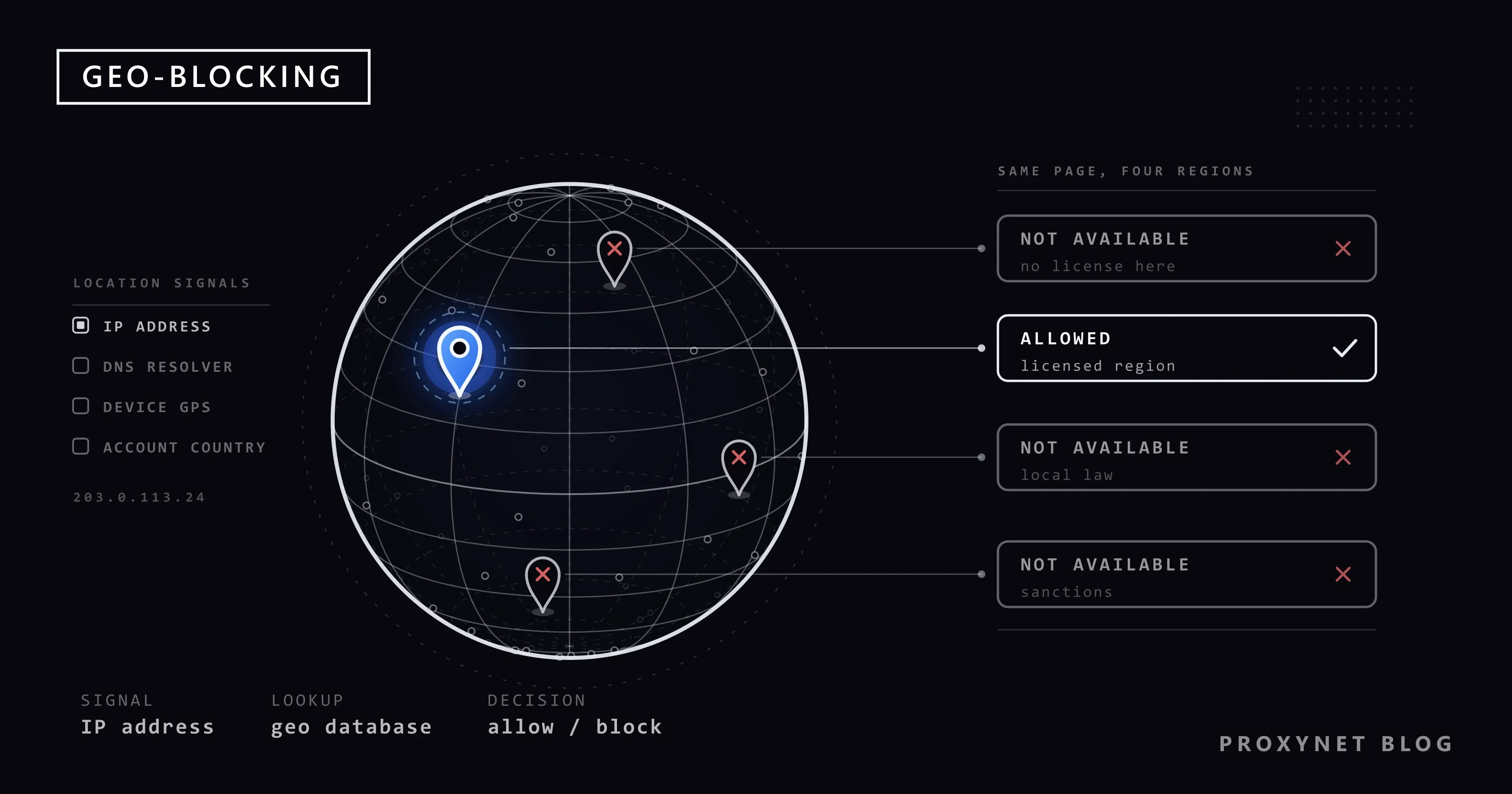
Geo-blocking is a rule on the service's side that says "visitors from this place get this, visitors from elsewhere get something else or nothing". The "something else" can be an error page, a shorter catalog, a redirect to another country's site or a checkout that refuses your address.
The word covers two outcomes. In the strict sense, access is blocked: the page or video does not open at all. In the wider sense, access is restricted or adjusted: the site opens, but some items, prices or features change. Most people meet the second kind every day without noticing, for example when a store shows prices in their own currency.
The site never knows where you are for certain; it estimates from the signals it can see. Many "not available in your country" messages seen at home come from a wrong estimate, not a real restriction.
Why do sites block or change content by country?
There is rarely a single reason. These five come up most often:
- Content licensing. Film studios, sports leagues and record labels sell rights country by country. YouTube's help page on videos unavailable in your country names this as the usual reason owners limit a video to certain countries.
- Local law. Gambling, some medicines, some financial products and some kinds of speech are legal in one country and banned in another. A service may withhold content in a country after a court or government order there.
- Sanctions and export rules. Companies must follow the trade sanctions of the countries where they are based. GitHub, for example, explains in its trade controls policy that it decides a user's location from sources including IP addresses and payment history.
- Market and pricing decisions. A company may launch a product in a few countries first, or set different prices for different markets.
- Fraud and security. A login from an unexpected country is one of the oldest warning signs for a stolen account. Banks, payment pages and online shops raise extra checks, or refuse the action, when the location does not fit your history.
The first four decide what you may see; the last asks whether it is really you, and needs a different response.
How do sites know where you are?
A site builds its guess from several signals, roughly in this order of weight:
- Your IP address. An IP address is the network address your internet provider gives your router or phone. The site looks it up in an IP geolocation database, a commercial list that maps address blocks to countries and cities. Country is usually right; the city is often off, sometimes by hundreds of kilometers. Why Is My IP Location Wrong? explains why.
- Whether the address looks like a VPN or a server. The same databases mark addresses that belong to VPN providers and hosting companies. Many services treat these addresses as "location unknown" and block them, which is where the "VPN or proxy detected" message comes from; see VPN or Proxy Detected Error.
- Your DNS resolver. Before your browser opens a site, a DNS server translates the name into an address. Large sites use that server's location, or part of your address passed along as described in RFC 7871, to send you to a nearby copy. A DNS server in another country can land you on the wrong regional version.
- Device location. On phones, apps can ask for the location from GPS, Wi-Fi and cell towers. Browsers can ask too, but only after you allow it in a pop-up. This signal ignores which network you are on.
- Your account and payment country. Many services fix a country when you create the account, or when you add a payment card or an app store account. That setting follows you when you travel. App stores go by this account country too, which is what lies behind the message covered in This Item Isn't Available in Your Country: What to Do.
- Time zone and language. Your browser tells sites its time zone and preferred language. On their own these do not decide anything, but a mismatch with the IP country is noted.
- WebRTC. This browser feature, used for video calls, can reveal your real IP address to a page even when the rest of your traffic goes through another route. WebRTC and DNS Leaks shows how to check for it.
A news site may look only at the IP address. A bank or a streaming service reads most of the list and asks for more proof when the signals disagree.
Geo-blocking, geo-restriction, geo-pricing and censorship
These words get mixed up, but different rules sit behind each.
| Term | What happens | Who decides | Typical example |
|---|---|---|---|
| Geo-blocking | The page, video or app does not open from your location | The service | A video that shows "not available in your country" |
| Geo-restriction | The service opens, but part of the content or some features are missing | The service, often because of a license | A streaming catalog that is shorter in one country |
| Geo-pricing | The same product has a different price or currency by country | The service | A software subscription priced lower in some markets |
| Redirect | You are sent to another country's version of the site | The service | A store that jumps from the .com site to a local one |
| Censorship | Content is removed or blocked by order of a government or court | A state | A post shown as withheld in one country |
| Network blocking | Your internet provider or network stops the connection | The provider, a school or a company | A site that will not load on the office Wi-Fi |
The first four are the service's own decisions; censorship and network blocking come from outside it. How platforms show withheld posts is covered in X Content Withheld in Your Country, and price differences in Geo-Pricing: Why Prices Differ by Country.
What does EU law say about geo-blocking?
The EU has two regulations on this topic, and both have limits that surprise people.
The Geo-blocking Regulation, (EU) 2018/302. It has applied since 3 December 2018. Its full text says three main things:
- A trader must not block or limit your access to its website or app because of your nationality or where you live in the EU, and must not redirect you to another country version without your explicit consent (Article 3).
- A trader must not apply different general conditions to you because of that, for example refusing to sell you goods it delivers to its own customers, or refusing an online service such as cloud storage (Article 4).
- Within the payment methods it accepts, a trader must not reject your card just because it was issued in another EU country (Article 5).
It does not force a shop to deliver everywhere, and it does not ban different prices in different countries as long as anyone can buy under local conditions. It also does not cover the services named in Article 2(2) of the Services Directive, which include audiovisual services, financial services and transport. Services whose main feature is copyrighted content, such as e-books, music and games, are also left out of the Article 4 non-discrimination rule. In short: the regulation does not open other countries' streaming catalogs.
The Portability Regulation, (EU) 2017/1128. This one covers paid online content services, which includes streaming. It has applied since 1 April 2018. Its full text says that if you subscribe in your home EU country and are temporarily in another EU country, the service must let you use it as you do at home, with the same catalog. To check where you live, the provider may use up to two means from a list that includes your payment details, your billing address and an IP address check (Article 5). Free services may offer portability but do not have to (Article 6).
Someone moving abroad for good, or traveling outside the EU, is not covered. Whether using a VPN or proxy is legal at all is a separate question, covered in Is Using a VPN or Proxy Legal?.
What do streaming services' terms say?
Streaming services write their own location rules into their terms. Netflix's Terms of Use, section 1.5 (last updated 10 April 2026), says you may access content "primarily within the country in which you have established your account".
To enforce rules like this, streaming services detect and block VPN and proxy addresses, and their terms entitle them to. This post does not explain how to get around those checks. If you want to know why a catalog differs between countries, Netflix Library by Country explains the licensing side, and Netflix Proxy Error explains the error message and the legitimate fixes.
How can you see what people in another region see?
Honest reasons include moving abroad, running a site for several countries, or researching how prices change by market. These routes stay within the rules.
- Use the site's own country setting. Many services let you choose a region for their recommendations. On YouTube, open your profile picture and choose Location; in the Google app, the path is Settings > Language & region > Search region. These settings change what is suggested to you, not what is licensed to you, so a blocked video stays blocked. How to Search Google From a Different Country covers the Google side.
- Check what the site thinks. Open a "what is my IP" page and note the country. If it is wrong, the fix is with your internet provider, not the service.
- Check your phone's location permissions. On iPhone, go to Settings > Privacy & Security > Location Services; on Android, Settings > Location. An app with location access will follow the phone, not the network.
- Use an IP address in that country for testing and research. If you check your own site, your ads or public prices across markets, a proxy lets you send your browser's traffic out through an address in the target country. Residential Proxy addresses belong to home internet connections, and you pick the country and city from our locations, for example Germany. Keep to each site's terms.
Where you run into geo-blocking in daily life
- Streaming video. Catalogs differ by country and some titles are missing. How the industry handles it is on our streaming proxy page, with a Netflix-specific view on Netflix proxy.
- YouTube videos. Some videos show "not available in your country" because of the owner's settings or local law. The reasons and checks are in Video Not Available in Your Country, and the testing side on YouTube proxy.
- Checking your own site abroad. Seeing your language and prices as each market sees them is localization testing; see localization.
- TV apps and devices. A smart TV cannot run every app; the options are compared in Smart DNS vs VPN vs Proxy.
- Reaching home services from abroad. People living outside Türkiye often need a Türkiye IP address for local services; see How to Get a Türkiye IP Address From Abroad.
Common mistakes
- Assuming the block is about you. It concerns the connection or the account country, not your behavior.
- Changing only the IP address. If the app reads your phone's location or your account country, a new IP address changes nothing. Check all the signals from the list above.
- Mixing up the reasons. A license block, a court order and a fraud check look alike. A fraud check is settled with the service, for example by confirming the login in its app.
- Using free VPNs or proxy lists. Databases mark these addresses first, and you do not know who reads your traffic. See Are Free Proxies Safe?.
- Expecting EU law to unlock streaming catalogs. The Geo-blocking Regulation leaves audiovisual services out; portability covers temporary stays of EU residents inside the EU only.
Decision guide
| Your situation | What to do |
|---|---|
| A video says "not available in your country" at home | Check your IP country on a "what is my IP" page; if it is wrong, contact your internet provider |
| You are traveling in the EU and your paid streaming app shows a different catalog | The Portability Regulation applies; contact the service if the home catalog does not appear |
| An online shop in another EU country will not sell to you | The Geo-blocking Regulation may apply; contact the shop, then your national consumer body |
| Your bank blocks a login from abroad | Treat it as a fraud check: confirm in the bank's app or call the bank |
| You need to see your own site as another country sees it | Use the site's region setting, or a proxy address in that country for testing |
| A post is withheld in your country | That is a legal order in your country, not a location error |
Frequently asked questions
Is geo-blocking legal?
In most countries, yes: a company decides where it offers a service, and licenses often require limits. In the EU, traders may not block without justification, but audiovisual, financial and transport services are excluded.
Why does a site think I am in another country?
Usually the IP geolocation database has an old entry for your address block. A foreign DNS server, a forgotten VPN extension or a company network can do the same.
Does a VPN or proxy remove geo-blocking?
It changes only the IP address a site sees; device location, account country and payment details stay the same. Many services also detect and block VPN and proxy addresses, which their terms allow.
Can a site see my exact home address from my IP address?
No. An IP address points to your internet provider and a rough area, usually the country and often the city. Precise location only comes from your device's location feature, and apps have to ask for your permission first.
Does the EU Geo-blocking Regulation apply to Netflix or YouTube?
No, audiovisual services are outside its scope. The Portability Regulation covers paid streaming only while an EU resident is temporarily in another EU country.
Why do prices change when I visit a store from abroad?
That is geo-pricing: the store shows prices set for the market it thinks you are in. Within the EU, a shop may keep different price lists, but it must let you buy under the same conditions as local customers.
Summary
Geo-blocking is a service's decision to block or change content based on where it thinks you are, mainly judged from your IP address and backed up by device location, account country and other signals. Licenses, law, sanctions, pricing and fraud checks drive it, and in the EU two regulations set limits: one against unjustified blocking by traders, one for streaming while you travel. When you need to see what another country sees, start with the site's own region setting; for testing, research and localization work, you can pick an address in the target country from our proxy services.