A friend in another country recommends a series, you open Netflix to watch it, and the search comes back empty. Or you are on holiday, open the app in the hotel, and the row of titles you were halfway through has changed. You pay the same kind of subscription as everyone else, so it is fair to ask why the screen is not the same everywhere.
This post explains why each country has its own Netflix library, how Netflix decides which country you are in, what happens when you travel or move, what the Terms of Use say, and how to check where a title is available without breaking any rules. The last part is for teams that test streaming apps across markets.
Why does Netflix have different shows in different countries?
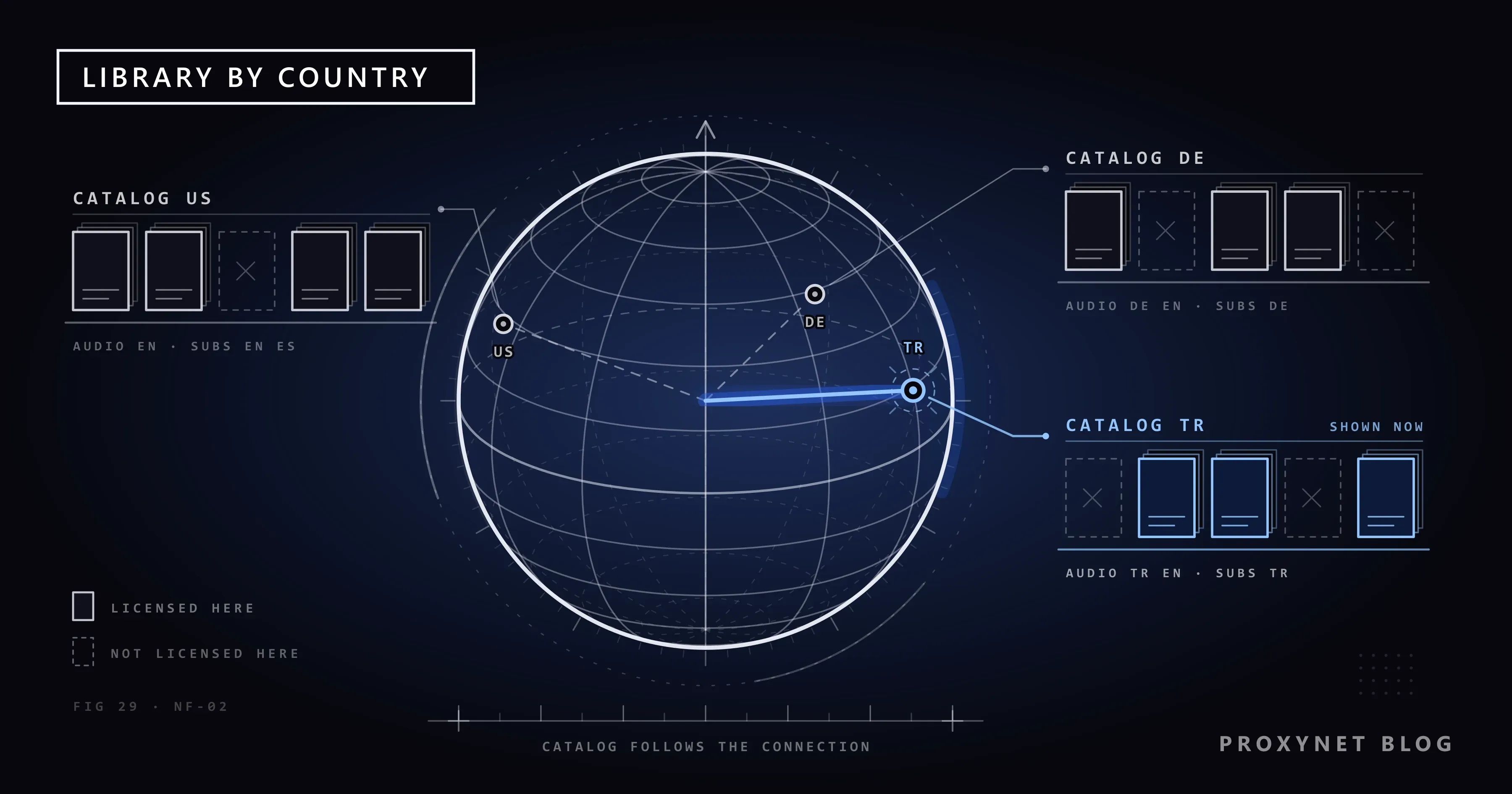
The main reason is licensing. A film or series is owned by a studio or distributor, and that owner usually sells the streaming rights separately for each territory, for a fixed period and often exclusively. Netflix's own help page on why a title is not available in your country lists the practical results: more than one company may own a title's rights in different regions, nobody may be selling the rights for a region, or another streaming platform may hold them exclusively.
So a series can be on Netflix in Germany because Netflix bought the German rights, and missing in Türkiye because a local broadcaster bought them first. Neither catalog is "the real one".
Taste also plays a part. Netflix says what is popular in one country is not always popular in another, even when the two share a language.
Are Netflix originals the same in every country?
Mostly, but not always. A title Netflix produced and owns worldwide appears everywhere Netflix operates. The "Netflix original" label is also used for shows another company made and Netflix distributes only in some regions. Netflix's help page gives two reasons an original can be missing: the title was made before Netflix could acquire exclusive rights, or other companies hold the rights for a region.
How does Netflix decide which country's catalog you see?
Netflix looks at two things, and it helps to keep them apart. The first is your account country, which is fixed when you sign up. The second is your current location, which Netflix works out each time you connect. The steps look like this:
- You sign up in a country. That country becomes your account country. Your plan price, billing currency and payment options come from it.
- You open Netflix. The connection carries your IP address, the network address your internet provider gives your home or phone.
- Netflix places the address on the map. Like most services, it uses IP geolocation databases that link address blocks to countries. How accurate those databases are, and why they sometimes get it wrong, is explained in Why Is My IP Location Wrong?.
- It loads that country's catalog. Rows, search results, audio tracks and subtitles all come from it.
- It applies local ratings. Maturity ratings are shown for the country you are in, so a title can carry a different age label, or be filtered by your profile's settings, when you cross a border.
- It checks for VPNs and proxies. If the connection looks like it comes from a VPN or proxy service, Netflix either shows an error or, according to its help page on changing account country, limits you to titles that are licensed for all regions. What that error looks like and how to clear it is covered in Netflix Proxy Error.
What makes one country's catalog different from another?
Licensing is the headline, but several smaller layers sit on top of it. The table puts them side by side.
| Layer | What changes | What you notice |
|---|---|---|
| Territorial licensing | Which licensed films and series are in the catalog | A title is present in one country and absent in another |
| Local originals and co-productions | Which regional productions Netflix owns or co-owns | More local-language shows in the country they were made for |
| Dubbing and subtitle rights | Which audio tracks and subtitle languages come with a title | The same film has a Turkish dub in one country and only English subtitles in another |
| Release windows | When a title arrives in each territory | A film reaches Latin America months before it reaches the US, or the reverse |
| Age ratings and local rules | Which rating board classifies the title and how | A different age label, and in some cases a title that is edited or not offered |
| Expiring licenses | How long each country's contract runs | A title leaves one country's catalog while it stays in another's |
Dubbing and subtitles deserve a note. A voice track or a subtitle file is a separate piece of work with its own rights, so the menu of languages can change even when the title itself is the same.
What happens when you travel with Netflix?
When you open Netflix abroad, you see the catalog of the country you are in, not the catalog of your account country. Netflix's travel help says that streaming and download choices, including audio and subtitle options, vary by country. A series you were in the middle of may disappear until you return.
Downloads follow the same rule. Titles you saved on your phone at home may not play abroad: the Terms of Use state that if you go online in a country where a downloaded title cannot be streamed, it will not play while you are in that country.
There is one important exception for Europeans. The EU's Portability Regulation (EU) 2017/1128, in force since 1 April 2018, requires paid online content services to let a subscriber who lives in one EU member state use the service as at home while temporarily present in another member state. An EU resident on a short trip inside the EU should therefore see their home catalog. The rule does not cover trips outside the EU, and it does not let anyone pick a catalog at will. How this regulation fits with the wider EU rules on location is covered in What Is Geo-Blocking?.
What if you move to another country?
Moving is different from a trip. Netflix does not let you change your account country by editing a setting; its help page says the country can only change when you actually move. The process is to cancel the membership, wait until the paid period ends and restart the account while you are in the new country.
Until you restart, you keep paying in the currency of the country where you signed up. Netflix keeps a cancelled account's profiles and viewing history for 10 months, so restarting with the same email address brings them back.
What do Netflix's Terms of Use say about the account country?
Section 1.5 of the Netflix Terms of Use says you may access content "primarily within the country in which you have established your account". The same section adds that content is offered only where Netflix has licensed it, and that what is available varies by location and changes over time.
Using a VPN, proxy or Smart DNS service to make Netflix believe you are somewhere else so you can watch a different country's catalog goes against these terms. Netflix may detect and block such connections, and this post does not describe how to get around that. The general difference between breaking a law and breaking a service's terms is explained in Is Using a VPN or Proxy Legal?, and the three tools themselves are compared in Smart DNS vs VPN vs Proxy.
How can you check where a title is available?
There are a few honest ways to find out whether a title is in your country's catalog, and roughly where else it is shown.
- Netflix's own search. Search for the title while signed in. If it is not in your catalog, Netflix will not offer it for playback, though it often shows similar titles instead. This is the only answer that counts for your account.
- The official Top 10 pages. Netflix publishes weekly Top 10 lists by country on its Tudum site. If a title appears in a country's list, it is in that country's catalog; if it never appears, that proves nothing either way, because only ten titles make each list.
- Third-party catalog sites. Independent sites track Netflix catalogs country by country. They are not run by Netflix and their data may lag behind, so treat them as a hint and confirm in the app.
If a title is missing, the legitimate options are to wait for a license change, to find the service that holds the local rights, or to buy or rent it from a store in your country.
Why would anyone need to see another country's catalog?
Most viewers don't. For a small group of professionals, seeing another region's view is part of the job, and it does not involve watching a catalog they are not entitled to.
A localization team checks that a streaming app's menus, subtitles and dates appear correctly in each market. A rights holder confirms that a title went live on the agreed date in each territory. A researcher compares public catalog pages across countries. They need a connection that appears to come from the target country, and they work with the platform's or rights holder's permission, or use pages anyone can view.
A proxy, a server that forwards your traffic so a site sees its address instead of yours, is the usual tool. Proxynet's Residential Proxy lets you choose a target country and city from a pool of home internet addresses, and ISP Proxy gives you a fixed address that stays yours. Neither changes what a streaming service's terms allow: platforms may block proxies and VPNs, and that is their right. The difference between a proxy and a VPN in daily use is explained in Proxy vs. VPN: Which One and When?.
Use cases
- Localization QA for streaming apps. Check menus, subtitles, price display and date formats as they appear in each market: localization.
- Release and artwork checks for rights holders. Confirm that a title's page, poster and description went live correctly in each licensed territory: streaming proxy.
- Research on regional catalogs. Compare public catalog pages and Top 10 lists across countries: Netflix proxy.
- Testing your own site from another country. See how your own streaming or media site behaves for a visitor in Germany: Germany proxy.
- Checking what your connection reveals. Before any regional test, make sure your real location is not leaking through the browser: WebRTC and DNS Leaks.
Common mistakes
- Thinking the account country decides the catalog. It decides the price. The catalog follows the location of your connection, which is why a trip changes your screen.
- Relying on downloads for a trip abroad without checking. A title downloaded at home may not play in the destination country once the app goes online.
- Trusting a catalog site over the app. Third-party lists can be out of date by days or weeks. What your app shows is what your account can play.
- Leaving a VPN switched on at home. A VPN left on for another purpose can trigger a proxy error or a reduced catalog. The steps to find it are in VPN or Proxy Detected Error.
Decision guide
| Your situation | What to do |
|---|---|
| A friend abroad can watch a title you cannot find | Search in your app; if it is absent, look for it on another local service or wait for a license change |
| You are travelling and your rows changed | This is expected; you see the catalog of the country you are in |
| You live in the EU and travel inside the EU | You should see your home catalog under the Portability Regulation; if not, contact Netflix support |
| You moved to another country permanently | Cancel, let the paid period end, restart the account in the new country |
| Netflix shows the wrong country while you are at home | Turn off any VPN or proxy, then check your IP location and contact your internet provider if it is wrong |
| Your team tests a streaming app in another market | Use a country-targeted proxy within the platform's rules |
Frequently asked questions
Which country has the largest Netflix library?
Netflix does not publish catalog sizes per country; the numbers online come from third-party counts that change every month. What matters is whether the title you want is in your country, and the app answers that directly.
Does a VPN give me a different Netflix catalog?
It is against the Terms of Use to use one to watch another country's catalog, and Netflix detects many VPN and proxy addresses. According to Netflix's help center, a connection that hides your region may be limited to titles licensed for every region, which is a smaller catalog, not a larger one.
Why did a show disappear from my Netflix?
Most often its license in your country ended. Each country's contract has its own end date, so a title can leave your catalog while it stays in another, and it can return if Netflix renews the rights.
Do I pay a different price when I watch Netflix abroad?
No. You keep paying in the currency of the country where you signed up. The price changes only when you move and restart the account in the new country.
Why are the subtitle and audio options different abroad?
Audio tracks and subtitle files carry their own rights. When you travel, Netflix shows the language options licensed for the country you are in, so a dub you used at home may be missing, or new languages may appear.
How does Netflix know which country I am in?
It reads the IP address of your connection and places it on the map with IP geolocation data. That is why a wrong database record, a VPN or a corporate network can make Netflix think you are in a different country. More on how location is determined online is in What Is Geo-Blocking?.
Summary
Each country's Netflix library is different because rights to films, series, dubs and subtitles are sold territory by territory, with their own release dates and age ratings. Netflix shows you the catalog of the place you are connecting from, based on your IP address, while your price stays tied to the country where you signed up. When you travel you see the local catalog, EU residents keep their home catalog on trips inside the EU, and a real move means restarting the account. The Terms of Use tie access to your account country, and platforms may block VPNs and proxies. For teams whose work is testing and localizing streaming experiences across markets, the options are on our streaming proxy page.