


































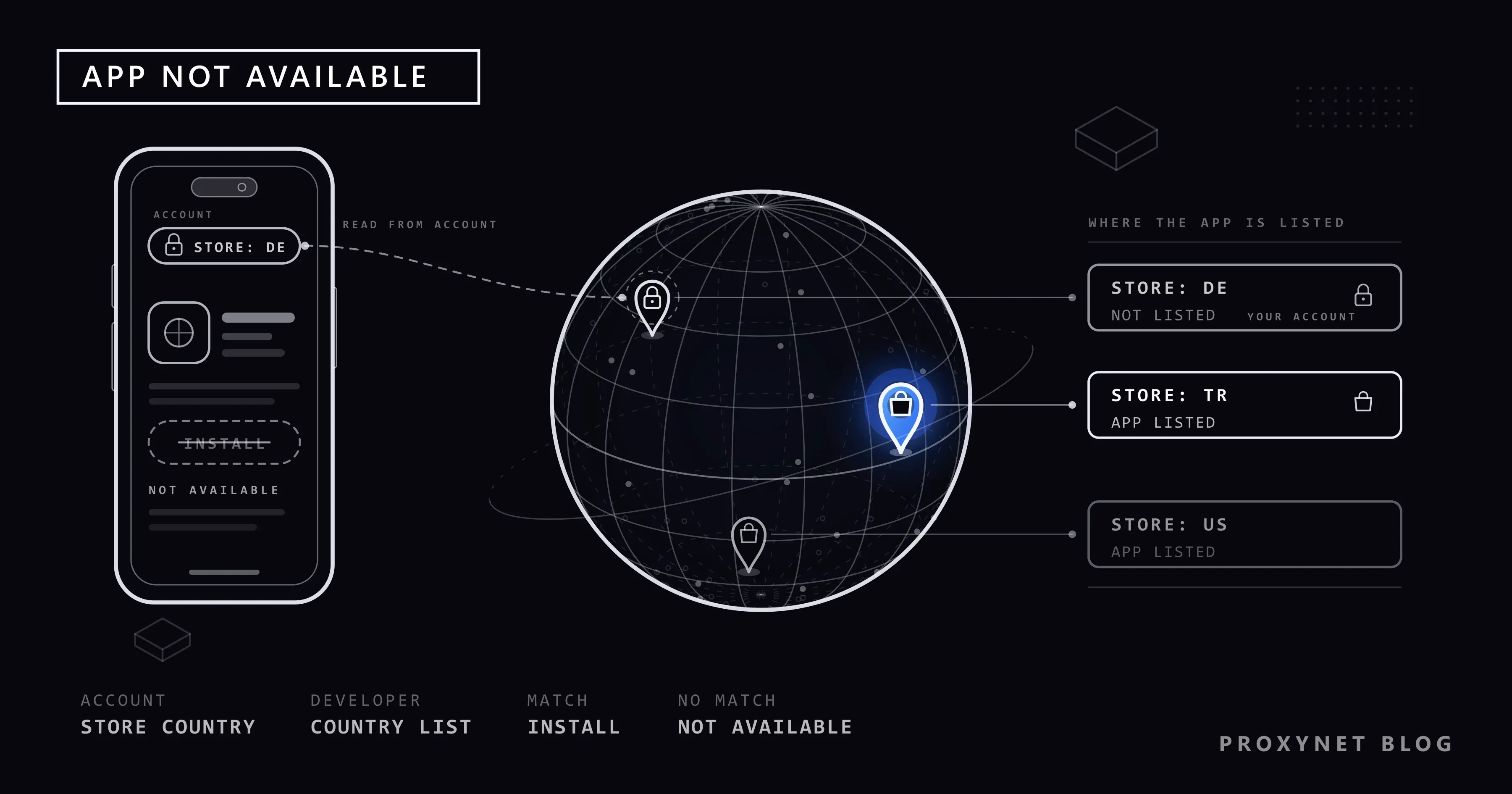
A friend recommends an app, say a city parking app or a supermarket's loyalty app. You find it on Google Play, and where the Install button should be you read "This item isn't available in your country." On an iPhone the same link opens a box titled "App Not Available": "This app is currently not available in your country or region." Your phone works, other apps install, and your friend downloaded it yesterday.
This post explains what the messages mean, how Google Play and the App Store decide which country you are in, and how to tell a country block from a phone that is too old for the app. Then come the legitimate options, what does not work, and a short section for app publishers.
What does "This item isn't available in your country" mean?
The app exists and works for other people, but the store will not offer it to an account from your country. Your phone is fine and your account is not banned. The developer keeps a list of countries where the app is published, and your store country is not on it.
Google's help page on finding apps says you only see apps and content that are compatible with your Google Play country. Apple's page on the availability of Apple Media Services says the same from its side: depending on your country or region, you might not be able to buy, download or subscribe to certain types of media.
Each store words it a little differently, and Apple Music and the TV app have their own version; the table below lists them all.
How does the store decide which country you are in?
Every Google account and every Apple Account has a store country: the Google Play country on Android, the account's country or region on Apple. It is set with the account and its payment method, and it stays until you change it.
The store uses that setting, not your current location. Google's Play Console help says so on its page about distributing apps to specific countries: country targeting is based on the user's Play country, where the account is registered, not their current location. The same page tells developers that a city transport app should be available worldwide if foreign tourists are to download it.
So the store country does not follow you onto a plane, and an account opened years ago in another country can still be set to that country after you move.
The other half of the decision belongs to the developer. In App Store Connect a developer can release an app in any of the 175 countries or regions where the App Store operates, or only in some; Play Console works the same way. Typical reasons for a short list are licences, local rules for payments or health services, a service that exists only in certain cities, or a launch that starts in a few markets.
What the store checks before you can install an app
When you open a listing, the store answers a few questions:
- Which country is this account set to? It reads the account's store country.
- Has the developer published the app there? If not, you get the country message, even if the app is popular next door.
- Can this phone run the app? It compares your system version and hardware with the developer's requirements.
- Is anything else in the way? Parental controls can also block apps.
- If everything passes, you see Install on Google Play or Get on the App Store.
Steps 2 and 3 produce different messages, and that difference is your best clue.
Which message means what?
| Message on screen | Store | What it means | About your country? |
|---|---|---|---|
| "This item isn't available in your country." | Google Play | The developer doesn't offer the app in your Play country | Yes |
| "App Not Available" / "This app is currently not available in your country or region." | App Store | The developer doesn't offer the app in your Apple Account's country or region | Yes |
| "This item is not currently available in your country or region." | Apple Music, TV app | The song or film is not licensed for your store country | Yes |
| "Your device isn't compatible with this version." | Google Play | Your phone doesn't meet the app's requirements | No |
| "Not compatible with this device." or "Requires iOS [version] or later." | App Store | Your iPhone model or iOS version is too old for the app | No |
| The app doesn't appear in search at all | Both | Not offered in your country, not compatible, or removed | Maybe |
The compatibility messages are a separate problem: each developer decides which devices are supported, and the fix is a system update, a newer phone or a question to the developer.
You moved to a new country: change the store country
If you now live in the new country, changing the store country is the official fix. Read the conditions first.
Google Play. Google's page on changing your Google Play country gives these steps:
- On your Android phone, open the Google Play Store app.
- At the top right, tap the profile icon.
- Tap Settings > General > Account and device preferences > Country and profiles.
- Tap the country where you want to add an account.
- Follow the on-screen instructions to add a payment method for that country.
The rules as Google states them today: you must be in the new country and have a payment method from there. After you first set your Play country you must wait at least 90 days before changing it, and at least 90 days between later changes. The profile can take up to 48 hours to update. Your Google Play balance stays with the old country, Play Points are lost, and subscriptions stay on the old payment profile until you cancel them. If the option is missing, you changed country in the last 90 days, you are not in a new country, or you belong to a Google family group. Many articles still say "once a year"; Google's current page says 90 days.
App Store. Apple's page on changing your Apple Account country or region asks you to prepare:
- Spend your Apple Account balance, or ask Apple Support to clear one too small to spend.
- Cancel subscriptions that block the change and wait until their period ends.
- Wait for memberships, pre-orders, film rentals, Season Passes and pending refunds to finish.
- Check Family Sharing: members of a family group might not be able to change country.
- Have a payment method for the new country ready. Without one, Apple says to wait until you are physically there and create a new Apple Account.
- Redownload your apps, music, films and books first; some may not be available in the new country.
Then, on an iPhone: open Settings and tap your name, tap Media & Purchases, tap Country/Region, select the new country, tap Continue, tap Agree on the Terms & Conditions, enter the payment method and billing address, and tap Done.
You are only travelling: leave the store country alone
On a holiday or a business trip, a store switch causes more trouble than it solves: on Google Play you would wait 90 days to switch back, and on Apple you would first have to spend your balance.
Your store follows your account, so the apps you already have keep working and updating. The harder case is a local app you need only for the trip, such as a transport card. If its developer publishes it only in that country, your home account won't see it. Check the service's website, a ticket machine or a printed pass first, and tell the developer; Google's own advice to developers is to make such city apps available worldwide.
If your banking app is the one acting up abroad, the store region is only part of it; our post on a banking app not working abroad also covers SMS codes and the bank's location checks.
Other legitimate routes: the web version and the developer
Use the website. Many services that limit their app by country still run a website that works in any browser, the quickest route when you need the service once.
Write to the developer. Apple's availability page says that if you think an app should be available in your country or region, you should contact the developer or publisher directly. Say which country you live in and which store and phone you use.
Wait for a launch. New apps often start in a few countries and reach others later.
What doesn't work, and what is risky
A VPN does not change your store country. A VPN changes the internet address that websites see; the store country is a setting on your account, and Google's rule for changing it requires that you are actually in the new country with a local payment method. This post doesn't describe ways around that rule. What a VPN and a proxy each change is covered in Proxy vs. VPN.
APK download sites are a gamble. An APK is the installation file of an Android app. Sites that offer copies of Play apps can't prove the file is the developer's original, and a modified file can hide malware. Such a copy doesn't update through Google Play, and some apps won't run at all: Google's Play Integrity API lets an app check whether it was installed from Google Play and is unmodified. The same "who is behind this?" problem comes up in Are Free Proxies and Web Proxy Sites Safe?
Switching store countries for lower prices is not covered here. Both stores tie the account country to where you are and how you pay. Why prices differ is explained in geo-pricing by country.
Some apps, and in a few places whole stores, are unavailable because of sanctions or national law; that is outside the scope of this post. The general legal picture is in Is Using a VPN or Proxy Legal?
For app publishers: checking your app in other markets
A home user doesn't need a proxy for any of the steps above, and a proxy would not change a store account's country either. This section is for developers and the teams that handle app store optimisation (ASO), the work of making an app easier to find in store search.
Start with the store tools. The Countries/regions tab in Play Console and the availability settings in App Store Connect are the real answer to where people can download your app. Google Play lets you target up to 50 custom store listings at countries, each with its own name, icon, description and graphics. On Apple's website the country code is part of a listing's address, as in apps.apple.com/us/… or apps.apple.com/tr/….
The connection's country matters inside your app and on your website, where sign-up options, prices from your own backend, regional content or consent screens often change by country. QA teams test that from a real connection in each market: a Mobile Proxy when users are mostly on phone networks, a Residential Proxy for home broadband, with a target country and city. Our app testing page describes the workflow, and localization covers translated screens.
Where this comes up in everyday life
- Travellers whose banking app goes missing: banking app not working abroad.
- Videos blocked in your country: Video Not Available in Your Country on YouTube.
- Websites that change by country: what is geo-blocking.
- A site that shows the wrong country: IP geolocation accuracy.
- Teams preparing a launch in new markets: market research.
Common mistakes
- Turning on a VPN and clearing the Play Store's data. The store country belongs to the account, so nothing changes.
- Changing the store country for a two-week trip. On Google Play you are then locked for 90 days.
- Installing an APK from a mirror site. The file may not be the developer's, and it won't update through the store.
- Reading a compatibility message as a country block. "Your device isn't compatible with this version" needs an update or another phone.
- Switching an Apple Account with money on it. Apple asks you to spend the balance first.
- Expecting the change at once. A new Play country can take up to 48 hours to appear.
Decision guide
| Your situation | What to do |
|---|---|
| You moved and live in the new country now | Change the store country in the official settings, after checking the conditions |
| You are travelling for a few weeks | Keep your store country; use the website or ask the developer |
| The message mentions your device or iOS version | Update the system or check supported devices; it is not a country problem |
| The app is published only in a country you don't live in | Ask the developer to add your country; use the web version meanwhile |
| You publish an app and need each market's view | Use the store consoles, then test in-app behaviour from local mobile or residential IPs |
Frequently asked questions
Why can my friend download the app when I can't?
Your friend's store account is set to a country where the developer publishes the app, and yours is not. The store looks at each account's country, not at where you are sitting.
How often can I change my Google Play country?
Google says you must wait at least 90 days after setting the Play country, and at least 90 days between later changes. The "once a year" rule in older articles is not on Google's page today.
Will I lose my apps if I change my store country?
You may lose access to some of them. Google warns that some books, films, games and apps may not be available in the new country, and Apple recommends redownloading your content before you switch.
Does a VPN change my App Store or Google Play country?
No. The store country is a setting on your account; a VPN only changes the address sites see. Google also requires a payment method from the new country.
Is it safe to download the APK from another website?
It is risky. You can't confirm the file is the developer's original, it won't update through Google Play, and some apps stop working when they weren't installed from Google Play.
The App Store says the app isn't available, but I live in that country. Why?
Usually the Apple Account is still set to another country, for example because it was created abroad. If the country is right, the developer may not have released the app there; Apple suggests asking the developer.
Summary
Both messages mean the developer hasn't published the app for your store account's country. The store reads that country from your account, not your location, so travel and VPNs don't change it. After a move, change the country in the official settings; on a trip, leave it alone and use the website or ask the developer. App publishers who test their app in other markets will find the address types for that on our proxy services page.


