You run the account of a café, the account of its second branch and your own personal profile from one phone. Or you work at an agency: twelve client Instagram accounts, four teammates, three different cities. In the first case the account switcher in the app does the job. In the second, after a while passwords start circulating in chat groups, verification codes land on the client's phone at midnight and accounts begin to show the "Suspicious Login Attempt" warning.
This post covers real accounts only: your own brands and client accounts you manage with the owner's written authorization. First we explain the routes Instagram itself offers for this work: account switching in the app, Accounts Center, and the client granting you access in Meta Business Suite. Then we show what breaks when the team grows, why it helps to always log in to an account from the same address, and how agencies set this up. None of the steps require code or technical knowledge.
Does Instagram allow multiple accounts?
Yes. One person having a personal profile, a business account and a hobby page is a use Instagram anticipates. If you also run accounts on other platforms, the shared rules are in How to Manage Multiple Social Media Accounts Safely.
What is not allowed has to do with the nature of the account, not the count. Accounts opened in someone else's name, accounts that do not represent a real person or business, and accounts created in bulk by automated means violate the Terms of Use. Follower, like and message automation falls under the same heading. None of the methods in this post are meant for accounts of that kind.
How many Instagram accounts can you have on one phone?
Instagram's page on adding and switching between multiple accounts answers this in one sentence: you can have up to 10 accounts logged in at one time. Many older guides still say "5 accounts". That is the old limit; on the day we prepared this post (19 September 2026) the figure was 10 in the Android, iPhone and computer versions of the Help Center.
This limit is the number of sessions you can keep open in one app at the same time. Instagram gives no figure for how many accounts a person can open in total, or how many accounts can be opened from the same IP address; the exact numbers you come across are user estimates.
How do you switch between accounts on the same phone?
The path below is the same in the Android and iPhone apps.
To add an existing account:
- Tap your profile picture in the bottom right to go to your profile.
- Tap Menu in the top right.
- Scroll to the bottom and tap Add account.
- Select Log into existing account.
- Enter the username and password of the account you want to add and tap Log In.
To switch accounts: on your profile, tap your username at the top of the screen and pick the account you want from the list. On a computer the same thing is done with the Switch accounts option in the More menu in the bottom left.
Account switching is designed for one person managing a few accounts. The most common accident also happens here: a story meant for the personal account ends up on the business account. Make a habit of looking at the username at the top before you press share.
What is Accounts Center for, and does a client account belong there?
Accounts Center is the settings screen Meta offers for managing your Facebook, Instagram and other accounts from one place. You can reach the accounts you add to the same Accounts Center with a single login and manage password and security settings on one screen. When you create a new account in the app, Instagram suggests adding it to your Accounts Center on its own.
For your own accounts this is convenient. For a client account it is the wrong place. The help page about Accounts Center states that information from accounts added to the same center is used together to personalize ads and account suggestions. So if you add the client's account to your own Accounts Center, the data of the two accounts becomes linked and the login details become dependent on your personal account.
In short, only accounts that belong to you go into Accounts Center. Access to an account that belongs to someone else is obtained through the route in the next section.
How do you manage a client account without taking the password?
Most agencies start by asking the client for a username and password. The password soon turns into a piece of information nobody can say how many people have seen. When someone leaves the team, the only way to cut their access is to change the password and hand it out to everyone again.
Meta offers Meta Business Suite for this job. The logic is this: the client owns the account and keeps owning it; the client adds the account to their own business portfolio and grants you access for specific tasks from there. You never see the Instagram password; you log in with your own Facebook account.
There are three prerequisites. All of them are written in Meta's help pages:
- The Instagram account must be a professional account (business or creator). A personal account is asked to switch to professional while being added to the portfolio.
- An Instagram account can be added to only one business portfolio. That is why the account should sit in the client's portfolio, not the agency's; even if the agency changes, the account stays with its owner.
- Adding people and defining partners requires full control of the portfolio. That person should be on the client's side.
Route 1: The client adds you as a person
This is the shortest route for freelance social media managers working alone. According to Meta's page on adding people to a business portfolio, this is what the client does:
- Goes to Settings in Meta Business Suite.
- Clicks People in the left menu, then Invite people in the top right.
- Enters the email address you use for your Facebook account.
- Selects the portfolio permission. Basic access, which is the default, is enough for most work.
- Ticks the Instagram account and the tasks you can perform on it (such as content, messages and ads) and clicks Invite.
Once you accept the invitation, the account appears in your Business Suite. The same page notes that it can take a few days before all features become available.
Route 2: The client adds your agency as a partner
This is the right route for agencies working as a team. The client does not add your employees one by one; it defines your agency's business portfolio as a partner. The agency decides inside its own portfolio which employee looks after which client. The steps on Meta's page on giving a partner access are as follows:
- The agency sends the client the business portfolio ID shown in its own Business Suite settings.
- In Settings, the client clicks Partners under the Users section in the left menu.
- Clicks Add, selects Give a partner access to your assets and enters the agency's ID.
- Chooses the Instagram account to share and the level of access. With partial access, only the ticked tasks (such as creating content, responding to messages and managing ads) are opened.
- Clicks Assign assets.
An agency given partial access can assign its own employees only the tasks the client granted. The client can remove the partner from the portfolio whenever it wants, and access ends at that moment.
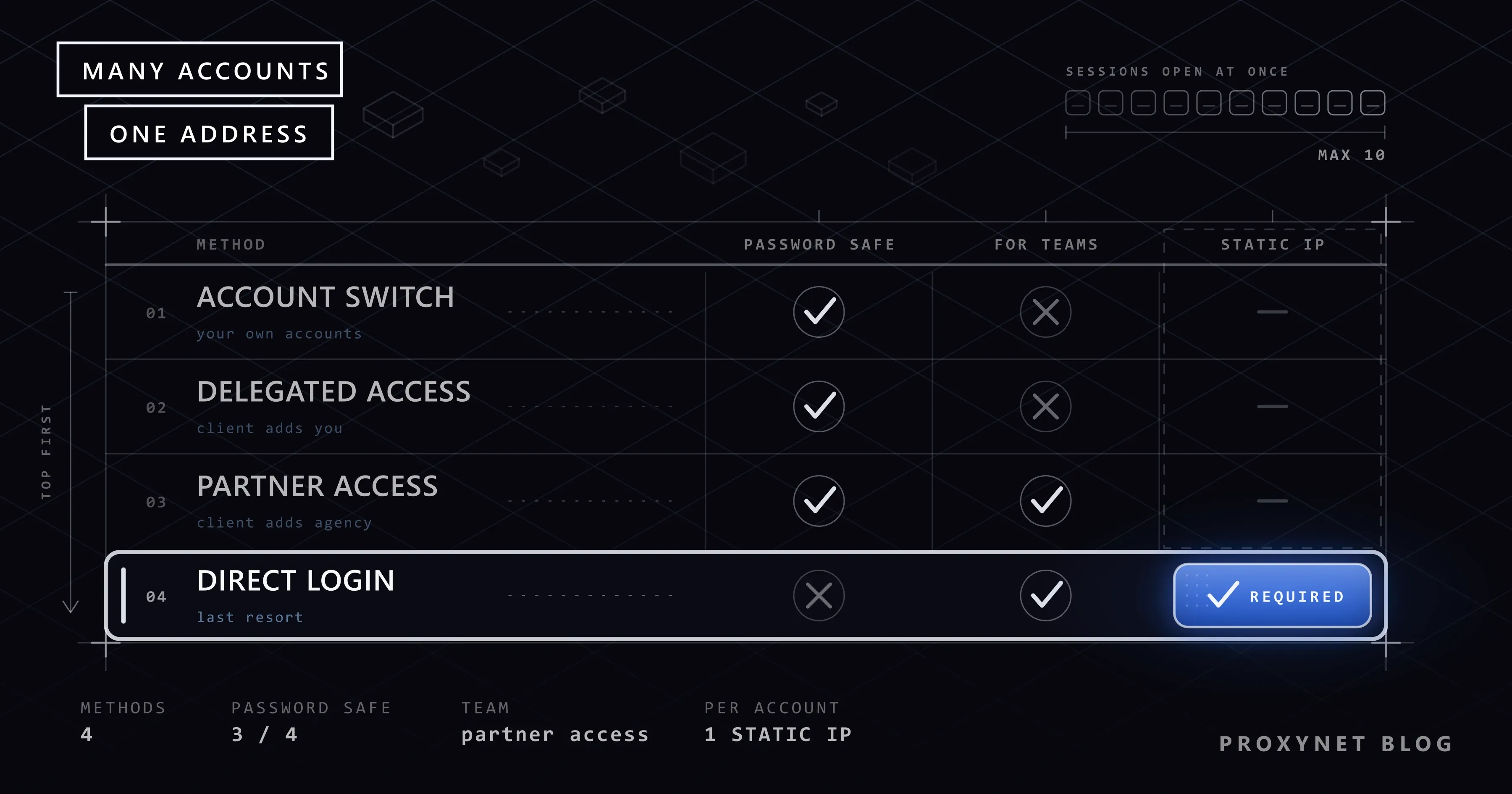
The four methods side by side
| Method | Who is it for? | Is the password shared? | How is access withdrawn? | Weak point |
|---|---|---|---|---|
| Account switching in the app | One person managing their own accounts | No, the accounts are yours anyway | By logging out of the account | Limit of 10 sessions; risk of posting from the wrong account |
| Accounts Center | Facebook and Instagram accounts that belong to the same person | No | By removing the account from the center | Not suitable for a client account, it links the accounts to each other |
| People or partner access in Business Suite | Freelancers and agencies | No | The client removes the person or the partner | Requires a professional account and setup on the Facebook side; not every app feature exists in Business Suite |
| Direct login to the account (with a separate browser profile and a fixed address) | Agency teams, for work Business Suite does not cover | Yes, which is why it is the last choice | By changing the password | Verification codes, login warnings and password security are the team's responsibility |
The order runs from top to bottom. If a row higher up does the job, do not move down to the next one.
Why does Instagram ask for verification when the team logs in from different places?
Business Suite does not cover every need. Some in-app features, or a client who does not want to switch to a professional account, push the team to log in to the account directly. A typical week goes like this:
- On Monday morning the account manager logs in from the office in Istanbul, using the browser on the work computer.
- In the afternoon the designer logs in to the same account from home in Izmir, on a personal phone, and uploads a post draft.
- In the evening the client opens the account from Ankara.
- On Tuesday the office internet goes down and the account manager connects over mobile data.
The picture Instagram sees: one account, four different cities, four different devices and four different connections in two days. That is exactly what a hijacked account looks like too. This is why the platform shows the "Suspicious Login Attempt" warning and sends a code to the email address or phone registered on the account. The code goes to the client, the client is in a meeting, the team waits.
This is a security check, not a penalty; Instagram is trying to protect the account on behalf of its owner. We covered the reasons behind the warning in single-user use and the Where you're logged in screen in our post Instagram IP Ban and Open Proxy Error: What They Mean; the details of address-based restrictions are there as well.
Instagram does not publish in detail what it looks at during a login check. Three signals that login security systems generally evaluate are well known, however:
- Location consistency. Is the account being opened today from the same city as yesterday? We looked at how accurate a location derived from an IP address is in Why Is My IP Location Wrong? What an IP Address Reveals.
- Device consistency. Are the browser, operating system, screen size and cookies the same as in earlier logins? The sum of these signals is called the browser fingerprint; the details are in our post What Is Browser Fingerprinting?.
- Type of address. Does the connection come from a home or mobile internet subscription, or from a data center? How this distinction is made is explained in ISP vs Residential Proxies: Which One Should You Choose?.
How much weight each of these signals carries is not disclosed either.
How do you keep a consistent address per account?
The core of the solution is consistency: the account is always opened from the same place, with the same device appearance. There are two parts to this.
A separate browser profile per account. Every client account sits in its own profile with its own cookies and its own session. The simplest form of this is the built-in profile feature of Chrome or Firefox. When the team grows, the problem becomes sharing profiles: the designer needs to be able to open the same profile, with the same session, as the account manager. Multi-profile browsers (commonly known as antidetect browsers) set up this arrangement: the profile is stored in the cloud, team members open the same profile in turn, and each profile gets its own connection setting. You can find how these tools work in What Is an Antidetect Browser and How Does It Work?, and their setup in our AdsPower Proxy Integration and Dolphin Anty Proxy Integration guides. The tool's job here is to keep things in order; it does not exempt the account from Instagram's rules.
A fixed address per account. Wherever the profile is opened from (office, home, another city), the connection going to Instagram should always leave from the same address. This is where a proxy comes in: an intermediary server that sits between the team member's computer and Instagram and sends the connection out from its own address. Once a proxy address is entered in the profile, both the designer in Izmir and the manager in Istanbul appear to connect to Instagram from the same address.
Not every proxy type fits this job:
- A ISP Proxy address does not change for months and is registered to an internet service provider. It is the most suitable type for setting aside one address per client account.
- A Sticky Proxy keeps the same address for the length of the session. It is enough for short checks and reporting tasks; in permanent account management the address can change between sessions.
- A Mobile Proxy uses a mobile carrier address. We explained the difference in Residential vs Mobile Proxies: Comparison Guide.
- Rotating proxies that change address on every request are wrong for this job. The account appears from a different city at every login. You can find out which jobs rotating addresses suit in What Is IP Rotation and How Does It Work?.
The country of the address should match the account as well: the account of a restaurant in Istanbul is expected to be opened from Türkiye, just like the client's own logins. We gathered all the scenarios on our Instagram proxy and social media proxy pages.
Why do free VPNs and data center addresses cause trouble?
The addresses of free VPNs and public proxy lists are used by a large number of people at the same time. Many different accounts have been logged in to from the same address that day, and some of them are there for spam. You would be putting your client's account into that crowd. Passing the connection you log in over with a password through a server run by someone you do not know is a separate risk; the details are in Are Free Proxies and Web Proxy Sites Safe?.
With data center addresses the problem is different. These addresses belong to servers and platforms can see the type of an address; a login to a café's account from a data center looks unusual.
Assigning a fixed exit to each profile
Once the team works in a multi-profile browser, the pairing is set up once and then left alone: one profile, one account, one proxy entry. The proxy is entered in the profile's own connection settings (type, host, port, username, password), never in the operating system, so that the address travels with the profile rather than with the computer it is opened on. Two proxy types fit this role:
- A fixed address per profile. A ISP Proxy keeps the same exit for months. The profile "Café, branch A" is created with address A; a year later, opened from another city by another teammate, it still leaves from address A. This is the default for accounts managed permanently.
- A sticky session per profile. A Sticky Proxy holds the address for a session length of 1 to 60 minutes that you choose. It suits accounts you open briefly, such as monthly reporting for a client, where a fixed address would sit unused most of the time. Set the session longer than the work you plan to do so the address does not change while you are logged in.
Name profiles and proxy entries the same way ("client-cafe-A", "client-cafe-A-proxy") and keep the mapping in the access list from the "Written authorization" section below. After creating a profile, open a "what is my IP" page inside it before the first login; where the proxy fields are in AdsPower, Dolphin Anty and in a plain browser profile is shown in Instagram Proxy Settings: Where They Are and How to Use Them.
What happens when profiles share an address
Two profiles on one address are, to the platform, one connection opening two accounts. That is harmless for a person's own accounts, but for client accounts it ties their fates together: when one account is restricted for something its previous manager did, the address is marked, and the other account starts receiving verification prompts at the next login. It also blurs your own records. When a client asks why the account demanded a code on Tuesday, you cannot tell which login caused it if three accounts left from the same exit. Separate exits keep each account's history its own, and let you answer that question with a single line from the access list.
What this workflow is, and what it is not
The arrangement above supports the ordinary work of an agency: a person opens the profile, publishes the content from the calendar, answers messages, checks the ads and exports the monthly report. Every action is made by a human, at a human pace, in an account the owner authorised in writing. It does not support engagement bots, scheduled mass following, comment automation or purchased likes. Those violate the Terms of Use whichever address they leave from, and a fixed exit makes them easier to attribute, not harder. If a tool promises "safe automation" through proxies, the proxy is not what makes it safe; nothing does.
How is two-factor authentication shared within a team?
On accounts with direct login, the most common mistake teams make is having two-factor authentication turned off because "the code always goes to the client". That removes the account's strongest protection.
Instagram's two-factor authentication page lists three methods: an authentication app, text message and WhatsApp. The recommended method is the authentication app, and the reason matters for teams: several devices can be linked to a single account and all of them can generate login codes. So the client and the account manager can each see the code for the same account on their own phone.
The path to the setting: on your profile, Menu > Accounts Center > Password and security > Two-factor authentication. The client, who owns the account, should do the setup and keep the backup codes. Tick the Trust this device option that appears after login only in the profile dedicated to that account; do not tick it on a shared computer.
Written authorization and handover
Anyone managing a client account should have these three things at hand:
- Written authorization. A contract clause or an email confirmation that says which accounts will be managed, for which tasks and between which dates.
- An access list. A simple table showing which employee reaches which account and by which route (Business Suite role or direct login).
- An exit plan. When the work ends, the client removes the partner from its portfolio, changes the password if there was direct login, and closes unfamiliar sessions on the Where you're logged in screen. The agency deletes the browser profile that belongs to that account.
Use cases
- Multi-branch business. Each branch has its own account, with one marketing lead. Account switching in the app is usually enough; Business Suite is added for the advertising side. No proxy is needed; if you run into a warning at login, see our Instagram IP ban post.
- Freelance social media manager. A handful of clients, one person. The clients add you as a person in Business Suite; you do not need to ask for a password.
- Agency team. Dozens of clients, employees in different cities. Partner access is the main route; for accounts that need direct login, a profile per account and a ISP Proxy address are used.
Common mistakes
- Writing the password in a chat group. Whoever leaves the group takes the password along. If a password has to be shared, use the sharing feature of a password manager.
- Changing address at every login. A rotating proxy, or a VPN that connects to a different server every day, makes the account look like someone who keeps moving.
- Piling every client onto a single address. Logging in to twenty client accounts from the same office address looks, to the platform, the same as one person running twenty accounts. When an account asks for verification, it also becomes harder to tell which login caused it.
- Having two-factor authentication turned off. The way to solve the code problem is not to remove the protection but to link a second device to the authentication app.
- Adding the account to the agency's portfolio. An Instagram account can go into one portfolio only. The account stays with the client, the agency becomes a partner.
- Treating the proxy as a permit. A fixed address only makes logins look consistent. Automated following, bulk messaging, purchased followers or fake accounts are rule violations whichever address they come from, and the outcome does not change.
Decision guide
| Your situation | Recommendation |
|---|---|
| You manage two or three accounts of your own | Account switching in the app (up to 10 sessions) |
| You manage a few clients' accounts on your own | Have the client add you as a person in Business Suite; do not ask for a password |
| You are an agency working as a team | Have the client add your agency portfolio as a partner; distribute tasks inside your own portfolio |
| You have to log in to the account directly for work Business Suite does not cover | A browser profile dedicated to the account, a fixed address per account, a second device in the authentication app |
| The team is in different cities and the account keeps asking for verification | Everyone uses the same profile and the same fixed address; turn the VPNs off |
| The business relationship with the client has ended | Partner access is removed, the password is changed, open sessions are closed, the profile is deleted |
For a general comparison of proxy types, see What to Look for When Buying a Proxy: 10 Questions.
Frequently asked questions
What is the maximum number of Instagram accounts you can have?
Instagram does not publish a figure for the total number of accounts. The only limit it publishes is that you can be logged in to up to 10 accounts at one time in one app. The "5 accounts" limit found in older sources is out of date.
Can multiple Instagram accounts be used from the same IP address?
Yes, this is an everyday situation: everyone in the same home and every employee in the same office connects to Instagram from one address. Instagram does not state a limit for this. What stands out is a large number of accounts being logged in to from one address within a short time, with those accounts behaving alike. That is why agencies keep client accounts on addresses separate from each other.
Do I need my client's Instagram password?
For most work, no. If the client switches the account to a professional account and grants you or your agency access in Meta Business Suite, you can publish content, respond to messages and run ads. A password is needed only for work Business Suite does not cover, and even then two-factor authentication should stay on.
Does the "Suspicious Login Attempt" warning harm the account?
Not on its own. The warning is a security check that appears when the account is accessed from an unusual place or device, and it closes once the code is entered. If it keeps recurring, it shows that the team logs in to the account from very different places.
Is using an antidetect browser against Instagram's rules?
What matters is not the tool but what is done with it. Keeping real accounts you manage under written authorization in separate profiles is a more organized form of using separate Chrome profiles. Opening fake accounts or running automated following with the same tool is a rule violation.
Is a separate proxy per account a must?
No. If you manage your own accounts from one phone, or reach client accounts only through Business Suite, you do not need a proxy. The need arises when a distributed team logs in to the same account directly and the logins have to look consistent.
Summary
Managing multiple Instagram accounts has a clear order. For your own accounts, account switching in the app is enough and the limit is 10 sessions at the same time. For client accounts, instead of asking for a password, ask the client to add you as a person and your agency as a partner in Meta Business Suite; the account stays with the client and access is withdrawn with one click. If you have to log in to the account directly, keep every account in its own browser profile and on its own fixed address, add a second device to the authentication app instead of turning two-factor authentication off, and put the authorization in writing. No part of this arrangement is meant for fake accounts or automation. If you are looking for a fixed address per account, take a look at our proxy services.