


































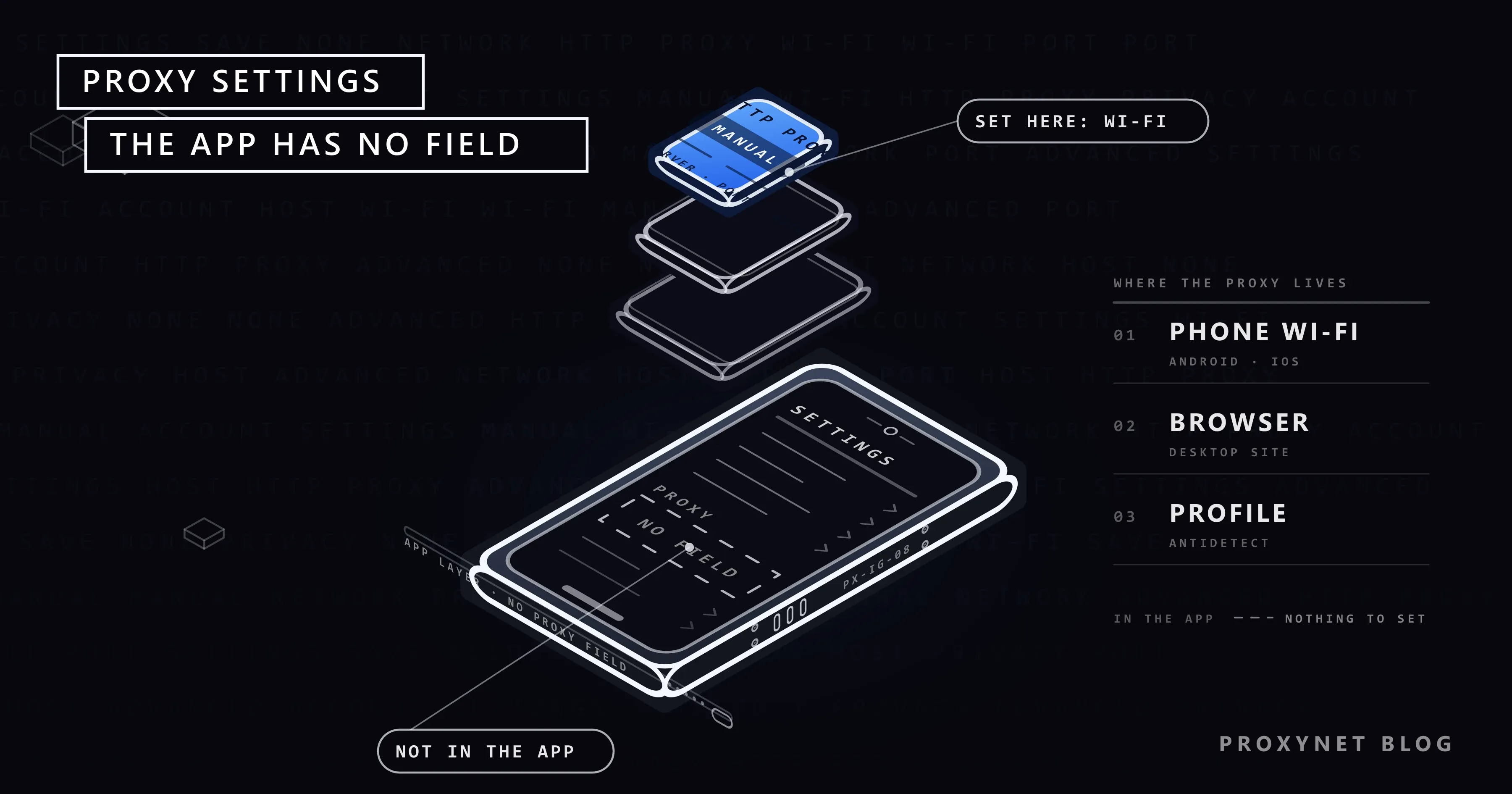
You open the Instagram app, go through every screen under Settings and cannot find a place to type a proxy address. Then you search for "Instagram proxy settings" and land on guides that show a form with a server, a port and a password. That form is not Instagram's. It belongs to the phone, to a browser or to a profile manager, and that is the piece most guides skip.
This post starts with the honest part: Instagram has no proxy field. Then we show the three places where the proxy actually lives, walk through the Android and iPhone screens with menu paths, explain which proxy type fits Instagram and why, show how to check the address before you log in, and go over what triggers the "Suspicious Login Attempt" warning. No code, no terminal.
Does Instagram have a proxy setting?
No. The Instagram app on Android and iPhone, the desktop site and the Lite app all use whatever connection the device gives them. There is no server or port field under Settings and activity, and there never was one. When a guide shows you a proxy form "in Instagram", look closely: it is the phone's Wi-Fi screen, a browser extension or a third-party app.
This is normal for consumer apps; banking apps, WhatsApp and YouTube have no proxy field either. So the question is not "where is the setting in Instagram" but "which layer under Instagram can carry a proxy". A proxy, in this post, is an intermediary server that carries your connection and shows its own address to Instagram instead of yours; how Instagram reads that address is covered in Instagram IP Ban and Open Proxy Error: What They Mean.
Where do you set a proxy for Instagram, then?
There are three places, and which one you use depends on how you open Instagram.
| Where the proxy lives | What it covers | Who it is for |
|---|---|---|
| The phone's Wi-Fi network settings | The phone's browser; on iPhone most apps including Instagram; on Android the Instagram app may ignore it | One person, one account, using the app |
| The browser or the computer's system proxy | instagram.com in that browser or computer | Desktop use, checks and reporting |
| A profile in an antidetect browser | Only that profile's instagram.com session | Teams with several real accounts |
The first row surprises people. Android's own Wi-Fi proxy screen warns that the HTTP proxy "is used by the browser but may not be used by the other apps", and the Instagram app is one of those other apps. On iPhone the Wi-Fi proxy is picked up by almost every app, so the app route works there.
The second row is the computer. The system proxy (Windows: Settings > Network & internet > Proxy; macOS: System Settings > Network > your connection > Details > Proxies) sends every browser through it, while a proxy extension in Chrome or Firefox limits it to one browser and can store the login. The weakness of this route: every account you open in the same browser shares one address and one fingerprint, which is what the third row fixes.
How to set a proxy on Android for Instagram
Android keeps the proxy inside each Wi-Fi network's details, not in a menu of its own. Google's advanced network settings page lists proxy settings together with metered access and automatic connections. On stock Android:
- Open Settings, tap Network & internet, then Internet.
- Tap the gear icon next to the Wi-Fi network you are connected to.
- Tap the pencil icon at the top right, then expand Advanced options.
- Set Proxy to Manual.
- Type the address into Proxy hostname (for example
pr.proxynet.io) and the port into Proxy port (for example8000). Nohttp://in front. - Tap Save.
Samsung, Xiaomi and other brands move the words around but keep the logic: network details, advanced, proxy. The brand-by-brand paths, and the APN proxy field for mobile data, are in How to Set Up Proxy Settings on an Android Phone. Two limits matter for Instagram in particular:
- There is no username and password field. If your proxy asks for a login, Android cannot send it from this screen. The way around it is the IP whitelist in your provider's dashboard: add your current public address to the allowed list (Proxynet accepts up to 10) and the proxy lets you through without a password.
- The Instagram app may not use the Wi-Fi proxy at all. Test it: set the proxy, check the address in Chrome, then open Instagram and look for any sign of the new location. If the app still behaves as if it were on your home address, the reliable route on Android is a proxy client app that routes the whole phone through the proxy with a local VPN-style tunnel; the Android post has a section on those apps.
How to set a proxy on iPhone for Instagram
iOS keeps the proxy in each Wi-Fi network's details too; Apple's Wi-Fi settings guide covers that screen.
- Open Settings and tap Wi-Fi.
- Tap the (i) button next to the network you are connected to.
- Scroll down to HTTP Proxy and tap Configure Proxy.
- Choose Manual.
- Type the address into Server and the port into Port; turn on Authentication and fill in Username and Password if your proxy uses a login.
- Tap Save.
Unlike Android, iOS has a login field, so no whitelist is needed, and the Wi-Fi proxy applies to nearly every app, Instagram included. Screenshots of each step are in iPhone Proxy Settings: How to Configure a Proxy on iOS. Switch off Connectivity Assist under Settings > Wi-Fi, which can move traffic to mobile data where the proxy does not apply, and iCloud Private Relay during the test. Cellular data has no proxy field on iPhone.
One profile, one proxy: the antidetect route for teams
Five people at an agency logging in to twenty client accounts from one office address is, from Instagram's side, "many accounts from one address", even when every account is real and the authorization is in writing. The first answer is not a proxy. Instagram's own tools come first: switching between accounts in the app (up to 10 logged in at once) and the client granting your agency access through Meta Business Suite so that no password changes hands. Both are covered in How to Manage Multiple Instagram Accounts.
When a team still has to log in directly, the setup is an antidetect browser: a desktop browser that keeps a separate profile per account, each with its own cookies, fingerprint and proxy. The proxy is typed into the profile's settings as host, port, username and password, and that profile opens instagram.com from that address every time, whoever on the team opens it. What Is an Antidetect Browser and How Does It Work? explains the mechanism and the limits. The rule inside that setup: one account, one profile, one address, and the address's country matches where the account lives; a restaurant in Ankara keeps logging in from Türkiye.
Which proxy type fits Instagram best?
Instagram sees three things about an address: which kind of network it belongs to (a mobile carrier, a home internet provider or a data center), how many people share it, and whether it changes between logins.
| Proxy type | What Instagram sees | Fit for Instagram |
|---|---|---|
| Mobile Proxy | An address from a 4G/5G carrier's pool | Best: the address type Instagram sees the most, shared by design |
| Residential Proxy | A home internet address in the country you pick | Good: looks like a normal home user; pair it with a sticky session |
| Static ISP proxy | One fixed address registered to an internet provider | Good for a permanent one-address-per-account setup |
| Datacenter proxy | A server address | Weak: a café account logging in from a data center is unusual |
| Rotating proxy | A different city on every request | Wrong for logins: it looks like a hijacked account |
Mobile proxies fit best for a reason that has nothing to do with tricks. Most Instagram traffic comes from phones on mobile data, and carriers put many subscribers behind one public address. That method is called CGNAT, and it uses the shared address range described in RFC 6598. Because thousands of ordinary users sit behind the same carrier address, Instagram cannot treat that address as one person, so a mobile address carries more tolerance than a server address. What Is CGNAT? How to Check and Get Out of It explains the mechanism, and Residential vs Mobile Proxies: Comparison Guide compares the two types.
The second half of the fit is the session. A login that changes address halfway through looks like two people. A Sticky Proxy keeps the same address for a set time; at Proxynet the session length is set between 1 and 60 minutes in the username, and the endpoint generator in the dashboard writes it for you: 10 minutes for a quick check, 60 for a posting session. Turkish carriers are in the mobile pool, so a Türkiye account can log in from a Turkish mobile address; the dashboard lets you choose country and city, not a specific carrier.
How to check the address before you log in
Do this after every setup change, before Instagram sees the new connection:
- Before enabling the proxy, open an IP lookup page and note the address, city and provider you normally show.
- Enable the proxy (Wi-Fi settings, extension or profile) and reload the same page.
- Confirm that the address, the country and the provider type changed. For a mobile proxy, the provider should be a carrier, not a hosting company.
- On iPhone, check that Connectivity Assist is off. On Android, check the app's behaviour as described above.
- Only then open Instagram and log in.
If the address did not change, do not log in; your real address followed by the proxy address is two locations in a row. The fuller checklist, including WebRTC leaks, is in Is My Proxy Working? How to Test a Proxy.
What triggers "suspicious login" and action blocks?
Instagram does not publish thresholds, and the "this many likes per hour" numbers on forums do not come from Instagram. What it has said is enough to understand the mechanism.
- A login from an unfamiliar place or device. The "Suspicious Login Attempt" warning is a security check, not a penalty: Instagram saw a login from a country, city or device it does not associate with you and asks for a code. A proxy in the wrong country, or an address that changes between logins, produces exactly this. Social Media Login From Another Country: Why and What to Do explains how platforms weigh a new location.
- Automation and bought engagement. Meta's spam policy lists engaging with content or creating accounts "at very high frequencies", manually or automatically, and buying or selling likes and follows. Its account integrity policy adds accounts created through automated means or to evade a previous removal.
- Third-party follower apps. In its announcement on removing fake likes, follows and comments, Instagram says such apps violate its terms, that it removes the engagement they produce and asks the owner to change the password.
- An address with a bad history. Free proxies and shared VPN exits are used by many people, some for spam; the "flagged as an open proxy" warning is tied to the address, not to you.
Action blocks ("Try Again Later", "Action Blocked") are tied to the account's own activity, and changing the address does not remove them. Open Account Status in the app instead; Instagram's Account Status page says you can request a review from there.
Everything in this post is for real accounts: your own brands and client accounts you manage with the owner's written authorization. A proxy changes the address Instagram sees and nothing else; it does not lift a restriction and it is not a way to reopen a disabled account under a new name. Follower farms, scripted engagement and bulk account creation break Meta's policies whatever address they come from, and Proxynet's products are not sold for that.
Troubleshooting
- Instagram app behaves as if there were no proxy (Android). The Wi-Fi proxy reaches the browser, not the app. Use a proxy client app with a local tunnel, or use instagram.com in Chrome.
- No internet or "proxy authentication required" after saving (Android). The proxy wants a login the Wi-Fi screen cannot send. Add your public address to the IP whitelist in the dashboard, or use the iPhone or browser route.
- The proxy works in Safari but Instagram still shows your city (iPhone). Turn off Connectivity Assist and iCloud Private Relay, then close and reopen the app.
- Instagram asks for a code on every login. The address changes between sessions. Use a longer sticky session, or a static address for that account, and log in from the same profile every time.
- "Flagged as an open proxy" appears the moment you connect. The address you got has a history. Request a new session and check the address again before logging in.
Decision guide
| Your situation | What to do |
|---|---|
| One personal or business account on your own phone | You do not need a proxy; switch to mobile data if a Wi-Fi address is flagged |
| One account, but you want a fixed exit for it on the phone | iPhone: Wi-Fi proxy with login. Android: Wi-Fi proxy plus IP whitelist, or a proxy client app |
| Several real accounts, a small team | Meta Business Suite access first; then antidetect profiles with one Mobile Proxy session each |
| Accounts that must keep one address for months | Static ISP address per account inside a dedicated profile |
| Account shows an action block | No proxy; open Account Status and wait or request a review |
Frequently asked questions
Where is the proxy setting in Instagram?
There is none. Instagram's app and website use the device's connection. The proxy goes into the phone's Wi-Fi network details, the browser or computer's proxy settings, or the profile settings of an antidetect browser.
Does the Wi-Fi proxy on Android work for the Instagram app?
Not reliably; Android itself notes that the HTTP proxy is used by the browser and may not be used by other apps. If the app ignores it, use a proxy client app that tunnels the whole phone, or use instagram.com in the browser.
Which proxy type should I use for Instagram?
A mobile proxy with a sticky session, because a carrier address shared by many subscribers is the most common kind of address Instagram sees. A residential address in the right country is the next option; a rotating one is wrong for logins.
Can I use one proxy for several Instagram accounts?
One address per account is the safe rule. Several accounts behind one address, opened from one browser, look like one operator running many accounts. For client accounts, use Meta Business Suite access first.
Why does Instagram still ask for a verification code after I set the proxy?
Because the account is logging in from a place it has not seen before. That is expected on the first login from a new address and should stop once you keep using the same address and profile. If it continues, the address is changing between sessions.
Will a proxy remove an Instagram ban or action block?
No. Address-based restrictions go away when the address changes, but account restrictions and action blocks follow the account to any address. Check Account Status in the app and use the review option there.
Summary
Instagram has no proxy field, so the setting lives one layer down: in the phone's Wi-Fi details (with the Android caveat that the app may ignore it), in the browser you open instagram.com from, or in an antidetect profile when a team runs several real accounts. Pick a mobile or residential address in the account's country, keep it fixed with a sticky session of up to 60 minutes, check it before every login, and keep to one account per address. For the account-side rules, start with Instagram IP Ban and Open Proxy Error: What They Mean; for the products and scenarios, see the Instagram proxy page.


