The media plan says your banner runs on three news sites in Izmir, mobile only, weekday evenings. The agency report agrees. You open one of those sites from the office in Istanbul on a Tuesday afternoon and see a car insurance ad where yours should be. Nobody is lying. The ad server saw a fixed business line in another city, a desktop browser and a time outside the flight window, and picked a different campaign. To see what an Izmir reader saw last night, you have to look like an Izmir reader last night.
This post explains what ad verification checks, why one page shows different ads to different visitors, how a proxy turns a check into a repeatable measurement, and the workflow: target list, exit IP, capture, comparison, report. It also covers what to log so a finding survives a dispute, the mistakes that produce false alarms, and which proxy type fits which job.
What is ad verification?
Ad verification is the set of checks an advertiser, an agency or a measurement vendor runs to confirm that a campaign was delivered as bought. The insertion order defines placement, geography, creative, schedule and brand safety rules; verification compares each with what a real visitor's browser received. In practice it is six questions.
- Placement. Is the ad on the site, section and slot that was sold? ads.txt from IAB Tech Lab lets a publisher list its authorised sellers; a seller missing from that file is the first thing a placement check catches.
- Geo delivery. Does a campaign bought for one city reach visitors there, and stay off screens outside the target?
- Creative. Is the rendered version the approved one: right language, size and landing page, no expired offer, no broken image?
- Brand safety. What sits next to the ad: an accident report, a pirated stream, a page of generated text? The Trustworthy Accountability Group runs a Brand Safety Certified programme for this problem; verification checks whether the promise holds on the page.
- Invalid traffic and click fraud. Are impressions and clicks coming from real people? Google's Ads Help page on invalid traffic defines it as traffic that does not represent genuine interest in your business, and the Media Rating Council publishes Invalid Traffic Detection and Filtration Guidelines that measurement vendors are audited against. Verification checks whether the filtered numbers match the page.
- Affiliate compliance. Do affiliates run the approved creative and landing page and respect the rules on bidding for your brand name? A partner that shows one page to your compliance team and another to customers abroad is caught only from where those customers are.
Why does the same page look different from the office and from the target city?
An ad slot is not a fixed picture. When the page loads, the slot asks an ad server for a creative, the server runs an auction or a rule set, and the winner is drawn in. The inputs to that decision are what differ between your office and the target city.
- IP location. The server reads the country and, where the database allows, the city from the visitor's IP. A campaign targeted to Izmir is not a candidate for an Istanbul request. Why that reading is sometimes wrong: Why Is My IP Location Wrong?.
- Network type. Its ASN, the number that identifies the network, shows whether the IP belongs to a home ISP, a mobile carrier or a hosting company. Many demand-side platforms exclude datacenter ranges, so a check from a datacenter IP sees leftover inventory, not your campaign.
- Device and browser. Mobile-only campaigns are decided on the user agent and screen. A desktop browser posing as a phone on a business line is inconsistent enough to be flagged; see Browser Fingerprinting.
- Frequency and history. Cookies carry a frequency counter. A reviewer who reloads the page ten times uses up the cap and then watches other campaigns win the slot.
- Time. Dayparting, budget pacing and the end of a flight change what the slot shows at 15:00 versus 21:00.
- Consent state. Where a consent banner exists, the page serves contextual ads until the visitor decides and personalised ads afterwards. A script that never touches the banner measures an ad stack no human sees.
The same mechanism makes search results differ from person to person (Why Are My Google Search Results Different from Others?) and gives a subscription a different price abroad (Why Do Prices Differ by Country?). A site tailors its output to the request; to audit one version you have to send that version's request.
How does a proxy make the check possible?
A proxy does not change what the ad server decides. It changes the inputs, so the decision is the one your audience gets.
- The verification tool opens a headless browser, a real browser engine without a visible window, so ad tags and lazy loading behave as they do for a person.
- The session connects through a proxy endpoint such as
pr.proxynet.io:8000with a username that carries the targeting: a-country-trpart for the country and a city part for the city. - The exit IP is residential or mobile. The publisher's ad server sees a home ISP or a carrier network in the target city, which is what a real reader looks like.
- A sticky session pins the IP. Page load, ad request, creative download and click redirects must come from one address, or the ad server counts several visitors. On Proxynet the session lasts 1 to 60 minutes, set with a
-session-…-ttl-…part in the username. - The browser records the evidence: a full-page screenshot, the rendered HTML, the ad requests and responses, the final URL after the click chain, and the run's metadata.
- The comparison engine checks the record against the order: expected domain, creative hash, landing page, geo and time window.
The proxy is only steps two and three, but without them steps five and six describe the office, not the audience.
Which proxy type fits ad verification?
| Proxy type | What the ad server sees | Fit for verification |
|---|---|---|
| Residential Proxy | A home ISP line in the chosen city | The default for display and video: placement, geo, creative and brand safety checks |
| Mobile Proxy | A carrier line, mobile ASN | Required for carrier-bought or in-app inventory and mobile-only campaigns |
| Sticky Proxy | The same residential or mobile IP for 1-60 minutes | A session mode, not a separate pool; needed for every run that follows a click |
| Datacenter proxy | A hosting company's range | Poor: many ad platforms exclude these ranges, so the slot shows fallback inventory |
| Static ISP proxy | One fixed ISP-registered IP for weeks | A long-lived monitoring identity for a few pages, not geo coverage |
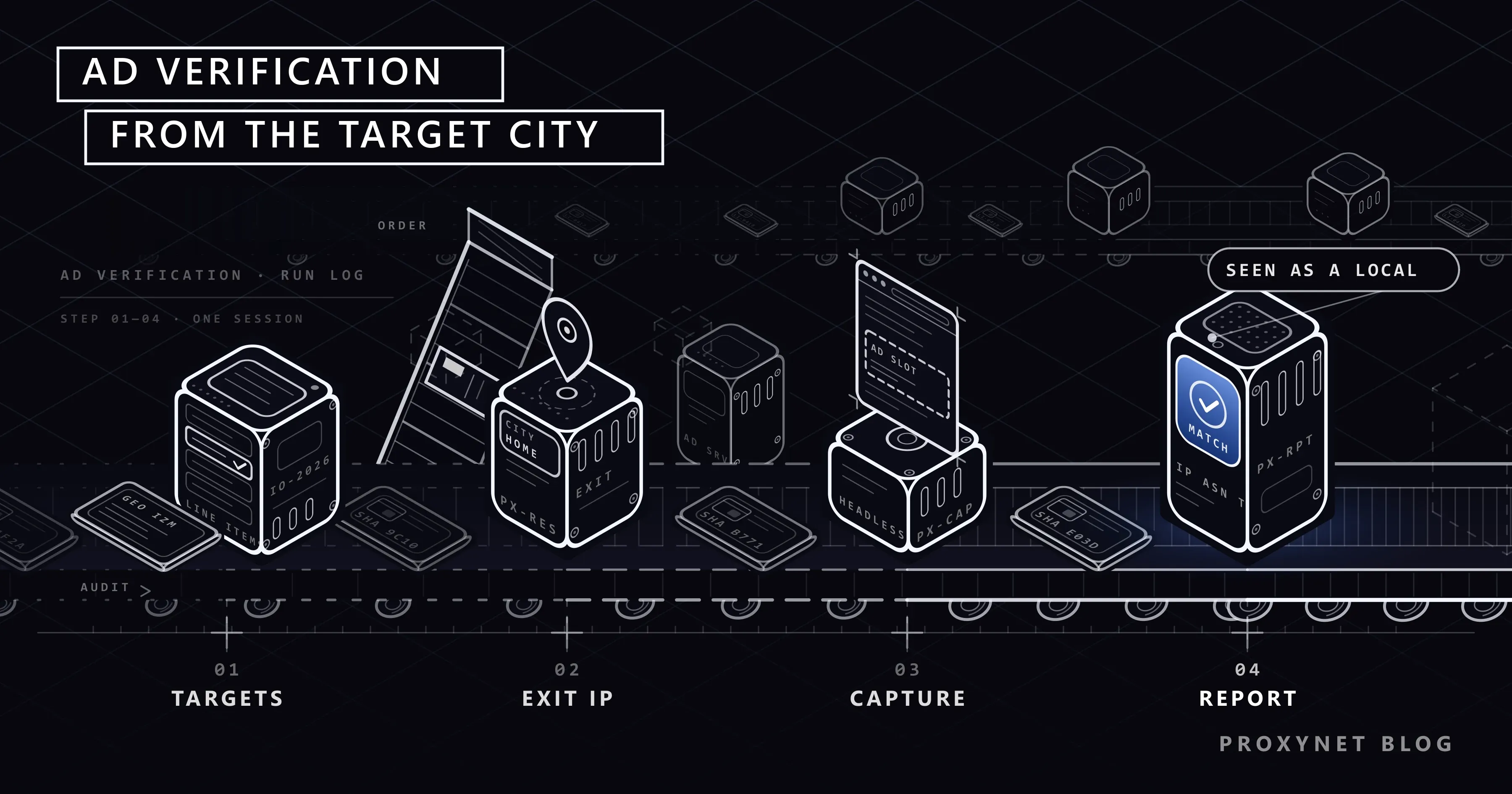
The verification workflow, step by step
This is the sequence we run for our own campaigns and for partner compliance, in a commercial platform or in a script built on a headless browser.
1. Build the target list
Start from the insertion order, not the publisher's site map. For each line item write down the domains and sections, the geo targets down to the city, the device split, the flight dates and hours, the approved creatives with a hash of each, and the approved landing URL. For affiliates add the partner's pages and the search terms they may bid on.
2. Pick the exit IP per target
Each row gets an IP profile: country, city, network type and session length. Residential for web display, mobile for carrier-bought or in-app lines, and a session long enough for the page, the lazy slots and the click chain; ten to fifteen minutes is a comfortable default. In the panel you choose the country and the city; the ASN is read back from the log after the run, and that reading proves the exit was a home or carrier line.
3. Capture
The headless browser connects through the chosen endpoint, sets a viewport and user agent matching the order, handles the consent banner as a user would, loads the page, scrolls to trigger lazy slots, waits for the ad requests to settle, and saves the screenshot, the HTML and the network log. For click checks it clicks the creative, follows every redirect on the same sticky IP and records the final URL.
4. Compare
The comparison is mechanical: approved creative in the approved slot, ad request to an authorised seller, final URL equal to the approved landing page, capture time inside the flight, exit geo equal to the line item's geo. Mismatches get a class: not delivered, wrong creative, wrong geo, unsafe adjacency, unauthorised seller, wrong landing page.
5. Report
The report lists each line item with its capture count, the share that matched, and one screenshot per mismatch with the log row underneath. A publisher reads the log row first: the IP, ASN and timestamp let them find the same request in their own logs.
What to log on every capture
A screenshot without context is an opinion. The log row that turns it into evidence carries these fields.
- Exit IP as seen by the target site, with the country and city assigned to it at capture time.
- ASN and network type: which ISP or carrier, and whether the range is residential, mobile or hosting.
- Timestamp in UTC, with the target market's time zone noted.
- Page URL and final URL after the click chain, plus every redirect between them.
- Screenshot hash and creative hash, for example SHA-256 of the image file and of the rendered asset, proving the screenshot is unmodified and the creative is the approved one.
- Ad request details: the ad server domain, the seller identifiers, and whether the seller appears in the publisher's ads.txt.
- Session and device: user agent, viewport, consent state, sticky session identifier, and the country and city parts of the proxy username.
Keep the raw captures for the dispute window in your contracts. Storage is cheap; a placement argument without the original capture is not.
What verification is, and what it is not
Ad verification measures your own campaigns and the partners you pay; the proxy exists so the measurement is taken from the audience's viewpoint. Two things fall outside that line.
Automating clicks on ads is not verification, whatever it is called. Google's Ads Help page lists intentional clicks from competitors and paid users among its examples of invalid traffic, and its Ad Traffic Quality team reviews unusual patterns with automated systems and people. A click check follows one chain per capture to see where it lands; it never generates clicks on anyone's ads.
Cataloguing everyone's campaigns by scraping a publisher's inventory is a different activity with different rules; keep the target list tied to the insertion order.
Where the same workflow is used
- Display and video campaigns across several cities. Each city gets its own residential exit and capture set. Landing page: ad verification.
- Brand safety sweeps. Pages where the creative appeared are re-captured from the target geo and classified by adjacency. Landing page: brand protection.
- Search ad monitoring. Which advertiser holds the top paid result for your brand term differs by city, so the check runs from that city. Details in Google Ads Click Fraud: What It Is and How to Detect It.
- Choosing a provider. Pool, city coverage and session model decide how many of these rows you can run; five providers are compared in Best Proxies for Ad Verification - 2026.
Common mistakes that produce false findings
- Capturing from a datacenter IP. The slot shows fallback inventory and the report says "not delivered". Check the ASN in the log before believing a miss.
- Reading a cached page. A CDN or the browser cache serves yesterday's ad tags. Disable the cache in the headless browser.
- Ignoring the consent banner. The pre-consent page runs a reduced ad stack. Decide once how the run handles the banner and log the choice.
- Rotating the IP mid-chain. A rotating endpoint gives the click redirect a new address and the chain breaks; use a sticky session.
- Wrong device profile. A desktop viewport on a mobile-only line item produces an empty slot every time.
- Reloading the same page from the same IP. The frequency cap fills and later captures show other campaigns; spread captures across sessions and hours.
- Trusting the IP database blindly. The publisher's geolocation database may put the IP in a neighbouring city. Treat a single geo mismatch as a lead, not a verdict.
Decision guide
| Need | Recommendation |
|---|---|
| Web display in one or more cities | Residential Proxy with city targeting, sticky session of 10-15 minutes |
| Carrier-bought or in-app mobile campaigns | Mobile Proxy, sticky session, device profile matching the order |
| Click chain and affiliate landing page checks | A residential or mobile line in Sticky Proxy mode, session longer than the chain |
| Search ad monitoring for your brand term | Residential exit in each target city, one query per session, results logged with the IP |
| Fetching your own ad platform reports | No proxy, or a datacenter line; the platform knows who you are |
Frequently asked questions
Do I need a proxy if the campaign runs only in my own city?
Usually yes. Your office line is a business connection with a fixed IP, a frequency history and possibly a hosting-type ASN behind a corporate gateway; a residential exit in the same city is what the audience looks like.
Which is better for ad verification, residential or mobile proxies?
Residential is the default for web display and video. Mobile is for campaigns bought on carrier traffic or shown inside apps, where the ad server expects a carrier ASN. Many teams run both and let the line item decide.
How long should the sticky session be?
Long enough to load the page, wait for lazy slots and follow the click chain, with margin. Ten to fifteen minutes covers most single-page captures; the ceiling on Proxynet is 60 minutes.
Can I verify ads without a headless browser?
Only partly. A plain HTTP fetch retrieves the page HTML but not the ad, because the ad is inserted by JavaScript after load. The screenshot, the rendered creative and the click chain all need a browser engine.
Is running ad verification through a proxy allowed?
Verifying your own campaigns and your partners' compliance from the audience's viewpoint is a normal part of media buying; the industry bodies cited above exist to standardise it. What is not allowed is generating clicks or impressions on any ads.
What if the publisher disputes the finding?
Send the log row: IP, ASN, timestamp, page URL, final URL, screenshot hash. The publisher can find the same request in its ad server log by time and IP. Without those fields a finding is an argument about trust; with them it is a look-up.
Summary
Ad verification is a viewpoint problem. The ad server tailors every slot to the visitor's IP location, network type, device, history and consent state, so a check from the office measures the office. A residential or mobile exit in the target city, held by a sticky session, lets a headless browser record what the audience saw; a log row with IP, ASN, timestamp and hashes makes that record evidence a partner can reproduce. The proxy side is on the ad verification page.