


































You click a link to a shop or a sign-in page. The tab spins for a moment, then Chrome shows "This page isn't working", a line saying the site "redirected you too many times" and ERR_TOO_MANY_REDIRECTS at the bottom. Firefox calls it "The page isn't redirecting properly"; Safari says too many redirects occurred.
Nothing harmful happened. The site kept sending your browser from one address to another until the browser stopped following. Below: what a redirect loop is, the fixes for visitors, what to change if the site is yours (Cloudflare, HTTPS and www rules, WordPress), one command that shows the chain, and the same error inside a scraper.
What does ERR_TOO_MANY_REDIRECTS mean?
A redirect is a short answer from a server that says "this page is somewhere else, go there instead", and the browser follows it without asking you. Sites use them all the time: from http:// to https://, from an old page to a new one, from a members-only page to the sign-in form and back.
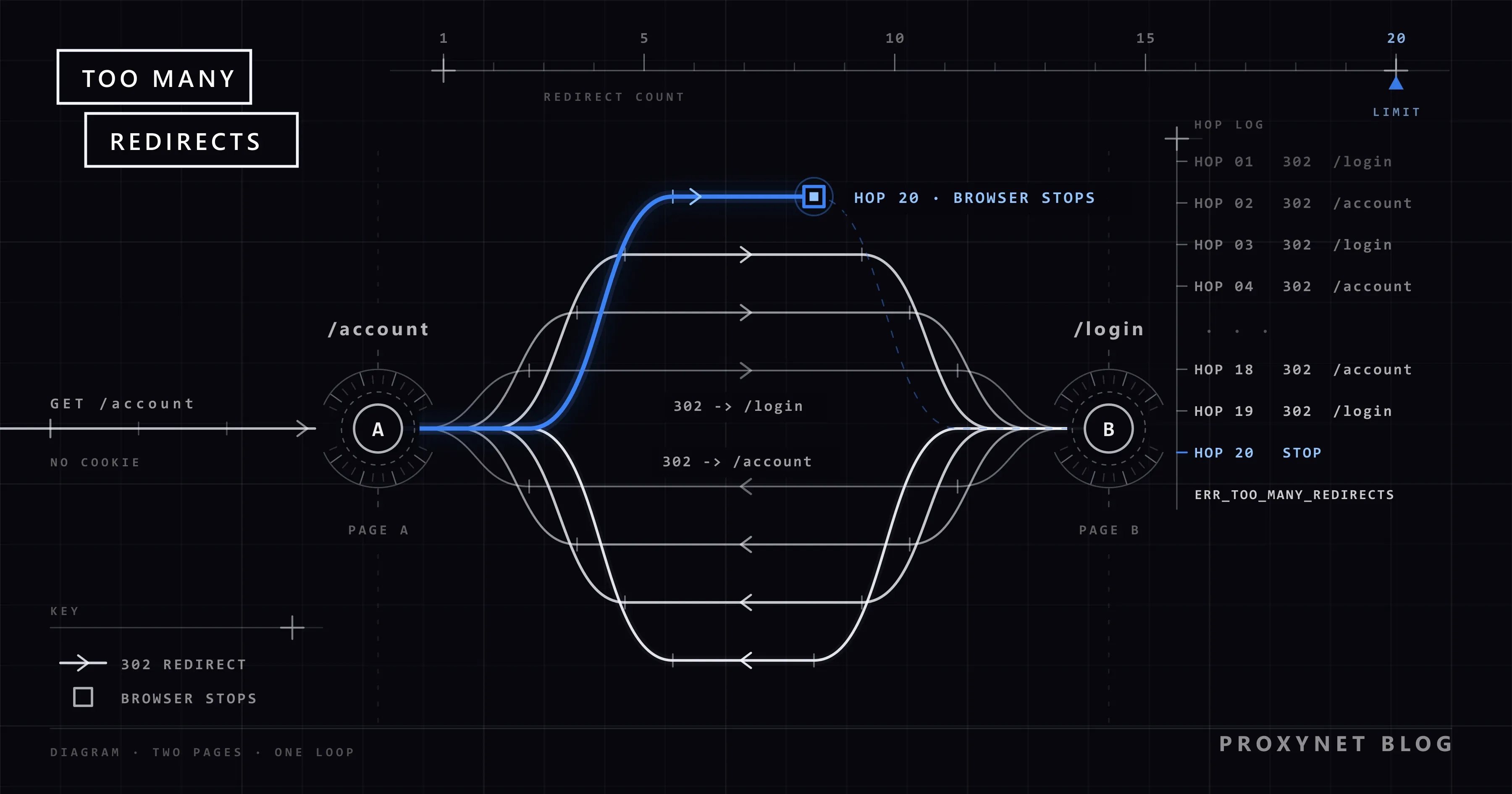
A redirect loop is a trail that never ends: page A sends you to B, and B sends you back to A. RFC 9110, section 15.4 asks clients to "detect and intervene in cyclical redirections", and the Fetch standard that browsers implement ends a request with a network error after 20 redirects. Chrome and Firefox both stop there.
What does the error look like in each browser?
The Chrome and Firefox wording comes from the browsers' own text files. Edge, Opera and Brave are built on Chrome's engine (Chromium) and show the same code.
| Browser | What the screen says | Code |
|---|---|---|
| Chrome | "This page isn't working", "example.com redirected you too many times." and a "Try deleting your cookies" link | ERR_TOO_MANY_REDIRECTS |
| Firefox | "The page isn't redirecting properly" and a note that refusing cookies can cause it | None |
| Safari (Mac, iPhone) | Safari can't open the page because too many redirects occurred | None |
Apple's archived help page for the Safari message describes the same loop. All three browsers point at cookies first.
How does a redirect loop happen, step by step?
Take a members-only page:
- You open
https://example.com/account. - The server looks for its sign-in cookie, a small piece of text the site stored in your browser earlier. It finds none and redirects you to
/login. - The sign-in page sees you are signed in on its side, sets a fresh cookie and sends you back.
- If the browser does not keep or send that cookie (blocked, already expired, set for another address), step 2 repeats.
- After 20 rounds the browser stops and shows the error.
The other family needs no cookies: two rules that disagree. One layer forces https://, another sends visitors back to http://; or one rule adds www. and another removes it.
What causes it, and whose problem is it?
| Cause | Whose side | Typical sign | First step |
|---|---|---|---|
| A stale, broken or blocked cookie | Yours | One site, one browser | Delete or allow that site's cookies |
| An extension rewriting addresses | Yours | Works in a private window | Turn extensions off |
| Device clock far off | Yours | Sign-ins loop | Set the time automatically |
| A VPN or proxy showing another country | Yours and the site's | Only while the VPN is on | Turn it off |
| A remembered permanent redirect | Yours, after the owner's fix | Other devices work | Use a private window |
| HTTPS settings fighting, often Cloudflare Flexible | The site's | Every visitor, every device | Owner: change the SSL/TLS mode |
| www or https rules in two places | The site's | Address flips between two forms | Owner: keep one rule |
| Wrong address in WordPress settings | The site's | Whole site or dashboard loops | Owner: fix the two URL fields |
How do you fix it as a visitor?
Reload the page after each step.
- Try a private window. In Chrome, select More > New Incognito window. It starts without cookies, and extensions run there only if you allowed them. If the page opens, a cookie or an extension is the cause.
- Delete the cookies for that one site, the one named in the message. This signs you out of that site only.
- Chrome on a computer: More > Settings > Privacy and security > Third-party cookies > See all site data and permissions, search for the site, select Delete (Google's steps).
- Chrome on Android: on the site, tap Page info at the left of the address bar, then Cookies and site data, then Delete.
- Firefox: click the shield icon left of the address bar, then Clear cookies and site data (Mozilla's steps).
- Safari on a Mac: Safari > Settings > Privacy > Manage Website Data, select the site, click Remove (Apple's steps).
- Safari on iPhone: Settings > Apps > Safari > Advanced > Website Data > Remove All Website Data. This clears every site's data, so you will sign in again elsewhere.
- Turn off extensions. Ad blockers, privacy tools, "always HTTPS" add-ons and VPN extensions can change where a page goes. In Chrome, open More > Extensions > Manage Extensions and switch them off one at a time (Google's steps).
- Check the date and time. Your browser discards a cookie whose expiry date has passed by your device's clock (RFC 6265, section 5.3), so a clock days ahead can make a fresh sign-in cookie vanish. On Windows, select Start > Settings > Time & language > Date & time and turn on Set time automatically (Microsoft's steps). A wrong clock also causes Your Connection Is Not Private warnings.
- Turn off a VPN or proxy and reload; the next section explains why.
- Check another network. If the page also fails on your phone over mobile data, the loop is on the site: tell the owner the address and the time, and wait. A page that cannot connect at all is a different error.
Why does it happen so often at sign-in?
Sign-ins hop between addresses on purpose: a shop sends you to a sign-in service (its own, Google's, Microsoft's), which sets a cookie and sends you back. If either side's cookie is missing or blocked, you go round again. When the message names the service, as in "accounts.google.com redirected you too many times", delete that service's cookies as well as the site's, and allow cookies for both if you block them.
Why does a VPN or proxy sometimes cause a redirect loop?
Many sites pick a country version from your IP address, say /de/ for Germany, and also remember the choice in a cookie. When your IP says one country and the cookie another, the two rules can send you back and forth (What Is Geo-Blocking and How Do Sites Know Your Location?).
A VPN changes the country the site sees, and a rotating proxy can even send two steps of one chain from two addresses. Turn the VPN off and reload; if that works, delete the site's cookies before reconnecting, or choose the country on the site. If you browse through a proxy on purpose, keep one exit for the visit: a Sticky Proxy holds the same IP for a set time (Proxy vs. VPN).
If it's your site: where does the loop come from?
Read the chain first (next section); its pattern points to the wrong rule.
Cloudflare's Flexible SSL mode
In Flexible mode, visitors reach Cloudflare over HTTPS, but Cloudflare connects to your server over plain HTTP (Cloudflare's encryption modes). A server that redirects HTTP to HTTPS sees every request from Cloudflare as HTTP and redirects again, so https://example.com/ redirects to itself.
In the dashboard, open SSL/TLS > Overview and choose Full (strict) once your server has a valid certificate, or Full while you get one. The reverse also loops: Full with a server that sends HTTPS back to HTTP. Cloudflare's page on this error also lists Always Use HTTPS, HSTS and conflicting redirect rules.
HTTPS and www rules in two places
A hosting panel adds www. while the application removes it, or a CDN forces HTTPS while the server forces HTTP. Choose one public address, enforce it in one layer and delete the other rules, including redirect plugins and .htaccess lines. Forward Proxy vs Reverse Proxy explains which layer sees what when a CDN sits in front.
WordPress address settings
WordPress builds its redirects from WordPress Address (URL) and Site Address (URL) under Settings > General. WordPress's guide says both need https:// and no trailing slash; a wrong scheme or an extra www sends visitors in circles. If the loop locks you out of the dashboard, set them in wp-config.php:
define( 'WP_HOME', 'https://example.com' );
define( 'WP_SITEURL', 'https://example.com' );
Behind a load balancer or reverse proxy that handles HTTPS while WordPress runs on plain HTTP, WordPress treats every request as insecure and, in its documentation's words, falls into an infinite redirect loop. Let it read the proxy's X-Forwarded-Proto header, as its HTTPS guide shows.
Test the fix in a private window
The HTTP standard lets browsers store a 301 ("Moved Permanently") redirect, so your own browser may keep looping after the fix. Test in a private window and use temporary 302 redirects while you experiment.
Advanced: see the redirect chain with one command
For readers comfortable with a command line: curl ships with Windows 10, Windows 11 and macOS (in PowerShell type curl.exe). This follows the redirects, prints each step's headers and stops after ten:
curl -sSIL --max-redirs 10 https://example.com/We ran it against a test server on our computer that copies the Flexible loop. Key lines, shortened (curl 8.21.0, Windows 11):
HTTP/1.1 301 Moved Permanently
Location: https://example.com/
HTTP/1.1 301 Moved Permanently
Location: https://example.com/
HTTP/1.1 301 Moved Permanently
Location: https://example.com/
curl: (47) Maximum (10) redirects followed
How to read it:
Locationrepeats the address you asked for: the server thinks the request came over HTTP (Flexible mode, or a proxy that dropsX-Forwarded-Proto).- The address alternates between two forms, such as with and without
www: two rules disagree. - It alternates between a page and a sign-in page: a cookie isn't kept; check the
Set-Cookielines. - It ends with
200: the server is fine, and the loop lives in a browser's cookies or cache.
If you're writing a scraper or crawler
We triggered both messages below against a looping test page:
| Tool | What it prints |
|---|---|
| Python Requests 2.34 | requests.exceptions.TooManyRedirects: Exceeded 30 redirects. |
| Playwright for Python 1.58 | Page.goto: net::ERR_TOO_MANY_REDIRECTS at <url> |
Requests gives up after 30 redirects, browsers after 20, and raising the limit never helps. The usual causes in code:
- No shared cookie jar. Separate
requests.get()calls don't share cookies; use onerequests.Session()per site (Sessions and Cookies in Python). - A cookie your client never receives. Some pages set it with JavaScript or a click, such as a consent banner, which a plain HTTP client never runs. Use the site's API or a real browser there. If the chain ends on a block page, stop: that is the site's decision (Sorry, You Have Been Blocked).
- The exit IP changes halfway. With per-request rotation each hop can leave from a different IP, even a different country, and a site that picks its country version by IP sends hop two somewhere hop one never asked for. Keep one exit per chain with a sticky session and fix the country with targeting; Residential Proxy offers both (What Is IP Rotation and How Does It Work?).
To see where a chain turns back, follow it one hop at a time:
from urllib.parse import urljoin, urlsplit

import requests

PROXY = "http://user:pass@pr.proxynet.io:8000"  # use a sticky-session username
START = "https://example.com/account"


def trace(url, session, max_hops=10):
    """Follow redirects one hop at a time and stop at the first repeat."""
    seen = set()
    for hop in range(max_hops):
        r = session.get(url, allow_redirects=False, timeout=15)
        target = r.headers.get("Location", "")
        cookie = "sets a cookie" if "Set-Cookie" in r.headers else "no cookie"
        print(hop, r.status_code, urlsplit(url).path, "->", target, f"({cookie})")
        if not r.is_redirect:
            return r
        if url in seen:
            print("Loop found: this URL was already requested")
            return None
        seen.add(url)
        url = urljoin(url, target)
    print(f"Stopped after {max_hops} hops")
    return None


with requests.Session() as s:  # one cookie jar for the whole chain
    s.proxies = {"http": PROXY, "https": PROXY}
    s.headers["User-Agent"] = "example-crawler/1.0 (+https://example.com/bot)"
    trace(START, s)
We ran it through a local test proxy with user:pass authentication against a test page that copies a consent loop, where the cookie would normally come from a button (requests 2.34.2, Python 3.13):
0 302 /account -> /consent (no cookie)
1 302 /consent -> /account (no cookie)
2 302 /account -> /consent (no cookie)
Loop found: this URL was already requested
No hop sets a cookie, so this client can never reach /account. If a hop does set one and the loop continues, compare the cookie's domain and path with the next address, then check that your exit IP stayed the same. Debug politely: one chain at a time, a User-Agent that names you, and the rules in robots.txt.
Where you might run into it
- Ad links that pass through several tracking redirects, checked from one IP (How Ad Verification Works with Proxies).
- Crawlers that meet a loop after a site migration (How to Build a Web Crawler in Python).
- Monitoring tools that report a loop after a settings change (How to Monitor a Website for Changes).
- Browser automation with a fresh profile or a proxy (Playwright with a proxy).
Common mistakes
- Deleting every cookie first. It signs you out everywhere; start with the site named in the message.
- Reinstalling the browser or restarting the router. The loop lives in a cookie, an extension or the site's rules.
- Raising the redirect limit in code. A loop is a loop at 30 hops and at 100.
- Testing a server fix in the same browser, where a remembered 301 keeps the old loop alive.
- Switching HTTPS off to stop the loop instead of making the layers agree.
Decision guide
| Your situation | What to do |
|---|---|
| One site fails, or only outside a private window | Delete that site's cookies, then check extensions |
| The loop starts at a sign-in page | Delete the cookies of the site and the sign-in service |
| Only with a VPN or proxy on | Turn it off, delete the site's cookies, choose the country on the site |
| Every device and network fails | Wait, or contact the site |
| Your Cloudflare site redirects to the same URL | Set the SSL/TLS mode to Full (strict) |
| Your WordPress site loops after moving to HTTPS | Fix the two address fields |
| Your scraper says "Exceeded 30 redirects" | One session and one sticky exit per chain; trace the hops |
Frequently asked questions
Is ERR_TOO_MANY_REDIRECTS a virus or a sign of hacking?
No. It comes from a cookie, an extension or the site's own redirect rules, and the browser stopped on purpose.
Why does the error appear on one site but not on others?
The loop lives in that site's rules or in the cookies stored for it; other sites have their own.
Do I have to delete all my cookies?
No. Delete the cookies of the site named in the message, and of its sign-in service if the loop starts there. That signs you out of those sites only.
Why does the loop happen only when my VPN is on?
The site picks a country version from your IP while a cookie remembers another one. Turn the VPN off, delete the site's cookies and reconnect, or choose the country on the site.
How many redirects does Chrome allow?
Twenty, the limit in the Fetch standard; Firefox uses the same number and Python's Requests library 30. A normal page needs one or two.
How do I fix too many redirects on Cloudflare?
Set the SSL/TLS mode to Full (strict), which needs a valid certificate on your server, or drop the server's own HTTP-to-HTTPS redirect if you stay on Flexible. Then check Always Use HTTPS, HSTS and your redirect rules for duplicates.
Summary
ERR_TOO_MANY_REDIRECTS means a site sent your browser in a circle and the browser stopped after 20 jumps. Visitors fix most cases by deleting one site's cookies, trying a private window, turning off extensions and a VPN, and checking the clock; a loop on every device is the site's to fix. Owners should look for two rules that disagree. In code, keep one session and one sticky exit per chain. You can compare proxy types and their uses on our proxy page.


