You land in Lisbon, connect to the hotel Wi-Fi and open LinkedIn to answer a message. Instead of your inbox you get a page asking for a code sent to an email address you have not opened in years. Instagram wants a video selfie, Pinterest has logged you out, and the text message X was supposed to send never arrives because your SIM card is switched off.
None of this means your accounts are banned. This post explains why a login from another country sets off these checks, what LinkedIn, X, Instagram, Threads, Pinterest, Reddit and Facebook each ask for, and what to prepare before a trip. The last part is for people who log in from abroad all the time: expats, remote workers and social media managers.
Why does a login from another country look suspicious?
Every device reaches websites from an IP address, the network address given to you by the Wi-Fi or mobile network you are on. The address tells a site roughly which country, and often which city, the connection comes from. The platform does not know where you are standing; it only sees the address. Why that guess is sometimes wrong is covered in Why Is My IP Location Wrong?.
Stolen passwords are mostly tried from far away, so a login from an unfamiliar country is one of the strongest hints that the person typing is not the owner. At the first moment, a trip abroad and a hacked account look alike.
Security teams call one version of this "impossible travel": the account was used in Istanbul an hour ago and now logs in from São Paulo. The platform cannot tell a shared account from an intruder, so it asks.
Which signals do platforms look at?
No platform publishes its full list, but their help pages mention the same few signals:
- Location from the IP address. X notes on its account security page that the location in its login alerts is approximate and comes from the IP address.
- The device and the browser. A phone or laptop that has never logged in before is new. Clearing cookies or using a private window makes a known browser look new again.
- The type of network. Hotel and airport networks put many guests behind one address. VPN and proxy addresses often belong to data centers, which platforms recognize; VPN or Proxy Detected Error explains how.
- Speed and repetition. Many attempts in a short time, or wrong passwords in a row, raise the alarm even without a country change.
One signal alone rarely locks you out. A new country, a new device and a crowded hotel network all at once often does.
What happens when you log in from abroad?
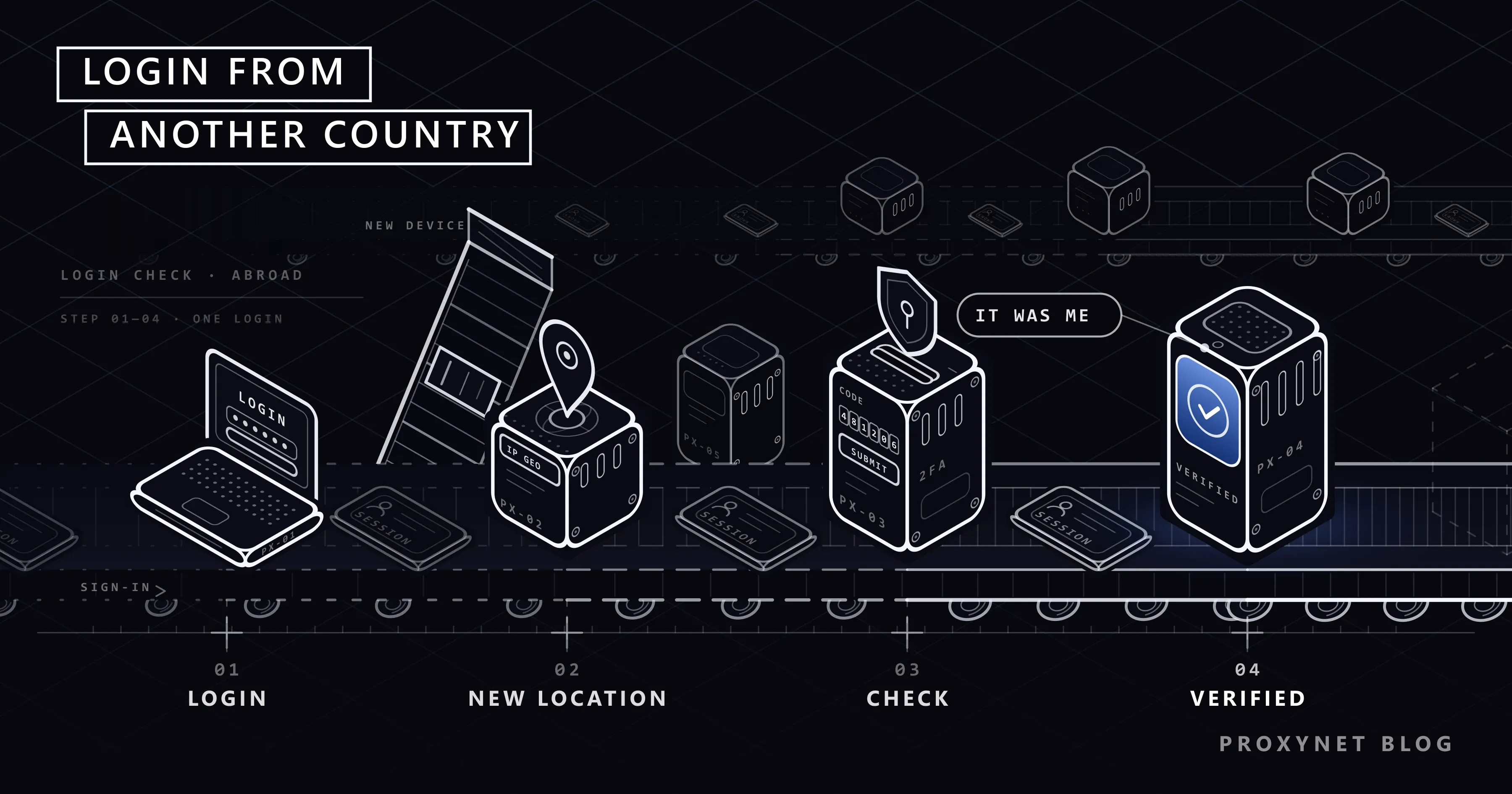
The check follows roughly the same order on every network:
- You enter your password. The platform accepts it but does not open the account yet.
- It compares the login with your history. Country, device, browser and network are set against what you normally use.
- It scores the risk. A familiar phone on a new network may pass quietly; a new laptop in a new country usually does not.
- It asks for proof. A code by email or text message, a prompt on a device that is already logged in, a code from your authenticator app, or on Meta's apps a short video selfie.
- It remembers the result. After you pass, the device and location count as known, and later logins from the same place usually go through.
- If proof fails, it protects the account. It may reset your password, log you out everywhere or lock the account until you go through recovery.
Step 6 is what people call "my account was blocked". Usually the owner can open it with the email or phone number on file.
What does each platform ask for?
The table sums up what each network's help pages say today; flows change, so follow the screen.
| Platform | What usually triggers the check | How you verify | Where it is written |
|---|---|---|---|
| Signing in from an unfamiliar location or device, or suspicious activity | A code sent to your email; the code from your app if two-factor authentication is on | Security verification when signing in | |
| X | A new device or an unusual location, or too many failed attempts | Confirming the login in a notification; the two-factor code (text message codes are for Premium subscribers only) | Two-factor authentication on X |
| A new device, city or network; a pattern that looks automated | A code by email or text message; sometimes a video selfie in which you turn your head | Why you might be asked for a video selfie | |
| Threads | Usually follows the Instagram login | The same checks as Instagram; profiles created without Instagram use their own email or phone | Signing up with or without Instagram |
| An unrecognized device or location | Approving from a phone that is already logged in, a code, or an identity check | Unfamiliar locations in "Where you're logged in" | |
| Logins from unusual locations, many logins in a short time, spam-like activity | Pinterest emails you, resets the password and logs everyone out; you set a new one | We protected your account | |
| Activity that does not match the account's normal behavior | A red warning asking you to reset your password through the email on the account | Locked as a security precaution |
Reddit's reset only works if an email address is connected to the account, so add one before you leave.
Why don't verification codes arrive when you travel?
The most common trap is not the check itself but where the code goes. If your two-factor authentication (a second step after the password, usually a six-digit code) goes by text message to your home number, that SIM card has to be on and roaming. Many travelers switch roaming off or use a local SIM, and the code never arrives.
An authenticator app avoids this. It creates the code on the phone itself from the current time, so it works in airplane mode, on a local SIM or with no signal. X already limits text message codes to Premium subscribers, so most X users need an app or a security key anyway.
Email codes have their own trap: if the recovery address is an old work account you can no longer open, the code arrives where you cannot read it.
How to prepare before you travel
Spend twenty minutes on these steps a few days before the trip:
- Move two-factor authentication to an app. Instagram: Menu > Accounts Center > Password and security > Two-factor authentication. LinkedIn: Me > Settings & Privacy > Sign in & security > Two-factor authentication. X: Settings and privacy > Security and account access > Security > Two-factor authentication.
- Save the backup codes. Reddit's page on backup codes says ten are created and each works once. Print them or keep them in a password manager, not only on the phone you travel with.
- Check the recovery email and phone number. Make sure you can open both without the SIM you are leaving behind.
- Log in once on the travel device. Sign in at home on the laptop or tablet you will take, so it is already known when the location changes.
- Review active sessions. On Facebook and Instagram: Accounts Center > Password and security > Where you're logged in. Log out devices you no longer use.
What to do if you are already locked out abroad
Start with the least effort:
- Stop retrying. Every failed attempt adds to the risk score; Pinterest lists many logins in a short time as a trigger on its own.
- Turn off any VPN, proxy or "change country" extension. A second foreign address makes the login look worse.
- Use the phone and app you normally use. A device that is already logged in can often approve the new login.
- Enter codes only in the platform's own app or site. Emails that ask for your password are a common trick.
- Wait for the code before requesting another. A new request may cancel the previous code.
- Send a selfie or ID only through the official flow. Never to "recovery services" or through direct messages.
If Instagram talks about an "open proxy" or a flagged address, the problem is the network, not the trip; see Instagram IP Ban and Open Proxy Error. If LinkedIn has restricted the account rather than asked for a code, see LinkedIn Account Restricted.
Why free VPNs and public proxies make it worse
The advice "use a VPN to look like you are at home" rarely helps. Free VPN and public proxy addresses are shared by thousands of people and mostly belong to data centers, which social networks score as risky. You swap one unusual login for a flagged one.
A free proxy also sees your login page before you do (Are Free Proxies Safe?); Proxy vs. VPN covers when each tool fits. A network or country that blocks a platform outright is a different problem, explained in What Is Geo-Blocking? and, for Reddit's own message, in Reddit "Blocked by Network Security".
Where a consistent IP address helps
For a holiday, the steps above are enough. An expat whose phone moves between home Wi-Fi, a coworking space and a local mobile network, however, looks like a new location several times a week.
A stable, dedicated address gives the platform the same place every time. It is not a way around the checks: the platform still sees a new device, still asks for your code and still applies its rules.
- Social media managers logging in to a client's LinkedIn or X account from different countries can keep one fixed address per account; see social media proxy, LinkedIn proxy and X proxy.
- Agencies running Instagram and Threads profiles can use a separate address per client instead of one shared office address; see Instagram proxy, Threads proxy and Manage Multiple Social Media Accounts.
- Pinterest and Reddit teams that publish or moderate while traveling can read the use cases on Pinterest proxy and Reddit proxy.
- Expats and remote workers who want one steady login location for their own accounts can use a ISP Proxy: the address stays the same and is registered to an internet provider. It is set up for the sites you choose; access to all sites is an add-on.
- Short working sessions, such as a daily check of a client's page, fit Sticky Proxy, which keep one address for the length of the session.
One account, one person, one address is the pattern, and each platform's rules still apply. LinkedIn, for instance, allows one personal profile per person, so a brand needs a Page rather than a second profile. Proxies are not for fake accounts, follow bots or reopening an account disabled for a rule violation.
Common mistakes
- Relying only on text message codes. They depend on a SIM card you may switch off abroad.
- Signing out everywhere or clearing cookies. Every device then has to prove itself again from the new country.
- Jumping between free VPN servers. The account appears in five countries in an hour, which is exactly what a takeover looks like.
- Giving your password to an "unlock service". No outside service can lift a platform's security lock.
Decision guide
| Your situation | What to do |
|---|---|
| Going abroad next week | Switch to an authenticator app, save backup codes, log in on the travel device at home |
| The code goes to a SIM that is switched off | Use a backup code or the app; if you have neither, turn on roaming briefly |
| Instagram asks for a video selfie | Complete it in the app, in good light; do not send the video anywhere else |
| Pinterest logged you out | Set a new password through the email Pinterest sent |
| Reddit shows a red security warning | Reset the password through the email on the account |
| You live abroad and get checks every week | Keep the same devices and cookies; consider one stable address for your accounts |
| You manage clients' accounts from several countries | Use each platform's role tools first; one fixed address per account if you log in directly |
Frequently asked questions
Will my account be banned for logging in from another country?
No. Logging in from abroad breaks no platform's rules; it only triggers a security check. Once you pass it, the account works as usual.
Why does Instagram ask me for a video selfie?
Meta's help page says the selfie confirms that you are a real person, because photos and documents can be edited. It usually appears when the login pattern looks unusual, such as a new device in a new country.
Can I stop LinkedIn from asking for a code every time?
LinkedIn's own advice is to keep cookies on, not to sign out every time and to avoid VPNs and proxy servers. After a few logins from the same device and place, the prompts usually become rare.
My code goes to my home phone number. What can I do abroad?
Use a saved backup code or an authenticator app. If you have neither, turn on roaming for a few minutes to receive the text message, then switch to an app.
Does a VPN help me log in from abroad?
Usually not. A VPN address adds another unusual location and often belongs to a data center, which platforms treat as risky. Your hotel connection or a local SIM is generally the easier path.
I live abroad permanently. Will the checks stop?
Yes, over time. Once the new country and your devices become the normal pattern, the checks become rare.
Summary
A login from another country is one of the strongest signals of a stolen password, so LinkedIn, X, Instagram, Threads, Pinterest, Reddit and Facebook all ask for proof when they see one: a code, sometimes a selfie or a password reset. The fixes belong before the trip: an authenticator app, saved backup codes, a recovery email you can open and a device that is already known. For people who log in from abroad every day, a stable login pattern and, where it fits, a dedicated address keep the checks rare. You can find the address types for this on our social media proxy page and all products under our proxy services.