You open a dashboard you used yesterday and Chrome shows a plain grey page: "This page isn’t working", with HTTP ERROR 401 at the bottom. On a company server the same code reads "401 - Unauthorized: Access is denied due to invalid credentials." In Postman it is a red 401 next to an API call that worked an hour ago.
All three are one HTTP status code: the server wanted to know who you are and did not get an answer it accepts. Below: what it means, how it differs from 400, 403 and 407, the fixes for visitors and for developers, and a real cURL test.
What does 401 Unauthorized mean?
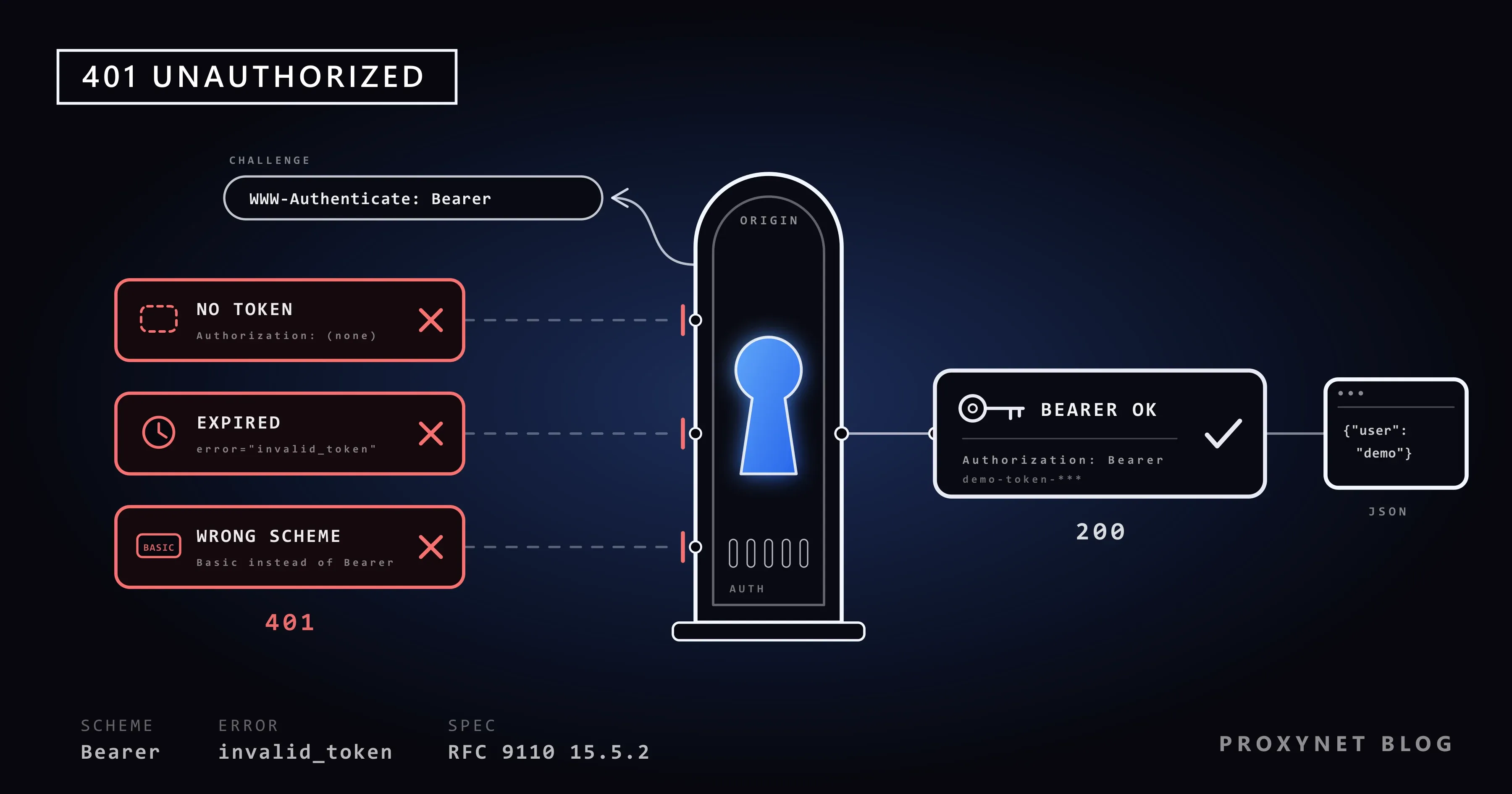
A 401 means the server did not carry out your request because it came without valid credentials. The HTTP standard, RFC 9110, defines it in section 15.5.2 as a request that lacks valid authentication credentials for the target resource. Credentials are whatever proves who you are: a password, a session cookie, an API key or a token.
The server must also send a WWW-Authenticate header that tells the client how to sign in. If the request already carried credentials, the 401 means they were refused.
The name misleads. Authentication answers "who are you?", authorization "what may you do?". A 401 is about the first question; a refusal on the second is a 403 Forbidden.
What does a 401 error look like?
That depends on who shows it: the browser, the web server and an API each word it differently.
| What you see | Shown by | What it means |
|---|---|---|
| "This page isn’t working", "HTTP ERROR 401" | Chrome | The site sent a 401 without a page of its own |
| A small box asking for a username and password | Your browser | The site uses HTTP sign-in (Basic) |
| "401 - Unauthorized: Access is denied due to invalid credentials." | IIS, Microsoft's web server | IIS did not accept the sign-in |
401 and a short JSON message | An API, in Postman or code | The key or token is missing, wrong or expired |
Chrome's page says nothing about the cause; in our test, Chromium (the engine behind Chrome) showed it for a 401 with an empty body.
What is the WWW-Authenticate header?
WWW-Authenticate is the response header in which the server names its sign-in method, called the scheme. MDN's reference shows the full syntax. Basic asks for a username and password, sent Base64-encoded (not encrypted, so safe only over HTTPS); browsers answer it with their sign-in box. Bearer asks for a token, the format OAuth 2.0 uses. Negotiate and NTLM are Windows sign-in on company networks.
WWW-Authenticate: Basic realm="Staging server", charset="UTF-8"
WWW-Authenticate: Bearer realm="example", error="invalid_token"
For tokens, read the error value. RFC 6750, the Bearer token standard, defines invalid_token for an expired, revoked or malformed token (401), insufficient_scope for a token without the needed permission (403) and invalid_request for a malformed request (400). A request with no token gets a bare challenge. Many APIs skip the header despite the rule; then only the response body tells you the reason.
How does a 401 happen, step by step?
A 401 is the first half of a short exchange:
- The request. Your browser or script asks for a protected page without credentials, or with ones that no longer work.
- The challenge. The server answers 401 and names the scheme in
WWW-Authenticate. - The credentials. The browser opens its sign-in box, the app sends you to its sign-in page, or your code requests a token.
- The repeat. The request goes again with an
Authorizationheader, such asAuthorization: Bearer <token>. - The verdict. Valid credentials get the page (200 OK), invalid ones another 401, valid ones without permission a 403.
Most websites with a sign-in form send a signed-out visitor to the sign-in page rather than a 401. A 401 in the browser usually comes from an admin area, a company intranet, or a web app whose calls to its own API are refused.
What is the difference between 400, 401, 403 and 407?
The four codes differ in who refuses and why: 400 is a request the server cannot read, 401 a missing or rejected sign-in, 403 a known user without permission, and 407 your proxy asking for its own credentials.
| Code | Who refuses | What it means | What fixes it |
|---|---|---|---|
400 | The site or API | The request is malformed | Correct the request |
401 | The site or API | No valid credentials | Sign in or send a valid token |
403 | The site or API | Known, but not allowed | Another account or the site's permission |
407 | Your proxy | The proxy wants credentials | The proxy's username and password or IP list |
A 401 invites you to retry with credentials; a 403 says the same credentials will not help. 403 Forbidden Error: What It Means and How to Fix It covers that case.
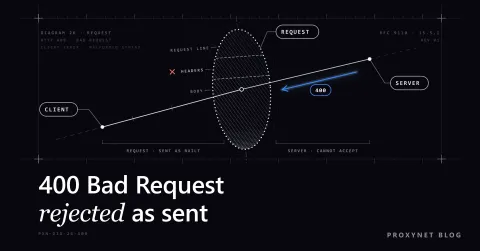
A 400 comes even earlier: the server could not read the request, so it never checked who sent it, as our guide to the 400 Bad Request error explains.
A proxy that wants credentials answers 407 Proxy Authentication Required with a Proxy-Authenticate header, never 401. The fix is the proxy's username and password, or your IP on its whitelist, not your login on the site. How to Fix HTTP 407 Proxy Authentication Required shows where proxy credentials go in each tool.
Does the proxy see your token? Not for an https:// address: the client opens a tunnel through the proxy with a CONNECT request, and the Authorization header travels inside the encrypted connection to the site. The proxy sees only the host name and port; that is how an HTTPS Proxy carries API calls. Over plain http:// the token passes as readable text.
Why am I getting a 401 error?
For a visitor, a 401 almost always means the site no longer recognises your sign-in, or never received it:
- Your session ended after inactivity, a password change or a sign-out on another device, or the site's cookie (the small file in which it remembers you) is damaged.
- Your password manager filled in another account, such as your personal one on a site where you also have a work account.
- You cancelled the browser's sign-in box, or typed a wrong password into it.
- The link was meant for someone else. Shared dashboards and test servers may need an account you do not have.
- A company page expects your work account and refuses a personal computer or a browser outside the company network.
How to fix a 401 error as a visitor
Work through these in order; the first ones take seconds.
- Check the address. A typo or an old bookmark can lead to a protected area; open the page from the site's home page.
- Sign out and sign in again to get a fresh session.
- Check the account. See which username your password manager filled in, and type the credentials by hand once.
- Clear that site's cookies. In Chrome: More > Settings > Privacy and security > Third-party cookies > See all site data and permissions, search for the site and select Delete. This signs you out of that site only.
- Try a private window. Chrome's More > New Incognito window (Ctrl+Shift+N) opens without the site's cookies and without extensions you have not allowed there. If the page works there, a cookie or an extension caused the 401.
- Answer the sign-in box with the credentials you were given. If it keeps coming back, they are wrong; ask whoever gave you access.
- Contact the site or your IT team with the address, the time and the account you used.
A 401 has one honest fix: credentials issued to you. Trying other passwords or someone else's account is unauthorised access, and repeated failures can lock the account.
How to fix a 401 error as a developer
In code, a 401 means the server did not accept what arrived in the Authorization header, so check the request before the account. Read the WWW-Authenticate value and the response body first.
- The header is missing. In
curl -voutput, no> Authorization:line means nothing was sent. Usual suspects: an empty environment variable, or a redirect. cURL drops theAuthorizationheader when a redirect leads to another host, port or scheme unless you add--location-trusted; in our test, a redirect fromlocalhostto127.0.0.1turned a 200 into a 401. - The scheme is wrong. A token goes as
Authorization: Bearer <token>, a username and password asBasic. A token sent as Basic,Tokenwhere the API expectsBearer, or an API key in a header the API does not read all end in 401. One space after the scheme, no quotes. - The token has expired or been revoked.
error="invalid_token"in the challenge says so. Get a new token, with a refresh token if you have one, and retry once. - The clocks disagree. A JWT (JSON Web Token) carries its own expiry (
exp) and start time (nbf), checked against the server's clock. A clock a few minutes off makes a fresh token look expired or not yet valid; the JWT standard expects a leeway of a few minutes at most, so sync both machines with NTP. - The token belongs elsewhere: a staging token sent to production, or one issued for another API. A JWT names its intended recipient in the
aud(audience) claim, and a server that does not find itself there must reject it. - The browser's preflight is refused. Before a cross-site request with an
Authorizationheader, the browser sends anOPTIONSrequest, the CORS preflight, which never carries credentials. If the server demands a token there too, it answers 401 and the real request never leaves. AnswerOPTIONSwithout authentication. - The server's own setup. On IIS, the number after the dot names the reason: 401.1 a failed logon, 401.2 the server's authentication settings, 401.3 file permissions; Microsoft's IIS status code list has the rest. In IIS Manager, the site's Authentication feature shows which methods are enabled.
If your crawler meets a 401, the page is behind a login: collect only public pages, or use the site's official API with a key issued to you. Never retry a 401 in a loop; without new credentials it cannot succeed.
How do you test a 401 with cURL?
curl -i prints the status line and response headers above the body, enough to see a 401 and its challenge. We wrote a small Node.js test API on our own computer whose /api/profile endpoint answers 401 unless the request carries demo-token-123, a made-up token, and called it with the cURL 8.22 built into Windows 11:
curl -i http://localhost:8401/api/profileHTTP/1.1 401 Unauthorized
WWW-Authenticate: Bearer realm="example"
Content-Type: application/json
Content-Length: 21
Date: Thu, 12 Nov 2026 01:20:35 GMT
Connection: keep-alive
Keep-Alive: timeout=5
{"error":"no token"}Then with the token:
curl -i -H "Authorization: Bearer demo-token-123" http://localhost:8401/api/profileHTTP/1.1 200 OK
Content-Type: application/json
Content-Length: 16
Date: Thu, 12 Nov 2026 01:20:35 GMT
Connection: keep-alive
Keep-Alive: timeout=5
{"user":"demo"}With an outdated token the server answered 401 with error="invalid_token". In Windows PowerShell 5.1, curl is a shortcut for Invoke-WebRequest, so type curl.exe there.
What is the difference between an API key and an OAuth token?
An API key is a long-lived secret that identifies your application or account; an OAuth access token is a short-lived pass issued after someone signs in.
| Question | API key | OAuth access token |
|---|---|---|
| Who issues it | The service's dashboard | A sign-in server, after a sign-in |
| How long it lives | Until deleted or rotated | Minutes or hours; a refresh token renews it |
| How it is sent | A header or parameter the API names | Authorization: Bearer <token> |
| Typical 401 cause | Mistyped, deleted or misplaced | Expired, or issued for another API |
A token without the right scope, the list of things it may do, gets a 403 rather than a 401. Keep keys and tokens in environment variables or a secrets manager, never in a code repository.
Where you might run into a 401
- Admin panels and test servers protected with the browser's sign-in box.
- Company intranet pages that use Windows sign-in.
- APIs and webhooks after a key rotation or token expiry.
- Postman or Bruno collections with an out-of-date token.
- Crawlers and monitoring scripts that reach pages behind a login.
Common mistakes
- Treating a 401 like a 403. More permissions do not help when the token is missing.
- Retrying in a loop, which can lock an account or trip a rate limit.
- Pasting real tokens into tickets, screenshots or shared
curl -voutput. - Demanding a token for
OPTIONSon the server. - Sending 401 without
WWW-Authenticate, which the standard requires.
Decision guide
| Your situation | What to do |
|---|---|
| Chrome shows "HTTP ERROR 401" | Sign in again, then clear that site's cookies |
| The browser keeps asking for a password | Check the credentials with whoever gave you access |
| "Access is denied due to invalid credentials" | Use your work account; admins read the 401.x code |
No > Authorization: line in curl -v | Fix the variable or redirect that drops it |
error="invalid_token" | Get a new token and retry once |
| 407 instead of 401 | Fix the proxy credentials, not the site login |
Frequently asked questions
Why do I get 401 Unauthorized in Postman?
Usually the request does not send the token you think it does. In the request's Authorization tab, the Auth type list shows whether it uses its own setting or one from its collection or folder (under Inherited). If the token comes from a variable, select the right environment and check that the token is current.
What does "Access is denied due to invalid credentials" mean?
It is the standard 401 page of IIS, Microsoft's web server: it did not accept the credentials your browser sent, or could not sign you in with its configured method. Visitors should use the right work account or ask IT; administrators should read the 401.x number.
Is a 401 error my fault or the website's?
Usually it is a sign-in problem you can fix: an expired session, a stale cookie, the wrong saved account. If the right credentials still fail with fresh cookies, the site's sign-in is broken.
Why does a 401 response have no body?
The standard does not require one; it requires the WWW-Authenticate header, so read the headers. A browser that gets an empty 401 shows its own page; in our test Chromium displayed "This page isn’t working".
Can a VPN or proxy cause a 401 error?
Rarely directly: a proxy that wants credentials answers 407. But both change your IP address, and some APIs accept a key only from listed addresses, refusing others with 401 or 403. For such an API, a ISP Proxy keeps the same exit IP.
Should my code retry a 401 automatically?
Once, and only after fetching new credentials such as a refreshed token. If the same challenge comes back, stop and report the error.
Summary
A 401 Unauthorized means the server did not get credentials it accepts, and WWW-Authenticate says which kind it wants. Visitors check the address, sign in again and clear the site's cookies. Developers check that the Authorization header is sent with the right scheme and a current token. For API work that needs a fixed exit IP or an HTTPS tunnel, compare the options on our proxy page.