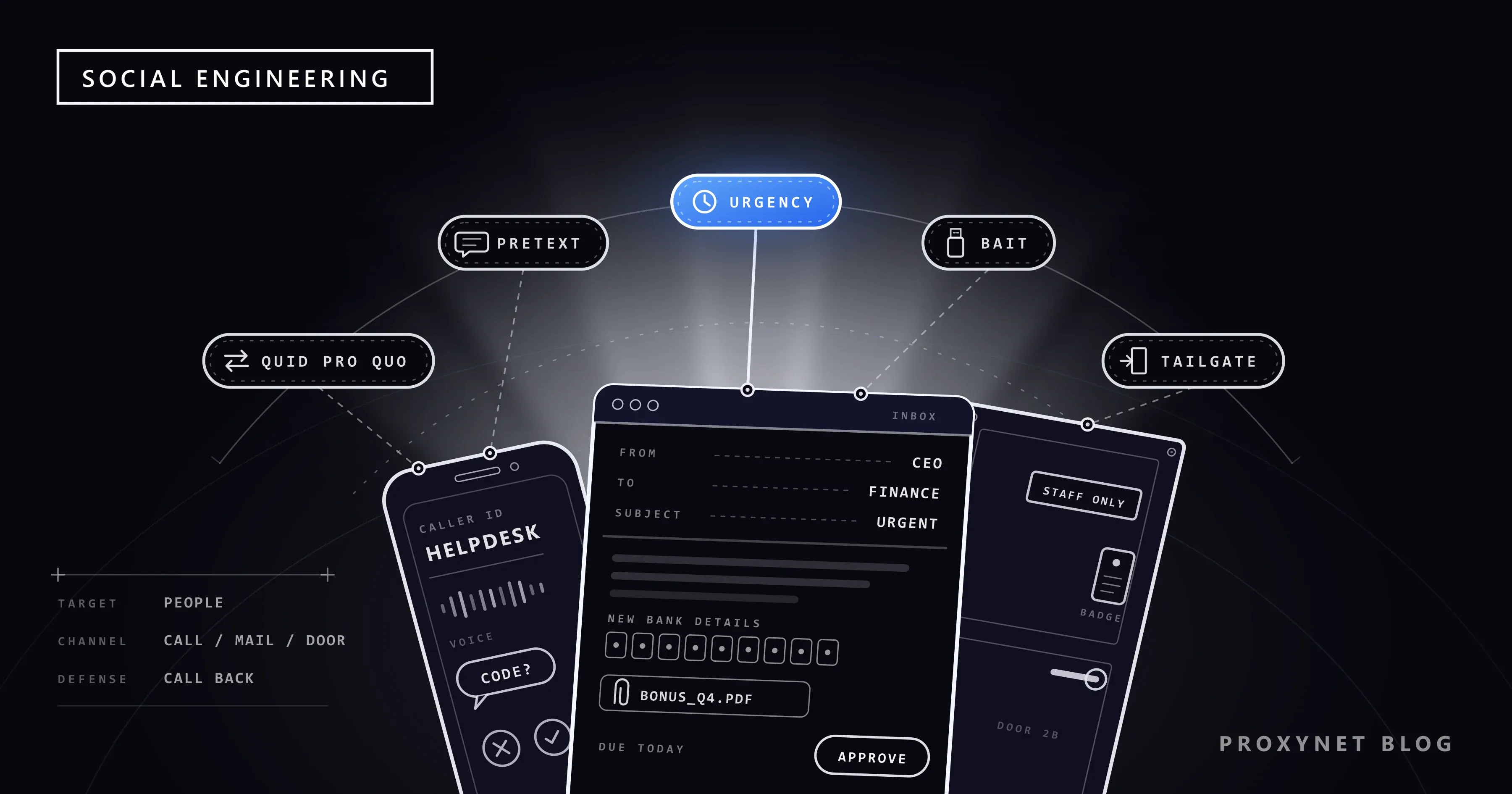
A call comes in on a busy afternoon. The caller says he is from the IT helpdesk, knows your name and your manager's, and warns that your account will be locked during tonight's update unless you read him the code that has just arrived on your phone. Nothing was hacked: someone asked, and the request sounded routine.
This post explains what social engineering is, the levers it pulls, the main attack types from pretexting to cloned voices, how to protect yourself and a team, and what to do if you already said yes. It is written for the person on the receiving end; there are no attacker scripts here.
What is social engineering?
Social engineering is the use of deception to get a person to give away access, information or money, or to take an action that helps an attacker. CISA, the US cybersecurity agency, describes it as an attacker using human interaction, or social skills, to obtain or compromise information about an organisation or its computer systems. The target is the person, not the software.
That is why the attack needs no technical flaw. A password read out over the phone works as well as one stolen by malware, and a door held open for a stranger beats any lock. Many larger incidents start this way: one employee approves a sign-in or changes a supplier's bank details, and the attacker uses that foothold to reach data, money or other accounts.
How does a social engineering attack work?
- Research. The attacker gathers what is public: names and job titles from the company website and social networks, suppliers, even who is on holiday.
- A pretext. They pick a role and a story that fits: a new colleague, IT support, an auditor, the chief executive, a supplier's accounts team.
- Contact. The story arrives by phone, email, text, messaging app, video call or in person at a door.
- Pressure. A lever stops the target from thinking twice: a deadline, a senior name, a threat, a reward.
- The request. A password, a one-time code, an approval, a payment, a door to hold.
- Reuse. CISA notes that attackers often ask several people small questions and use each answer to sound more convincing to the next.
Which psychological levers does social engineering use?
Social engineering triggers reactions that normally serve people well. The Canadian Centre for Cyber Security lists familiarity, sympathy, urgency, threats, authority cues and a casual tone among the tactics, and most attacks combine two or three:
- Authority. A message from "the CEO", "the bank" or "the police" invites obedience rather than questions.
- Urgency. A one-hour deadline leaves no time to check with anyone.
- Fear. A locked account, a fine or a legal threat makes people act to make the problem go away.
- Curiosity. A USB stick labelled "Salaries", a parcel notice, a shared file with an intriguing name.
- Helpfulness. Someone carrying boxes at a secured door, or a "new colleague" who cannot log in, asks for a small favour.
- Reciprocity. A free gift or a helpful fix comes first, and the request follows.
None of these is a weakness to be ashamed of; they are how teams and families work. The defence is to notice when someone you cannot verify is using one of them on you.
What are the main types of social engineering attacks?
| Type | How it reaches you | What the attacker wants |
|---|---|---|
| Phishing | Email, text, call, QR code | A login, card details, a code, a click |
| Pretexting | A call or message with an invented story | Information or access |
| Baiting | A free download, a found USB stick | You run their file |
| Quid pro quo | An offer of help or a reward | A password or a task in return |
| Tailgating | In person, at a secured door | Entry to the building |
| Business email compromise | Email from a "manager" or supplier | A payment, staff records |
| Deepfake voice or video | A call that sounds like someone you know | Money, a code, a transfer |
Phishing is the most common form: a message that poses as a trusted sender to get your password, card number, a code or a click. It has its own guide, What Is Phishing?, so this post covers the other types.
Pretexting builds the attack around a story. The Canadian Centre for Cyber Security defines it as contact based on a fabricated scenario or narrative that makes the request seem reasonable. The caller might be an "auditor" checking staff details or a "bank fraud team" confirming your identity; the story itself is the attack.
Baiting offers something tempting and lets curiosity do the rest: a USB stick left in a car park, or a free film or software download that carries malware. CISA's advice for a drive you find is simple: do not plug it in, and hand it to your IT or security team.
Quid pro quo means "something for something". The attacker offers a service, such as a fix for a slow laptop or a gift card for a short survey, and asks for a password or a task in return. Baiting dangles a thing; quid pro quo trades a favour.
Tailgating is the physical version. UK Government Security describes it as gaining unauthorised access to secure areas by pretending to be someone trustworthy: following you through a door while seeming to be on a work call, asking for help with a heavy box, or wearing a hi-vis jacket. Some guides call it piggybacking when the person ahead knowingly holds the door.
Business email compromise (BEC) goes after payments. The FBI describes it as a scam aimed at businesses and individuals who make regular transfers, carried out by compromising email accounts and other channels such as phone numbers and video meeting apps. Its 2025 Internet Crime Report counts 24,768 BEC complaints with just over 3 billion US dollars in reported losses, second only to investment fraud.
Deepfake voice and video add a familiar voice or face to an old trick. The FBI's Internet Crime Complaint Center (IC3) warns that criminals generate short audio clips in a relative's voice to ask for money in a "crisis". Its advice: agree a secret word or phrase with your family, and hang up and call back on a number you look up yourself.
What does social engineering look like in real life?
In each of these three examples the request sounds routine, and the giveaway lies in how it is made.
The IT support call. A caller from "the helpdesk" says your account needs a quick fix and asks you to approve a sign-in prompt or read out the code you just received. The giveaway: you did not start the contact, and no real helpdesk needs your code. Hang up and call the helpdesk number from your intranet.
The "CEO" payment request. On a Friday afternoon, finance gets an email from the chief executive, "in a meeting and unable to talk", asking for an urgent, confidential payment to a new supplier. The giveaway: secrecy, urgency and a new bank account at once. Follow the approval process and call her back on her known number.
The USB stick in the car park. A drive labelled "Bonuses Q4" lies near the entrance. The giveaway: nobody loses a drive with exactly the label that makes people open it. Hand it to IT unopened.
How can you protect yourself from social engineering?
The strongest habit is to verify any unexpected request through a channel you already know, not the one the request came on:
- Call back on a known number. Use the number in your contacts, the company directory or on your card, never the number, link or address in the request.
- Never share a code or approve a prompt you did not start. The FBI's advice is never to give a two-factor code to anyone over email, text or a messaging app.
- Slow down when pushed. A genuine request survives a ten-minute check; only a scam needs you to act before you think.
- Share less in public. Job details, travel dates and family names feed pretexts, and clips of your voice can feed voice cloning.
- Use a family code word for any call that asks for money in an emergency.
- Use phishing-resistant sign-in. A passkey only works on the site it was made for, and a password manager only fills in on the real domain, so neither can be talked into a fake page.
How can a team or company defend against social engineering?
Organisations rely on processes that make one person's mistake harmless, and on training that rewards reporting.
- Payment changes need a second channel. A change to a supplier's or employee's bank details is confirmed by phone with a contact already on file, and unusual transfers need two approvers. Telling suppliers "our bank details will not change by email" gives them a simple test too.
- A helpdesk that verifies callers. Password and MFA resets happen only after an identity check, and staff know IT will never ask for their code.
- Visible passes. Staff wear building passes, and anyone without one is sent to reception.
- Training without blame. The UK's National Cyber Security Centre (NCSC) warns that punishing people for clicking "starts to resemble entrapment" and that staff who fear for their jobs will not report mistakes. Count reports, not only clicks.
- Technical layers. Phishing-resistant multi-factor authentication (MFA), email filtering and least privilege, meaning each account reaches only what its job needs, limit what one tricked person can unlock.
Security teams also check what a stranger can learn about the company from public sources, because that is where pretexts start. This OSINT (open-source intelligence) review runs from outside the corporate network so that it sees what an outsider sees; our data security page describes the setup.
How do brands spot impersonation before it reaches people?
Brands watch for look-alike domains and fake profiles, because a convincing pretext often borrows a real company's name. A "support" account that copies a logo, or a login page on a domain one letter off the real one, lends the story credibility; What Is Typosquatting? shows how such domains are built and spotted.
Brand-protection teams scan new domains, marketplaces and social platforms for these copies and report them for takedown. What a platform shows can differ by country, so they check from a Residential Proxy exit in the market where the fake appears, seeing the page as a local customer would. They look and document; they never reply or fill in forms.
What should you do if you fell for social engineering?
Act straight away, starting with whatever you gave; speed matters most when money was sent.
- Stop and keep the evidence. Do not reply or call the number they gave; save the messages, the number and the time.
- Tell your IT or security team if it happened at work, even if you only suspect a mistake, so they can lock accounts early.
- Change passwords and reset MFA if you gave a password, read out a code or approved a prompt, and sign out of other sessions.
- Call your bank at once if money left. The FBI's advice is that time is of the essence: ask the bank to recall the transfer, then report the fraud. In the US the report goes to ic3.gov; elsewhere, to the police and your national cybersecurity agency.
- Disconnect and scan if you opened a file or plugged in a device, and let IT check the machine.
If the information you handed over belonged to customers or colleagues, the organisation may be dealing with a data breach, with its own reporting duties; What Is a Data Breach? explains what comes next.
Where you meet social engineering
On calls from a "bank fraud team" or "technical support". In work email and chat, from a manager or supplier writing in a hurry. At reception desks and secured doors. In social network messages offering jobs or prizes. In family messaging apps, where a relative "with a new number" needs money. On video calls where the voice is not what it seems.
Common mistakes
- Thinking only careless people fall for it. The attacks are built around conscientious reactions: helping, obeying, hurrying.
- Trusting caller ID or a display name. CISA notes that internet calling makes caller ID easy to spoof.
- Checking with the contact details in the request. That number or address belongs to the attacker.
- Treating a voice or a face as proof. Both can be cloned; a callback or a code word cannot.
- Keeping quiet after a mistake. The hours lost to embarrassment are the attacker's best time.
Decision guide
| Your situation | What to do first |
|---|---|
| A caller asks for a code or a password | Hang up; call back on a number you already have |
| A supplier's bank details have "changed" | Confirm by phone with a contact on file |
| An urgent, secret payment request from a manager | Follow the approval process; call them back |
| You find a USB stick | Hand it to IT unopened |
| Someone without a pass wants to follow you in | Send them to reception |
| A relative's voice asks for money | Ask for the code word; call their usual number |
| You already gave a code or sent money | Tell IT or your bank now; change passwords; report it |
| Your brand is being impersonated | Monitor look-alike domains and profiles; report them |
Frequently asked questions
Is phishing social engineering?
Yes. Phishing is the most widespread form of social engineering: the deception arrives as an email, text, call or QR code instead of in person. Pretexting, baiting and tailgating pull the same levers through other channels.
How do companies test for social engineering?
Through authorised awareness exercises: simulated phishing emails, training sessions and, for physical security, tests the organisation has approved in writing with an agreed scope. The NCSC cautions against relying on simulations alone or punishing staff who click; one alternative it suggests is having staff write their own phishing emails to learn the techniques.
What is the difference between pretexting and phishing?
Pretexting is about the story, phishing about the delivery. A phishing email usually goes to many people with a ready-made lure, while pretexting builds a specific role, often over several calls, to make one request look normal. Many targeted phishing messages rely on a pretext.
What is reverse social engineering?
It is a variant in which the victim makes the first contact. The attacker creates or fakes a problem, such as a frightening pop-up, and presents themselves as the help, so the victim calls the "support" number and trusts whoever answers. The defence is the same: reach support only through contact details you found yourself.
Is social engineering illegal?
Using deception to obtain money, data or access to someone else's accounts or buildings is fraud or unauthorised access in most countries; the exact offence depends on local law. An exercise run with the organisation's written permission is a security test, not an attack.
Can security software stop social engineering?
Only in part. Email filters and browser warnings catch known lures, and phishing-resistant MFA limits what a stolen password is worth, but no software hears a phone call or sees a held door. Habit covers the rest: verify through a known channel and never share codes.
Summary
Social engineering targets people instead of systems: someone plays a trusted role, adds pressure and asks for a code, a password, a payment or a held door. The types differ, from pretexting and baiting to business email compromise and cloned voices, but the defence is the same: verify through a channel you already know, never share codes, confirm payment changes by phone and report mistakes quickly. Companies whose names are borrowed for these stories can find the monitoring setup on our brand protection page.