You open an online shop based on another continent, and the product photos appear as quickly as on a local site. Or you look at a page's response headers and find a line such as cf-cache-status: HIT, or a script address that begins with cdn.. Each time, a content delivery network, usually shortened to CDN, is standing between you and the website.
This post explains how a CDN sends you to a nearby server, what it caches and why, how to check whether a site uses one, and why the same page can look different from another country.
What is a CDN?
A CDN is a network of servers in many locations that delivers a website's content on the site's behalf, from a point close to each visitor. RFC 3466, an early IETF vocabulary for content networks, spells the abbreviation out as "Content Delivery Network or Content Distribution Network"; both names are still in use.
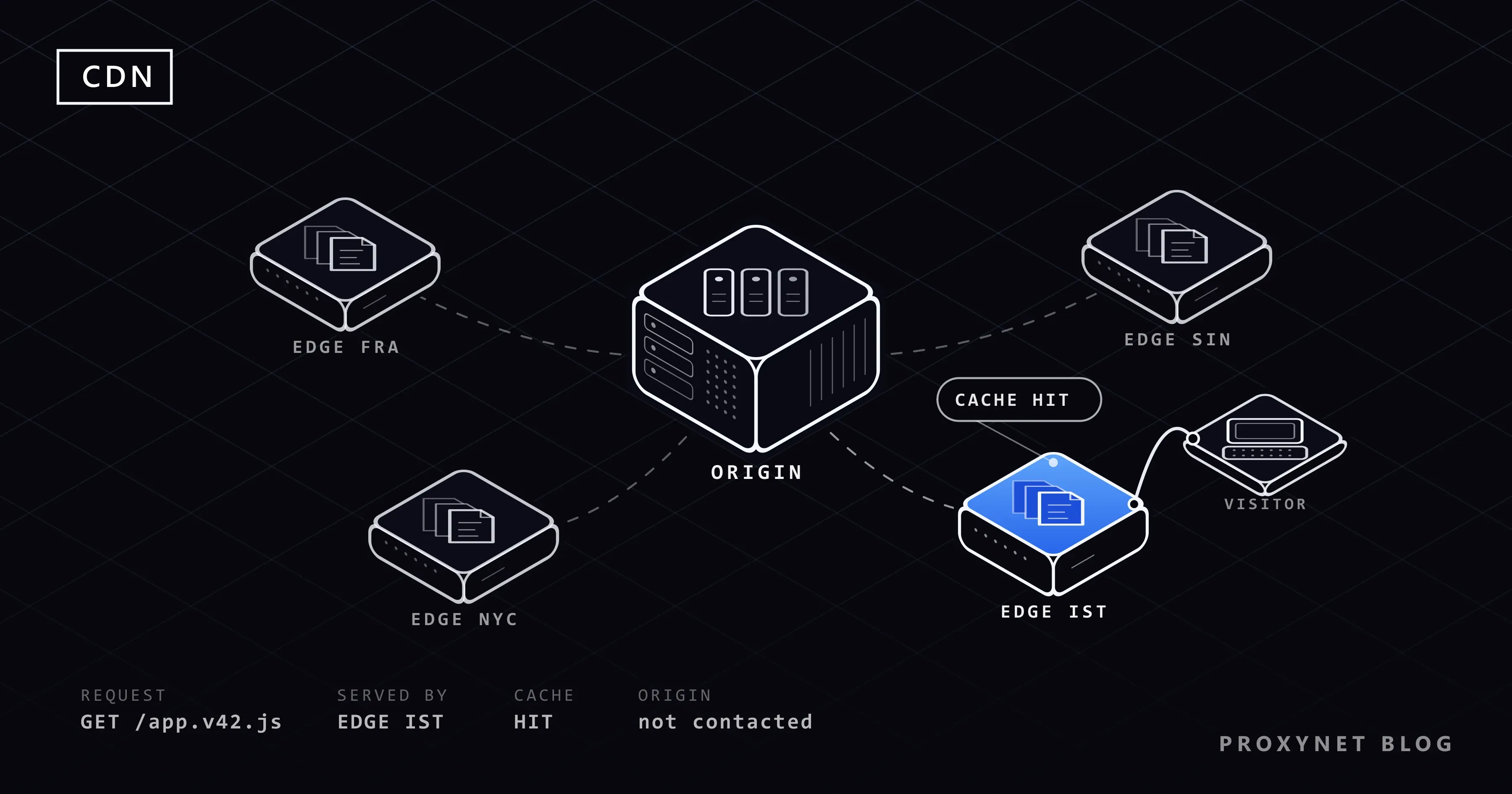
Three terms come up again and again. The origin is the site's own server, where the real files and the application live. An edge server is a CDN machine that faces visitors, and a data center holding a group of them is a point of presence (PoP). The cache is the store of copies an edge server keeps so it can answer without asking the origin.
Well-known CDNs include Cloudflare, Akamai, Amazon CloudFront and Fastly; they differ in features and pricing but work on the same principle.
Why does a CDN make websites faster?
A CDN makes pages faster mainly by shortening the distance each request travels. Before the first byte of a page arrives, your browser makes several round trips, each a message there and an answer back: a DNS lookup, a TCP connection, a TLS handshake for HTTPS and the request itself.
With the server on another continent, every round trip is long; with an edge server in your own country, each one is short, and a page with dozens of images and scripts multiplies the saving. This delay is called latency; What Is Latency? shows how to measure it.
A cache hit also never reaches the origin, so the origin has less work and answers the requests that really need it sooner.
How does a CDN work, step by step?
A CDN takes over the site's address, sends each visitor to a nearby edge server and answers from its cache whenever it can.
- The site owner puts the CDN in front of the site. The domain's DNS records are changed so that a name such as
www.example.compoints to the CDN instead of the origin. - Your request is steered to a nearby edge, by DNS steering, anycast or both (explained in the next section).
- The edge server handles the HTTPS connection. It holds a certificate for the site's domain and completes the TLS handshake with your browser. A second, separate connection runs from the CDN to the origin.
- It looks for a stored copy. The lookup uses the cache key: the file's address, sometimes combined with details such as language or country.
- On a cache hit, the edge answers at once. The copy is still fresh, so the origin is not contacted.
- On a cache miss, the edge asks the origin. It passes the file on to you as it arrives and stores a copy for the next visitor if the origin's headers allow it; Amazon walks through this sequence in How CloudFront delivers content.
- When the copy goes stale, the edge checks back. It asks the origin whether the file has changed; an unchanged file is served again without a new download.
How does a CDN choose which server answers you?
A CDN picks your edge server either through its DNS answer or through internet routing, a method called anycast.
With DNS steering, the CDN's DNS server replies with the address of an edge location chosen for you, typically the one with the lowest latency from where your query came. People looking up the same name in different countries get different IP addresses.
With anycast, the CDN announces the same IP addresses from many data centers at once, and internet routing delivers your packets to one of them; RFC 4786, the IETF's guide to anycast, says the routing system decides which node handles each request. That is usually a nearby location but not always the closest on a map, because, as Cloudflare's documentation notes, your internet provider's routing decides.
What does a CDN cache, and what does it not?
A CDN caches content that is the same for every visitor and passes personal or constantly changing content to the origin. Images, style sheets, scripts, fonts, downloads and video segments are cached. An account page, a basket or a checkout goes to the origin, because a shared copy would show one person's data to the next.
The rules come mostly from the origin, in the Cache-Control response header defined by RFC 9111, the HTTP caching standard. A CDN is a shared cache, one that stores responses for many users, while your browser's cache is private, and some directives treat the two differently:
| Directive | What it tells a CDN |
|---|---|
max-age=3600 | The copy stays fresh for 3,600 seconds (one hour) |
s-maxage=86400 | Fresh for a day in shared caches; overrides max-age there |
private | Do not store it: the response is for one user only |
no-store | Do not store it anywhere, the browser included |
no-cache | Storing is allowed, but check with the origin before each reuse |
CDNs add their own defaults: Cloudflare, for example, does not cache HTML or JSON unless the site owner adds a rule.
Static files usually carry a version number or a hash in their name, such as app.v42.js, so they can be cached for months while a new release uses a new name; MDN's HTTP caching guide recommends this pattern. When a file must change under the same name, the owner purges it, telling the CDN through its dashboard or API to drop the stored copy.
What are the benefits of a CDN?
The main benefits are faster pages for distant visitors, less load on the origin and better resistance to traffic floods.
| Benefit | How the CDN achieves it | Who notices |
|---|---|---|
| Lower latency | Answers from an edge near the visitor | Visitors far from the origin |
| Origin offload | Cache hits never reach the origin | The site's servers |
| DDoS absorption | Attack traffic spreads over many locations | The site stays reachable |
| TLS at the edge | HTTPS handshakes end close to the visitor | Visitors and site admins |
A distributed denial-of-service (DDoS) attack floods a site with traffic from many machines at once; behind an anycast CDN, the flood lands on many data centers instead of one server. Many CDNs also run a web application firewall (WAF), a filter that blocks known attack patterns before they reach the origin.
There are trade-offs. Because the CDN terminates HTTPS, it can read the traffic it carries, and when a large CDN has an outage, many sites fail at the same moment.
Is a CDN a reverse proxy?
Yes. A CDN is a reverse proxy, a server that stands in front of a website and answers visitors on its behalf, run at global scale. A forward proxy is the opposite: it stands in front of the user and makes requests for them, as Forward Proxy vs Reverse Proxy explains side by side.
Because the CDN is the visible front of the site, it hides the origin's IP address, not yours. It passes your address on to the origin in headers such as X-Forwarded-For or Cloudflare's CF-Connecting-IP.
How can you tell if a site uses a CDN?
The quickest check is the response headers, where most CDNs add lines that name them and report the cache result. On Windows, open Command Prompt and run curl -I followed by the address (in PowerShell, type curl.exe -I, because plain curl there runs a different command). The -I option asks for the headers only. This is what our test PC received from example.com, trimmed:
HTTP/1.1 200 OK
Date: Sun, 15 Nov 2026 13:46:55 GMT
Content-Type: text/html; charset=utf-8
Server: cloudflare
last-modified: Thu, 12 Nov 2026 21:56:22 GMT
Age: 14266
cf-cache-status: HIT
CF-RAY: a5aeb470a9822346-IST
Server: cloudflarenames the CDN in front of the site.cf-cache-status: HITmeans the edge answered from its cache. Other values on Cloudflare's list of cache statuses include MISS (fetched from the origin) and DYNAMIC (not eligible for caching).Age: 14266means the copy had been fetched or confirmed at the origin 14,266 seconds earlier, just under four hours. A few minutes later the same command showedAge: 41, a copy refreshed 41 seconds earlier.CF-RAYends in a three-letter airport code for the data center that processed the request; IST, Istanbul, answered our test PC.
Other CDNs use other names, such as X-Cache with HIT or MISS, X-Served-By or Via. RFC 9211 also defines a standard Cache-Status header for this.
Without a command line, use the browser. In Chrome, press F12, choose the Network panel and reload the page. Click a file in the Name column, open the Headers tab and read Response Headers.
What does a CDN error page mean?
A CDN error page usually means your request reached the CDN but the CDN got no proper answer from the origin. You see the CDN's own page because the CDN is the server your browser talks to. Cloudflare's 520 to 526 pages are the most common example; Cloudflare Error 520, 521, 522 and 524 explains each code.
A site that still shows the old version after an update is a cache symptom, not an error: the stored copy has not expired or been purged yet.
Where do you meet CDNs?
- News sites, shops and blogs: images and style files, often from an address such as
cdn.orstatic.in front of the domain. - Software and app updates: large downloads that many devices fetch at once.
- Online video: players fetch short segments, which the edge caches like any other file.
- "CDN links" in web pages: a
<script>or<link>tag that loads a library or font from a public CDN.
Why does a CDN show different content in different countries?
A CDN shows different content by country because the edge estimates each visitor's location from the IP address, and the site uses it to choose language, currency, prices or ads. Amazon CloudFront, for example, can pass the visitor's country, worked out from the IP address, to the origin in a CloudFront-Viewer-Country header; Cloudflare sends a similar CF-IPCountry header. The site can add the country to the cache key, so each country gets its own cached copy.
This matters to anyone who checks what customers elsewhere see: a team confirming that the German page shows euros, a marketer checking a campaign in another city. Changing the browser's language does not reproduce it, because the CDN looks at the IP address of the connection. The request has to come from that country, which is the workflow our localization proxies are built for.
Here the two kinds of proxy meet. The CDN is a reverse proxy working for the site; a Residential Proxy is a forward proxy working for you, sending your request through a home connection in the country and city you choose, so the CDN treats it like a local visitor's. Use it to check pages and campaigns you are responsible for, not to get around a site's regional restrictions.
Common mistakes
- Caching pages with personal data. A logged-in page sent without
privateorno-storecan be shown to the next visitor. - Long cache times on files that keep their name. Visitors get the old file until it expires; version the name or purge.
- Leaving the origin open to everyone. Anyone who finds its IP can skip the CDN; let only the CDN's addresses reach it.
- Expecting a CDN to hide the visitor. It hides the origin; the site still receives your IP address.
- Testing regional content only from the office. The CDN sees one country and serves that country's copy.
Decision guide
| Your situation | What to do |
|---|---|
| Visitors near your server, light pages | A CDN is optional; measure first |
| Visitors on several continents | Put a CDN in front of the site |
| Many images, videos or downloads | Cache static files for months, with versioned names |
| Pages that differ per user | Mark them private; cache the static parts |
| Visitors still see an old file | Purge it or rename the file |
| See what another country's visitors get | Send the request from an IP in that country |
Frequently asked questions
What does CDN stand for?
CDN stands for content delivery network. You will also see content distribution network; RFC 3466 lists both, and they mean the same system of edge servers.
Is a CDN the same as web hosting?
No. Hosting runs the origin, the server with the site's real files, database and code; a CDN sits in front of it and keeps copies close to visitors. Some providers sell both, which is why the two get confused.
Does a CDN hide my IP address?
No. A CDN hides the origin server's IP address from visitors, not yours from the site. The edge passes your IP to the origin in headers such as X-Forwarded-For and uses it to estimate your country. Sending requests from a different IP address takes a forward proxy or a VPN.
Is Cloudflare a CDN?
Yes. Cloudflare runs a CDN and also offers DNS and security services, including DDoS protection and a web application firewall. That is why its name appears on error and verification pages: it is the reverse proxy your browser is talking to.
What is the difference between a CDN and a cache?
A cache is any store of copies kept to avoid fetching the same thing twice; your browser has one. A CDN is a network of shared caches in many locations, plus the routing that sends each visitor to one of them and the controls that let a site owner set rules and purge copies.
Do I need a CDN for a small website?
Not always. If most visitors are near your server and the pages are light, the gain may be small; if they are spread across countries or the site serves many images or large files, a CDN usually helps. Measure from where your visitors are, and check whether your hosting already includes a CDN option.
Summary
A CDN is a network of edge servers that keeps copies of a website close to its visitors and answers for the site's own server, the origin. DNS steering or anycast sends you to a nearby edge, which answers from its cache on a hit and asks the origin on a miss, following the site's Cache-Control rules; headers such as cf-cache-status and Age show it at work. Because the CDN reads your IP address to pick content by country, checking another market's pages means sending the request from that market; our proxy products cover the locations for that.