


































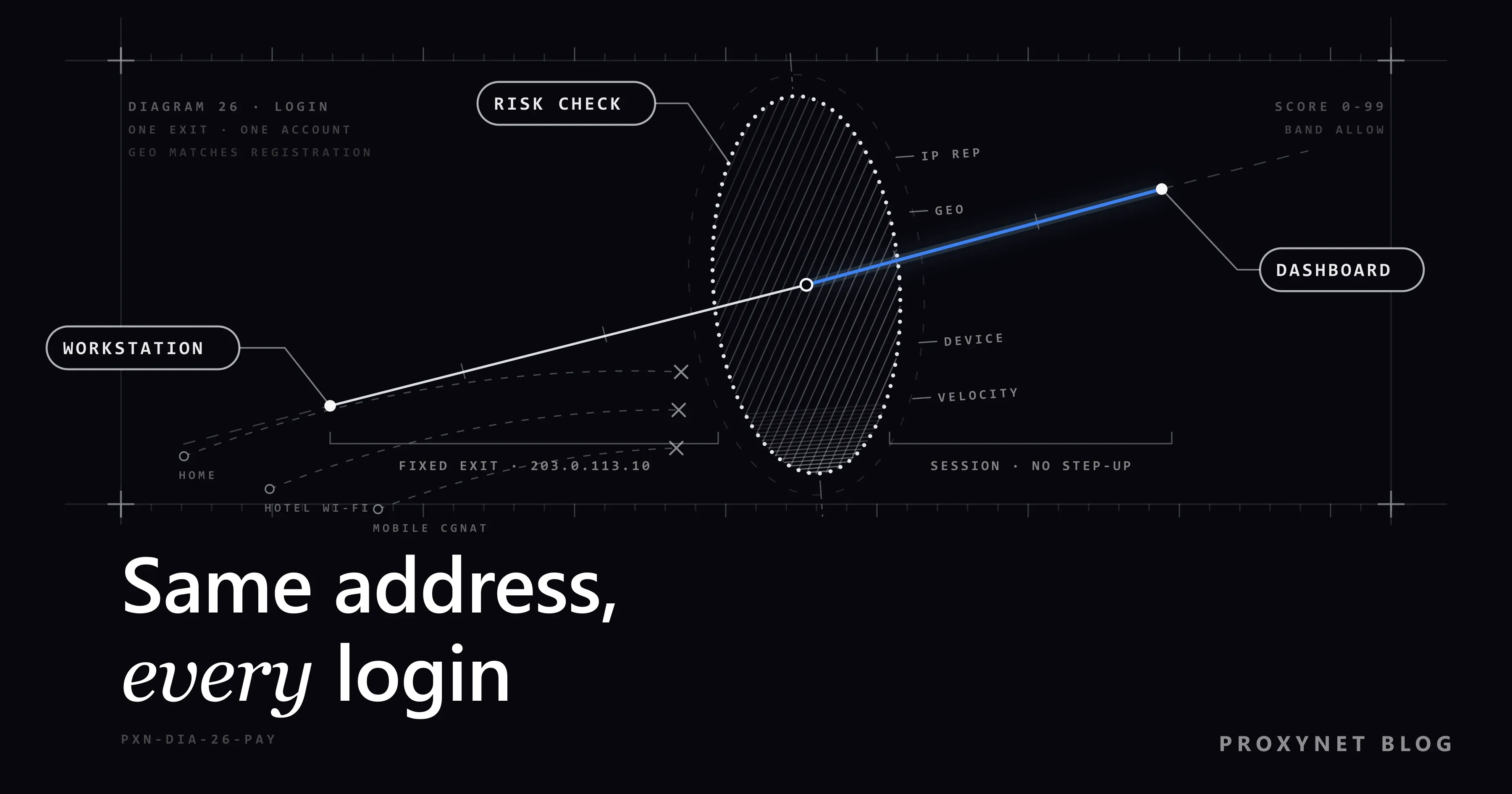
Monday the finance lead approves payouts from the office. Tuesday she works from home, Wednesday from a hotel lobby, Thursday from her phone's hotspot on the train. On Friday the merchant dashboard asks for a verification code it has never asked for, and the morning payout sits in "under review". No password leaked. What changed, from the platform's point of view, is that one account appeared from four networks in four days.
This post is for businesses that run merchant, payout or business-banking accounts on platforms such as Stripe, Adyen, Wise or Payoneer. It explains which signals a provider reads at login, what a flagged login triggers, why a finance team that moves between networks keeps tripping the rules, what a fixed exit address gives you and what it does not, how to set one up, and where API keys and webhooks need their own allowlists. It is not financial or legal advice; the provider's terms decide what you may do with your account.
What does a payment platform check at login?
A bank checks whether you are you. A payment platform must also judge whether the person now in the account is about to move money out of it, so merchant dashboards look at more than the password.
The provider sees your public IP address, the browser and device, the time, and every earlier login on the account. From the address it derives a country and a rough city, the network operator (the ASN) and the network type: consumer line, mobile carrier, hosting company, known VPN or proxy service. Payoneer's security centre describes this as adaptive authentication that examines risk indicators such as location, IP address and transaction amount, and asks for an extra verification step when something looks off. None of these signals is a verdict on its own; they are added up.
How is a login scored?
The exact model is each provider's secret, but the building blocks are public and appear in the documentation of every large identity system. Microsoft's list of sign-in risk detections is a good map of the categories, and the same categories apply to a payment dashboard.
- IP reputation. Has this address been seen in credential-stuffing attacks, on public proxy lists or on abuse blocklists? Is it a Tor exit or a consumer VPN? A bad history raises the score before anything else is read. Our post on IP fraud scores shows what these databases hold.
- Geolocation against the account. The address maps to a country and a city. If the country differs from the one on your business registration, or from every earlier login, the score rises. Location from an IP is an estimate; mobile addresses in particular may map to a city hundreds of kilometres away.
- Impossible travel. Two logins from places further apart than anyone could travel in the time between them. Microsoft calls this "atypical travel" and notes that it deliberately ignores obvious false positives such as company VPNs. A payment platform knows less about your company and may not.
- Device fingerprint. Browser, operating system, screen, fonts, cookies and stored tokens. A known device from a new address is a smaller anomaly than a new device from a new address. The same comparison lets a platform notice a stolen session cookie turning up on a different device, the attack known as session hijacking.
- Velocity. Logins, failed attempts, password resets or payout changes in a short window. Five addresses in one week is itself a velocity signal, even if each address is clean.
- Decision. The sum falls into a band: allow, ask for more proof, limit, or hold for a human.
What does a flagged login trigger?
The response is graded, and the first steps are automatic:
- Step-up verification. A code by SMS or authenticator app, a push to a registered phone, or a passkey prompt. Wise's help centre, for example, says that a login from a new device must first verify that you are the device owner.
- Temporary limits. Payouts paused, withdrawal amounts reduced, new payout destinations frozen for a cooling period, or API keys that lose sensitive permissions until someone confirms the change.
- Review. A person looks at the account: identity documents again, proof of business address, or an explanation of the login pattern. Reviews take hours to days, and while they run the money waits.
Why do finance teams trip these rules?
Because a modern finance team is exactly the kind of user the rules are tuned against:
- Home lines change address. Most consumer connections hand out a new public address after a modem restart or a maintenance window; see Static IP vs Dynamic IP.
- Mobile data is CGNAT. Carriers put thousands of subscribers behind one shared public address and rotate it. A hotspot login looks like it comes from a busy, shared, moving address, often geolocated to the wrong city.
- Hotels, airports and coworking spaces share an address with hundreds of strangers, some of whom have hurt that address's reputation.
- Consumer VPNs combine a shared address, a hosting-type network and often the wrong country. A bank sees the same thing, as Why Your Bank Flags a Login from an Unusual Location describes.
- Several people, one account. An owner, an accountant and an assistant logging into the same account from three cities produce a travel pattern no single human could.
Each login is legitimate. As a series, the history reads like a takeover in progress.
What a fixed exit IP gives you
A fixed exit address means the finance workstation always reaches the provider from the same public IPv4 address, whichever local network it is physically on. Compare the signals:
| Signal the platform reads | Team on many networks | Finance workstation on a fixed exit |
|---|---|---|
| Address reputation | Whatever the hotel, carrier or VPN has accumulated | Only your own history |
| Country and city | Changes with every network; mobile often wrong | Stable, matching the registered business |
| Impossible travel | Frequent, especially with several users | Never; the address does not move |
| Network type | Consumer, CGNAT, hosting, VPN in turn | One consistent ISP-registered line |
| Velocity of address changes | High | Zero |
| Audit log on your side | "Someone logged in from somewhere" | Every login from one known address |
The last row matters more than it looks. When the provider asks a question, "all logins to this account come from 203.0.113.10, our finance exit" is an answer you can back with your own logs. Two things follow: you have an address to allowlist where the provider supports it, and the country the provider derives from the address matches the account every time, because the address is registered to a line in that country.
What a fixed exit IP does not do
- It is not a way to appear somewhere else. The exit must be in the country where the business is registered and the account was opened. Using an address to look like you are in a country the provider serves, when you are not, is misrepresentation, and every provider's terms forbid it. If a platform does not serve your country, the answer is a different platform.
- It does not change the account's country. Providers tie the account to the verified business and address. A consistent login address supports that record; it cannot replace it.
- KYC and 2FA still apply. Identity checks, business verification and two-factor authentication are contractual and regulatory. A fixed address makes the prompt rarer, not optional.
- It is not a hiding place. A provider can see when an address belongs to a proxy or hosting company, and some, as shown below, let merchants block such sources by policy. Read your provider's terms; if they prohibit proxy or VPN access to the dashboard, use a static address from your internet provider or office line instead.
How to set up a fixed exit for the finance workstation
The goal is one address, one account, one workstation. The address is either a static IP from your internet provider on the office line, or a static proxy address dedicated to you; the first is cleanest when available, the second is what a distributed team or an office on a dynamic line uses.
Pick the address type. For a dashboard login the address should look like an ordinary business or home line in your country, not a datacenter block. That is what a ISP Proxy is: an address registered to an internet service provider, allocated to you alone and unchanged until you give it up. The concept, and the difference from rotating pools, is on our Static Proxy page.
One address per account. Do not put two merchant accounts, or a merchant and a personal account, behind the same exit. Shared exits are how unrelated accounts get linked in a provider's records.
Never use a shared datacenter pool. A pooled address is used by other customers at the same time; you inherit their reputation and their velocity.
Bind it to the workstation or the router. Configure the proxy in a browser profile used only for finance, or, in an office, on the router so the whole finance network leaves through it. Keep personal browsing out of that profile.
Check the exit before you trust it. Run this from the finance machine a few times over a day; the address must be identical each time and geolocate to your country:
bashcurl -x http://user:pass@pr.proxynet.io:8000 https://api.ipify.orgWhat else to test is in How to Test a Proxy.
Log in from the new address once, deliberately. The first login from any new address is a new-device event; complete the step-up, and from then on the history is flat.
Record it. Note the address, the account and the workstation in your security documentation. When the address is retired, remove it from every allowlist the same day.
Two-factor codes may still go to a phone that travels: the phone is a second factor, not a login address.
API keys and webhooks: allowlists where the provider supports them
Your integration is a different session with different rules, and here providers give you explicit tools.
Restrict API credentials to addresses. Adyen's API credentials documentation lets you add an allowed IP range to a credential, after which only requests from that range are accepted. Stripe's API keys documentation describes access policies that restrict a key to specific IPv4 addresses or CIDR ranges, or, in the advanced form, to particular network operators and countries while blocking anonymous VPNs, public proxies, residential proxies and Tor exit nodes. Read that last clause carefully: Stripe explicitly offers merchants a switch to block residential-proxy sources from its API. Your API traffic should therefore leave from your own server's fixed address, not from a proxy, and the policy on the key should name that address.
Allowlist the provider's addresses on your side. Webhooks arrive from the provider's servers. Stripe publishes the IP addresses its webhooks come from and the domains an integration must reach, with notice before changes. Put those on your firewall's inbound allowlist and verify the webhook signature as well.
Keep the directions separate. The workstation's exit is for the dashboard, the server's address is for the API key, the provider's published addresses are for your firewall. Pointing an API key at the workstation's proxy breaks the first rule of static IPs for API access: the registered address must belong to the system that makes the calls. The same discipline on exchange APIs is in Crypto Exchange API IP Whitelist.
Ways to get a consistent address, compared
| Option | Address stays the same | Looks like a line in your country | Dedicated to you | Fits a distributed team |
|---|---|---|---|---|
| Static IP from your internet provider | Yes | Yes | Yes | No, office only |
| Static ISP proxy address | Yes | Yes | Yes | Yes |
| Dedicated datacenter proxy address | Yes | No, hosting block | Yes | Weaker for dashboard logins |
| Company VPN with fixed egress | Yes | Depends on the exit | Yes | Yes |
| Consumer VPN | No | Often not | No | Unsuitable |
| Rotating residential proxy | No | Varies per request | No | Unsuitable |
| Mobile hotspot (CGNAT) | No | City often wrong | No | Unsuitable |
Use cases
- A distributed finance team on one merchant account: the whole team reaches the dashboard through one exit in the registered country; see our finance proxy page.
- An accountant serving several clients: one dedicated address per client account, never one address for all.
- Staff who travel with the workstation: the laptop keeps its exit in the hotel and on the train while the phone that receives codes moves freely; compare the consumer version in Banking App Not Working Abroad.
- Protecting the data on the finance machine: the exit address is one control among several; see our data security page.
Common mistakes
- Using an exit in the wrong country. The address must match the country on the account. Anything else is a terms-of-service problem, not a technical one.
- One address, many accounts. Providers link accounts that share an address; a limit on one can spread to the others.
- Turning off two-factor because prompts got rarer. The second factor is what protects you when the address is not enough.
- Pointing an API key at the workstation proxy. The key belongs on the server, with the server's address in the policy.
- Trusting one geolocation database. Databases disagree, as IP Geolocation Accuracy explains; check what the provider's says.
Decision guide
| Your situation | Recommendation |
|---|---|
| Single office with a business line | Ask your internet provider for a static IP; no proxy needed |
| Small team on home lines and mobile, one merchant account | One static ISP address for the finance workstation |
| Several client accounts managed by one firm | One dedicated static address per account, documented |
| Integration server calling the provider's API | The server's own fixed address in the key's access policy; no proxy |
| Provider's terms prohibit proxy or VPN access | Static IP from your provider or office line only |
| A platform that does not serve your country | Do not; choose one available where the business is registered |
Frequently asked questions
Will a fixed exit IP stop all verification prompts?
No. It removes the prompts caused by address changes, which for a mobile team are most of them. New devices, password changes, new payout destinations and unusual amounts still trigger checks.
Is using a proxy for a merchant dashboard allowed?
It depends on the provider's terms, and they differ: some prohibit anonymising services, some are silent, and some, like Stripe for API keys, let merchants decide which network types to block. If yours forbids it, use a static IP from your internet provider or an office line.
Should I use a datacenter address or an ISP address?
For a human login, an ISP-registered address, because it looks like a business or home line in your country. For a server calling an API, the server's own address, registered on the key's access policy.
Does the proxy provider see my dashboard session?
Not the content. The dashboard uses HTTPS, so the proxy sees which host you connect to and how much data passes, while the page, your password and your two-factor code stay inside the encrypted tunnel.
Can I use one exit address for our merchant account and our business bank?
Use one address per account. Two accounts on one exit share reputation and get linked in the providers' records; a limit on one can affect the other.
What if the provider still flags a login from the fixed address?
Complete the verification, then look at what else changed: a new browser profile, a cleared cookie store, a new laptop. The address is one signal; the device is another.
Summary
Payment platforms score every login from the address reputation, the country it implies, the distance from the last login, the device and the pace of change, and they answer with step-up checks, limits and reviews. A finance team moving between home, office, hotel and mobile CGNAT addresses produces the pattern those models are built to catch. A fixed exit address dedicated to your business, in the country where the account is registered, serving one workstation for one account, flattens that history and gives you something to allowlist and to audit. It does not change where the business is, replace two-factor authentication or override the provider's terms. Keep API keys on the server's own address, allowlist the provider's webhook addresses on your firewall, and compare the fixed-address options on our proxy services page.


