A headline says your browser has a zero-day and that you should update now. You open the browser, nothing looks different, and the only sign of trouble is a small prompt asking you to relaunch it. Behind that prompt is a flaw that someone was already using in real attacks before anyone could fix it.
This post explains what a zero-day vulnerability is, how it differs from an exploit and an attack, how a flaw travels from discovery to patch, who finds these flaws and what you and your company can do. It is written for defenders; there are no attack details here.
What is a zero-day vulnerability?
A zero-day vulnerability is a flaw that attackers can use while the people who make the software either do not know it exists or have not yet shipped a fix. A vulnerability, in the CVE Program's wording, is a weakness in a product that can be exploited to harm the confidentiality, integrity or availability of data or systems. "Zero-day" adds the timing: defenders have had no time to prepare.
Definitions differ slightly. The US National Institute of Standards and Technology (NIST) calls a zero-day attack one that exploits a previously unknown hardware, firmware or software vulnerability. Google's Threat Intelligence Group (GTIG) counts a flaw as a zero-day when it was maliciously exploited before a patch was publicly available. Both point at the same window: the flaw is real, it is being used, and the fix does not exist yet.
The term describes a moment, not a type of bug. The same coding mistake is a zero-day while attackers use it and no fix exists, and an ordinary known vulnerability once the patch is out.
Vulnerability, exploit and zero-day attack: what is the difference?
A vulnerability is the weakness, an exploit is the tool that uses it, and a zero-day attack is that tool used against real people before a fix exists. Headlines often mix the words up:
| Term | What it is | Is a fix available? |
|---|---|---|
| Vulnerability | A weakness in code or hardware | Not necessarily |
| Exploit | Code or a method that uses a vulnerability | Depends on the flaw |
| Zero-day vulnerability | A flaw attackers can use before a fix exists | No |
| Zero-day attack | Real attacks using a zero-day | No |
| N-day vulnerability | A known flaw whose fix is out but not installed everywhere | Yes, if you install it |
The last row matters more than its name suggests. Once a fix is published, the flaw becomes an "n-day" (some say "one-day"): the vendor has repaired it, but every device that has not installed the update is still exposed, and the advisory tells attackers which versions to look for.
How does a zero-day go from flaw to patch?
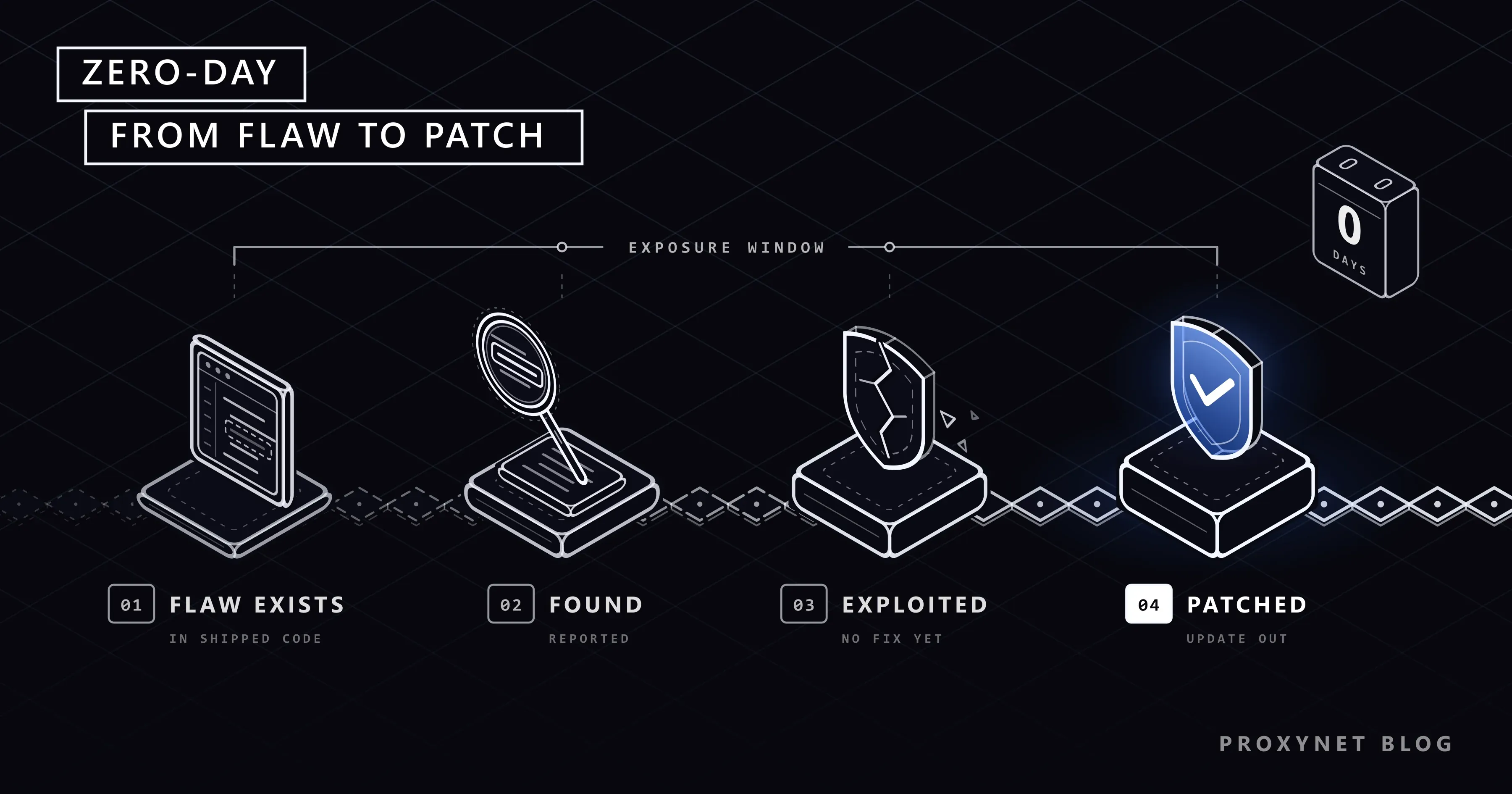
A zero-day moves from a mistake in code to an installed fix in five steps, and a device is exposed from the first step until the last:
- The flaw ships. A programming error or design weakness reaches users inside a browser, an operating system, a phone, a router or a server product. Nobody has noticed it yet.
- Someone finds it. It may be the vendor's own security team, an independent researcher, a participant in a bug bounty programme or an attacker.
- It is reported or exploited. A researcher reports it privately to the vendor. An attacker keeps it secret and builds an exploit; once that exploit runs on a victim's device, it usually installs malware, software made to spy on or damage the device, and What Is Malware? covers what comes next.
- The vendor fixes it. The vendor writes and tests a patch, publishes a security advisory and, if the flaw was used in attacks, usually says so.
- The fix reaches devices. Automatic updates spread the patch over days or weeks. Until a device installs it, that device is running an n-day.
Who finds zero-day vulnerabilities?
Zero-days are found by vendors' own security teams, independent researchers, bug bounty participants, government cyber agencies and threat-intelligence teams who catch an attack in progress and trace it back to an unknown flaw. Many vendors pay rewards for flaws reported privately; Chrome's release notes list security fixes under the heading "Security Fixes and Rewards".
The usual route for a researcher is coordinated vulnerability disclosure: report the flaw privately, give the vendor time to fix it, and publish the details only after users can update. Google's Project Zero, for example, gives vendors 90 days, and only 7 days when a flaw is already being exploited in the wild. CISA, the US cybersecurity agency, also coordinates reports sent to it and may publish after 45 days if the vendor does not respond.
When the flaw is disclosed, it normally gets a CVE ID, a public label in the form CVE-YYYY-NNNN. The CVE Program describes its mission as identifying, defining and cataloguing publicly disclosed vulnerabilities, with one CVE Record per vulnerability, so vendors and customers can talk about exactly the same flaw.
Vendors often keep the technical details back for a while. Google's Chrome release note of 9 November 2026 says access to bug details "may be kept restricted until a majority of users are updated with a fix", because a detailed write-up helps attackers as much as defenders.
How common are zero-day attacks?
Zero-days are rare compared with ordinary vulnerabilities, but dozens are caught in use every year. In its review published in March 2026, GTIG tracked 90 zero-day vulnerabilities exploited in the wild in 2025, up from 78 in 2024 and below the record of 100 in 2023. Of the 90, 47 were in end-user platforms and products, such as phones, computers and browsers, and 43 in enterprise software and appliances. GTIG notes that the count covers only what it tracked.
Two examples from official advisories show what this looks like:
- A browser flaw. On 9 November 2026 Google released a Chrome update and wrote: "Google is aware that an exploit for CVE-2026-125350 exists in the wild." CISA added the flaw to its catalogue of exploited vulnerabilities the next day and noted that it could affect other browsers built on Chromium, including Microsoft Edge and Opera.
- A server product. CISA's advisory AA23-158A of June 2023 describes attacks on Progress MOVEit Transfer, a file-transfer product, through "a previously unknown SQL injection vulnerability", a type of flaw that lets outside input run as database commands, from late May 2023.
How do you protect yourself from zero-day attacks?
You cannot install a fix that does not exist yet, so home protection has two goals: get the fix the day it ships, and make a successful attack less damaging.
Turn on automatic updates on every device you use:
- Windows: Start > Settings > Windows Update, and install what it offers.
- Mac: Apple menu > System Settings > General > Software Update, where you also choose whether updates install automatically.
- iPhone and iPad: Settings > General > Software Update > Automatic Updates, then turn on Automatically Install. The device installs updates overnight while charging on Wi-Fi.
- Android: most system updates and security patches install automatically; to check, open Settings > System > Software updates (Pixel wording; other makers use similar names).
Restart the browser when it asks. Chrome downloads updates in the background but applies them only when it restarts. To check, open More (three dots) at the top right > Help > About Google Chrome and select Relaunch; Google's Chrome update help notes that if there is no Relaunch option, you already have the latest version. Edge and Opera, which share Chromium's code, ship the same fixes through their own updates.
Have less to attack. Every app, plug-in and browser extension is more code that can contain a flaw. Remove the ones you no longer use, and replace software that no longer gets security updates, such as an old operating system or a browser that has stopped updating.
Make the follow-up harder. A browser exploit still needs you to open a crafted web page, and the link often arrives in a message; What Is Phishing? shows how to spot one. Multi-factor sign-in, a second step beyond the password, limits what stolen passwords are worth.
Keep a backup you can restore. Some exploited flaws are used to plant ransomware; CISA marks 361 entries in its catalogue as known to be used in ransomware campaigns. A recent backup kept off the device turns that from a disaster into a reinstall, as What Is Ransomware? explains.
What do companies do about zero-days?
Companies cannot prevent zero-days either, so they work on two clocks: patch known exploited flaws first and fast, and limit what an attacker can reach in the meantime. The main tools:
- Know what you run. An up-to-date list of software, versions and internet-facing systems answers "are we affected?" within minutes of an advisory.
- Patch by exploitation, not only by severity. CISA's Known Exploited Vulnerabilities catalogue listed 1,781 flaws on 13 November 2026, each with evidence of real-world exploitation and a published fix or mitigation. CISA says organisations should use it as an input to their patch priorities, and US federal civilian agencies must fix listed flaws within set deadlines. The list is free as CSV and JSON.
- Apply vendor mitigations while waiting. When a patch is days away, advisories often suggest turning off an affected feature or restricting access to a management interface.
- Assume one layer will fail. Least privilege (each account gets only the access it needs), network segmentation (separate zones, so one break-in cannot reach everything), monitoring of computers and servers, and tested offline backups keep one exploited flaw from becoming a company-wide breach.
- Watch the sources. Security teams follow vendor advisories, the KEV feed and alerts from their national CERT (computer emergency response team).
Does a VPN or proxy protect you from zero-days?
No. A VPN or proxy changes the network path and the IP address that websites see, but the page still reaches your browser, and the flaw is in the browser or the operating system that processes it. Only the vendor's update closes the hole.
Proxies do have a place in security work, just not as a shield. Threat-intelligence teams, who track attackers and their methods, collect information from public sources and check suspicious pages reported by staff. They often route that research through a residential exit, an IP address from a home internet connection, so the company's own network stays out of the investigation. Our data security page describes that set-up, which is meant for legitimate research on public sources only.
Where you meet zero-days
In news headlines that end with "update now". In a browser's prompt to relaunch, and in phone updates that arrive between the big yearly releases. In vendor release notes that say an exploit "exists in the wild" (Google) or that a flaw "may have been exploited" (Apple). At work, in emergency patch windows and IT notices asking everyone to restart.
Common mistakes
- Postponing the restart. A downloaded update does nothing until the browser or the device restarts.
- Thinking only zero-days matter. Every entry in the KEV catalogue has a published fix or mitigation and was still exploited, because a device that never installs the fix stays open.
- Running unsupported software. A system that no longer receives updates keeps every new flaw forever. Chrome, for example, now needs Windows 10 or later and macOS 13 Ventura or later.
- Installing "updates" from pop-ups or emails. Real updates come from the device's own settings, the browser's About page or the official app store; a web page that says your browser needs a patch is usually a lure.
- Treating antivirus as a patch. Security software can catch what an exploit does next; it does not remove the flaw.
Decision guide
| Your situation | What to do first |
|---|---|
| A news story says your browser has a zero-day | Open the browser's About page and relaunch |
| Your phone offers a security update | Install it today, plugged in and on Wi-Fi |
| Your device no longer gets updates | Move to a supported system or a newer device |
| A product your company runs is on the KEV list | Patch it first; use the vendor's mitigation until you can |
| You suspect a device was attacked | Disconnect it, tell IT or the vendor, report to your national CERT |
| You research threats for a company | Isolated machine, public sources only, a separate network exit |
Frequently asked questions
Can antivirus stop zero-day attacks?
Sometimes, but not reliably. Antivirus that recognises known malicious files cannot recognise an exploit nobody has seen before. Modern security software also watches behaviour, such as a browser suddenly starting other programs, and can block what an exploit tries to do next. Updates remain the only real fix.
How do I know if my device has a zero-day?
You usually cannot tell, because a zero-day is by definition unknown or unfixed. What you can check is whether the fix is installed: the vendor's release notes name the flaw, and your device's update screen shows whether you have that version. On Android, Settings > About phone > Android version shows the date of the latest security update.
What is a CVE?
A CVE is a public ID for one disclosed vulnerability, written as CVE, the year and a number, for example CVE-2026-125350. IDs are assigned by CVE Numbering Authorities (CNAs), many of them software vendors. A zero-day often gets its CVE only when the vendor publishes the fix.
Is a zero-day the same as a critical vulnerability?
No. "Critical" describes how much harm a flaw could do; "zero-day" describes timing, meaning it is used before a fix exists. A zero-day can have a medium severity rating, and a critical flaw that is patched before anyone uses it never becomes a zero-day.
Can phones be hit by zero-day attacks?
Yes. Phone operating systems and the apps on them have zero-days too; Apple's security notes, for example, sometimes say a fixed flaw "may have been exploited" against specific targeted individuals. Automatic updates on iPhone and Android are the main defence for most people.
How long does it take to fix a zero-day?
It varies from days to months. Browsers often ship an emergency fix within days of learning about an attack, while complex products can take longer. Google's Project Zero publishes the details of a flaw that is already exploited in the wild 7 days after reporting it, which pushes vendors to move quickly.
Summary
A zero-day is a flaw that attackers can use before a fix exists; once the patch ships, the danger shifts to every device that has not installed it. You cannot patch the unknown, but you can make sure the fix arrives the day it is released: automatic updates on, browser relaunched, unused apps and extensions removed, sign-in protected with a second step and a backup ready. Companies add an inventory, KEV-first patching and layers that contain a single failure. If you use proxies for work, our proxy overview explains what they change and what they leave to your updates.