An invoice arrives from billing-example-support.com, a domain you have never seen, asking you to confirm a payment. Before you click anything, you want to know two things: who is behind that name, and how long it has existed. A WHOIS lookup answers the second question in seconds. The first one, these days, it usually answers with a blank, a "redacted" note and a contact form.
This post covers what a WHOIS record contains, how a lookup finds it and why RDAP has replaced the old service. It also explains why the owner's name is hidden, how to look up a domain or an IP address, and where the record stops being useful.
What is WHOIS?
WHOIS is a protocol for asking a registration database about a name or a number, and also everyone's shorthand for "look up who registered this". The protocol is described in RFC 3912 from 2004: a client opens a connection to TCP port 43 on a WHOIS server, sends one line of text such as a domain name, and the server answers with free-form text and closes the connection.
That simplicity is also its weakness. RFC 3912 itself notes that the protocol has no provisions for strong security and was never internationalised, so it has no way to say which character set the answer uses. Every registry also formats its replies its own way, so programs that read WHOIS text break easily.
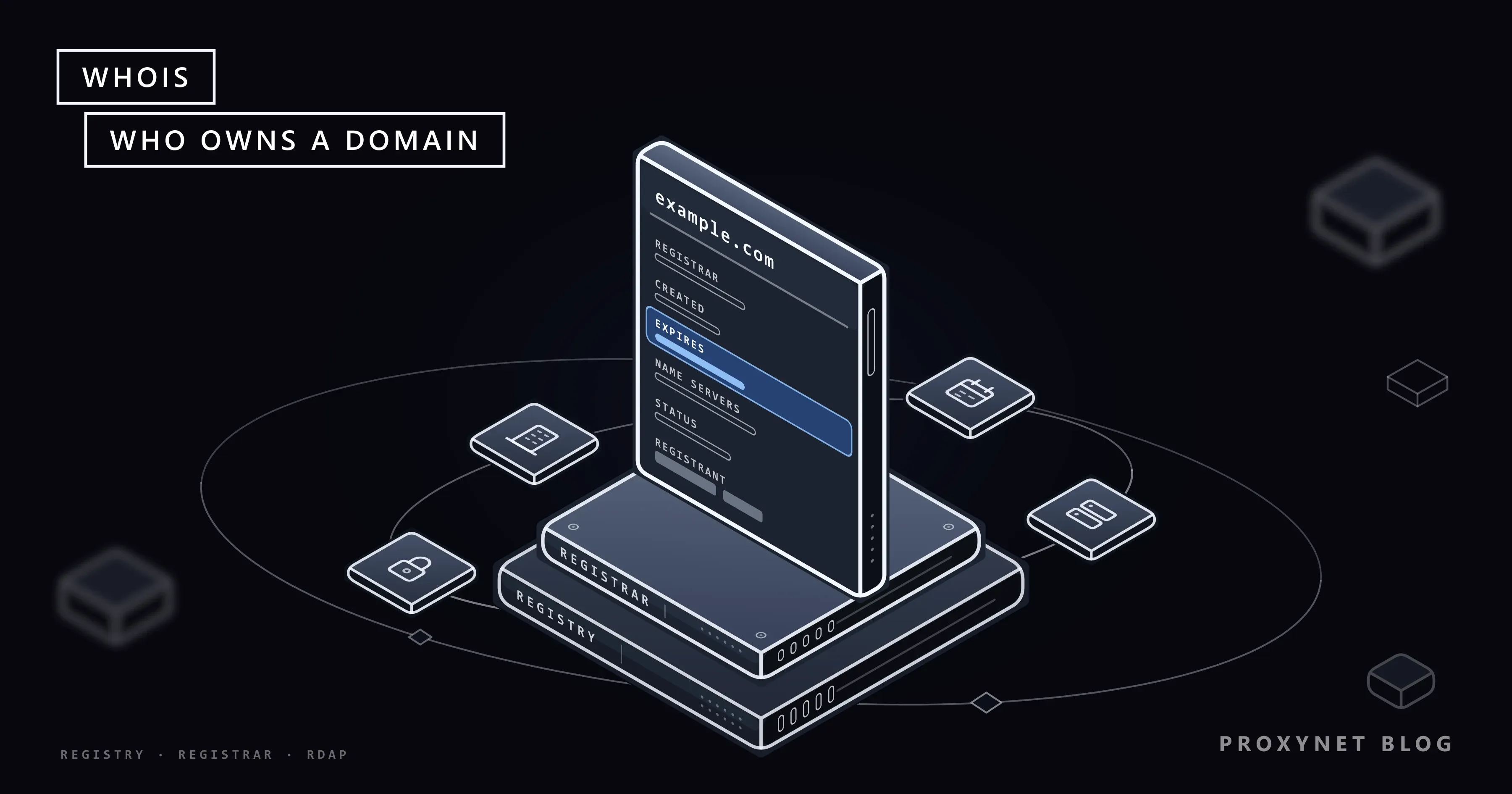
Three parties hold registration data. A registry runs one ending, such as .com or .org, and keeps the master list of names under it. A registrar is the company that sells names to the public and holds the customer's contact details. The registrant is the person or organisation the name is registered to. A lookup asks the registry first and, when the registry keeps only part of the record, the registrar.
What does a WHOIS record show?
A domain record shows who manages the name, when it was created, when it expires, which name servers answer for it and which locks are set. The labels differ slightly between WHOIS and RDAP, but the content is the same.
| Field | What it tells you | Example |
|---|---|---|
| Registrar | The company the name was bought from | Example Registrar, Inc. |
| Created | When the name was first registered | 1995-08-14 |
| Expires | When the paid term ends | 2027-08-13 |
| Updated | The last change to the record | 2026-08-14 |
| Name servers | Which servers answer DNS for it | ns1.example.net |
| Status | Locks and pending actions | client transfer prohibited |
| Registrant | The holder; usually redacted | REDACTED |
| Abuse contact | Where to report misuse | abuse@registrar.example |
The status codes are the part most people skip and the part that says the most. client transfer prohibited means the registrar has locked the name against a move to another registrar, which is normal for a healthy domain. A status such as pending delete or redemption period means the name has lapsed and is on its way back to the open market.
The name servers tie the record to DNS, the system that turns names into addresses. Our guide to what a domain name is covers registration, renewal and how the name servers make a site reachable; this post stays with the record itself.
How does a WHOIS lookup work?
A lookup is a short chain of questions that starts from the ending and ends at the database that holds the record.
- Find the ending. The client takes the last label of the name,
cominexample.com, and finds which registry runs it. For RDAP this list is a public file kept by IANA, the body that coordinates the root of the domain system. - Ask the registry. The registry's server returns what it holds: registrar, dates, status and name servers.
- Follow the referral. Many registries,
.comamong them, keep no contact data and only name the registrar. The answer then points to the registrar's own server. - Ask the registrar. The registrar returns the contact part of the record, with personal fields redacted where its policy requires it.
The same chain works for IP addresses, except that the first step finds the regional internet registry responsible for the address range instead of a domain registry.
What is RDAP and why did it replace WHOIS?
RDAP (Registration Data Access Protocol) is the successor to WHOIS: it serves the same registration data, but as structured JSON over HTTPS, with standard field names, standard error codes and a built-in way to find the right server. ICANN, the organisation that coordinates generic domain endings, required every generic registry and registrar to run an RDAP service by 26 August 2019.
The switch became final on 28 January 2025. From that date, according to ICANN's RDAP FAQ, registries and registrars of generic endings are no longer required to provide WHOIS, on port 43 or on the web, with three exceptions: .com, .name and .post. Old WHOIS servers may keep running, but RDAP is the authoritative source.
| Aspect | WHOIS | RDAP |
|---|---|---|
| Transport | Plain text on TCP port 43 | HTTPS |
| Answer format | Free text, varies by registry | JSON with fixed field names |
| Finding the server | Built into each tool | IANA bootstrap files |
| Redaction | Text such as "REDACTED" | Marked field by field |
| Required for generic endings | No, since 28 January 2025 | Yes |
Country endings follow their own rules, because ICANN's contracts do not bind them. On the day we wrote this, IANA's bootstrap file listed RDAP servers for 1,204 endings, .uk among them but not .de; for the rest, ask the registry's own website or WHOIS server.
Why is the owner's name hidden in WHOIS?
Because it is personal data. Until 2018 a WHOIS record often showed the holder's full name, postal address, phone number and email, which made it a favourite source for spam lists. Since the EU's GDPR took effect that year, registrars redact these fields by default for most holders, and ICANN's Registration Data Policy, in effect since 21 August 2025, sets the rules for generic endings.
When a registrar redacts a record, the policy lists the fields that must go: the holder's name, street, postal code and phone, along with the same fields for other contacts. The city may be hidden too. In place of the email, the registrar must publish an email address or a web form that reaches the holder without revealing who they are. The country and, where it was collected, the state or province stay public, and so does the organisation name when the holder agreed to it.
RDAP marks every hidden field explicitly. RFC 9537 adds a redacted list to the answer that names each removed field and how it was hidden: removed entirely, left as an empty value, partly removed or replaced, for example by a contact-form link. A program can then tell "redacted" from "never provided", which plain WHOIS text could not.
Redaction is not the same as a privacy service. With redaction, the registrar hides fields in the public answer but stores your real details; a privacy service (sold as WHOIS privacy or protection) puts a forwarding company's details in the record itself. Either way, the registrar knows who the holder is.
Someone with a legitimate reason, such as a lawyer in a trademark case, can ask for the hidden data: for generic endings, ICANN's Registration Data Request Service (RDRS) passes requests to participating registrars, which decide case by case.
How do you do a WHOIS lookup?
The easiest route is a web tool; the most precise is a terminal.
- On the web. ICANN Lookup takes a domain name, queries the registry and registrar over RDAP and shows the result on one page. Registrars also offer a lookup box, usually next to their domain search.
- macOS and Linux. Both have a
whoiscommand (on Linux it is often a separate package):whois example.comasks the right WHOIS server and prints its text. - Windows. Windows has no built-in
whoiscommand, and our Windows 11 Pro test machine had none to find. Microsoft offers a separate Sysinternals tool called Whois, or you can query RDAP from PowerShell, which every Windows computer has. - Country endings. Many country registries run their own lookup on their website; it is the first place to check when ICANN Lookup finds nothing.
Advanced: an RDAP query from the command line
RDAP is plain HTTPS, so any HTTP client can ask. In PowerShell, Invoke-RestMethod turns the JSON into an object you can read field by field:
$r = Invoke-RestMethod -Uri "https://rdap.verisign.com/com/v1/domain/example.com"
$r.events | Format-Table eventAction, eventDate
On our test machine, this returned four dated events for example.com, from registration on 14 August 1995 to expiration on 13 August 2027, plus three client locks and no registrant at all, because the .com registry holds no contact data. A made-up name returned HTTP 404 (not found), the RDAP way of saying "not registered".
We then looked up icann.org at its registrar, which the .org registry's answer linked to. The registrant's name, street, city and postal code came back empty, the phone was removed and the email was replaced by a contact-form address, while the organisation and the state stayed visible. The redacted list named each field and its method, as RFC 9537 describes.
What is IP WHOIS?
IP WHOIS is the same kind of lookup for an IP address: it shows which organisation holds the address block, how large the block is, which country it is registered in and where to report abuse. The data comes from the five regional internet registries (RIRs) listed by the Number Resource Organization: AFRINIC for Africa, APNIC for Asia Pacific, ARIN for the United States, Canada and parts of the Caribbean, LACNIC for Latin America and the Caribbean, and the RIPE NCC for Europe, the Middle East and parts of Central Asia.
Our test query for 1.1.1.1 went to APNIC and returned the block 1.1.1.0/24, registered in Australia to APNIC Research and Development, with a remark that AS13335, the network of the company running the resolver, routes it. The holder and the network that carries the traffic can differ, and the record shows both only when the holder writes it in.
That routing network is identified by an ASN (autonomous system number), the number a network uses to announce its address ranges to the rest of the internet. Our post on what an ASN is explains how to find the ASN of an address and what the number reveals.
Why do websites read the network behind an IP?
Because IP WHOIS and ASN data say what kind of network a request comes from. A visit from an address held by a home internet provider looks like an ordinary customer; a visit from a hosting company's range looks like a server, and fraud filters, analytics tools and content rules treat the two differently. Sites read this data passively; nothing in the request has to mention it.
This is also why the network matters when you test how a site behaves for real customers. A Residential Proxy exit carries the address and network of a home connection, and on Proxynet you can narrow it by country, city and, free of charge, by ASN, so the site sees the provider network you chose.
How does WHOIS help spot a phishing domain?
Domain age is one of the quickest signals. A shop or bank you have used for years sits on a name registered long ago; a page asking for your password on a name created last week deserves suspicion. The creation date in the record, with the registrar and the status, takes ten seconds to check.
Look-alike names are the usual trick: a letter swapped, a hyphen added or another ending, as our guide to typosquatting shows. A WHOIS check does not prove a page is safe, but a week-old name that copies a familiar brand is a strong reason to stop.
What is WHOIS used for?
- Buying a domain: checking when a taken name expires and whether it is locked.
- Watching your own domains: confirming the expiry date, the registrar and the transfer lock on every name you own.
- Abuse reports: finding the registrar's abuse contact for a domain, or the network's abuse contact for an IP address.
- Security work: dating suspicious domains and checking which organisation holds an attacking address.
- Brand protection: spotting new registrations that copy a brand name and collecting the registration facts for a dispute.
Brand teams pair these lookups with a look at the page itself from their customers' countries, because a look-alike site often shows different content by location; our brand protection page describes that monitoring.
What can't WHOIS tell you?
WHOIS tells you about registration, not about the site. It cannot show who built a page, where the server physically stands or whether the content is legitimate. The hosting company appears only indirectly, through name servers or the IP address the name points to.
A hidden owner is normal for an honest small business and a scammer alike. And the record can be wrong, because registrars do not verify every detail a customer types in; ICANN takes complaints about inaccurate data, but a complete-looking record can still be false.
Common mistakes
- Treating "redacted" as a warning sign. Most personal registrations are redacted by default; it says nothing about the holder.
- Reading the expiry date as "available soon". Grace and redemption periods keep a lapsed name registered for weeks after that date.
- Taking the registrar for the owner. The registrar sold the name; the registrant holds it.
- Expecting IP WHOIS to give a street address. It shows the organisation that holds the block, not where a device is.
- Using port-43 tools for every ending. Generic endings other than
.com,.nameand.postmay have turned WHOIS off; use RDAP.
Decision guide
| Your need | What to use |
|---|---|
| Who manages a domain and until when | ICANN Lookup or a registrar's lookup |
| Data for a country ending | The country registry's own lookup |
| Fields for a script | RDAP JSON over HTTPS |
| Who holds an IP address | IP WHOIS at the regional registry |
| Which network announces an IP | An ASN lookup |
| The hidden owner, for a legal reason | A disclosure request via RDRS or the registrar |
| A quick phishing check | Creation date, registrar and status |
Frequently asked questions
Is WHOIS still used?
Yes, but mostly as a name. Since 28 January 2025 generic endings rely on RDAP, except .com, .name and .post, which must still offer WHOIS; many country endings run only WHOIS. ICANN Lookup, for one, queries RDAP in the background.
Is a WHOIS lookup free?
Yes. ICANN Lookup, registrar lookups, RDAP servers and the whois command cost nothing. Some paid services sell history instead: older versions of a record from before redaction or before a transfer.
How do I hide my information in WHOIS?
For most generic endings you need to do nothing: registrars redact personal data by default. A privacy service, if your registrar offers one, goes further and replaces the contact itself. Country endings set their own rules, so check your registry's policy.
Can I find out who owns a domain with privacy on?
Usually not directly. You can write to the holder through the contact form or email the record shows, report abuse to the registrar, or, with a legitimate legal reason, request disclosure through ICANN's RDRS or the registrar itself.
Is there a whois command on Windows?
No, Windows has no built-in whois command. Use a web lookup, Microsoft's separate Sysinternals Whois tool, or an RDAP query from PowerShell with Invoke-RestMethod.
What is the difference between WHOIS and DNS?
WHOIS tells you who registered a name and on what terms; DNS tells computers where the name points right now. A registered domain can still have no working DNS.
Summary
WHOIS is the lookup for registration data: registrar, dates, status, name servers and, ever more rarely, the holder. For generic endings RDAP has taken over, with every redacted field marked, while country endings keep their own lookups. IP WHOIS does the same job for address blocks through the five regional registries and, with the ASN, tells sites what kind of network a request comes from. When the network your traffic arrives from matters for testing or monitoring, compare the options on our proxy products page.