An online shop runs on one server, and every Black Friday the same thing happens: pages that open in half a second on a normal day take eight seconds, then time out. The team adds two more servers and hits the real question: visitors still type one address, so who decides which server answers each of them, and what happens when one crashes mid-sale?
The answer is a load balancer. This post covers what load balancing is, how a balancer handles a request, layer 4 vs layer 7, the common algorithms, health checks, sticky sessions, DNS balancing and anycast, and the usual mistakes.
What is load balancing?
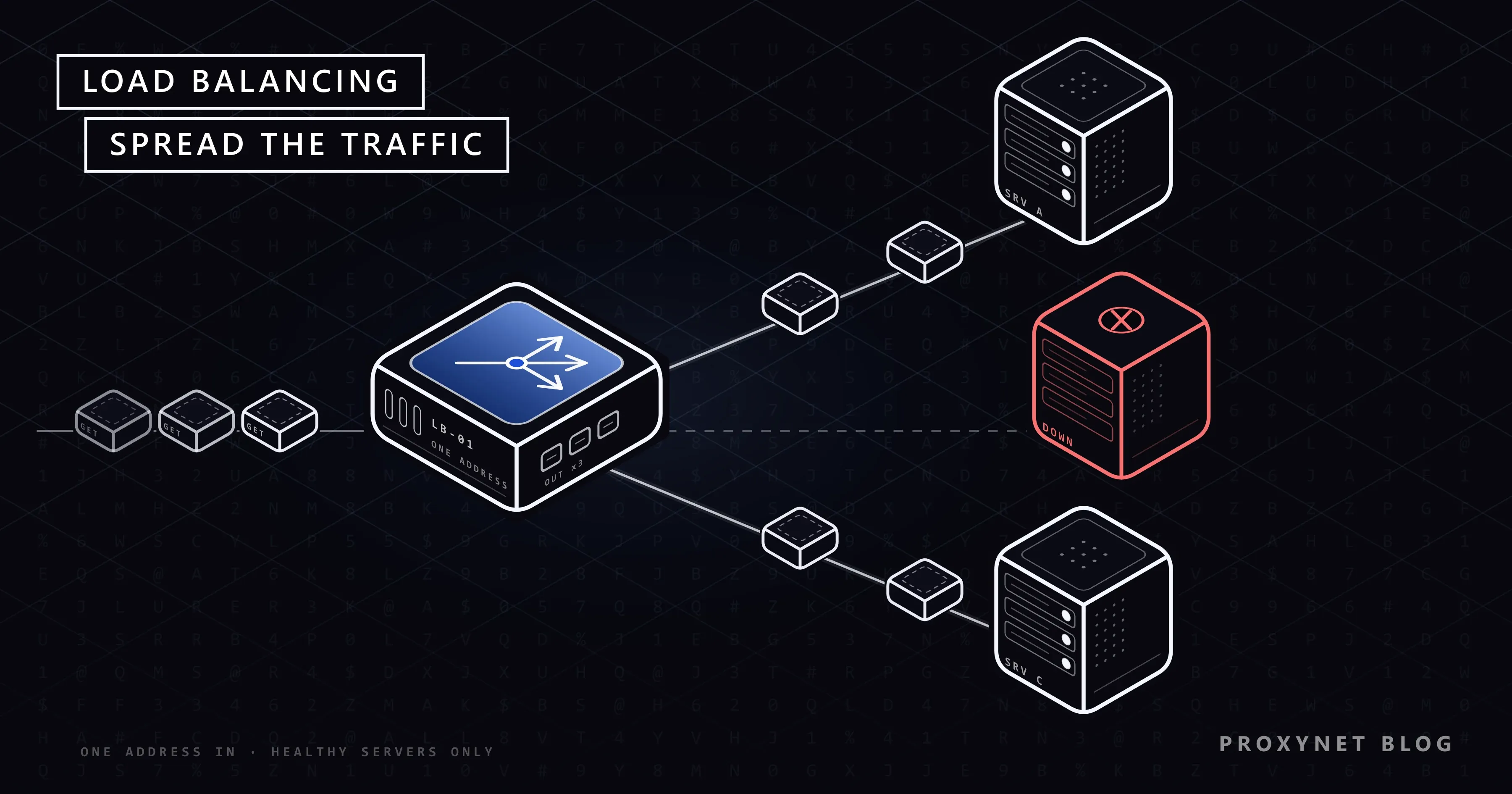
Load balancing is the distribution of network traffic or work across several servers that can all do the same job. The servers form a group, called a pool, an upstream or a backend depending on the software, and the component that hands out the work is the load balancer.
To the visitor, the group looks like one server: one name, one address, and the balancer decides behind it which machine does the work. A balancer can be a hardware appliance, software on an ordinary server or a managed cloud service; the principle is the same, only who runs it changes.
Why do sites use a load balancer?
Sites use a load balancer for three reasons: more capacity, fewer outages and maintenance without downtime.
- Capacity. With a balancer you add servers side by side instead of buying one ever-bigger machine; this is called scaling out, or horizontal scaling.
- Availability. When a server crashes, the balancer stops sending it traffic and the others carry on. Visitors may notice a slower page, not an error page.
- Maintenance. You can take one server out of the pool, update it and put it back while the rest keep serving. A new version can be rolled out server by server the same way.
How does a load balancer work?
A load balancer accepts the client's connection itself, picks a healthy server and forwards the request to it. For an HTTP balancer the steps are:
- The client finds the balancer. DNS turns the site's name into the balancer's address, not a server's. The client never learns the servers' own addresses.
- The balancer accepts the connection. If the site uses HTTPS, the balancer usually completes the TLS handshake with its own certificate, so it can read the request.
- It picks a server. The algorithm chooses one server from the pool, skipping any server that is currently marked unhealthy.
- It forwards the request. The balancer opens its own connection to that server (or reuses an open one) and passes the request on, often adding a header such as
X-Forwarded-Forwith the client's real IP address. - It relays the response. The server's answer travels back through the balancer to the client.
- It keeps checking in the background. Health checks run all the time, so a failed server leaves the pool and a recovered one comes back without anyone editing a configuration.
Step 4 has a side effect: the application sees the balancer's address as the client. The original address travels in X-Forwarded-For or in the standard Forwarded header of RFC 7239, and the application should trust it only when the request came from its own balancer.
Layer 4 vs layer 7 load balancing: what is the difference?
A layer 4 balancer decides from IP addresses and ports alone, while a layer 7 balancer reads the HTTP request and can decide by URL, host name, header or cookie. The layer numbers come from the OSI model: layer 4 is the transport layer (TCP and UDP), layer 7 the application layer (HTTP and others).
| Layer 4 | Layer 7 | |
|---|---|---|
| Sees | IP, port, protocol | URL, host, headers, cookies |
| HTTPS | Passes encrypted bytes through | Usually decrypts (TLS termination) |
| Can route by path | No | Yes, /api to one pool |
| Cost per request | Low | Higher, it parses HTTP |
A layer 4 balancer is simpler and works for any TCP or UDP service, such as databases or mail. A layer 7 balancer can send /api and /images to different pools, pin a visitor with a cookie and retry a failed request elsewhere. Many setups use both, and nginx and HAProxy can each work at either layer.
Which load balancing algorithms are there?
An algorithm is the rule a balancer uses to pick the next server. Most products offer the same handful under slightly different names.
| Algorithm | How it picks | Works well when |
|---|---|---|
| Round robin | Each server in turn | Servers and requests are similar |
| Weighted round robin | In turn, bigger servers more often | Servers differ in size |
| Least connections | Fewest open connections | Requests vary in length |
| IP hash | Hash of the client's IP | A client should stay on one server |
| Power of two choices | Two at random, the less busy wins | Large pools, several balancers |
Round robin and weighted round robin
Round robin sends the first request to server A, the second to B, the third to C and starts again. It ignores how busy each server is, which is fine when servers and requests are alike. In nginx it is the default: the nginx load balancing guide says that when no method is configured, it "defaults to round-robin".
Weighted round robin adds a number to each server: with weights 2 and 1, the larger server receives two of every three requests. A low weight also brings a freshly updated server in gently.
Least connections
Least connections sends each new request to the server with the fewest open connections. It suits traffic where some requests stay open for minutes, such as downloads or WebSockets; HAProxy's documentation notes it is not well suited to short HTTP requests.
IP hash and consistent hashing
IP hash runs the client's IP address through a hash function and maps the result to a server, so the same address always lands on the same server. The catch: everyone behind one office network or carrier gateway may share an address and land on one server.
A plain hash also remaps most clients when a server is added or removed. Consistent hashing fixes that. The nginx upstream module describes its consistent option as one where "only a few keys will be remapped" when the pool changes, which matters most for caches.
Random with two choices
The "power of two choices" method picks two servers at random and sends the request to the less busy one. It avoids a problem of least connections: several balancers, each with its own counts, can all pick the same "least busy" server at once. Sampling two at random spreads that rush. nginx offers it as random two, and HAProxy's backend documentation states that from version 3.3 its default algorithm selects two candidate servers at random, replacing round robin as the default.
How do health checks work?
A health check is how a balancer finds out that a server should stop receiving traffic. There are two kinds, and many setups use both.
- Passive checks watch real traffic. If a request to a server fails, the balancer marks the server as failed for a while. In open-source nginx, a server is skipped after
max_failserrors (default 1) withinfail_timeout(default 10 seconds) and is tried again with live requests when that time is up. - Active checks send their own test requests on a timer, for example a request to a
/healthURL every few seconds. HAProxy's health check guide gives its defaults: one check every two seconds, a server is taken out after 3 failed checks and returned after 2 successful ones.
To see what happens without a health check, we built a tiny round-robin balancer in Node.js on our test machine, with two local servers answering "A" and "B", and stopped B. Every reply still came from A, but 5 of the next 6 requests went to the stopped server first and were refused before the retry: the balancer never learned that B was gone.
A good health check tests what users need: a check that only opens a TCP connection passes even when the application returns errors. Do not make it too strict either, or a slow shared database can take every server out at once.
What are sticky sessions?
Sticky sessions, also called session persistence or affinity, mean that the balancer sends all requests from one visitor to the same server. They matter when a server keeps a cart or a login in its own memory, which the other servers cannot see.
Source IP affinity pins a visitor by address, as IP hash does. Cookie-based persistence has the balancer note the chosen server in a cookie that later requests carry back; it needs a layer 7 balancer, because layer 4 cannot read cookies.
Stickiness has costs: load becomes uneven, and when the pinned server fails its visitors lose their session anyway. The sturdier design keeps sessions in a shared store, such as a database or cache every server can read, so stickiness becomes optional.
What are DNS load balancing, GSLB and anycast?
DNS load balancing, GSLB and anycast spread traffic before it reaches a balancer: they decide which site or data centre a visitor goes to. A balancer then spreads the traffic inside that site.
With DNS load balancing, a name has several addresses and clients receive them in different orders. Answers are cached for their TTL, so clients keep using a dead address until the cache expires. GSLB (global server load balancing) is a smarter DNS service: it checks the health of each data centre and answers with the address of a healthy one near the visitor. With anycast, many locations announce the same IP address and internet routing delivers each visitor to one of them; RFC 4786, the IETF's guide to anycast, says "the routing system decides which node is used". CDNs combine these methods, as our post on how a CDN works explains.
Is a reverse proxy a load balancer?
Most HTTP load balancers are reverse proxies: servers that receive requests on behalf of other servers. Once a reverse proxy forwards to more than one server, it is balancing load. The difference between this kind of proxy and the kind a user configures is covered in Forward Proxy vs Reverse Proxy.
nginx and HAProxy are well-known open-source examples; both balance load, check health and terminate TLS. TLS termination means the balancer holds the site's certificate and decrypts HTTPS, then talks to the servers in plain HTTP on a private network or re-encrypts with an internal certificate. Certificates stay in one place, and the balancer can read what it routes.
How do proxy gateways use the same idea?
A proxy gateway applies load balancing in the other direction: it spreads your outgoing connections across many exit IP addresses instead of spreading incoming requests across servers. You send every request to one endpoint, such as pr.proxynet.io:8000, and the gateway decides which exit IP carries each connection.
A Rotating Proxy gives each request a new exit, much like a balancer handing requests out across a large pool. It suits work where every request stands alone, such as checking public prices page by page.
A Sticky Proxy works like session persistence: requests with the same session ID keep the same exit IP for a period you choose, from 1 to 60 minutes. It suits multi-step flows, where the target expects the same visitor from the first page to the last.
One detail surprises people: a connection your client keeps open stays on its exit, so the IP may not change when you expect it to. Rotation and its pitfalls are explained in What Is IP Rotation.
Where you meet load balancing
- Websites and online shops: a balancer spreads visitors across web servers and takes failed ones out.
- APIs and microservices: each internal service sits behind its own balancer, often managed by the platform.
- Cloud computing: managed load balancers with listeners, target groups and health checks replace self-run nginx or HAProxy.
- Databases: read requests are spread over several replicas while writes go to one primary.
- Office networks: a load balancing router spreads outgoing connections over two internet lines.
Common mistakes
- Health checks that test nothing. A check that only opens a port passes while the application returns errors.
- Keeping sessions in server memory, then forgetting stickiness. Users get logged out at random as requests jump between servers.
- Trusting
X-Forwarded-Forfrom anyone. A client can send the header itself; accept it only from your own balancer. - One balancer, no backup. The balancer becomes the single point of failure you were trying to remove.
- Long DNS TTLs in front of a failing site. Clients keep the dead address for as long as the TTL allows.
- Too little capacity left for a failure. If three servers each run at 80 %, losing one overloads the other two.
Decision guide
| Your need | What to use |
|---|---|
| Identical servers, short requests | Round robin |
| Servers of different sizes | Weighted round robin |
| Long or uneven requests | Least connections |
| Big pool or several balancers | Power of two choices |
| Cart or login kept in server memory | Sticky sessions, better a shared store |
| Any TCP or UDP service | Layer 4 balancer |
| Route by URL or host | Layer 7 balancer |
| Users in several regions | GSLB or anycast, then local balancers |
Frequently asked questions
What is the difference between a load balancer and an API gateway?
A load balancer spreads traffic across servers; an API gateway also checks API keys, applies rate limits and reshapes requests. Many gateways balance load internally, and a balancer often sits in front of them.
Is load balancing the same as failover?
No, but they overlap. Failover switches to a standby when the active system fails, while load balancing uses all servers at once; a balancer with health checks gives you failover as a side effect.
Is the load balancer a single point of failure?
It can be, so production setups run at least two. A common pattern is two balancers sharing one floating IP address through a protocol such as VRRP, so the standby takes over the address when the active one fails; managed cloud balancers handle this for you.
Which load balancing algorithm is best?
None is best for every case. Round robin is a sound default for identical servers and short requests, least connections helps when request length varies, and the power of two choices scales well in large pools.
What is a load balancing router?
It is a router with two or more internet connections that spreads your outgoing traffic across them. It usually balances per connection, so one download still runs over one line, while many connections together use both.
Does load balancing make a website faster?
It makes a site faster under load, not per request. A quiet single server answers as fast as a pool; the gain shows when traffic would otherwise queue on one machine.
Summary
Load balancing spreads requests across a pool of servers behind one address, so a site can grow, survive a failed server and be updated without downtime. The algorithm decides who gets the next request, health checks decide who may get it, and sticky sessions decide whether a visitor stays put. Proxy gateways use the same ideas for outgoing traffic, where rotation and sticky sessions decide your exit IP; the options are on our proxy products page.