


































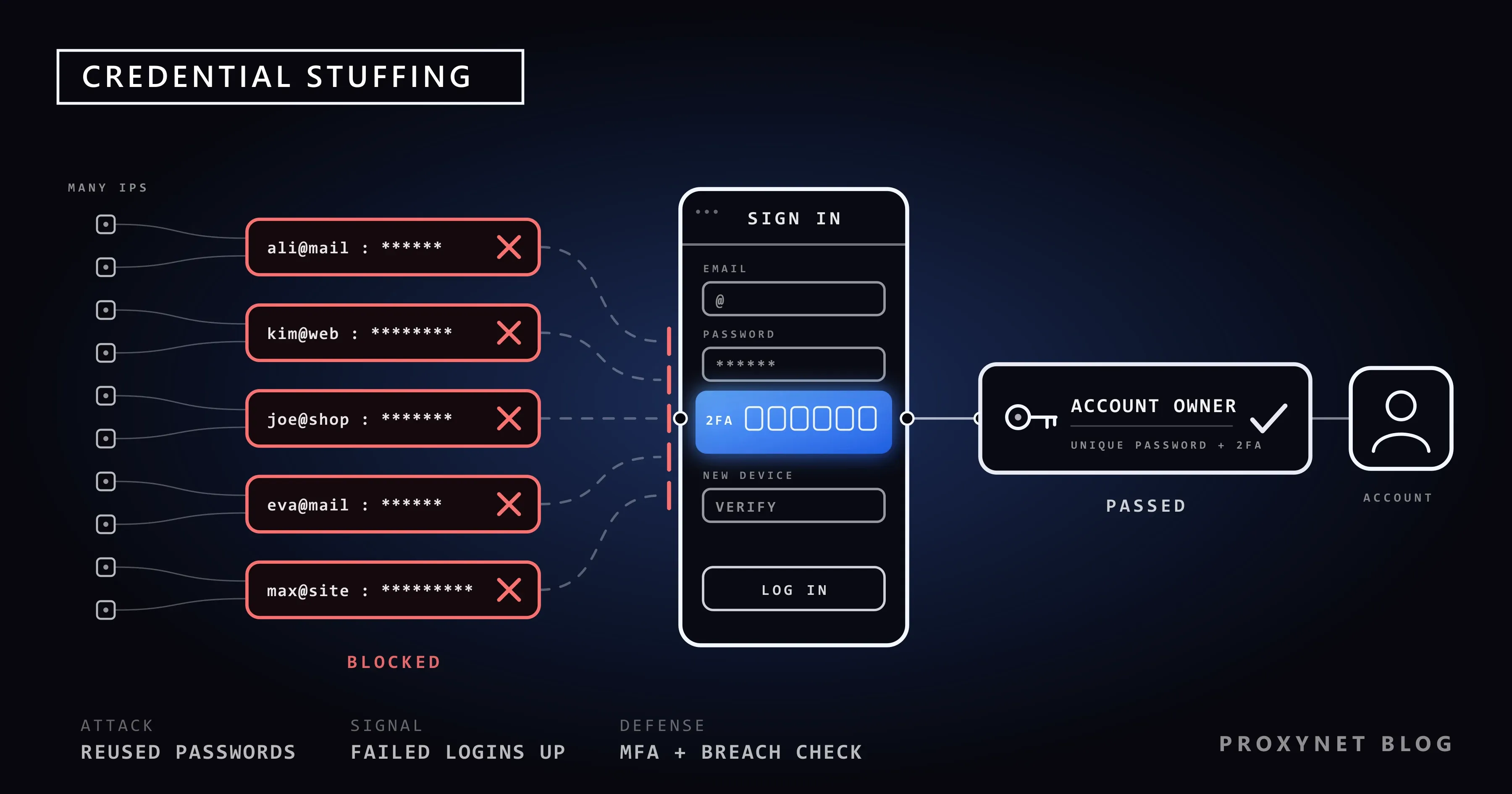
A small online shop leaks its customer database. Weeks later, a video streaming service sees a wave of logins to accounts it never had a problem with, the gaming platform down the road sees the same, and so does a bank. None of them was breached. The same email and password pairs from the shop simply worked on their login pages, because many people use one password everywhere.
This post looks at credential stuffing from the defender's side: how it differs from brute force and password spraying, why it arrives through thousands of IP addresses, the signals it leaves in your logs, the controls that stop it and what users can do. Two short Python examples are included, both defensive.
What is credential stuffing?
Credential stuffing is the reuse of stolen login details at scale. The attacker starts with pairs that are already known to be real, taken from an earlier breach of some other service, and feeds them into a login form with automated software. Most pairs fail. The ones that succeed are accounts whose owners used the same password on the breached site and on the target.
The OWASP Credential Stuffing Prevention Cheat Sheet defines it as testing username and password pairs "obtained from the breach of another site". The target site's own passwords were not stolen and its code has no bug; the weakness is password reuse.
What the attacker wants is account takeover (ATO): a working login to an account with stored value. That can be loyalty points, a saved payment card, gift card balances, personal data, or simply a trusted account to send spam from. Taken-over accounts are often resold.
How does a credential stuffing attack work?
At a high level, an attack moves through five stages. Knowing them helps you decide where to put each defense.
- A breach elsewhere. A service is compromised and its user list, with emails and passwords (or password hashes that were later cracked), ends up in circulation.
- Collection. Leaked pairs from many breaches are merged into large lists. Old leaks keep their value for years because many people never change a reused password.
- Automation. Software submits the pairs to the target's login form or login API, much faster than a person could type.
- Distribution. To avoid simple per-IP limits, the requests are spread across many IP addresses, often through botnets of infected devices or rented proxy networks, so each address sends only a few attempts.
- Use of the hits. Pairs that work are checked for value, then used or sold. Some attackers change the email and password at once to lock the real owner out.
Stage 1 happens on someone else's server. Your defenses sit at stages 3 to 5: make automated logins costly, make a correct password insufficient on its own, and notice a takeover early. Checking passwords against breach lists turns stage 2 against the attacker.
Credential stuffing vs brute force vs password spraying
The three attacks all target login pages, but they use different inputs and leave different traces. The definitions below follow the OWASP cheat sheet.
| Attack | What is tried | Pattern | Typical success rate per attempt | Main defense |
|---|---|---|---|---|
| Brute force | Many passwords against one account | One account, many passwords | Very low unless the password is weak | Per-account attempt limits, long passwords |
| Password spraying | One common password against many accounts | Many accounts, one or a few passwords | Low, relies on weak passwords | Blocklist of common passwords, MFA |
| Credential stuffing | Real leaked pairs, each tried once | Many accounts, one password each | Higher, because every pair was real somewhere | MFA, breached-password checks, bot detection |
A per-account lockout after five wrong passwords stops brute force. It barely touches credential stuffing, because each account usually sees only one attempt. Session hijacking skips the login form altogether: with a stolen session cookie, the site asks for neither the password nor the second factor.
Why proxies and residential IPs show up in these attacks
Blocking an IP address after twenty failed logins seems like protection, so attackers route requests through many addresses: hijacked home routers, infected devices, cloud servers and proxy networks. Home connection addresses are hard to block, because real customers may use them too.
This is why the OWASP cheat sheet says IP blocking and IP reputation "should not be used as the sole or primary defense". There are three practical problems:
- Low volume per address. When each address sends one or two attempts, no per-IP threshold fires.
- Shared addresses. Mobile carriers and many home providers put many customers behind one public address (carrier-grade NAT). Blocking that address can lock out real users.
- Churn. The addresses change quickly, so a blocklist is out of date almost as soon as it is written.
IP data is still useful as one signal among several. An IP fraud score or a hit on an IP blacklist can raise the risk of a login and trigger an extra check instead of an outright block.
A note on our own network: Proxynet's Terms of Service forbid unauthorised access attempts, and accounts that break the acceptable use rules can be suspended without notice. Legitimate uses such as testing your own site from other countries are covered on our data security page.
Signals that you are under attack
No single signal proves an attack, but several together are hard to miss. These are the ones worth putting on a dashboard:
- A jump in the login failure rate. Most leaked pairs do not match, so a run pushes a normally stable rate up sharply.
- Many "unknown user" failures. Leaked lists contain emails that never registered with you.
- Many accounts, one attempt each. The ratio of distinct usernames to attempts is close to one, the opposite of a brute force pattern.
- Many IP addresses, few attempts each, often from networks that rarely send you real users.
- Identical client fingerprints across thousands of "different" users; how bot detection works explains these signals.
- Logins with no page view. Requests that go straight to the login API without loading the login page, its scripts or images.
- What happens after success. A login followed within seconds by an email, password or payout change.
Users often notice before you do: a suspicious login alert from a bank or a "new sign-in" email they did not trigger. Make it easy for them to report it.
How to prevent credential stuffing on your site
The OWASP cheat sheet lists defenses in rough order of value. The list below keeps that spirit and adds what NIST SP 800-63B (Revision 4, final since August 2025) requires of password systems.
- Multi-factor authentication. OWASP calls MFA "by far the best defense" against password attacks: a correct leaked password is no longer enough. Require it for admin accounts and risky actions, and trigger it when the signals above fire.
- Passkeys. A passkey replaces the password with a key pair kept on the user's device. The FIDO Alliance describes them as phishing-resistant, and there is no shared secret on your server to leak or reuse. An account that signs in only with a passkey has nothing for credential stuffing to try.
- Breached-password checks. NIST SP 800-63B, section 3.1.1.2, says verifiers shall compare a new password against a blocklist of "commonly used, expected, or compromised" values. Check at sign-up and at password change, and force a change when there is evidence of compromise.
- Attempt limits that follow the account, not only the IP. NIST section 3.2.2 caps consecutive failed attempts on one account at no more than 100. Combine it with limits per device, per IP range and per login endpoint, and slow responses step by step rather than locking accounts.
- Bot management. Check whether the client runs JavaScript and whether its connection fingerprint matches its claimed browser. A CAPTCHA is a speed bump, not the whole defense.
- Same answer for every failure. Return the same message and similar timing for "wrong password" and "no such user", so the login form cannot be used to check which emails have accounts.
- Notify users and watch the account after login. Alert on new-device sign-ins and account changes, and ask for a second factor before those changes.
Code: a breached-password check with k-anonymity
The Pwned Passwords API from Have I Been Pwned lets you check a password against known breaches without sending the password, or even its full hash. You send only the first five characters of the SHA-1 hash; the service returns every hash suffix that starts with them, with a count, and you look for your suffix locally. This is the k-anonymity model. The range API needs no API key, and the Add-Padding header adds decoy rows (count 0) so response size does not give anything away.
import hashlib
import time
import urllib.error
import urllib.request

API = "https://api.pwnedpasswords.com/range/"


def breach_count(password: str, retries: int = 3) -> int:
    """Return how many times a password appears in Pwned Passwords (0 = not found)."""
    digest = hashlib.sha1(password.encode("utf-8")).hexdigest().upper()
    prefix, suffix = digest[:5], digest[5:]
    request = urllib.request.Request(
        API + prefix,
        headers={"User-Agent": "example-signup-check", "Add-Padding": "true"},
    )
    for attempt in range(retries):
        try:
            with urllib.request.urlopen(request, timeout=5) as response:
                body = response.read().decode("utf-8")
            break
        except (urllib.error.URLError, TimeoutError):
            if attempt == retries - 1:
                raise
            time.sleep(2 ** attempt)
    for line in body.splitlines():
        candidate, _, count = line.partition(":")
        if candidate == suffix:
            return int(count)  # padded rows have count 0
    return 0


if __name__ == "__main__":
    for pw in ["password123", "correct horse battery staple", "vX9#qL2-mT8!rW4zK7"]:
        hits = breach_count(pw)
        verdict = "reject: seen in breaches" if hits else "not in the breach list"
        print(f"{pw!r}: {hits} -> {verdict}")
Run it and the first two passwords come back as found, with counts that grow as the dataset is updated; the random string returns 0. In a sign-up form, call breach_count on the server, reject any non-zero result with a clear message, and decide in advance what happens if the API is unreachable.
Code: spotting a stuffing run in login logs
Most sites already log each login attempt. The script below reads a CSV log with time, ip, username and result columns, groups attempts by minute and prints the minutes where the failure rate is abnormal, with the share of unknown usernames and the number of distinct accounts and addresses.
import csv
from collections import defaultdict

ALERT_FAIL_RATE = 0.50
MIN_ATTEMPTS = 50

# Group login attempts into one-minute buckets.
buckets = defaultdict(lambda: {"total": 0, "failed": 0, "unknown": 0, "users": set(), "ips": set()})
with open("logins.csv", newline="") as f:
    for row in csv.DictReader(f):
        b = buckets[row["time"][:16]]          # "2026-09-28T10:41"
        b["total"] += 1
        b["users"].add(row["username"])
        b["ips"].add(row["ip"])
        if row["result"] != "ok":
            b["failed"] += 1
        if row["result"] == "unknown_user":
            b["unknown"] += 1

for minute in sorted(buckets):
    b = buckets[minute]
    fail_rate = b["failed"] / b["total"]
    unknown_share = b["unknown"] / b["total"]
    if b["total"] >= MIN_ATTEMPTS and fail_rate >= ALERT_FAIL_RATE:
        print(f"{minute}  attempts={b['total']}  failed={fail_rate:.0%}  "
              f"unknown-user={unknown_share:.0%}  accounts={len(b['users'])}  ips={len(b['ips'])}")
On a test log with normal traffic and a simulated burst, the output looks like this:
2026-09-28T10:40  attempts=80  failed=78%  unknown-user=49%  accounts=80  ips=69
2026-09-28T10:41  attempts=80  failed=79%  unknown-user=45%  accounts=80  ips=70
Eighty accounts, almost as many addresses and half the usernames unknown: the stuffing pattern. Set thresholds from your own normal traffic.
What users can do
Credential stuffing only works on reused passwords, so users have real control over it.
- Use a password manager so every site gets its own random password.
- Turn on two-step verification, starting with email and banking; an authenticator app or security key beats SMS codes.
- Switch to passkeys where a site supports them. There is no password left to leak or reuse.
- Check your email on Have I Been Pwned and change any password you reused.
- Act on "new sign-in" alerts you did not trigger: change the password and sign out other sessions.
- Avoid logging in through unknown networks. A free proxy run by a stranger can read your traffic; see Are Free Proxies Safe?.
Where this matters most
- Online shops and marketplaces. Saved cards, gift cards and loyalty points make accounts worth taking over; see our e-commerce page for how shops test their own storefronts.
- Banks and fintech. Account takeover leads straight to money movement; the finance page covers how financial teams check their public pages from other regions.
- Streaming and gaming. Shared and resold accounts are a steady market for stolen logins.
- Any site that collects personal data. A takeover exposes the user's saved details, which is a data protection problem as well as a fraud one; Personal Data in Scraped Datasets covers the handling side for data teams.
Common mistakes
- Relying on IP blocking. It fails against distributed attacks.
- Locking accounts after a few failures. It lets attackers lock out your customers.
- Different error messages for "wrong password" and "no such account". It turns your login form into a free email checker.
- Protecting the web form but not the API. Mobile apps and old API versions often have their own login endpoint with weaker limits.
- Forcing regular password changes. NIST SP 800-63B says not to; force a change only on evidence of compromise.
- Watching only the login. Takeover shows most clearly in what happens next.
Decision guide
| Your situation | What to do first |
|---|---|
| Failed logins jump and most usernames are unknown | Treat it as credential stuffing: raise friction for risky sessions, add a second factor for successful logins from new devices |
| You run a small site with no security team | Add MFA, a breached-password check at sign-up and change, and a managed bot protection service in front of the login |
| Admin or staff accounts use passwords only | Require MFA or passkeys for them now |
| Customers report logins they did not make | Force a reset for the affected accounts, notify them and review what changed after login |
| You only block IPs today | Keep it as one signal; add per-account and per-endpoint limits and device checks |
| You are a user who reuses passwords | Move to a password manager and turn on two-step verification, starting with email |
Frequently asked questions
Is credential stuffing illegal?
Yes. Logging into someone else's account without permission is unauthorised access under computer misuse laws in most countries, whatever tool is used. Testing is only lawful on systems you own or have written permission to test.
How is credential stuffing different from a data breach?
A breach is the theft of data from one service. Credential stuffing is what happens afterwards, when the stolen pairs are tried on other services. The site under attack may never have been breached itself.
Does a CAPTCHA stop credential stuffing?
It slows it down and raises the cost, but it is not a complete defense. OWASP lists it as one layer among several, behind multi-factor authentication.
Why not just lock an account after three wrong passwords?
In credential stuffing, each account usually gets a single attempt, so the lockout rarely fires. Where it does, it can be used to lock out real users. Limits spread across account, device and endpoint work better.
Is checking passwords against Pwned Passwords safe for my users?
With the range API, you send only the first five characters of the password's SHA-1 hash, and the matching happens on your server. The service never sees the full password or its full hash.
Do passkeys end credential stuffing?
For accounts that sign in only with a passkey, yes: there is no reusable password to try. While a site still accepts passwords as a fallback, that fallback needs the same protections.
Summary
Credential stuffing turns one site's breach into many sites' account takeovers, because people reuse passwords. It is spread across many IP addresses, so IP blocking alone does not stop it. The defenses that work are multi-factor authentication or passkeys, rejecting passwords that appear in breach lists as NIST SP 800-63B requires, attempt limits tied to accounts and devices, bot detection, and watching what happens after a login. Users close the door on their side with a password manager and unique passwords. For legitimate testing of your own login flows and pages from other regions, see our proxy services and Residential Proxy.


