You are about to pay on a small online shop you found through an ad. The address bar shows the usual symbol, and a friend says the site "has SSL", so it must be fine. The certificate behind that symbol does prove something, but less than most people think: that the encrypted connection really ends at that web address, not that the shop will ever send your order.
This post covers what is inside a certificate, how your browser checks it, the main types, and how to open one in Chrome, Edge, Firefox and Safari. It also explains why lifetimes are getting shorter, how a site owner gets a free certificate, and what a proxy does to it.
What is an SSL certificate?
An SSL certificate is a digital document that proves a website controls its domain name and lets your browser set up an encrypted HTTPS connection to it. Think of it as an ID card issued by a certificate authority (CA), an organisation that browser and operating system makers have agreed to trust. The CA checks that the applicant controls the domain, then signs a file containing the domain name and the site's public key.
The public key is one half of a key pair; the other half, the private key, never leaves the web server. On every connection the server has to prove that it holds that private key, which a copied certificate cannot do. How the two keys work together is covered in What Is Encryption? Symmetric vs Asymmetric Explained.
SSL stands for Secure Sockets Layer, a 1990s protocol that TLS (Transport Layer Security) replaced long ago. The old name stuck, so an "SSL certificate", a "TLS certificate" and an "HTTPS certificate" are the same thing.
What is inside an SSL certificate?
A certificate is a short list of fields defined by RFC 5280, the X.509 standard that browsers and CAs follow:
| Field | What it holds | In Chrome's viewer |
|---|---|---|
| Subject | Who the certificate was issued to | Issued To |
| Subject Alternative Name | Every domain name it covers | Details tab |
| Issuer | The CA that signed it | Issued By |
| Validity | Start and end date (Not Before, Not After) | Validity Period |
| Subject public key | The server's public key | Details tab |
| Serial number | The CA's unique number for it | Details tab |
| Signature | The CA's signature over all the fields | Details tab |
Browsers match the address you opened against the Subject Alternative Name list; the older Common Name inside the Subject no longer counts. The private key is never in the certificate: it stays on the server.
How does a browser check an SSL certificate?
The browser runs the same checks on every HTTPS connection, during the TLS handshake and before any page data or form field is sent:
- The server sends its certificate, together with one or more intermediate certificates.
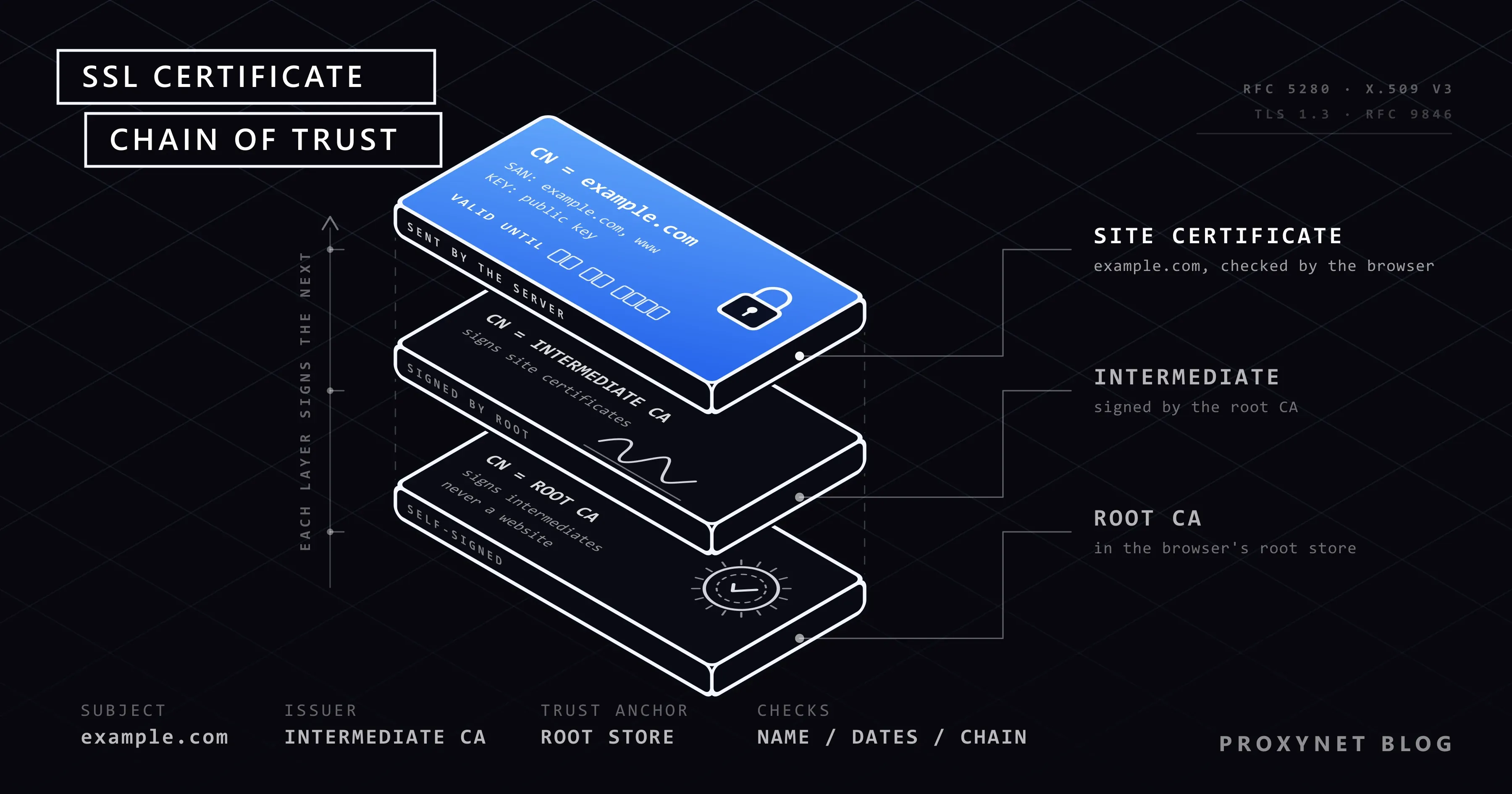
- The browser builds the chain. Each certificate must be signed by the next one up, ending at a root certificate in the browser's or operating system's root store, the built-in list of trusted CAs.
- It checks the dates. Today's date, by your device's clock, must fall between Not Before and Not After.
- It checks the name. The address in the bar must match a name in the Subject Alternative Name list.
- It checks the status. The CA must not have revoked (withdrawn) the certificate, and Chrome also requires it to appear in public Certificate Transparency logs.
- The server proves it holds the private key by signing the handshake; RFC 9846, the TLS 1.3 standard published in July 2026, calls this message CertificateVerify.
- All checks pass: session keys are agreed and the page loads. If one fails, you get a full-page warning and nothing is sent.
Step 6 is why a copied certificate is useless to an impostor: anyone can download a site's certificate, but nobody without the private key can complete the handshake.
What are root, intermediate and site certificates?
They are the three links of the chain of trust: a root CA signs intermediate certificates, and an intermediate signs the certificate a website uses. The CA/Browser Forum, the body of CAs and browser makers that sets the rules for website certificates, forbids root keys from signing website certificates directly. A compromised intermediate can then be revoked without replacing a root that is built into browsers and devices.
On letsencrypt.org, for example, the site certificate is signed by an intermediate called YE2, which leads up to a root of ISRG, the non-profit behind Let's Encrypt. When a server forgets to send its intermediate, browsers may cope, but many apps and command-line tools report an unknown issuer.
What types of SSL certificates are there?
Certificates differ in how much the CA checked about the owner and in how many names they cover; the encryption they enable is the same.
| Type | What it proves or covers | Typical use |
|---|---|---|
| Domain Validated (DV) | Control of the domain only | Most sites, blogs, shops |
| Organization Validated (OV) | Domain plus the organisation's identity | Company sites |
| Extended Validation (EV) | Domain plus legal, physical and operational existence | Banks, large companies |
| Wildcard | All names one level below a domain | Many subdomains |
| Multi-domain (SAN) | A list of different names | Several sites on one server |
| Self-signed | Nothing: no CA vouches for it | Test servers, home devices |
In the address bar, DV, OV and EV look alike; Firefox, for example, shows the legal name of an EV certificate's owner only after you click the symbol. A wildcard matches exactly one label: *.example.com covers www.example.com and shop.example.com, but not a.b.example.com or example.com itself. That rule comes from RFC 9525, which is why example.com's own certificate lists the bare domain and the wildcard as two separate names.
What does an SSL certificate prove, and what does it not?
A certificate proves that whoever runs the server controls the domain in the address bar and holds the matching private key. It does not prove that the business behind the domain is honest, real or safe to buy from.
A DV certificate is issued after an automatic domain check, often in seconds and for free, so a phishing site on a look-alike address can get one as easily as your bank. Apple's Safari guide says it plainly: encryption keeps the connection secure "but it doesn't guarantee the website is trustworthy." Check the site name in the address bar before you type anything.
How do you check a website's SSL certificate?
Click the symbol to the left of the web address and open the certificate from the panel that appears; desktop browsers show the same fields under slightly different names.
Chrome and Edge
- Click the icon to the left of the address; Chrome names it View site information.
- Select Connection is secure, then Certificate is valid.
- The General tab shows Issued To, Issued By and the Validity Period with Issued On and Expires On; the Details tab lists every field, including the Subject Alternative Name.
Microsoft Edge is built on the same engine and opens a similar panel from the same icon.
Firefox
- Click the shield icon to the left of the address; older versions show a padlock.
- Select Connection secure, then More site information.
- On the Security tab of the Page Info window, select View Certificate. Ctrl + I opens the same window.
Safari on a Mac
Choose Safari > Connection Security Details in the menu bar to see whether the connection is encrypted. When Safari shows a certificate warning, Show Certificate opens the certificate itself. Phone browsers show less detail.
From the command line (for site owners)
Online SSL checkers test a server from outside, including whether it sends its intermediate certificates. OpenSSL prints the essentials with one command; we ran it in Git Bash on our Windows test machine on 15 November 2026, and it works the same in Terminal on a Mac or Linux:
openssl s_client -connect letsencrypt.org:443 -servername letsencrypt.org </dev/null 2>/dev/null | openssl x509 -noout -subject -issuer -datessubject=CN=letsencrypt.org
issuer=C=US, O=Let's Encrypt, CN=YE2
notBefore=Nov 3 13:44:34 2026 GMT
notAfter=Feb 1 13:44:33 2027 GMTThat certificate runs for exactly 90 days; add -ext subjectAltName to the second command to list its names. Since Chrome requires Certificate Transparency, you can also search those public logs for certificates issued for your domain that you never requested.
Why are SSL certificates getting shorter?
Because the CA/Browser Forum voted in April 2025, in ballot SC-081, to cut the maximum lifetime of website certificates in steps, from 398 days to 47 days by March 2029. The dates are now part of the forum's Baseline Requirements, the rules every publicly trusted CA must follow:
| Period | Maximum validity | Domain check reusable for |
|---|---|---|
| Until 14 March 2026 | 398 days | 398 days |
| From 15 March 2026 | 200 days | 200 days |
| From 15 March 2027 | 100 days | 100 days |
| From 15 March 2029 | 47 days | 10 days |
The last column is how long a CA may rely on an earlier proof that you control the domain. Shorter lifetimes limit the damage when a private key is stolen or a certificate is issued by mistake, and they push everyone towards automatic renewal. Let's Encrypt, which has issued 90-day certificates since 2015, plans to cut its default to 64 days on 10 February 2027 and to 45 days on 16 February 2028.
How does a website get an SSL certificate?
A site owner proves control of the domain to a CA, receives a signed certificate and installs it, ideally with software that renews it automatically.
- Pick the type. DV is enough for nearly every site; OV and EV, which check the organisation's identity, come from commercial CAs for a fee.
- Use your host's option first. Many hosting control panels request and renew a free certificate with one switch; What Is Web Hosting? Types and How to Choose explains what else a host manages.
- Or run an ACME client on your own server. ACME (RFC 8555) is the protocol for automatic issuance; Let's Encrypt recommends the Certbot client in its getting started guide.
- Prove domain control. The client places a file under
/.well-known/acme-challenge/on port 80 (HTTP-01) or creates a DNS TXT record at_acme-challenge.<your domain>(DNS-01). Wildcards need DNS-01. - Let it renew itself. Renew about two-thirds of the way through the lifetime, as Let's Encrypt advises, and set an alert in case a renewal fails.
Let's Encrypt, a free, automated certificate authority run by the non-profit Internet Security Research Group, issues only DV certificates, because OV and EV checks cannot be automated.
What do "Not secure" and expired certificate warnings mean?
Not secure next to the address means the page came over plain HTTP with no certificate at all, so anything you type travels unencrypted. A full-page red warning means a certificate exists but failed one of the checks above.
An expired certificate is a common cause: Chrome and Edge show NET::ERR_CERT_DATE_INVALID, the same code a wrong clock on your own device produces. A certificate for a different name gives NET::ERR_CERT_COMMON_NAME_INVALID, one without a trusted root NET::ERR_CERT_AUTHORITY_INVALID. What to check for each code is in Your Connection Is Not Private Error: Causes and Fixes.
Never continue past such a warning on a login or payment page. If the site is yours, renew the certificate, send the intermediates, and make sure every name you serve, www included, is listed.
Does a proxy change a website's SSL certificate?
A normal HTTPS proxy does not: it relays an encrypted tunnel, and your browser checks the site's own certificate through it. The browser sends the proxy a CONNECT request naming only the host and port; under RFC 9110, the HTTP standard, the proxy then forwards bytes blindly in both directions while the TLS handshake runs between your browser and the site.
We checked this on our Windows test machine: letsencrypt.org's certificate had the same SHA-256 fingerprint directly and through a small local proxy, whose log held only CONNECT letsencrypt.org:443 and two byte counts. Proxynet's HTTPS Proxy works the same way, with no certificate to install.
Interception proxies are different. Debugging tools, company TLS inspection and antivirus HTTPS scanning decrypt traffic on purpose and present their own certificate, which your browser accepts only if that tool's root certificate is installed. Install one only for your own debugging tool or when your company's IT department requires it; a proxy, VPN or website that asks for one wants to read your encrypted traffic.
Where you meet SSL certificates
- Every website that opens with
https://, including banking, email and shopping. - Mobile apps and mail apps, which talk to their servers over TLS in the background.
- APIs and scripts: curl and Python stop with an error when a chain is incomplete.
- Company and school networks that inspect traffic with their own root certificate.
- Routers, printers and test servers, which often use self-signed certificates.
Common mistakes
- Reading the padlock as "safe site". It proves the domain, not the business.
- Renewing by hand. As lifetimes shrink, one forgotten reminder means an outage.
- Covering
example.combut notwww.example.com. - Not sending the intermediate certificate. Browsers may cope while apps fail.
- Turning off certificate checks in code (
verify=False,curl -k) to silence an error. - Installing a root certificate because a site or app asked you to.
- Buying EV for a special address bar. The company name appears only in the details.
Decision guide
| Your situation | What to do |
|---|---|
| You want to know if a login page is genuine | Check the domain name first, then Issued To |
| The address bar says Not secure | Do not enter passwords or card numbers |
| A full-page certificate warning appears | Do not continue on login or payment pages |
| You run a blog or a small shop | Free DV certificate with automatic renewal |
| You need your company's name verified | OV or EV from a commercial CA |
| You serve many subdomains | Wildcard certificate via the DNS-01 challenge |
| An app asks you to install a root certificate | Refuse, unless it is your own tool or your IT department |
| You send HTTPS traffic through a proxy | HTTPS (CONNECT) or SOCKS5 proxy; the certificate stays the site's own |
Frequently asked questions
Does a padlock mean the website is safe?
No. The padlock, or Chrome's default symbol, means the connection is encrypted and the certificate is valid for that address. Scam and phishing sites get valid certificates for their own domains too, so read the address before you log in or pay.
Is SSL the same as TLS?
TLS is the successor to SSL. TLS 1.0, published as RFC 2246 in January 1999, was based on SSL 3.0, and RFC 7568 banned SSL 3.0 in June 2015. Connections today use TLS 1.2 or 1.3; "SSL certificate" survives as the everyday name for the same X.509 certificate.
Are free SSL certificates safe?
Yes. A free DV certificate from Let's Encrypt encrypts the connection exactly like a paid one, and browsers trust it in the same way. A paid certificate adds support or an OV or EV identity check, not stronger encryption.
How long is an SSL certificate valid?
At most 200 days for certificates issued since 15 March 2026, falling to 100 days on 15 March 2027 and 47 days on 15 March 2029. Many are shorter: Let's Encrypt issues 90-day certificates by default.
What happens when an SSL certificate expires?
Browsers stop trusting it at once and show every visitor a full-page warning such as NET::ERR_CERT_DATE_INVALID; many apps refuse to connect. Only a renewed certificate fixes it, which is why renewal should run automatically before the deadline.
Do I need an SSL certificate if my website has no login or payments?
Yes. Without one, browsers mark every page as Not secure, and anyone on the network path can read or change what your visitors see. Many hosts include a free certificate, so it is often a single setting.
Summary
An SSL certificate is a CA-signed file that binds a domain name to the server's public key. Browsers check its chain, dates, names and status before any data is sent. The maximum lifetime is 200 days today and 47 days from 2029, so renewal has to be automatic. A padlock proves the domain, not the business, and an ordinary HTTPS proxy leaves the certificate untouched; to choose a proxy type, compare the options on our proxy products page.