You have bought a domain name, or built a few pages on your laptop, and now you want other people to open them. The laptop goes to sleep, moves between networks and sits behind a home router, so it cannot answer visitors at three in the morning. The usual answer is web hosting: a computer in a data center that keeps the site online for you.
This post explains what a host provides, how a visit reaches a hosted site, the main types and who each suits, how hosting differs from a domain, what to check before you choose and why hosting at home is hard. It ends with why websites can tell a hosting IP address from a home connection, and what that means for proxies.
What is web hosting?
Web hosting is renting a place for your website on a computer that is always on and always connected to the internet. That computer is a web server. MDN, Mozilla's developer documentation, describes a web server on two levels: the hardware is a computer that stores the site's files, and the software is at least an HTTP server, a program that understands web addresses and sends the files to visitors' browsers.
The company that runs these servers is the host, or hosting provider. It places the machines in a data center, a building with backup power, cooling and fast network links, and sells you part of a server, a whole server, or computing capacity billed by use.
What does web hosting do for a website?
Hosting keeps a website reachable: it stores the files, runs the code that builds the pages and answers every visitor's request. A typical plan includes:
- Storage for pages, images, style sheets and scripts.
- A web server program that sends them to browsers over HTTP and HTTPS.
- A database for sites that build pages on request, such as a blog or a shop.
- A public IP address and a fast network connection.
- Email at your own domain, on many plans.
- A control panel for files, databases, mailboxes and HTTPS certificates.
- Backups and security updates, done for you or left to you, depending on the plan.
MDN separates two kinds of site. A static web server sends stored files exactly as they are; a dynamic one adds an application server and a database that build each page first. Plain HTML pages need only the first, while a content management system (CMS) such as WordPress needs the second.
How does a visit reach a hosted website?
A visit reaches a hosted site in two stages: the domain name is turned into the server's IP address, then the browser asks that server for the page. MDN's How the web works describes the same sequence for beginners.
- You type the address, for example
www.example.com, or click a link. - DNS finds the server. Your device asks a DNS resolver, a server that translates names into IP addresses, where the name points; the domain's DNS records hold your host's server address. What Is DNS? follows this lookup step by step.
- The browser connects to that IP address. For HTTPS it also checks the site's certificate and sets up encryption.
- The browser sends an HTTP request with a
Hostheader that names the site. On shared hosting many sites can share one IP address, and this header tells the server which one you want; RFC 9110, the HTTP standard, defines the field for exactly that purpose. - The server prepares the answer. For a static site it reads the file from disk; for a dynamic site it runs the code, queries the database and builds the page.
- The response comes back. The server returns a status code such as
200 OKwith the page, and the browser then requests the images, styles and scripts the page refers to.
Each stage fails in its own way: a name that points nowhere gives a DNS error, a server that never answers a timeout, and a server that cannot build the page a 5xx status code.
What are the types of web hosting?
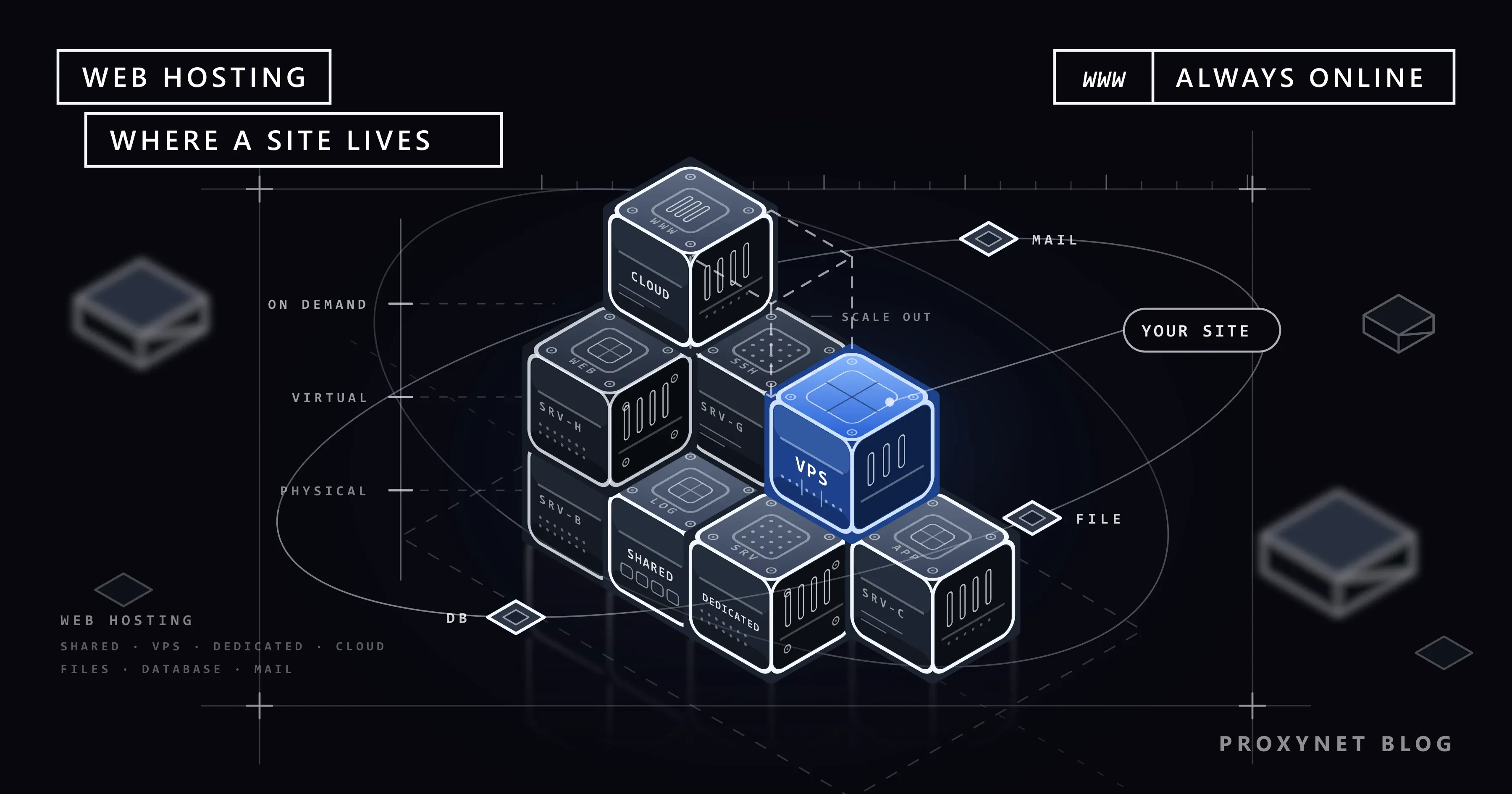
Hosting types differ in how much of a server you get and how much of its upkeep is yours. The four basic types are shared, VPS, dedicated and cloud; managed and static-site hosting are services built on top of them.
| Type | What you get | Suits | Who runs the server |
|---|---|---|---|
| Shared | An account on a server used by many sites | First sites, blogs, small businesses | The host |
| VPS | A virtual server with fixed resources and admin access | Growing sites, custom software | You, unless managed |
| Dedicated | A whole physical server | Heavy, steady traffic; strict isolation | You, unless managed |
| Cloud | Virtual servers you scale and pay for by use | Traffic that rises and falls | You or the platform |
| Managed WordPress | A server tuned for WordPress | WordPress sites without an admin | The host |
| Static site | Files served as they are, often via a CDN | Portfolios, docs, landing pages | The host |
Shared hosting puts many websites on one server, each in its own account. The host maintains everything, which makes it the cheapest and simplest type; the catch is that the sites share processor, memory and disk, so a busy neighbour can slow yours.
A VPS (virtual private server) is a virtual machine: software splits one physical server into isolated servers, each with its own operating system and guaranteed resources. You get administrator (root) access, and with it the job of patching and securing the server unless the plan is managed.
Dedicated hosting rents you a whole physical machine. You get predictable performance and full isolation, at the highest price and with the most administration.
Cloud hosting draws virtual servers from a large pool and lets you add or remove them as traffic changes. NIST's definition of cloud computing lists its traits, among them on-demand self-service, rapid elasticity and measured service, which means usage is metered and usually billed as you go.
Managed hosting is a service layer, not a type of machine: the host handles updates, backups and security, often for one platform such as WordPress. Static-site hosting serves pre-built files with no server code, usually through a CDN, a network of servers that keeps copies of files close to visitors.
What is the difference between web hosting and a domain name?
A domain name is your site's address; web hosting is the computer where the site lives. You can buy them together or from different companies, and DNS joins them: the domain's records point to the host's IP address. Registration, renewal and the parts of a name are covered in our guide to domain names.
Because the two are separate, you can move to a new host and keep the domain: copy the files and database, then change the DNS records. A domain without hosting can still forward visitors elsewhere or receive email, but it shows no website of its own.
A website builder bundles hosting, a page editor and templates in one subscription, but the site usually cannot be moved elsewhere as it is. Email hosting runs your domain's mailboxes, on your web host or on a separate mail service that the domain's MX records, the DNS entries for mail, point to.
How do you choose web hosting?
Choose hosting by what your site runs and where its visitors are, then check the details that decide how it behaves every day. Work through these questions in order:
- What does the site run? Plain HTML needs only static hosting, a CMS needs a database and a supported programming-language version, and custom software needs a VPS or a cloud server.
- Where are your visitors? A server near them answers faster, because every round trip is shorter. For visitors on several continents, a CDN in front of the server helps more than moving it.
- What are the limits? Read the disk, traffic and database limits; plans sold as "unlimited" still have them, usually in a fair-use policy.
- What uptime is promised? Uptime is the share of time the server is reachable. A 99.9% guarantee still allows about 43 minutes of downtime in a 30-day month.
- Who makes backups? Daily automatic backups stored away from the server are the baseline; restore one once as a test.
- Is HTTPS included? The host should install and renew certificates automatically. Free certificates from Let's Encrypt, a non-profit certificate authority, are enough for most sites.
- What support do you get? Check the hours and channels; a shop needs someone who answers at night.
- Can you leave easily? You should be able to download all files, databases and email. Compare the first-term price with the renewal price, which is often higher.
Can you host a website on your own computer?
Yes, technically: install web server software, open it to the internet and point a domain at your IP address. In practice a home connection works against you, for the reasons MDN gives for a hosted server: availability, a fixed address and someone else's maintenance.
- The computer must stay on. Every restart or power cut takes the site offline.
- Your IP address may change. Many home lines get a dynamic address, and the domain points to the old one until you update DNS.
- You may have no public IPv4 address. Behind carrier-grade NAT (CGNAT), one public address is shared by many subscribers, so connections from the internet cannot reach your router. A router WAN (internet) address between
100.64.0.0and100.127.255.255, the block RFC 6598 reserves for this, means you are behind CGNAT. - Upload is slow. On many home plans upload is far slower than download, and visitors download what your line uploads.
- Your contract may forbid it. Some providers ban servers on home plans or block incoming connections on ports 80 and 443.
- Security is all yours. Automated scanners probe every server open to the internet, and each unpatched program is a way in.
For learning, your own computer is the right place: the site answers at localhost, and only you can see it.
Why can websites recognise a hosting IP address?
Websites can recognise a hosting IP address because every server's address belongs to its host's network. Each block of IP addresses is announced by an autonomous system, a network with its own number (ASN): your home connection sits in your internet provider's, a hosted server in a hosting or cloud company's. Lookup tools show the ASN behind any address in seconds, as What Is an ASN? explains.
IP-intelligence databases then label networks as residential, mobile or hosting. Most people browse from home and mobile networks, so sites often add extra checks to requests from hosting networks, typically at sign-up, login and checkout. That is why a script running on a VPS can meet checks that the same request from your laptop does not.
Proxies sit on both sides of this line. A Datacenter Proxy gives you an address in a data center network: fast, stable, with unmetered traffic, and openly recognisable as hosting. That suits APIs, your own servers and sites that do not treat hosting traffic differently.
A Residential Proxy gives you an address from a home internet connection in the country and city you choose, so a site sees the kind of network its local customers use; it fits checking prices, ads or search results as those customers see them. Neither type changes what a site allows: its rate limits, login rules and terms still apply.
What is web hosting used for?
- Company and personal websites, blogs and portfolios.
- Online shops, which need a database, HTTPS and reliable backups.
- Web applications, and the APIs that mobile apps talk to.
- Email at your own domain.
- Staging copies, where changes are tested before they go live.
- Documentation, help centres and file downloads.
Common mistakes
- Buying a plan before you know what the site runs. A static site on a VPS is wasted admin work; a busy shop on the smallest shared plan is slow.
- Relying only on the host's backups. A backup on the same server goes down with it; keep a copy elsewhere.
- Letting someone else register your domain in their name. The registrant should be you or your company, or moving later becomes a dispute.
- Leaving the CMS and its plugins un-updated. An outdated plugin or theme is a common way into a hacked site.
- Forgetting renewal dates. When hosting expires, the site goes down, and email on the same plan stops with it.
Decision guide
| Your situation | What to choose |
|---|---|
| A first site, a blog or a small business page | Shared hosting |
| A WordPress site and no time for server work | Managed WordPress hosting |
| Pages with no server code, such as a portfolio | Static-site hosting |
| Custom software or your own server settings | VPS |
| Heavy, steady traffic or strict isolation | Dedicated server |
| Traffic that jumps with campaigns or seasons | Cloud hosting |
| Learning and testing | Your own computer, on localhost |
Frequently asked questions
Do I need web hosting to have a website?
Yes, every website runs on a server that hosts it, but you do not always buy hosting separately. Website builders and blogging platforms include it; you need your own when you want to choose the software or move the site freely.
Do I need web hosting if I only have a domain?
Only if you want a website at that domain. A domain on its own can forward visitors to another address or receive email through a mail service; to show your own pages, you need hosting and DNS records that point to it.
Is free web hosting safe to use?
It is fine for learning and small static sites, but a poor home for anything important. Free plans tend to bring tight limits, forced ads or no custom domain, and no promise the service will last; keep your own copy and never put customer data there.
What is the difference between a web server and web hosting?
A web server is the computer and the software that answer browsers; web hosting is the service of renting one, or part of one, with network, power and upkeep included. You can run a web server yourself; hosting means someone runs it for you.
Can I move my website to another hosting provider?
Yes. Copy the files and databases to the new server, test the site there, then point the domain's DNS records to the new IP address. Visitors switch over as cached DNS answers expire, so keep the old plan for a few more days.
What happens when web hosting expires?
The site goes offline, and any email on the same plan stops. Many hosts keep the account for a short time before deleting it, but the period varies, so renew quickly or download a backup. The domain is a separate contract with its own expiry date.
Summary
Web hosting is the rented server that keeps a website online: storage, a web server, often a database and email, and a public IP address on a connection that never sleeps. Shared, VPS, dedicated and cloud hosting differ in how much of a server you get and how much upkeep is yours; the domain is the separate address that DNS points at it. Choose by what the site runs and where its visitors are, then check uptime, backups, HTTPS, support and the way out. Sites can tell a hosting address from a home connection; if your work needs addresses from data center or home networks in specific countries, our proxy products cover both.