


































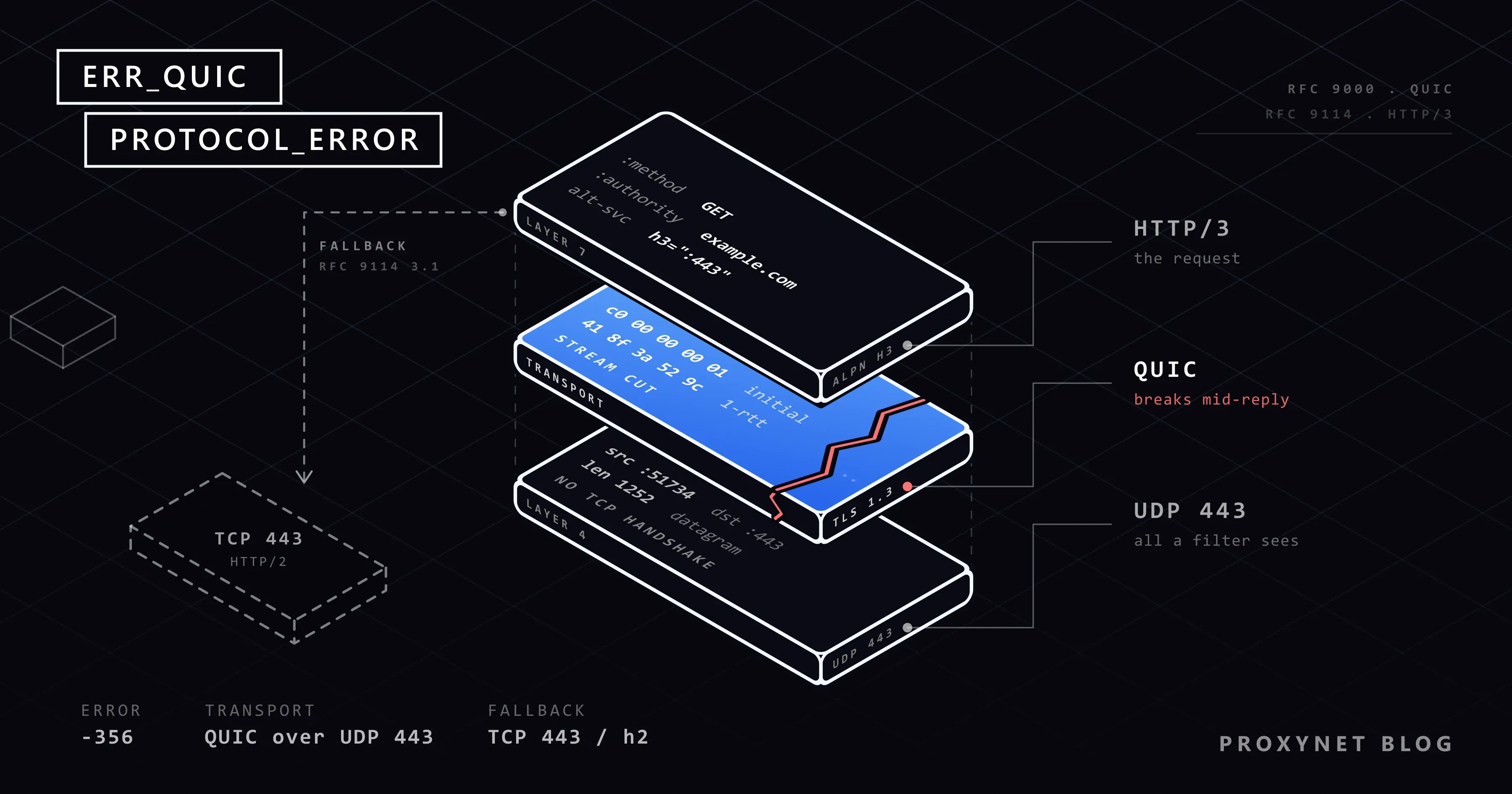
You open a video or a web app in Chrome, part of the page appears, and then the tab turns into a grey screen: "This site can’t be reached", a line saying the webpage "might be temporarily down or it may have moved permanently to a new web address", and ERR_QUIC_PROTOCOL_ERROR at the bottom. A reload sometimes helps and sometimes doesn't, and the same site opens fine on your phone.
The site is rarely down. The error comes from QUIC, the newer way Chrome and Edge connect to many large sites, and from something on your computer or network that lets that connection start and then breaks it. Below: what QUIC is, why Chrome usually hides such failures, the causes and fixes, and what changes with a VPN or a proxy.
What does ERR_QUIC_PROTOCOL_ERROR mean?
QUIC is a transport protocol: the set of rules that moves a page's data between the site's server and your browser. Most web traffic still uses TCP for that job. QUIC does the same job on top of UDP, a simpler protocol that sends packets without waiting for each one to be confirmed; QUIC adds the checking, the ordering and the encryption itself. The difference between the two is explained in TCP vs. UDP.
In Chromium's list of network errors, the source code behind Chrome and Edge, this is error -356, described in one line: "There is a QUIC protocol error." It says that the QUIC connection failed, not who caused it. The grey page is Chrome's generic one: Chromium has no special text for this error, so "temporarily down" is a default sentence, not a diagnosis.
How are HTTP/3, QUIC and UDP port 443 connected?
HTTP is the language browsers and servers use for requests and pages. Its newest version, HTTP/3, is defined in RFC 9114 as HTTP carried over QUIC, and the QUIC standard, RFC 9000, puts QUIC packets inside UDP datagrams (single UDP packets). For an https:// address that normally means UDP port 443. Secure sites have always used port 443, but until HTTP/3 it was a TCP port, and many firewalls and filters were built around that.
A site announces HTTP/3 in a header of an ordinary answer. When we checked on 6 October 2026, example.com replied with alt-svc: h3=":443"; ma=86400: HTTP/3 ("h3") is available on port 443, and the browser may remember this for 86,400 seconds, one day. YouTube and Google send the same offer with a 30-day memory.
The standard also plans for failure. When a network blocks UDP, RFC 9114 says browsers should fall back to the TCP-based versions of HTTP: HTTP/2 or HTTP/1.1 over an ordinary encrypted connection.
Why does Chrome show an error instead of falling back?
Chrome follows that rule, so a network that blocks QUIC completely rarely produces this error. The error appears when QUIC works at first and fails later:
- The site offers HTTP/3. The offer arrives in the
alt-svcheader or, on some sites, in a DNS record, and Chrome stores it. - Chrome tries QUIC. On the next visit it opens a QUIC connection to UDP port 443 and keeps an ordinary TCP connection in reserve.
- QUIC never connects. If the UDP packets are blocked outright, TCP takes over, and Chrome marks QUIC as broken for that site for a few minutes, longer after repeated failures. You notice nothing.
- QUIC connects, then breaks before the answer arrives. Chrome sends the request again over TCP and, if that works, marks QUIC as broken for the site.
- QUIC breaks after the answer has started. Once part of the reply has reached the browser, Chromium's connection code treats the request as one that "can not be retried". Chrome shows
ERR_QUIC_PROTOCOL_ERROR.
So the error points to a network that half-works for QUIC: packets get through long enough to start a page, then something drops, changes or cuts them. A clean block would only have cost you HTTP/3, not the page.
What causes ERR_QUIC_PROTOCOL_ERROR?
| Cause | Typical sign | First check |
|---|---|---|
| Antivirus or internet security with web protection | Many sites fail on one computer, on every network | Pause web protection for one reload |
| Company, school or public Wi-Fi firewall | Only on that network | Ask whoever runs the network |
| VPN app | Only while the VPN is connected | Disconnect, or pick another server |
| Router or firewall that forgets quiet UDP connections | A tab left open for a while fails on the next click | Reload; update the router's firmware |
| The site's HTTP/3 server or its CDN | One site, on every network and device | Wait, or tell the site owner |
| A proxy set in the browser | Not this error: Chrome does not use QUIC through a proxy | See the proxy section below |
Security programs are the first suspect on a home computer. ESET's help centre says its web protection may not work correctly while QUIC is on, and Trend Micro and WatchGuard document blocking UDP port 443 so that browsers move to HTTP/2. A filter that blocks QUIC cleanly is harmless; one that lets the first packets through and drops the rest produces this error.
Routers and firewalls also keep track of each conversation passing through them. RFC 9308, the IETF's guide to running QUIC, notes that they forget an idle UDP conversation much sooner than a TCP one, and some firewalls then refuse server packets they no longer expect. That is why a tab that sat quietly for a while can fail on the next click.
How do you fix ERR_QUIC_PROTOCOL_ERROR?
Work through these in order and reload the page after each step:
- Reload once. A one-off drop, such as a short Wi-Fi hiccup, often doesn't repeat.
- Try another network. Open the site over your phone's mobile data or a hotspot. If it works there, the site is fine.
- Disconnect the VPN. If the page then loads, try another server or another connection protocol in the VPN app.
- Pause antivirus web protection for one test. Turn off the feature that scans web or HTTPS traffic, reload, then turn it back on. If the pause helped, update the program and search its help pages for HTTP/3 or QUIC; some vendors recommend the next step instead.
- Turn off QUIC in the browser. This removes the error in every case, because the browser stops using QUIC. The steps follow below.
- On a work or school computer, ask the IT team. The firewall and the browser settings belong to the organisation, and so does the fix.
How do you turn off QUIC in Chrome and Edge?
QUIC is on by default. The switch sits on the browser's experiments page, where flag names stay in English in every language. In Chrome on Windows, Mac, Linux or Android:
- Type
chrome://flags/#enable-quicin the address bar and press Enter. The page jumps to Experimental QUIC protocol. - Change the menu next to it from Default to Disabled.
- Click Relaunch at the bottom of the page. Chrome closes and opens again.
In Edge, type edge://flags/#enable-quic, set Experimental QUIC protocol to Disabled and click Restart.
What you lose is HTTP/3. Pages load over HTTP/2 or HTTP/1.1 on TCP, and on a good line you will rarely notice. To undo the change, set the flag back to Default. Treat it as a workaround: if a security program caused the error, updating or reconfiguring that program is the real fix.
Organisations switch QUIC off centrally with a policy called QuicAllowed ("Allow QUIC protocol"), which has the same name in Chrome and in Edge (Microsoft's documentation). Type chrome://policy in the address bar to see your computer's policies; if QuicAllowed is listed, your organisation decides whether QUIC is used.
Is the website to blame?
Sometimes. If one site fails on every network and device while other sites work, its HTTP/3 server or the content delivery network (CDN, a network of servers that delivers a site's pages from a location near you) is the likely cause. Only the site's owner can fix that; meanwhile, switching QUIC off works around it.
If the site is yours, confirm with visitors on other networks, then switch HTTP/3 off for a test; on Cloudflare the toggle is under Speed > Settings > Protocol Optimization > HTTP/3. Behind your own load balancer, RFC 9308 warns that balancers routing by address and port can break QUIC when a visitor's router changes the port.
Do VPNs and proxies cause it?
A VPN app carries all of your device's traffic, UDP included, inside an encrypted tunnel to its server. Wrapping each packet in another leaves less room per packet, and RFC 9000 says QUIC must not be used on a path that cannot carry UDP packets of at least 1,200 bytes. A VPN server that filters UDP, or a tunnel with too little room, breaks QUIC; change the server or the protocol in the app.
A proxy set in the browser works differently. With an HTTP or HTTPS proxy, Chrome asks the proxy for a tunnel to the site with a CONNECT request, which runs over TCP. A comment in Chromium's connection code states that QUIC cannot be spoken to proxies that are not QUIC proxies, so Chrome loads the site over HTTP/2 or HTTP/1.1 and this error does not occur.
SOCKS5 is the special case, because the protocol itself can carry UDP as well as TCP; What Is a SOCKS5 Proxy? explains how.
Chrome does not use that part. Its proxy documentation says SOCKS5 in Chrome handles only TCP requests and "cannot be used to relay UDP traffic". Our SOCKS5 Proxy relays UDP for apps that send it themselves, yet in Chrome it carries pages over TCP like any other proxy.
This also explains what you see at work. When you check how a shop looks from another country through a Residential Proxy, the browser's developer tools (DevTools) show h2 where a direct visit shows h3. That is expected, not a fault. A proxy is not a fix for this error either: switching QUIC off has the same effect without sending your traffic through anyone else.
Advanced: check whether a site uses HTTP/3
This part is for readers who want to see it for themselves. DevTools shows the protocol of every request:
- Open the site and press F12 or Ctrl+Shift+I (Cmd+Option+I on a Mac), then select the Network panel.
- Right-click the header of the requests table and select Protocol.
- Reload the page.
h3means HTTP/3 over QUIC,h2means HTTP/2 over TCP.
If the failing site shows h3 on a network where it works, QUIC is in play, and turning it off will remove the error. To see a site's HTTP/3 offer without a browser, ask for its headers with curl, which ships with Windows 10, Windows 11 and macOS; in Windows PowerShell type curl.exe.
curl -sI https://example.comOur run on 6 October 2026 (curl 8.21.0, Windows 11) returned, among other headers:
alt-svc: h3=":443"; ma=86400No h3 in the answer usually means the site does not offer HTTP/3 this way.
Related errors
| Code | What failed | Runs over |
|---|---|---|
ERR_QUIC_PROTOCOL_ERROR (-356) | A QUIC connection broke after the reply had started | UDP |
ERR_QUIC_HANDSHAKE_FAILED (-358) | A QUIC connection never finished its setup; Chrome may resend the request | UDP |
ERR_HTTP2_PROTOCOL_ERROR (-337) | An HTTP/2 connection failed | TCP |
ERR_SSL_PROTOCOL_ERROR (-107) | The encrypted handshake failed | TCP |
ERR_CONNECTION_RESET (-101) | An established connection was cut | TCP |
If switching QUIC off turns the error into ERR_SSL_PROTOCOL_ERROR, the same filter is now breaking the TCP connection, and How to Fix err_ssl_protocol_error picks up from there.
Where you might run into it
- YouTube and Google services, which offer HTTP/3 to every visitor and ask browsers to remember it for 30 days.
- Sites behind Cloudflare, which offers HTTP/3 on all of its plans.
- Office and school networks whose firewalls inspect web traffic.
- Computers with an internet security suite that filters web pages.
Common mistakes
- Clearing cookies and the cache. They hold pages and logins, not the connection; the break happens below them.
- Reinstalling Chrome. A fresh install uses QUIC by default again.
- Leaving web protection off for good instead of updating the program or switching QUIC off.
- Blaming the site after one failure. Test another network first.
- Changing a work computer's settings without asking. The firewall that breaks QUIC belongs to the organisation.
Decision guide
| Your situation | What to do |
|---|---|
| Fails on Wi-Fi, works on mobile data | Check the router and any filter on that network |
| Fails only with the VPN on | Change server or protocol in the VPN app |
| Started with a new or updated antivirus | Pause web protection for one test, then update or reconfigure it |
| One site, every network | Tell the site owner; switch QUIC off meanwhile |
| Work or school computer | Ask the IT team |
| You need the page right now | Set Experimental QUIC protocol to Disabled |
Frequently asked questions
Is it safe to turn off QUIC?
Yes. Pages still travel encrypted, using TLS over TCP instead of QUIC, as most of the web did before HTTP/3. You can set the flag back to Default at any time.
Will turning off QUIC slow down browsing?
On some sites, slightly. QUIC sets up connections faster and copes better when packets get lost, so the difference shows mainly on weak mobile or Wi-Fi connections.
Why does it happen mostly on YouTube and Google sites?
Chrome uses QUIC with them more often than with most sites, because they offer HTTP/3 to every visitor. A filter that mishandles QUIC shows up there first.
How do I fix it on Android?
Switch between Wi-Fi and mobile data and turn off any VPN app first. If the error stays, open chrome://flags/#enable-quic in Chrome for Android and set Experimental QUIC protocol to Disabled.
Does Firefox show ERR_QUIC_PROTOCOL_ERROR?
No. The code belongs to Chromium, the engine behind Chrome, Edge, Brave and Opera. Firefox has its own HTTP/3 support and its own error names.
Can a proxy or VPN fix the error?
A VPN is more often the cause than the cure. A browser proxy removes the error only as a side effect, because Chrome does not use QUIC through ordinary proxies; switching the QUIC flag off does the same.
Summary
ERR_QUIC_PROTOCOL_ERROR means a QUIC connection, the UDP transport behind HTTP/3, broke after the site had started answering, so Chrome could not fall back to TCP quietly. Test another network, the VPN and your antivirus's web protection to find what interferes, and set Experimental QUIC protocol to Disabled if you need the page now. If you route a browser through proxies for work, expect HTTP/2 there; you can compare proxy types and protocols on our proxy page.


