You join a friend's Wi-Fi, type the password, and a few seconds later your phone is online. You never typed an IP address, a gateway or a DNS server, yet the phone now has all three. That is DHCP at work, and most people notice it only when it fails: a 169.254.x.x address, a "no internet" warning, or a "DHCP server" switch in the router you are not sure about.
This post explains how a device gets its address in four messages, how long the address is lent for and what happens when DHCP fails. It then shows how to see and renew your lease on Windows, Mac, iPhone and Android.
What is DHCP?
DHCP is a network protocol that hands out IP addresses and the other settings a device needs on a network, so nobody has to type them in. The name stands for Dynamic Host Configuration Protocol; a "host" is any device with an address, from a phone to a printer. The protocol is defined in RFC 2131, published in March 1997 and still in force with a few later updates.
Two roles take part. The DHCP client is the device that needs an address; Windows, macOS, iOS and Android all include one. The DHCP server keeps a pool of free addresses, often called a scope or range, and lends them out. On a home network the server is a feature of the router (the box from your provider is often a modem and router in one).
How does DHCP work?
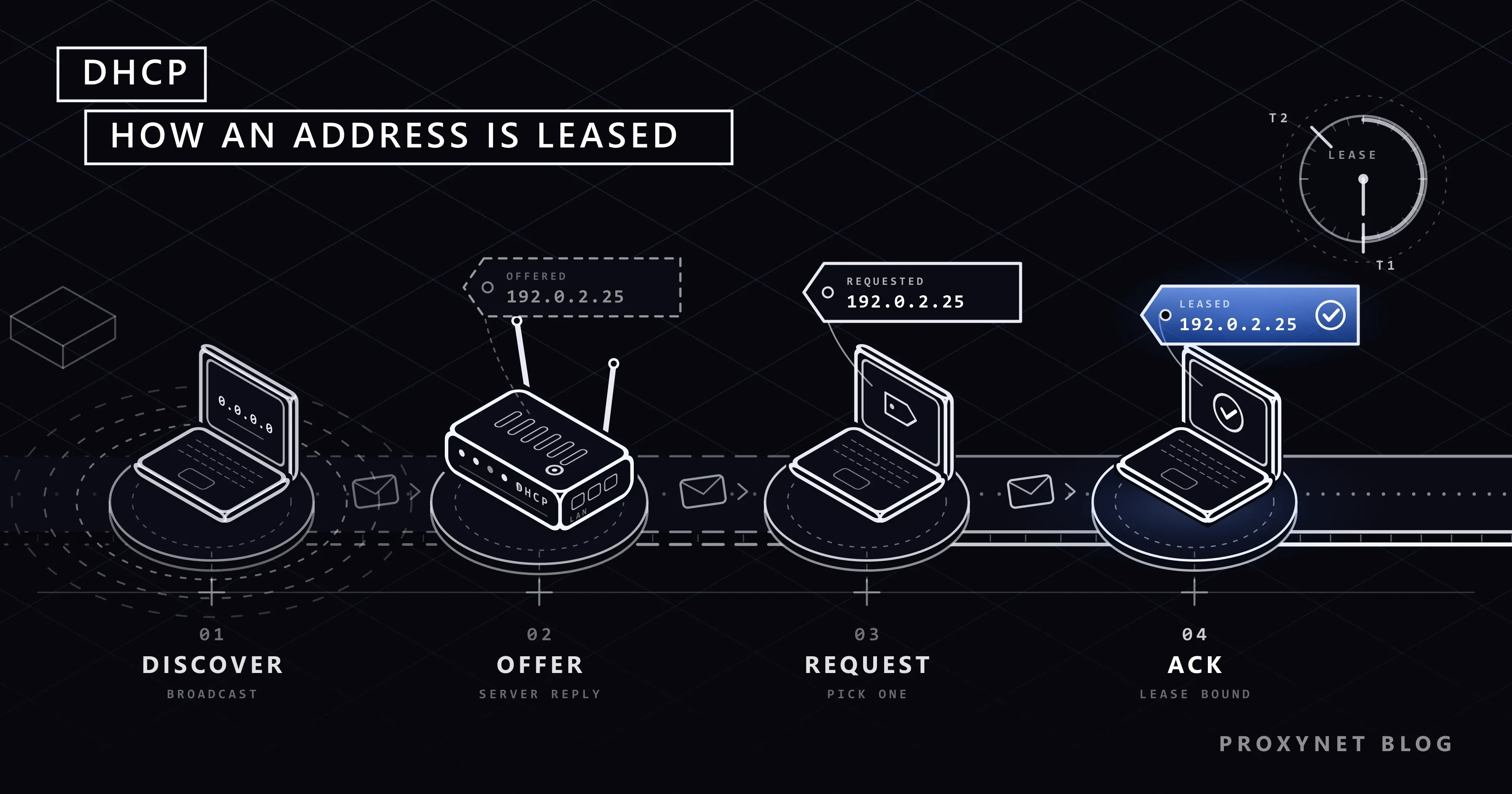
A device gets its address in four messages, often remembered as DORA. They travel over UDP, a protocol for short messages that need no connection, from the client's port 68 to the server's port 67.
- Discover. The new device has no address yet, so it cannot write to anyone in particular. It broadcasts a DHCPDISCOVER message, which every device on the local network receives: "I need an address."
- Offer. Every DHCP server that hears it replies with a DHCPOFFER: a free address from its pool, the settings that go with it and how long the address may be kept.
- Request. The device picks one offer, usually the first, and broadcasts a DHCPREQUEST naming the chosen server. Any other server now knows its offer was turned down.
- Acknowledge. The chosen server confirms with a DHCPACK. From this moment the address belongs to the device for the length of the lease.
If the device finds the address already in use, it refuses it with a DHCPDECLINE; if the server cannot honour a request, it answers with a DHCPNAK. Either way the exchange starts over.
After a restart, a device that has been on the network before simply requests the address it remembers and usually gets it back. That is why your laptop's local address often stays the same for weeks although nobody fixed it.
What does a DHCP server hand out?
Besides the address, the DHCPACK carries options: numbered fields defined in RFC 2132, the companion document to RFC 2131. A home router fills in the same handful almost every time.
| Setting | Option | What it tells the device | Example |
|---|---|---|---|
| IP address | – | The device's own address here | 192.0.2.25 |
| Subnet mask | 1 | Which addresses are local | 255.255.255.0 |
| Default gateway | 3 | Where traffic for outside goes | 192.0.2.1 |
| DNS servers | 6 | Who turns names into addresses | 192.0.2.1 |
| Lease time | 51 | How long the address is lent | 86400 s (24 h) |
| Domain name | 15 | A name suffix for the network | corp.example |
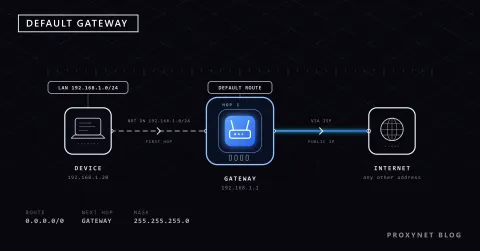
With a subnet mask of 255.255.255.0, every address that shares the first three numbers is local. Everything else goes to the default gateway, which at home is the router itself, as our guide to the default gateway explains. The examples come from ranges reserved for documentation; your network more likely uses 192.168.x.x or 10.x.x.x.
What is a DHCP lease and when is it renewed?
A lease is the period for which a DHCP server lends an address to a device; until it runs out, the address is reserved for that device. Apple's guide to recommended router settings suggests 8 hours for home and office networks and 1 hour for hotspots and guest networks, because a router's pool is limited and a shorter lease returns unused addresses sooner.
The device does not wait for the end. RFC 2131 sets two timers, T1 and T2, as fixed fractions of the lease:
- T1, at 50 % of the lease. The device asks the server that gave it the address to extend the lease, directly and to that server only.
- The server agrees. It answers with a DHCPACK, the lease starts again and the address stays the same.
- T2, at 87.5 % of the lease. If the first server has not answered, the device broadcasts its request so that any DHCP server can extend it.
- Expiry. If nobody answers before the lease ends, the device must stop using the address and starts again with Discover.
With a 24-hour lease, renewal starts after 12 hours and the broadcast attempt after 21. A device can also return its address early with a DHCPRELEASE message, which is what ipconfig /release sends on Windows.
Where does the DHCP server run: home router or company server?
At home the DHCP server is part of the router and is on from the factory; the router's admin page usually has a DHCP section with the address pool, the lease time and the devices holding an address. The same Apple guide gives the key rule: a network should have only one DHCP server. When the provider's modem and your own router both hand out addresses, devices land in two ranges and some lose access.
Company networks are split into subnets, for example one per floor, served by dedicated DHCP servers. A broadcast does not cross a router, so the routers between subnets act as relay agents that forward the Discover message to the central server.
DHCP reservation vs static IP: which should you use?
For a printer, a camera or a home server that should keep the same local address, a DHCP reservation is usually the better choice. You tell the router to always give one device the same address, and it recognises the device by its MAC address, the hardware address of its network adapter. The device stays on DHCP, so a later change of router is one setting in one place.
A static IP in this sense means typing the address on the device. In Windows: Settings > Network & internet, the network you are on, then Edit next to IP assignment and Manual instead of Automatic (DHCP). You then enter the mask, gateway and DNS servers yourself and must pick an address outside the router's pool, or two devices end up with the same address. Microsoft recommends staying on Automatic (DHCP).
Both options concern the local address inside your home. A static IP from your internet provider is a fixed public address on your line, compared with the usual changing one in Static IP vs Dynamic IP.
What happens when DHCP fails? (169.254.x.x and APIPA)
When a Windows device gets no answer from a DHCP server, it gives itself an address between 169.254.0.0 and 169.254.255.255 with the mask 255.255.0.0. Microsoft calls this Automatic Private IP Addressing (APIPA), and its APIPA article spells out the limit: such a device can talk only to devices on the same local network with the same kind of address. With no gateway and no DNS server, the internet is out of reach.
So a 169.254.x.x address is a symptom. The usual causes are a frozen or restarting router, a Wi-Fi connection that never finished joining (wrong password, weak signal), a faulty cable or a full address pool. Windows keeps sending Discover messages every few minutes and switches to a proper address once a server answers.
How do you see your DHCP lease?
Each system shows whether DHCP is on and which address you got:
- Windows 11. Open Settings > Network & internet, select Wi-Fi and your network, or Ethernet, and find IPv4 address. IP assignment reads Automatic (DHCP).
- Mac. Choose Apple menu > System Settings, click Network, the connection you use, Details, then TCP/IP. Configure IPv4 reads Using DHCP.
- iPhone and iPad. Go to Settings > Wi-Fi and tap the Info button next to your network; scroll down for the address details.
- Android. Menus differ by brand. On a Pixel, open Settings > Network & internet > Internet and tap the settings icon next to your network. If your phone does not list the IP address there, the router's device list does.
Advanced: the full lease in ipconfig /all
On Windows, type cmd into the Start menu, open Command Prompt and run:
ipconfig /allThis is the Ethernet part of the output from one of our Windows 11 computers, shortened, with real addresses replaced by documentation examples and the dates in US format:
Ethernet adapter Ethernet:

   Physical Address. . . . . . . . . : 00-00-5E-00-53-1A
   DHCP Enabled. . . . . . . . . . . : Yes
   Autoconfiguration Enabled . . . . : Yes
   IPv4 Address. . . . . . . . . . . : 192.0.2.25(Preferred)
   Subnet Mask . . . . . . . . . . . : 255.255.255.0
   Lease Obtained. . . . . . . . . . : Thursday, November 12, 2026 3:15:56 AM
   Lease Expires . . . . . . . . . . : Friday, November 13, 2026 3:16:06 AM
   Default Gateway . . . . . . . . . : 192.0.2.1
   DHCP Server . . . . . . . . . . . : 192.0.2.1
   DNS Servers . . . . . . . . . . . : 192.0.2.1
DHCP Enabled: Yes means the adapter asks a server for its address; Autoconfiguration Enabled: Yes only means the 169.254 fallback is allowed. The lease runs for one day, and Default Gateway and DHCP Server match because the home router plays both roles.
How do you renew a DHCP lease?
Renewing asks for the lease again; try it when one device has no internet while others work.
- Windows. In Command Prompt,
ipconfig /renewrequests the lease again. The common recipe first runsipconfig /release, which, according to Microsoft's ipconfig reference, sends a DHCPRELEASE and removes the address, so the connection stays down until the renew finishes. Never run it on a computer you control remotely. - Mac. In System Settings > Network, click the connection, Details > TCP/IP, then Renew DHCP Lease and OK, as in Apple's renewal guide.
- iPhone, iPad and Android. Turn Wi-Fi off and on, or forget the network and join again: Forget This Network on the iPhone's Info screen; on a Pixel, Settings > Network & internet > Internet > Saved networks, the network, Forget.
- All devices at once. Restart the router.
When we ran ipconfig /renew on our test computer, the same address came back; Lease Expires moved to 24 hours after the renewal, while Lease Obtained kept its old time.
How does DHCP work with IPv6?
IPv6 has its own version, DHCPv6, but many home networks do not use it for addresses. With SLAAC (stateless address autoconfiguration), the router announces the network's prefix and each device builds its own IPv6 address from it; RFC 9915, the current DHCPv6 standard from January 2026, lets DHCPv6 work instead of SLAAC or next to it.
Why does a proxy IP whitelist need your public address?
Because the addresses DHCP hands out inside your home never reach the internet. All your devices go online behind the router's single public address, which comes from your internet provider and on most home lines changes from time to time.
With IP whitelist authentication, a proxy provider accepts connections only from addresses you registered, so you register your public address, not the one ipconfig shows, and update it when it changes. A username and password do not depend on your address at all; our guide to proxy authentication compares the two. Proxynet supports both, with up to 10 IP addresses on the whitelist.
When a site must always see the same address from you, an ISP Proxy gives you a dedicated exit address that stays the same however often your own address changes.
Where you meet DHCP
- Home Wi-Fi and Ethernet: the router lends every phone, laptop and TV its address.
- Hotels, cafés and airports: guest networks work best with short leases, so addresses return to the pool quickly.
- Offices and campuses: central servers, relay agents and reservations for printers.
Common DHCP problems and how to fix them
| Symptom | Likely cause | Fix |
|---|---|---|
Address starts with 169.254, no internet | No DHCP server answered | Restart the router, check cable or Wi-Fi password, renew |
| Wi-Fi or Ethernet shows DHCP Enabled: No | IP assignment set to Manual | Set it back to Automatic (DHCP) |
| "IP address conflict" warning | Manual address inside the pool | Use a reservation or an address outside the pool |
| Some devices get odd addresses and lose access | Two DHCP servers (modem and router) | Keep DHCP on one device only |
| New devices cannot join, old ones work | The address pool is full | Shorten the lease or enlarge the pool |
| Sites fail by name but work by IP | Wrong DNS server handed out | Check the DNS field on the router's DHCP page |
A Windows troubleshooter report that DHCP is not enabled for Wi-Fi or Ethernet points at the second row.
Common mistakes
- Turning DHCP off on the main router "for security". New devices then need manual settings and the network is no safer.
- Typing a manual address inside the DHCP pool. Sooner or later the router lends it to another device.
- Expecting
ipconfig /releaseand/renewto change your public IP. They only touch the local lease. - Taking
169.254.x.xfor the router's address. It is the address a device gives itself when no server answered.
Decision guide
| Your need | What to do |
|---|---|
| New devices should just work | DHCP on in the router, Automatic (DHCP) on the device |
| A printer or camera keeps its local address | DHCP reservation in the router |
One device shows a 169.254 address | Restart the router, then renew the lease |
| You added a second router or mesh unit | DHCP on the main router only |
| A proxy or service recognises you by IP | Whitelist your public IP, or use username and password |
| A site must always see the same address | Fixed IP from your provider, or a static ISP proxy |
Frequently asked questions
Should DHCP be on or off on my router?
On, on the one router that hands out addresses. Turn it off only on a second router or extender used as an access point, because a network should have a single DHCP server.
Is DHCP safe?
On a home network, yes, with one limit: DHCP cannot prove that a server is genuine. RFC 2131 itself calls the protocol "quite insecure", because anyone already on the network can run a fake server that hands out a wrong gateway or DNS server. A strong Wi-Fi password keeps such people out; company networks also use switches that accept DHCP replies only from the real server's port.
Does DHCP change my public IP?
No. The DHCP server in your router lends local addresses only; the public address websites see comes from your internet provider and changes, if at all, by the provider's rules.
What does "DHCP Enabled: No" mean in ipconfig?
That adapter does not ask a DHCP server for its address: someone typed its settings by hand, or it is a virtual adapter managed by software, like the disconnected VPN adapter on our test computer. On your normal Wi-Fi or Ethernet adapter, set IP assignment back to Automatic (DHCP).
What is a good DHCP lease time for a home network?
Anything from a few hours to a day works. Apple recommends 8 hours for home and office networks and 1 hour for guest networks; the router behind our test computer uses 24 hours (86,400 seconds).
Which ports does DHCP use?
DHCP for IPv4 runs over UDP: servers listen on port 67 and clients on port 68. DHCPv6 uses UDP port 547 for servers and 546 for clients.
Summary
DHCP gives every device on a network its address, subnet mask, gateway and DNS servers in four messages: Discover, Offer, Request and Acknowledge. The address is a lease, renewed at half its time; without a server, Windows falls back to a 169.254 address that cannot reach the internet. At home the router should be the only DHCP server, and nothing in DHCP changes the public address the internet sees. When that address matters, for an IP whitelist or a fixed exit, compare the options on our proxy products page.