A router setup guide tells you to type your default gateway into the browser. Or the Windows network troubleshooter reports, without further explanation, that "the default gateway is not available". The term sounds technical, but it describes something simple: the door your device uses to leave the home network.
This post explains what a default gateway is and how your device decides when to use it. It then shows how to find yours on Windows, Mac, iPhone, Android and Linux, what to do when Windows says it is not available, and how a gateway differs from a router, a modem, a DNS server and a proxy.
What is a default gateway?
A default gateway is the router your device uses as its exit from the local network. Every packet addressed to something outside that network goes to the gateway first, and the gateway passes it on.
"Gateway" is the internet's original word for a router: RFC 1122, the standard that sets the requirements for internet hosts, says networks are joined by packet-switching computers called gateways or IP routers. "Default" means it is the route your device falls back on when it has no more specific instruction for a destination, which at home is almost always.
The router has two sides: on the inside a private address that every device in the house uses as its gateway, on the outside the address your provider assigned to your line. "The default gateway" means the inside address.
You rarely type it yourself. When a device joins a network, the router's DHCP service, which hands out network settings automatically, gives it an IP address, a subnet mask, DNS servers and the default gateway in one go; What Is DHCP? walks through that exchange.
How does your device decide when to use the gateway?
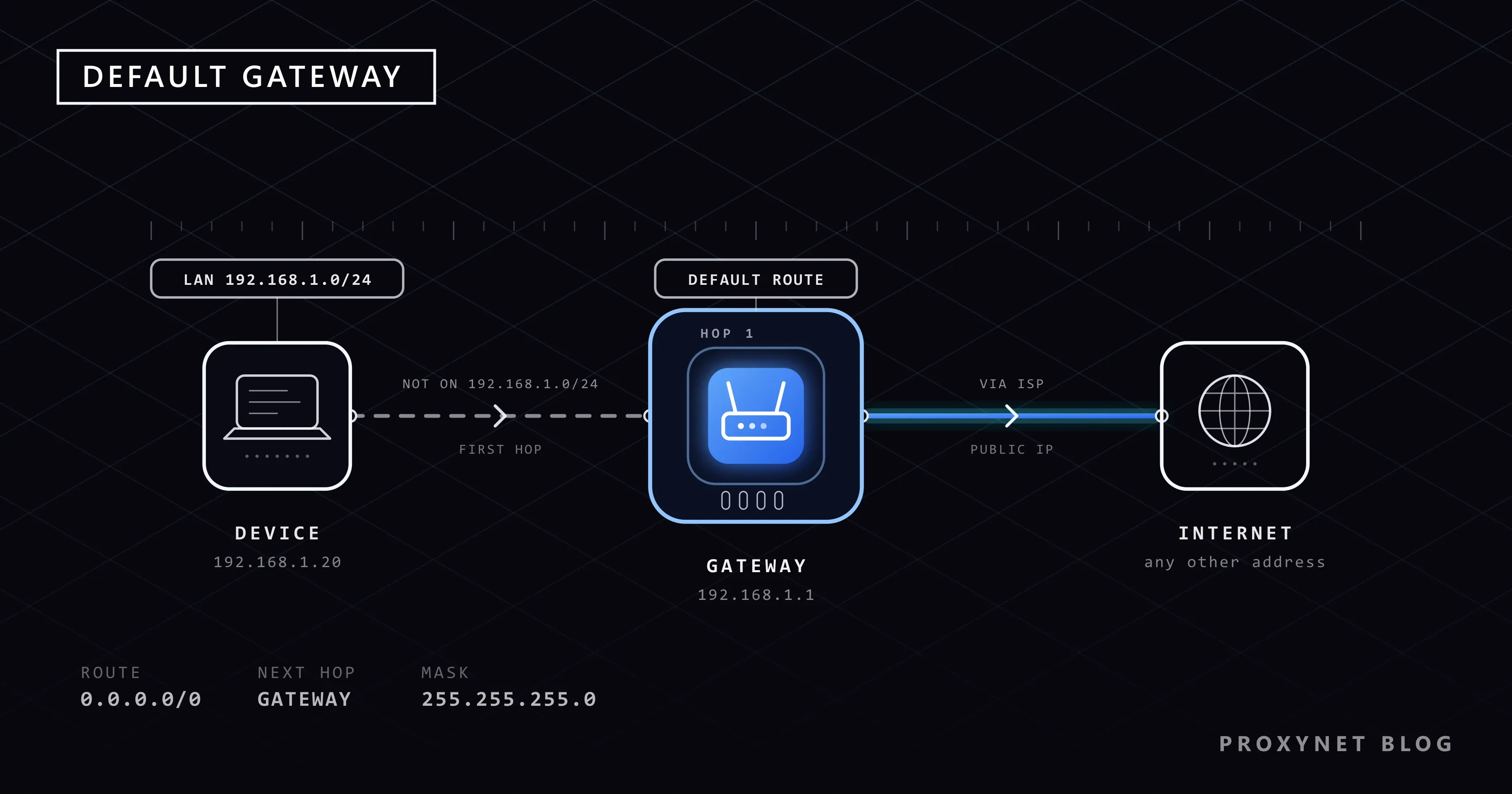
Your device sends a packet directly when the destination is on its own network and to the gateway in every other case.
- Your device knows its address and subnet mask. Say the laptop is
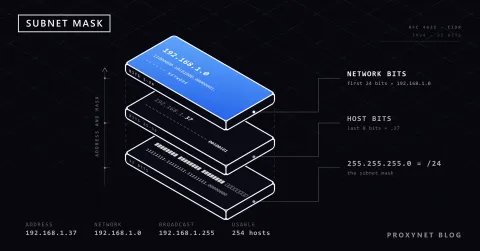
192.168.1.20with the mask255.255.255.0. The mask marks which part of the address names the network, here the first three numbers, so the local network runs from192.168.1.0to192.168.1.255. Reading and calculating masks is covered in What Is a Subnet Mask?. - It checks the destination. A printer at
192.168.1.30shares the first three numbers, so the laptop sends to it directly, without the gateway. - Anything else goes to the gateway. A website at
203.0.113.10does not match, so the laptop hands the packet to192.168.1.1. The packet still carries the website's address as its destination; only its first stop changes. - The router forwards it. It swaps your private source address for its own outside address and sends the packet to your provider. Replies come back to the router, which hands them to your laptop.
This is the rule written into RFC 1122: a destination on a connected network is reached directly, anything else through a gateway, and the address mask decides which case applies.
Inside the device the gateway is stored as the default route, an entry in the routing table (the rules the system uses to choose where packets go) that matches every address: 0.0.0.0/0 in IPv4, ::/0 in IPv6. More specific entries, such as your local network, are checked first; the default route catches whatever is left.
What does a default gateway address look like?
A home default gateway is almost always a private address, often the first address of the local network. Common ones are 192.168.1.1 and 192.168.0.1, used by many home routers, and 10.0.0.1, used by some providers' routers; others are possible.
Private ranges are blocks reserved for local networks and never routed on the internet; RFC 1918 sets aside 10.0.0.0 to 10.255.255.255, 172.16.0.0 to 172.31.255.255 and 192.168.0.0 to 192.168.255.255. That is why millions of homes use the same 192.168.1.1 without conflict: the address only has meaning inside its own house.
On IPv6 the router announces itself from its link-local address, as RFC 4861 requires, so the IPv6 gateway usually appears as an address beginning with fe80::: the same router, reached over the other protocol.
Default gateway, router, modem, DNS server and public IP: what is the difference?
The default gateway is a setting on your device; the router is the box that answers at that address. The other terms on a network settings screen sit around them:
| Term | What it is | What it does for you |
|---|---|---|
| Default gateway | An address in your device's settings | Tells the device where to send traffic for other networks |
| Router | The box at that address | Forwards traffic between your network and your provider |
| Modem | The box on the provider's line | Turns the cable, fibre or DSL signal into a network link |
| DNS server | A server that turns names into addresses | Answers "which IP is example.com?" |
| Public IP | The address websites see | Sits on the router's outside or on the provider's shared device |
In many homes the modem and router are one box. The DNS field often shows the gateway's address too, because many routers relay DNS questions to the provider; but a DNS server can be anywhere, while a gateway must be on your local network.
How do you find your default gateway?
Every operating system shows the gateway in its network details. The steps below come from the vendors' help pages and, for Windows, from running the command ourselves.
Windows 11 and Windows 10
The quickest way is ipconfig, which according to Microsoft's ipconfig reference displays the IPv4 and IPv6 addresses, the subnet mask and the default gateway of every network adapter.
- Open the Start menu, type
cmdand open Command Prompt. - Type
ipconfigand press Enter. - Find the block for the adapter you use (its name contains Wi-Fi or Ethernet) and read the Default Gateway line.
This is the Ethernet part of the output on our test PC, with our own addresses replaced by ones reserved for documentation; on your screen the gateway will usually look like 192.168.1.1:
Ethernet adapter Ethernet:

   Connection-specific DNS Suffix  . :
   Link-local IPv6 Address . . . . . : fe80::20%7
   IPv4 Address. . . . . . . . . . . : 192.0.2.20
   Subnet Mask . . . . . . . . . . . : 255.255.255.0
   Default Gateway . . . . . . . . . : 192.0.2.1
Adapters that are not connected, such as an idle VPN adapter, show "Media disconnected" and no gateway, which is normal.
Mac
Apple's guide to TCP/IP settings on Mac uses this path:
- Choose Apple menu > System Settings, then click Network in the sidebar.
- Click the connection you use, for example Wi-Fi, then click Details.
- Click TCP/IP (you may need to scroll). The router address shown there is your default gateway.
iPhone and iPad
Open Settings > Wi-Fi and tap the More Info button (the small "i") next to your network. In the IPv4 section, next to the IP address and subnet mask, you will see the router address, your default gateway; Apple's Wi-Fi troubleshooting guide checks the same three values.
Android
Menu names vary by brand. On Pixel phones and others with the standard Android menus, open Settings > Network & internet > Internet, tap the gear icon next to the Wi-Fi network you are connected to and scroll to Network details; the Gateway line shows the address. On other brands, look for the details screen of the connected Wi-Fi network.
Linux
Open a terminal and run ip route. The line that begins with default via names the gateway, followed by the network interface after dev; in the ip tool, default stands for the whole address space.
What can you do with the gateway address?
The main use is opening your router's admin page. On a device connected to the router, type the gateway address into the browser, for example http://192.168.1.1; the login details are often printed on a label on the router. There you change the Wi-Fi name and password, see connected devices and update the firmware. If the router still uses a factory password such as "admin", change it first, because anyone on your Wi-Fi can open the same page.
The gateway is also the first stop for testing a connection. A traceroute, which lists the routers your packets pass through, shows it as hop 1, and a ping to it tells you whether your device can reach the router at all.
Why does Windows say "the default gateway is not available"?
The Windows network troubleshooter shows this message when your PC could not reach the router at its gateway address during the check. It appears most often on Wi-Fi, where the link to the router can drop for a moment. Work through these steps in order; they follow Microsoft's guide to fixing Wi-Fi connection issues in Windows.
Restart the modem and router. Unplug both, wait at least 30 seconds, plug the modem in, wait until its lights settle, then plug the router in.
Ping the gateway. Run
ipconfig, note the Default Gateway, then runpingfollowed by that address. Our wired test PC answered like this (address masked):bashPinging 192.0.2.1 with 32 bytes of data: Reply from 192.0.2.1: bytes=32 time<1ms TTL=64 Reply from 192.0.2.1: bytes=32 time<1ms TTL=64 Reply from 192.0.2.1: bytes=32 time<1ms TTL=64 Reply from 192.0.2.1: bytes=32 time<1ms TTL=64 Ping statistics for 192.0.2.1: Packets: Sent = 4, Received = 4, Lost = 0 (0% loss),Replies mean the PC reaches the router, so the fault lies further out, in the modem or with the provider. No replies point to the link between the PC and the router.
Stop Windows from switching off the Wi-Fi adapter. In Device Manager, expand Network adapters, right-click the Wi-Fi adapter, choose Properties, and on the Power Management tab clear Allow the computer to turn off this device to save power. Try this when the message keeps coming back.
Reinstall the network adapter driver. In Device Manager, right-click the adapter, choose Uninstall device and restart; Windows installs the driver again. Keep the maker's driver at hand in case it does not.
Reset the network settings. Microsoft's guide lists a few reset commands for an administrator Command Prompt. The last resort is Settings > Network & internet > Advanced network settings > Network reset on Windows 11, which reinstalls every adapter, so VPN software may need setting up again.
Default gateway vs proxy: what is the difference?
A default gateway forwards all your traffic at the network level, for every app, without any of them knowing. A proxy works at the application level: only the browser, script or app you point at it sends requests there, and the proxy makes those requests on your behalf, so the website sees the proxy's IP address instead of yours.
The two stack rather than compete: your request to a proxy still leaves the house through your default gateway, and changing the gateway cannot give one app a different public address. When requests must arrive from home connections in another country or city, that is the job of a Residential Proxy: you keep your own gateway and send only that app's traffic through an address in the location you choose.
Common mistakes
- Taking the gateway for your public IP.
192.168.1.1is the router's inside address; websites see a different one. - Setting a static IP and leaving the gateway empty. The local network keeps working, nothing outside it does.
- Swapping the gateway and DNS fields. They often match at home, but a public DNS server typed into the gateway field breaks the connection.
- Looking for the modem's page behind a second router. With two routers in a row, your PC's gateway is the second one; the first sits at another address.
- Keeping the router's factory password. The admin page sits at a well-known address that anyone on your Wi-Fi can open.
Decision guide
| Your need | What to do |
|---|---|
| Find the gateway on Windows | Run ipconfig, read the Default Gateway line |
| Find it on a Mac | System Settings > Network > Details > TCP/IP |
| Find it on an iPhone | Settings > Wi-Fi > More Info button |
| Find it on Android | Network & internet > Internet > gear icon |
| Open your router's settings | Type the gateway address into the browser |
| "Default gateway is not available" | Restart the router, ping the gateway, turn off adapter power saving |
| One app needs another public IP | A proxy for that app; leave the gateway alone |
Frequently asked questions
Is the default gateway my public IP address?
No. The default gateway is your router's private address on the home network, and websites never see it. Your public IP sits on the router's outside or, if your provider shares one address among many customers, on a device in the provider's network, as explained in What Is CGNAT?.
What should my default gateway be?
It should be your router's own address, and it has to be in the same network as your device. If your device is 192.168.0.25 with the mask 255.255.255.0, the gateway is another 192.168.0.x address, usually 192.168.0.1.
Can I change my default gateway?
Yes, but only to the address of a router that really exists on your network. On Windows open Settings > Network & internet, choose your Wi-Fi network (under Manage known networks) or Ethernet, select Edit next to IP assignment, switch to Manual and fill in Gateway along with the IP address and subnet mask. To change it for every device, change the router's own address in its admin page instead.
Why do I have no default gateway?
Usually because the device did not get its settings from the router. If ipconfig shows an address starting with 169.254 and an empty Default Gateway line, Windows got no answer from the router's DHCP service and gave itself an address. A static IP without a gateway, an unplugged cable or a dropped Wi-Fi link look the same; restarting the router and reconnecting fixes most cases.
Is the default gateway the same as the router's IP address?
On a home network, yes: it is the router's local IP address. In larger networks it can be a separate router or firewall, but it is always the device that leads out of the local network.
Is it safe to share my default gateway address?
Yes. It is a private address that countless other homes use too, and nobody on the internet can reach it. What protects your network is the router's admin password and your Wi-Fi password, not keeping 192.168.1.1 secret.
Summary
The default gateway is the router address your device sends every packet to when the destination is outside the local network; at home it is the router's private address, such as 192.168.1.1. Your device reaches local devices directly and leaves everything else to the gateway, stored as the default route 0.0.0.0/0. Find it with ipconfig or in the Wi-Fi details, use it to open your router's settings, and ping it to tell a router problem from a provider problem. A gateway carries all of a device's traffic; when only certain apps should reach websites from another address, compare the options on our proxy products page.