A support team wants an assistant that answers from the public documentation of the products it supports. The first version downloads the pages with Requests and hands the HTML to the model. The answers quote the cookie banner, the menu takes up more of the prompt than the article, pages that load their text with JavaScript come back empty, and a page that changed last week is still answered from the old copy. Nothing is wrong with the model. The data was never prepared.
This post covers that preparation: what RAG is, why web pages are the hardest source to prepare, why Markdown beats both HTML and plain text, the pipeline from fetch to refresh, a measured example on one real page with a 58-line Python script, and where scraping APIs and proxies fit. The script ran on 9 November 2026 with trafilatura 2.3.1, tiktoken 0.14.0 and Python 3.13.
What is RAG and what is it used for?
RAG, short for retrieval-augmented generation, is a way of answering with a language model where the facts come from documents retrieved at question time rather than from the model's training alone. A retriever searches an index of passages, the best matches go into the prompt, and the model writes its answer from them. The index can hold anything that was turned into text: PDFs, tickets, database rows and web pages.
The name comes from a 2020 paper by Patrick Lewis, Ethan Perez, Aleksandra Piktus and colleagues, Retrieval-Augmented Generation for Knowledge-Intensive NLP Tasks. It pairs a pre-trained sequence-to-sequence model, whose knowledge sits in its parameters, with a dense vector index of Wikipedia read by a neural retriever, which the authors call non-parametric memory. Two problems the paper names are exactly the ones web content raises: updating what the model knows, and showing where an answer came from. Fine-tuning bakes knowledge into the weights, so every page change means another training run and no source to cite; with RAG a changed page is fetched again and re-indexed, and every answer can carry its URL and section.
Why are web pages the hardest RAG source?
Web pages are hard because the content you want is a minority of what the server sends. A documentation page carries a navigation tree, a header, a footer, a cookie notice, share buttons and "related articles", all as text that a naive pipeline indexes next to the article. When a user asks about rate limits, the retriever returns the cookie banner because it contains the word "limit".
Three more problems are specific to the web. Many pages load their text with JavaScript, so the HTML you download holds a title and an empty div. One article often lives at several URLs, with tracking parameters, a print view, http and https or a trailing slash, so the same passage lands in the index three times and fills the top results with copies of itself. And pages change silently: a PDF you indexed in March is still that PDF, a pricing page is not. Add pagination that splits one document over several pages and encoding mistakes that turn — into —, and you have the ordinary state of a public site.
Why Markdown and not HTML or plain text?
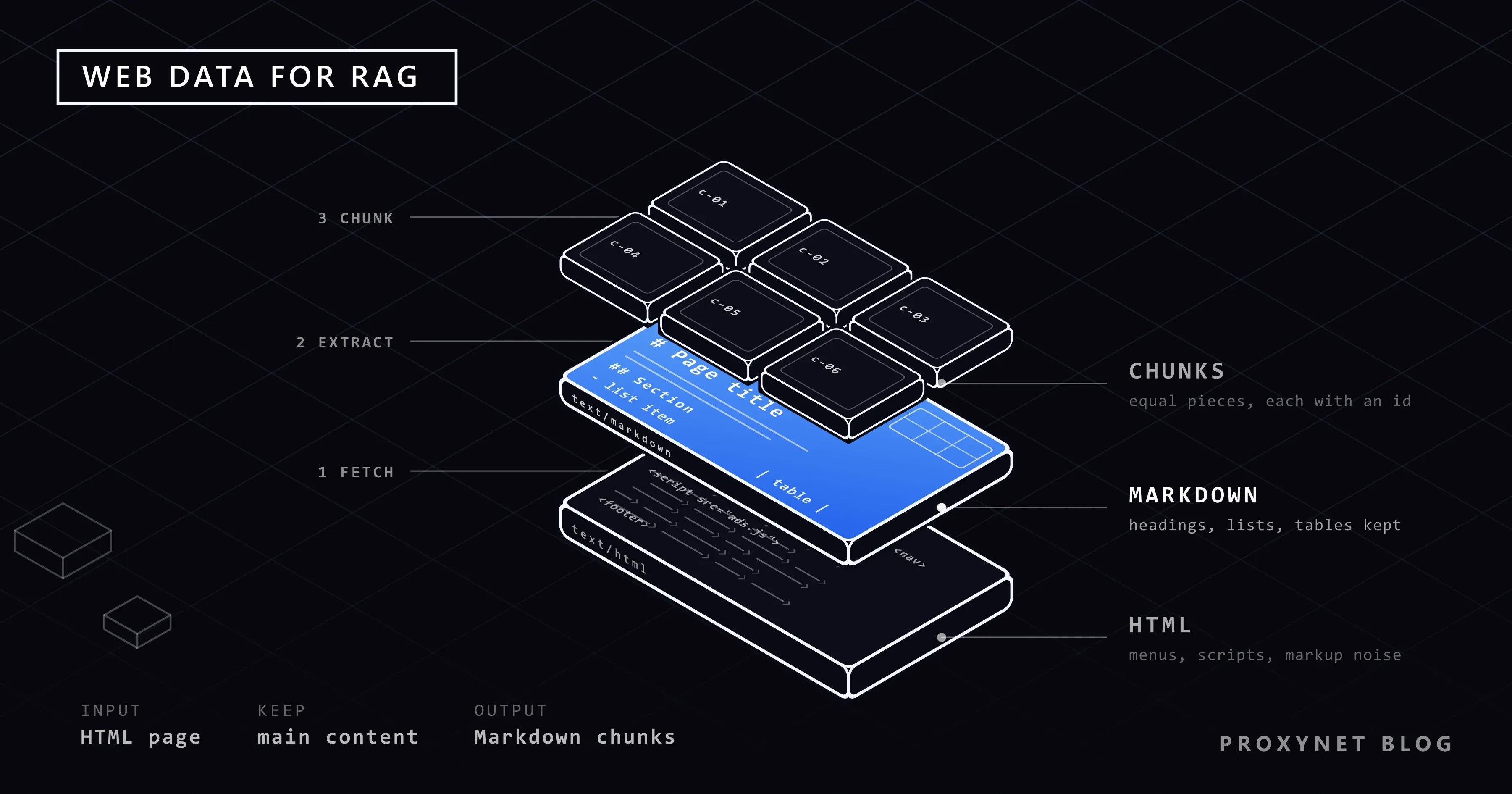
Markdown is the right intermediate format because it keeps the structure a retriever and a model need, such as headings, lists, tables, code blocks and links, while dropping the markup, scripts and styles that carry no meaning. HTML spends most of its tokens on tags and attributes. Plain text goes too far the other way: a table becomes a run of words, a heading becomes a line like any other, and there is no longer a reliable place to cut a chunk. The llms.txt proposal, which asks sites to publish Markdown versions of their pages, puts it plainly: "At the moment the most widely and easily understood format for language models is Markdown."
We measured the difference on one real page, the Python documentation's HOWTO on fetching internet resources with urllib, with the o200k_base tokenizer from tiktoken. The numbers describe this page, not the web in general.
| Format | What survives | Tokens on the test page | Where chunks can be cut |
|---|---|---|---|
| Raw HTML | Everything, including menus, scripts and markup | 21,044 | At tags, which say nothing about meaning |
| Plain text | Words only; headings and tables flatten | 4,133 | At blank lines, at best |
| Markdown | Headings, lists, tables, code and links | 4,405 | At heading lines |
Markdown cost 272 tokens more than plain text on this page, about 7 percent, and in return every section heading is still a heading. Against the raw HTML it is 4.8 times smaller. One caution: Markdown has a specification for its core, CommonMark (version 0.31.2, January 2024), but pipe tables and fenced code blocks are extensions popularised by GitHub, so check that your converter writes them rather than dropping them.
How does the web-to-RAG pipeline work?
The pipeline has ten steps, and the order matters because each relies on the one before it.
- Fetch only what you may fetch. Read the site's robots.txt before the first request and skip disallowed paths; the rules are explained in our robots.txt guide. Read the terms of use, send a
User-Agentthat names your bot and a contact address, and keep a polite pace per domain. If the site publishes Markdown versions of its pages, use those instead of parsing HTML. - Extract the main content. trafilatura is a Python package and command-line tool under the Apache 2.0 licence that turns raw HTML into text, Markdown, XML or JSON and also pulls out the title, author and date. Mozilla Readability is the JavaScript library behind Firefox Reader View;
new Readability(document).parse()returns the title, the cleaned content and the byline. Both work from structure and text density, without a per-site parser. - Convert to Markdown. trafilatura writes Markdown directly with
output_format="markdown". If you already have cleaned HTML, markdownify in Python or Turndown in JavaScript convert it; choose ATX-style#headings, because the chunker splits on them. Pages that build their content with JavaScript need a browser: Crawl4AI renders them in Chromium and returns a "fit" Markdown without menus, as shown in our Crawl4AI guide. - Clean. Remove what the extractor left: anchor glyphs after headings, "Edit this page" links, breadcrumbs, duplicated whitespace. Fix the encoding at the source, not in the text. Leave code blocks and tables exactly as they are.
- Chunk at headings within a token budget. Cut where a heading line starts, keep the heading path as metadata (
Fetching URLs > Data), and split sections above the budget at paragraph boundaries. Count tokens with the tokenizer of the model you embed with; tiktoken is the fast BPE tokenizer for OpenAI's models, ando200k_baseis the encoding its README uses. Characters are no substitute: 500 characters are about 100 tokens in English prose and far more in code. - Remove duplicates. Hash the normalised chunk text; two chunks with the same hash are the same passage whatever URL they came from. Near-duplicates, such as the same page with a different "last updated" line, need a similarity test on word shingles or on the embeddings.
- Attach provenance. Every chunk carries its URL, fetch time, page title, section path, content hash and token count. Without these you cannot cite, refresh or delete.
- Embed and index. Each chunk becomes a vector in a vector index; many teams add a keyword index and merge the two result lists. Which model and database you pick does not change the steps above.
- Refresh. Store the
ETagandLast-Modifiedheaders and sendIf-None-MatchorIf-Modified-Sincenext time; a304 Not Modifiedcosts almost nothing, and our test page sent both headers. Use sitemaplastmoddates to decide what to revisit first, replace chunks by URL and section, and drop the chunks of pages that now return 404 or 410. - Evaluate retrieval. Write down 30 or 50 real questions with the passage that answers each and measure how often the right chunk is in the top results. Tune chunk size, overlap and budget against that number, not against a feeling.
A tested example: one page from HTML to Markdown chunks
The script runs the first seven steps on one page and prints what it found. We chose a page of the Python documentation, whose robots.txt disallows /dev, /release and old versions such as /3.10/ but allows /3/, checked on 9 November 2026; the script checks it again with urllib.robotparser before fetching.
python -m venv .venv
.venv/bin/pip install trafilatura tiktoken requests   # Windows: .venv\Scripts\pip
Two details explain two lines of the code. docs.python.org sends Content-Type: text/html without a charset, so Requests' resp.text would decode the page as ISO-8859-1 and every heading would end in a stray Â; the page declares UTF-8 in its <meta charset>, so the script decodes the bytes itself. And the documentation generator leaves a pilcrow sign (¶) after every heading as an anchor link, which trafilatura keeps as text, so the clean step removes it. A third detail matters for chunking: the page contains 17 fenced code blocks whose Python comments start with # , so a chunker that splits on every # line would cut inside the code and treat comments as headings. The script keeps each fenced block whole.
"""Fetch one public page, keep its main content as Markdown, chunk it by heading and count tokens."""
import hashlib, json, re, sys
from datetime import datetime, timezone
from urllib.parse import urlsplit
from urllib.robotparser import RobotFileParser
import requests
import tiktoken
import trafilatura

URL = sys.argv[1] if len(sys.argv) > 1 else "https://docs.python.org/3/howto/urllib2.html"
UA = "rag-prep-demo/1.0 (+https://example.com/bot)"
BUDGET = 512                                  # max tokens per chunk; longer sections are split by paragraph
enc = tiktoken.get_encoding("o200k_base")     # the tokenizer of OpenAI's current models
tokens = lambda s: len(enc.encode(s))

# 1. robots.txt first: stop if the path is disallowed for our user agent
robots = RobotFileParser(urlsplit(URL)._replace(path="/robots.txt", query="", fragment="").geturl())
robots.read()
if not robots.can_fetch(UA, URL):
    sys.exit(f"robots.txt disallows {URL}")

# 2. one fetch, three views of the same page: raw HTML, main content as Markdown, plain text
resp = requests.get(URL, headers={"User-Agent": UA}, timeout=30)
resp.raise_for_status()
html = resp.content.decode("utf-8")           # the page declares UTF-8; resp.text would guess ISO-8859-1
fetched_at = datetime.now(timezone.utc).isoformat(timespec="seconds")
md = trafilatura.extract(html, url=URL, output_format="markdown", include_tables=True, include_formatting=True)
md = md.replace("¶", "")                 # clean: Sphinx leaves a pilcrow anchor after every heading
txt = trafilatura.extract(html, url=URL, output_format="txt", include_tables=True)
title = trafilatura.extract_metadata(html, default_url=URL).title

# 3. split into blocks (paragraphs, heading lines, whole code fences), then cut at headings and at the budget
blocks = []
for seg in re.split(r"(```[\s\S]*?```)", md.strip()):           # a fenced code block is one block, never cut
    blocks += [seg] if seg.startswith("```") else [p.strip() for p in re.split(r"\n\s*\n|\n(?=#{1,6} )", seg) if p.strip()]
chunks, path, piece = [], [], ""
for block in blocks + ["# end"]:                                 # the sentinel heading flushes the last chunk
    head = re.match(r"(#{1,6}) (.+)", block)
    if head or (piece and tokens(piece + "\n\n" + block) > BUDGET):
        if piece:
            chunks.append((list(path), piece))                   # a heading with no text under it adds no chunk
        piece = "" if head else block
    else:
        piece = f"{piece}\n\n{block}".strip()
    if head:
        path = path[:len(head.group(1)) - 1] + [head.group(2).strip()]

# 4. provenance: every chunk carries where it came from, when, and a hash for de-duplication
records = [{"url": URL, "fetched_at": fetched_at, "title": title, "section": " > ".join(p[1:]) or "(top)",
            "content_hash": hashlib.sha256(text.encode()).hexdigest()[:16], "tokens": tokens(text), "text": text}
           for p, text in chunks]

print(f"page: {title}\nfetched: {fetched_at}")
print(f"tokens (o200k_base): html={tokens(html)}  markdown={tokens(md)}  text={tokens(txt)}")
sizes = sorted(r["tokens"] for r in records)
print(f"chunks: {len(records)}  min={sizes[0]}  median={sizes[len(sizes) // 2]}  max={sizes[-1]}  budget={BUDGET}")
print("\n".join(f"  {r['tokens']:>4} tok  {r['content_hash']}  {r['section'][:60]}" for r in records[:6]))
print(json.dumps({k: v for k, v in records[1].items() if k != "text"}, indent=2))
It printed:
page: HOWTO Fetch Internet Resources Using The urllib Package
fetched: 2026-11-09T12:32:13+00:00
tokens (o200k_base): html=21044  markdown=4405  text=4133
chunks: 19  min=10  median=183  max=495  budget=512
   276 tok  e21a9bc9bc9dc71b  Introduction
   460 tok  30fc2c8722d53c1a  Fetching URLs
   434 tok  51aca2bdee7780e4  Fetching URLs > Data
   144 tok  f8e6254387670d87  Fetching URLs > Data
   329 tok  3b49bcc1ef1326f3  Fetching URLs > Headers
    79 tok  3928e9cb23c19eee  Handling Exceptions
{
  "url": "https://docs.python.org/3/howto/urllib2.html",
  "fetched_at": "2026-11-09T12:32:13+00:00",
  "title": "HOWTO Fetch Internet Resources Using The urllib Package",
  "section": "Fetching URLs",
  "content_hash": "30fc2c8722d53c1a",
  "tokens": 460
}
The page became 19 chunks with a median of 183 tokens, and none exceeded the 512-token budget. "Fetching URLs > Data" appears twice because that section was longer than the budget and was cut at a paragraph boundary into 434 and 144 tokens; the two pieces share a section path but have different hashes, which is what a de-duplication step needs. The smallest chunk has 10 tokens, the page's one-sentence "Footnotes" section; a production pipeline would merge it into its neighbour. The sidebar, the previous and next links and the footer of the original page do not appear in the Markdown at all, which is the extractor doing its job. The JSON record is the provenance that travels with the chunk into the index; many teams also prepend the section path to the text before embedding it.
Where do scraping APIs fit?
A scraping API fits when rendering, extraction and politeness should be someone else's problem. Many of them return Markdown directly, render JavaScript pages in a browser and manage the request rate per domain, so your pipeline starts at the chunking step. Four checks tell you whether a service suits a RAG corpus: fetch ten pages you know and look for menus in the Markdown and for tables that arrived whole; make sure the title, the canonical URL and, if available, the last-modified date come with the content, because they become provenance; run the same unchanged page twice and compare the output, or your hashes will mark every page as changed; and ask how the service treats robots.txt and rate limits, because the requests are made on your behalf.
Where does a proxy fit?
A proxy fits in two situations here, and neither is about fetching faster from one site. The first is breadth: a RAG corpus often spans hundreds of domains, and a crawler that respects each domain's pace can still run many domains at the same time. Spreading those fetches over more than one exit address, for example through a Rotating Proxy, keeps every single domain seeing a slow, polite client while the whole job finishes in hours instead of days.
The second is location. Documentation, help and pricing pages often differ by the visitor's country or language, and an index built from the wrong version answers users with content they never see. Fetching from the country your users are in, with a Residential Proxy and country targeting, indexes the page they will actually read. robots.txt, the terms and the rate stay the same whichever address the request leaves from.
Common mistakes
- Chunking by character count across headings. A 1,000-character window that straddles two sections answers neither question. Cut at headings, then at paragraphs.
- Indexing boilerplate. Cookie notices, menus and footers become chunks that match everything a little and nothing well.
- No provenance. Without URL, fetch time and section you cannot cite a source, refresh a changed page or remove one that was taken down.
- Never refreshing. A corpus built once is a snapshot; conditional requests with
ETagandLast-Modifiedmake a weekly refresh cheap. - Embedding the same page several times. Tracking parameters, print views and trailing slashes create copies that crowd the top results; hash the content, not the URL.
- Counting characters instead of tokens, or counting with a different tokenizer than the embedding model uses.
- Splitting inside code blocks and tables. A
#comment inside code is not a heading, and half a table answers nothing. - Indexing an empty page. If the content is built with JavaScript, the downloaded HTML has no article; check the extracted token count before you index.
- Fetching what robots.txt or the terms exclude, or faster than a person would read. The legal position (see the last FAQ) does not improve with volume.
Decision guide
| Need | Recommendation |
|---|---|
| A few hundred documentation pages | trafilatura to Markdown, heading chunks of 200 to 500 tokens, a weekly refresh |
| Pages that render with JavaScript | A browser-based extractor such as Crawl4AI, or a scraping API that returns Markdown |
| The site offers Markdown versions or llms.txt | Fetch the .md twins and skip extraction |
| Answers must cite their source | Provenance on every chunk: URL, fetch time, title, section path, hash |
| The same passage keeps appearing in results | Content hashes, URL normalisation, a near-duplicate test |
| Hundreds of domains at a polite pace each | Parallel domains over several exits with a rotating proxy |
| Country-specific documentation or pricing | A residential proxy with country targeting |
| No team to run the pipeline | A managed scraping API that delivers Markdown with metadata |
Frequently asked questions
What does RAG stand for and how is it different from fine-tuning?
RAG stands for retrieval-augmented generation: the model answers from passages retrieved at question time. Fine-tuning changes the model's weights with training data, so new information needs a new training run and the model cannot say which document an answer came from. RAG updates by re-indexing a page and can cite the URL and section it used.
Why is Markdown better than HTML for LLMs?
Markdown keeps the structure that matters, such as headings, lists, tables and code, in a few characters, while HTML spends most of its tokens on tags, attributes and scripts. On our test page the Markdown was 4,405 tokens against 21,044 for the HTML, and chunks could still be cut at headings.
What is the ideal chunk size for RAG?
There is no single number; a working range for documentation is 200 to 500 tokens with cuts at headings, and the right value is the one that scores best on your own retrieval test. Smaller chunks match more precisely but lose context; larger ones carry context but dilute the match.
How often should I re-crawl pages for RAG?
As often as the pages change, which conditional requests tell you cheaply: send the stored ETag or Last-Modified value and a 304 Not Modified answer means nothing changed. Documentation is usually fine weekly, pricing and status pages daily, and sitemap lastmod dates say where to look first.
Does llms.txt replace scraping?
No. llms.txt is a curated index of a site's important pages for AI tools, and the same proposal asks sites to offer Markdown versions of pages; where both exist, fetch the Markdown and skip extraction. Most sites publish neither, and the file controls nothing about access, as our llms.txt guide explains, so robots.txt and the terms still decide what you may fetch.
Is it legal to use scraped web pages in RAG?
That depends on the site and the jurisdiction, and this is a description, not legal advice. Four things are usually examined: robots.txt, which RFC 9309 describes as a request to crawlers rather than an access authorization; the site's terms of use, which often forbid automated access; copyright, which concerns reproducing text and is affected by how much of a page an answer repeats and whether it is attributed; and personal data in the pages, which the GDPR and Türkiye's KVKK regulate and which a RAG corpus should not collect at all. Provenance on every chunk lets you remove a source on request. Consult a lawyer before you build a corpus from third-party sites.
Summary
RAG answers from retrieved passages, so the quality of the answers is set by the quality of the passages. For web sources that means fetching only what you may, extracting the main content, converting it to Markdown rather than HTML or plain text, chunking at headings within a token budget, attaching provenance, removing duplicates and refreshing with conditional requests. On our test page that pipeline turned 21,044 tokens of HTML into 19 clean chunks from a 4,405-token Markdown, with a script short enough to read in one sitting. If you would rather receive Markdown than build the pipeline, our Web Scraping API, a managed page extraction service available through the sales team, is described on the data scraping page.