


































You click a link to a ticket shop, an online form or your bank. The tab spins for about twenty seconds, then Chrome shows "This site can't be reached", the line "example.com took too long to respond." and ERR_CONNECTION_TIMED_OUT at the bottom. You reload and wait another twenty seconds for the same screen.
Your computer called, and nobody picked up. Below: what happens during those seconds, how a timeout differs from a refusal, fixes for one site and for every site, phones, one command that confirms a timeout, your own site, and proxies. If your screen shows a different code, This Site Can't Be Reached explains each one.
What does ERR_CONNECTION_TIMED_OUT mean?
Before a page can load, the browser has to open a connection to the site's server, the computer that holds the site. With ERR_CONNECTION_TIMED_OUT that first step never finished: the request went out and nothing came back, not even a "no". Chromium's network error list numbers the code -118 and describes it in five words: "A connection attempt timed out."
The site's name was found, or you would see a DNS code such as DNS_PROBE_FINISHED_NXDOMAIN; nobody answered at the address.
| Browser | What the screen says | Code |
|---|---|---|
| Chrome | "This site can't be reached" and "example.com took too long to respond." | ERR_CONNECTION_TIMED_OUT |
| Firefox | "The connection has timed out" and "The server at example.com is taking too long to respond." | None |
| Safari (Mac, iPhone) | "Safari Can't Open the Page", adding that the server isn't responding | None |
Edge, Brave and Opera are built on Chrome's engine (Chromium) and show the same code. Chrome on a computer also suggests "Checking the connection", "Checking the proxy and the firewall" and, on Windows, "Running Windows Network Diagnostics", which starts Windows' own troubleshooter.
What happens in the seconds before the error?
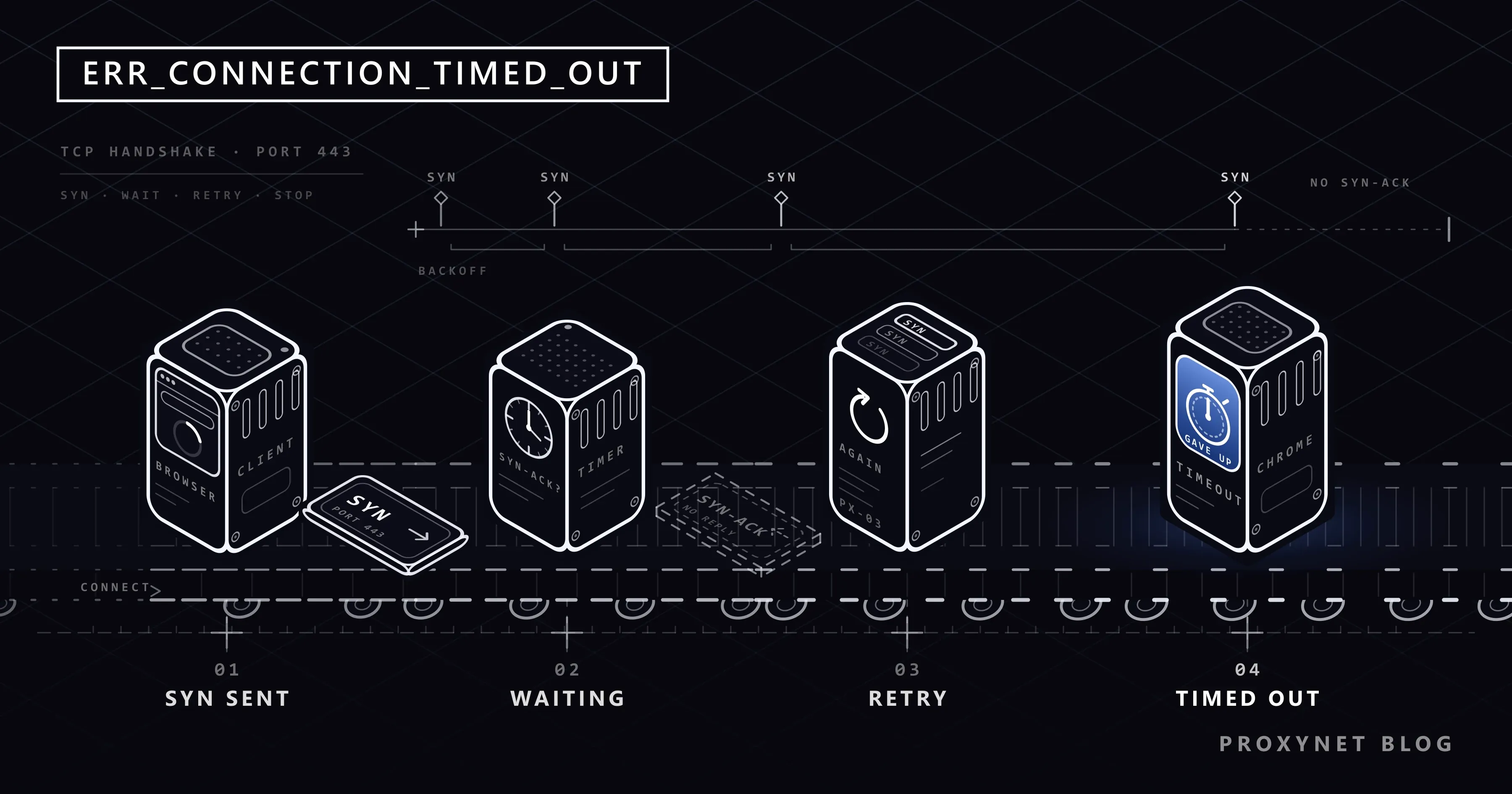
Opening a connection is a short exchange that the TCP standard (RFC 9293) calls the three-way handshake. TCP is the set of rules most web traffic uses to deliver data complete and in order.
- The browser sends a small opening message (SYN) to the server's address and port. A port is a numbered door a service listens on; secure sites use 443.
- A working server replies that it is ready (SYN-ACK), the browser confirms (ACK), and the page request follows.
- When no reply comes, your computer sends the opening message again, waiting longer before each try.
- After a few tries the operating system gives up and tells the browser, which shows the error.
How long that takes depends on the system; a comment in Chromium's source puts it between about 20 seconds and over three minutes. On 6 October 2026, a Windows 11 PC of ours gave up after 21 seconds.
The silence has only a few sources:
- The server is off, or the site's address points to a machine that no longer exists.
- The server is too busy. The Linux manual page for listen(2), the call servers use to accept connections, says that when the waiting line is full a new request "may be ignored". To a visitor, that looks like a dead server.
- A firewall drops the traffic. A firewall is a filter that decides which traffic may pass; many drop unwanted traffic silently instead of refusing it.
- The traffic is lost on the way, in one of the networks between your provider and the site.
Timed out, refused or reset: what is the difference?
Chrome puts all three under the same heading, but they describe different events:
| Code | What happened | Usual meaning | When it appears |
|---|---|---|---|
ERR_CONNECTION_TIMED_OUT | No reply at all | Server down or overloaded, traffic dropped | After a wait of 20 seconds or more |
ERR_CONNECTION_REFUSED | The machine said nothing listens on that port | Service stopped, wrong port | Within a second or two |
ERR_CONNECTION_RESET | A connection opened, then was cut | Security software, a network filter | At once or while loading |
ERR_CONNECTION_ABORTED | A connection opened, but sent data was never acknowledged | Unstable connection | After a wait |
The wait is the clue: a refusal comes back within a second or two because something answered, while a timeout makes you wait because your computer keeps retrying. ERR_TIMED_OUT shows the same line and is checked the same way.
One screen looks similar but means something else. If the heading reads "This page isn't working" and the code line says HTTP ERROR 504, a gateway in front of the site (a server that passes requests on to the real one) answered and reported that the server behind it was too slow. Only the site can fix that.
Is it one site or every site?
The fix depends on how far the silence reaches:
- Open two well-known sites. If they also time out, the problem is your connection or device; see the next section.
- Open the failing site on your phone with Wi-Fi off. If it loads over mobile data, the problem lies between your home network and the site. If not, the site is probably down.
- Try another device on the same Wi-Fi. If it loads there, a VPN, proxy app or security software on the first device is in the way.
- Check whether others see it on the site's status page, its official social media account or an independent "is it down" checker.
If every site times out
When nothing opens, the cause is close to you:
- A public Wi-Fi sign-in page. Café, hotel and airport networks often hold your traffic until you accept their terms on a login page, known as a captive portal. Tap the sign-in notification your device shows.
- A VPN whose connection has died. The app may still say "connected" while its server passes nothing. Disconnect it and reload.
- Security software that drops traffic. Pause only the "web protection" or firewall module of your antivirus for a quick test, then switch it back on.
- A proxy setting. A proxy is a server that makes requests on your behalf. If the one your device uses is dead, Chrome usually says "There is something wrong with the proxy server, or the address is incorrect." instead; Proxy Server Not Responding shows how to turn a leftover setting off.
- The router or the line. If every device at home is affected, restart the router once; if it continues, call your internet provider.
If only one site times out
When everything else loads, the silence is on the path to that site or on the site itself.
- The site is down or overloaded. Exam results, ticket sales and big discounts bring crowds in the same minute, and a full server ignores new requests. Retry every few minutes, not every few seconds.
- The site has just moved. After a hosting change your device or provider may keep the old address for a while, and the old machine never answers. This clears up by itself, within minutes to about a day.
- The site drops traffic from your network. A site's firewall can ignore whole address ranges, for example after abuse from a shared address or by country, and a school or office network can drop traffic its rules do not allow. The sign: the site loads on mobile data but never on that network. No device setting fixes this; give the site your public IP address and the time of the error, or ask the network's administrator.
- A broken route. A fault in one network along the way can make a few sites time out for hours; if others can open the site, tell your provider.
- Your VPN or Apple's Private Relay. Both send your traffic out from another address, which a site may not answer. Turn them off and reload.
How do you fix it on a phone?
Chrome on Android shows the same screen; Safari on iPhone shows its own message. The checks:
- Switch between Wi-Fi and mobile data. A weak or crowded Wi-Fi network often times out while mobile data works. If only mobile data fails, restart the phone and then ask your operator.
- Turn off VPN and ad-blocking apps. Some ad blockers and "data saver" apps run as a VPN, and connections hang when they stop. On Android, check Settings > Network & internet > VPN.
- On iPhone, follow Apple's order. Apple's Safari troubleshooting page suggests loading a site over cellular data or another Wi-Fi network, checking your VPN settings, and turning off Private Relay in iCloud settings for a while if only certain sites fail. On a Mac, Safari's View > Reload and Show IP Address reloads the page without Private Relay.
Advanced: confirm it is a timeout with one command
You can skip this section. curl, a small command-line download tool, ships with Windows 10, Windows 11 and macOS. In PowerShell type curl.exe (on a Mac, curl) and the site's address; -I asks for the headers only:
curl.exe -I https://example.comA working server answers with a status line such as HTTP/1.1 200 OK. We ran the command against http://example.com:81, a port where nothing answers, and against a closed port on our own computer (curl 8.21.0, Windows 11, 6 October 2026):
curl: (28) Failed to connect to example.com:81 after 21297 ms: Could not connect to server
curl: (7) Failed to connect to 127.0.0.1:81 after 2012 ms: Could not connect to server
28 is curl's timeout code: nothing replied for 21 seconds, the same event as ERR_CONNECTION_TIMED_OUT. 7 after two seconds matches a refusal. If curl gets a status line while Chrome keeps timing out, the server is reachable and an extension, a proxy setting or security software on the browser's side is in the way.
If it's your site: where does the silence come from?
Visitors see a timeout when their opening messages reach your network and get no reply. Check in this order:
- Firewall rules. Cloud firewalls (on AWS, security groups) and firewalls on the server drop traffic that no rule allows, without replying. Make sure ports 80 and 443 are open; a rule lost in a migration is a common cause.
- Server load. When connections arrive faster than the server accepts them, new requests are ignored. Check connection counts, CPU and memory during the outage.
- DNS records. The A record (and AAAA, for IPv6) must point to the server that runs the site today, not to one you retired.
- Blocks that hit real visitors. Country rules, reputation lists and rate limits that drop instead of refusing look like an outage to the people they catch; your firewall logs show the drops.
- Cloudflare in front. Visitors then see Cloudflare's own page with error 522 instead of Chrome's screen. Cloudflare's documentation for error 522 says it appears when your server does not answer Cloudflare's opening message within 19 seconds, usually because a firewall or rate limit blocks Cloudflare's IP ranges, the server is overloaded or the origin address is wrong.
Test from outside your own network too: a phone on mobile data, or a Residential Proxy with country targeting, which loads your site through a home connection in the country you choose. A site that opens at the office but times out from one country usually has a geo or firewall rule doing it.
If you use a proxy: which hop timed out?
Through a proxy, a request travels two hops, from you to the proxy and from the proxy to the site, and the error tells you which one went quiet. If the proxy itself does not answer, your tool names the proxy, as Chrome does above. If the proxy answers but the site does not, the proxy replies with an error of its own, for example 504 Gateway Timeout: in the HTTP standard, a gateway or proxy that got no timely response from the server behind it. Libraries also separate a connect timeout (no reply to the opening message, this error) from a read timeout (connected, but the page came too slowly); give the first a few seconds and the second longer. Before blaming the site, check that the proxy itself works.
Some partner APIs accept only listed addresses and silently drop the rest, so a changing IP simply times out; a ISP Proxy keeps one fixed address the partner can add to its list. If a public site times out only for your proxy's addresses, treat that as the site's decision: slow down, follow its robots.txt or use its official API, rather than switching addresses until something gets through.
Common mistakes
- Clearing cache and cookies. The page never arrived, so there is nothing stale to clear.
- Reloading every few seconds during a rush. Each reload joins the queue of a server that is already full.
- Changing DNS servers. The lookup already worked; nobody answered at the address it gave.
- Trying another browser as a test. All browsers on the device share the same connection.
- Switching protection off for good. Pause one module for a test, then turn it back on.
- Installing a free VPN to reach one site. If the site drops your network on purpose, take it up with the site.
Decision guide
| Situation | What to do |
|---|---|
| Every site times out on one Wi-Fi network | Look for a sign-in page, then check the VPN, security software and router |
| Every site times out on every network | Check the device: VPN apps, proxy settings, security software |
| One site times out everywhere | The site is down or overloaded; retry every few minutes |
| One site times out at home but loads on mobile data | A route problem or a block; contact the site or your provider |
The screen says HTTP ERROR 504 | The site's gateway timed out; only the site can fix it |
| Your own site times out for visitors | Check firewall rules for ports 80 and 443, server load and DNS records |
| Requests through your proxy time out | Find the hop: the proxy itself, or the site behind it |
Frequently asked questions
Why does ERR_CONNECTION_TIMED_OUT appear on only one website?
That site is down or overloaded, or traffic between your network and the site is dropped. If it loads over mobile data, the problem is on your network's path.
Why do I get it on my phone but not on my computer?
Phones switch between Wi-Fi and mobile data, and VPN or ad-blocking apps can stall every connection when they fail. Check those, and on an iPhone also Private Relay.
How long does Chrome wait before showing the error?
Until the operating system stops retrying: 21 seconds on Windows 11 in our test, and anywhere from about 20 seconds to over three minutes according to Chromium's source.
What is ERR_CONNECTION_ABORTED?
A close relative: the connection had opened and data was sent, but the other side never acknowledged it. Check it like a timeout, with extra attention to a weak Wi-Fi or mobile signal.
Is "took too long to respond" with HTTP ERROR 504 the same error?
No. Under "This page isn't working", HTTP ERROR 504 means a gateway in front of the site answered and reported that the server behind it was too slow. Your connection worked; the site has to fix it.
Can a VPN or proxy cause ERR_CONNECTION_TIMED_OUT?
Yes. A VPN with a dead connection makes every site time out, and some sites do not answer VPN or proxy addresses. A dead proxy setting usually shows a proxy error instead. Turn them off and reload to find out.
Summary
ERR_CONNECTION_TIMED_OUT means the site's server never answered your browser's request to connect, so your computer gave up after retrying. If every site times out, look close to you: a Wi-Fi sign-in page, a dead VPN or security software. If one site times out everywhere, wait; if it fails only on your network, ask the site or your provider. Site owners should check firewall rules, server load and DNS records first. If you work through proxies, the proxy types and what each is for are on our proxy page.


