Your new app runs fine on the server at 127.0.0.1:3000, and Apache already answers on ports 80 and 443 for the company site. You want app.example.com to reach the app, with the certificate Apache already manages. You add one ProxyPass line, open the page, click "Log in" and the browser jumps to http://127.0.0.1:3000/login, an address that only works on the server itself. That half-working state is the most common first result of an Apache reverse proxy.
This guide builds the setup in order: modules, a minimal VirtualHost, redirects and host names, forwarded headers, HTTPS, WebSocket, timeouts, load balancing, testing and the error messages you will meet. Directives come from the Apache HTTP Server 2.4 documentation; the backend behaviour was tested with a ten-line Node app on 127.0.0.1.
What does an Apache reverse proxy do?
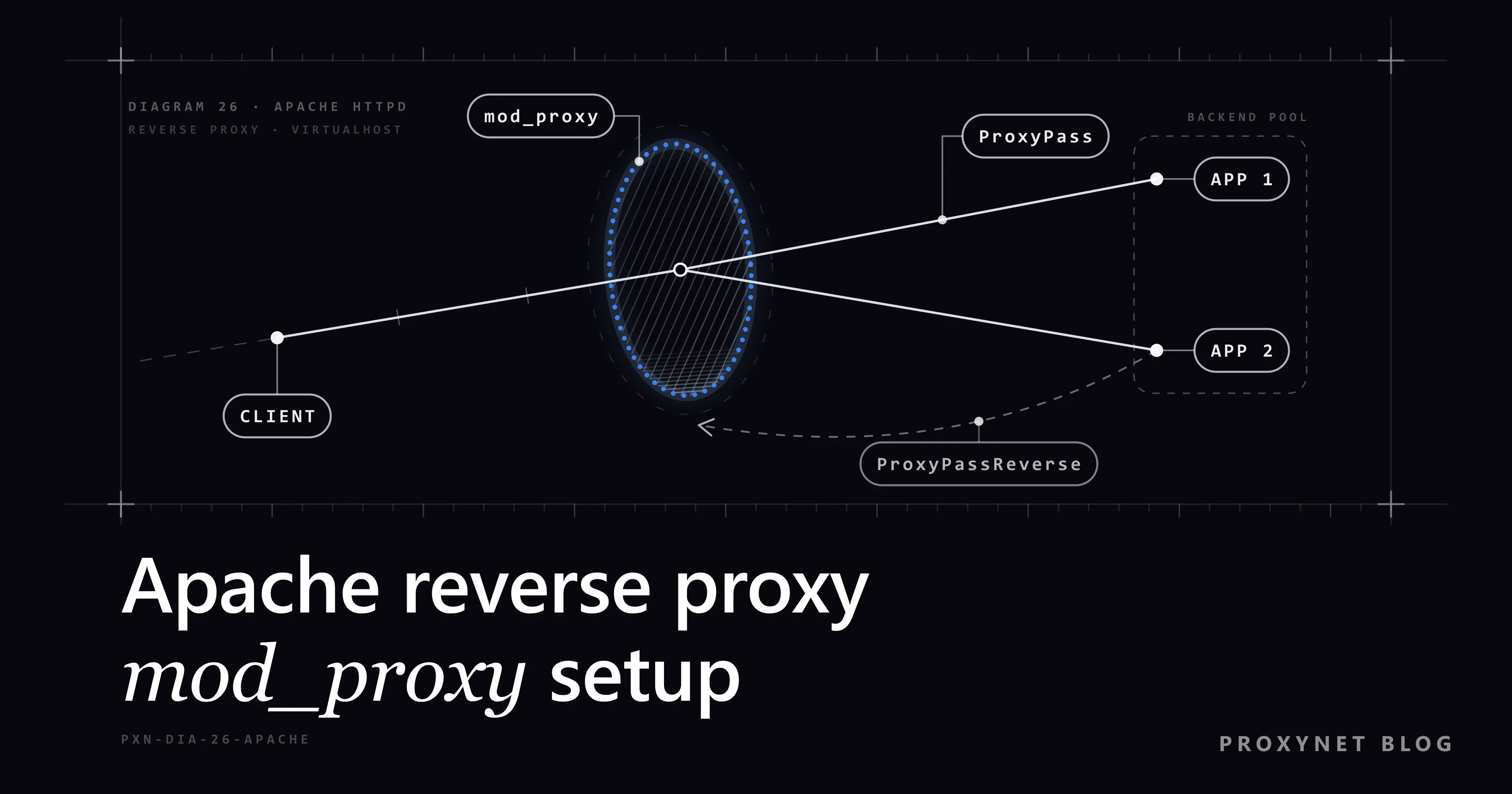
An Apache reverse proxy accepts requests for your site, passes them to an application server behind it and returns that server's answer as if Apache had produced it. The visitor only talks to Apache; the app on 127.0.0.1 or a private network stays unexposed. The difference from the proxy a client configures for itself is covered in Forward Proxy vs Reverse Proxy.
This is what happens to one request:
- Apache picks the VirtualHost whose
ServerNamematches theHostheader the browser sent. - It checks the
ProxyPassrules in order; the first matching path wins. mod_proxy_httpopens a connection to the backend and forwards the request, addingX-Forwarded-For,X-Forwarded-HostandX-Forwarded-Server.- The backend answers. If the answer is a redirect,
ProxyPassReverserewrites the backend address in theLocationheader to the public one. - Apache sends the response to the visitor, with its own TLS certificate if the VirtualHost runs HTTPS.
Which Apache modules do you need?
You need mod_proxy, which supplies the proxy machinery, plus one protocol module for the kind of backend you talk to. The mod_proxy documentation lists them; the ones a typical setup uses are below.
| Module | What it does | You need it for |
|---|---|---|
mod_proxy | Core proxy features | Every setup |
mod_proxy_http | Talks HTTP to the backend | Node, Python, Java, Go apps |
mod_headers | RequestHeader directive | X-Forwarded-Proto |
mod_ssl | TLS for the site | HTTPS |
mod_proxy_balancer | Backend pools | Load balancing |
mod_lbmethod_byrequests | One balancing method | Load balancing |
mod_proxy_wstunnel | WebSocket tunnel | Apache before 2.4.47 |
mod_proxy_fcgi | FastCGI backends | PHP-FPM |
Debian and Ubuntu keep modules in /etc/apache2/mods-available and switch them on with a2enmod, which creates links in mods-enabled. The Ubuntu Server guide to Apache modules uses the same commands:
sudo a2enmod proxy proxy_http headers ssl
sudo systemctl restart apache2
RHEL-family systems load modules with LoadModule lines in /etc/httpd/conf.modules.d/. In the CentOS Stream 9 package, 00-proxy.conf already loads mod_proxy, mod_proxy_http, mod_proxy_balancer, the balancing methods and mod_proxy_wstunnel, while mod_ssl is a separate package (sudo dnf install mod_ssl). If a module is missing, the line looks like this:
LoadModule proxy_module modules/mod_proxy.so
LoadModule proxy_http_module modules/mod_proxy_http.so
Check what is loaded with apachectl -M | grep -i proxy. On Windows the same LoadModule lines sit in conf\httpd.conf.
How do you write a minimal ProxyPass configuration?
Put a ProxyPass and a matching ProxyPassReverse line inside the VirtualHost that answers for the public name. This is the smallest useful setup for the app from the introduction:
<VirtualHost *:80>
    ServerName app.example.com

    ProxyRequests Off
    ProxyPreserveHost On

    # served by Apache itself, not by the app
    ProxyPass "/.well-known/acme-challenge/" "!"

    ProxyPass        "/" "http://127.0.0.1:3000/"
    ProxyPassReverse "/" "http://127.0.0.1:3000/"

    ErrorLog  ${APACHE_LOG_DIR}/app-error.log
    CustomLog ${APACHE_LOG_DIR}/app-access.log combined
</VirtualHost>
${APACHE_LOG_DIR} is defined on Debian and Ubuntu; on RHEL-family systems write logs/app-error.log instead. Save the file as /etc/apache2/sites-available/app.conf and enable it with sudo a2ensite app, or drop it into /etc/httpd/conf.d/app.conf.
Three rules decide whether the lines behave:
- Slashes must match. If the first argument ends in
/, the second must too, and the other way round. A mismatch produces backend URLs with a missing or doubled slash, which usually shows up as a 404 from the app. - Order matters. Apache checks
ProxyPassrules in the order they appear and uses the first match, so put longer paths first:/api/before/. - Exclusions come first. A
!rule keeps a path out of the proxy, here the folder used for certificate validation, and it only works above the general rule.
Under a sub-path, ProxyPass "/app/" "http://127.0.0.1:3000/" sends /app/orders to the backend as /orders; the app must then build links that start with /app/, usually through a "base path" setting.
What do ProxyPassReverse and ProxyPreserveHost change?
ProxyPassReverse fixes redirects, and ProxyPreserveHost decides which host name the backend sees. Both matter because applications build absolute URLs from the Host header of the request they receive.
Our test app on 127.0.0.1:3901 did exactly that. Asked for /admin with its own address in the Host header, it answered 302 with Location: http://127.0.0.1:3901/login; sent the same request with Host: www.example.com, it answered Location: http://www.example.com/login. By default Apache sends the host from the ProxyPass target, which is the first case, the broken login link from the introduction.
ProxyPassReverse repairs that by rewriting the Location, Content-Location and URI headers of redirects: a value that starts with the backend URL becomes your public address again. Links inside HTML or JavaScript are not touched. For cookies, ProxyPassReverseCookieDomain and ProxyPassReverseCookiePath rewrite the domain and path in Set-Cookie.
ProxyPreserveHost On passes the visitor's original Host header to the backend, so the app builds correct URLs in the first place. The Apache documentation says the option "should normally be turned Off", because a backend that only knows its internal name may reject the public one. Turn it on when the app checks the host name, generates absolute links or serves several domains.
How does the backend learn the visitor's IP and protocol?
Through request headers that Apache adds on the way in. In reverse proxy mode mod_proxy_http adds three of them on its own, controlled by ProxyAddHeaders, which is on by default:
X-Forwarded-For: the visitor's IP address.X-Forwarded-Host: theHostheader the visitor sent.X-Forwarded-Server: the proxy's own host name.
X-Forwarded-Proto, which tells the app whether the visitor used HTTPS, is not added automatically. Set it with mod_headers in the HTTPS VirtualHost: RequestHeader set X-Forwarded-Proto "https". The set action replaces any value the client sent.
Treat these headers as hints, not proof. If a request already carries X-Forwarded-For, Apache appends to it, so the backend receives a comma-separated list. Our test app received 198.51.100.9, 203.0.113.7 exactly as curl typed it and could not tell which entry a proxy had added. Bind the app to 127.0.0.1 so that only Apache can reach it, and let the framework trust forwarded headers from that one proxy.
How do you add HTTPS to an Apache reverse proxy?
Terminate TLS in Apache: a VirtualHost on port 443 holds the certificate, decrypts the request and passes plain HTTP to the app on the local machine. Port 80 then only redirects:
<VirtualHost *:80>
    ServerName app.example.com
    Redirect permanent "/" "https://app.example.com/"
</VirtualHost>

<VirtualHost *:443>
    ServerName app.example.com

    SSLEngine on
    SSLCertificateFile    /etc/ssl/app.example.com/fullchain.pem
    SSLCertificateKeyFile /etc/ssl/app.example.com/privkey.pem

    ProxyRequests Off
    ProxyPreserveHost On
    RequestHeader set X-Forwarded-Proto "https"

    ProxyPass        "/" "http://127.0.0.1:3000/"
    ProxyPassReverse "/" "http://127.0.0.1:3000/"
</VirtualHost>
The certificate paths are placeholders; use the files your certificate tool writes. Since Apache 2.4.8, SSLCertificateFile can hold the intermediate certificates after the server certificate, which replaces the older SSLCertificateChainFile. If your certificate tool validates the domain over plain HTTP, check that it still works after you add the redirect; many tools add their own rule for port 80.
If the backend itself speaks HTTPS, write https:// in ProxyPass and add SSLProxyEngine on. Apache then checks the backend certificate's name by default (SSLProxyCheckPeerName), and a mismatch ends in a 502. Because mod_proxy_http must read the path, Apache always decrypts the request; it does not pass the visitor's encrypted stream through untouched.
How do you proxy WebSocket connections?
From Apache 2.4.47, add upgrade=websocket to the ProxyPass line that serves the WebSocket path. mod_proxy_http then forwards the browser's Upgrade request and turns the connection into a tunnel only if the backend answers 101 Switching Protocols:
ProxyPass        "/socket/" "http://127.0.0.1:3000/socket/" upgrade=websocket
ProxyPassReverse "/socket/" "http://127.0.0.1:3000/socket/"
ProxyPass        "/" "http://127.0.0.1:3000/"
ProxyPassReverse "/" "http://127.0.0.1:3000/"
Check your version with apachectl -v. On 2.4.46 and earlier, load mod_proxy_wstunnel and point the WebSocket path at a ws:// URL instead: ProxyPass "/socket/" "ws://127.0.0.1:3000/socket/". In both cases the WebSocket rule goes above the general / rule. The browser can still use wss:// while Apache talks plain ws to the local app, because TLS ends at Apache, which is what people mean by "WebSocket over SSL" with Apache.
How do you set timeouts for a reverse proxy?
Apache waits up to ProxyTimeout for the backend to send data, and ProxyTimeout defaults to the server-wide Timeout, which is 60 seconds. A report page whose backend works for two minutes before sending its first byte therefore fails at the one-minute mark unless you raise one of them:
ProxyTimeout 180

ProxyPass "/reports/" "http://127.0.0.1:3000/reports/" timeout=300 connectiontimeout=5
ProxyPass "/"         "http://127.0.0.1:3000/"
ProxyTimeout applies to the whole VirtualHost. The timeout= parameter overrides it for one target, and connectiontimeout= limits the wait for the connection itself, so a dead backend fails in seconds. retry= sets how long a failed backend stays out of use (60 seconds by default). Raise timeouts only where needed, since every waiting request holds an Apache worker.
How do you load balance with mod_proxy_balancer?
Define a balancer:// group with one BalancerMember per backend and point ProxyPass at the group. Besides mod_proxy and mod_proxy_http, this needs mod_proxy_balancer and at least one method module such as mod_lbmethod_byrequests:
<Proxy "balancer://appcluster">
    BalancerMember "http://10.0.0.11:3000" route=a
    BalancerMember "http://10.0.0.12:3000" route=b
    BalancerMember "http://10.0.0.13:3000" status=+H
    ProxySet lbmethod=byrequests stickysession=ROUTEID
</Proxy>

Header add Set-Cookie "ROUTEID=.%{BALANCER_WORKER_ROUTE}e; path=/" env=BALANCER_ROUTE_CHANGED

ProxyPass        "/" "balancer://appcluster/"
ProxyPassReverse "/" "balancer://appcluster/"
byrequests shares requests evenly, bytraffic balances by bytes and bybusyness picks the least busy member. status=+H makes the third server a hot standby that only takes traffic when the others fail. The route values and the ROUTEID cookie (set with mod_headers) keep each visitor on one member, which matters when an app keeps sessions in memory.
The Apache reverse proxy guide also covers health checks with mod_proxy_hcheck and the balancer-manager status page, which must be limited to trusted addresses, for example with Require host localhost.
How the methods compare is explained in What Is Load Balancing?.
Why must ProxyRequests stay Off?
Because ProxyRequests On turns Apache into a forward proxy that fetches any URL for whoever asks, and ProxyPass works without it; Off is also the default. An open forward proxy on a public server gets found and used by strangers for spam and attacks. Those requests leave from your server's IP address, which then lands on blocklists and in abuse reports to your host. Write ProxyRequests Off explicitly, so that a line copied from an old tutorial cannot switch it on unnoticed; a forward proxy for your own machines needs a <Proxy "*"> block with Require ip.
How do you test the configuration?
Test in three steps: the syntax, the backend on its own, and the path through Apache. Run these on the server:
sudo apachectl configtest          # syntax check, names the file and line of an error
sudo apachectl -S                  # which VirtualHost answers for which name and port
curl -I http://127.0.0.1:3000/     # the backend alone
sudo systemctl reload apache2      # RHEL-family: sudo systemctl reload httpd
curl -I https://app.example.com/   # the full path through Apache
curl -I prints only the status line and headers. If the backend answers directly but not through Apache, the problem is in the proxy lines; if neither answers, start the app first. In a redirect, the Location header must show the public name, never 127.0.0.1. When something fails, read the error log: /var/log/apache2/error.log on Debian and Ubuntu, /var/log/httpd/error_log on RHEL-family systems, or the file the VirtualHost names.
Is this the same kind of proxy that proxy services sell?
No. A reverse proxy sits in front of your server and speaks for it; the proxies a provider sells sit in front of your client. An HTTPS Proxy is a forward proxy: your browser, script or server sends outgoing requests to it, and the target site sees the proxy's IP address.
The two can meet in one stack, for example when the app behind your Apache calls a partner API that accepts a single allowlisted address. A Datacenter Proxy gives that outgoing traffic a dedicated, fixed IPv4 address; per-IP products ship with a target-site restriction by default, so check that the partner's host is reachable through your IPs.
Where you meet Apache reverse proxies
The classic case is an application server that should not face the internet directly: a Node, Python or Go app on a local port, or a Java app in Tomcat on port 8080, with Apache handling certificates and logs. Servers that already run Apache for other sites get a ProxyPass line instead of a second web server. Teams also use it to put several apps under one domain, to run PHP through PHP-FPM with mod_proxy_fcgi, and to keep a legacy app online behind current TLS settings.
Common Apache reverse proxy errors
Most problems leave a clear line in the error log:
Invalid command 'ProxyPass', perhaps misspelled or defined by a module not included in the server configuration:mod_proxyis not loaded. Enable it and runconfigtestagain.- 503 Service Unavailable with
AH00957: … attempt to connect to 127.0.0.1:3000 … failedandAH01114: HTTP: failed to make connection to backend: nothing is listening on the backend address. Start the app or fix the port. Apache then keeps that backend out of use for theretry=period (60 seconds by default) and logsAH00940 … disabled connection, so the 503 can outlast the fix by up to a minute. - 502 Bad Gateway with "Error reading from remote server": the backend accepted the connection but closed it or stayed silent past the timeout. Check the app's own log, then the timeout settings. Every cause of this status is collected in 502 Bad Gateway Error: What It Means and How to Fix It.
- 502 after switching the backend to
https://:SSLProxyEngineis missing, or the backend certificate does not match its name. - Redirects to
127.0.0.1or the internal host:ProxyPassReverseis missing or its URL differs from theProxyPasstarget, or the app needsProxyPreserveHost On. - The browser reports too many redirects: the app sees plain HTTP from Apache and redirects to HTTPS forever. Send
X-Forwarded-Proto "https"and tell the framework to trust it. - Unexpected 404s from the app: a trailing-slash mismatch between the two
ProxyPassarguments, or a sub-path the app does not know about. - The WebSocket connection fails or closes at once:
upgrade=websocketis missing, the WebSocket rule sits below the/rule, or the server runs a version older than 2.4.47 withoutmod_proxy_wstunnel.
Decision guide
| Need | Recommendation |
|---|---|
| Publish one app on a domain | ProxyPass + ProxyPassReverse in its VirtualHost |
| App builds absolute links | ProxyPreserveHost On |
| App must know about HTTPS | RequestHeader set X-Forwarded-Proto "https" |
| HTTPS for visitors | Port 443 VirtualHost with SSLEngine on |
| Backend speaks HTTPS | https:// target + SSLProxyEngine on |
| WebSocket, Apache 2.4.47+ | upgrade=websocket |
| WebSocket, older Apache | mod_proxy_wstunnel + ws:// |
| Slow pages time out | timeout= on that path, or ProxyTimeout |
| Several app servers | balancer:// with mod_proxy_balancer |
| Keep a path on Apache | ProxyPass "/path/" "!" above the main rule |
Frequently asked questions
What is the difference between ProxyPass and ProxyPassReverse?
ProxyPass sends requests for a path to the backend; ProxyPassReverse rewrites the backend's address in redirect headers on the way back. Use both with the same arguments, or the app's redirects send visitors to an address they cannot reach.
Do I need ProxyRequests On for a reverse proxy?
No. ProxyRequests only controls forward proxying, and ProxyPass works with it off, which is the default. Turning it on without strict access rules creates an open proxy that anyone can use.
How do I reverse proxy several domains or apps with Apache?
Give each domain its own VirtualHost with its own ServerName and ProxyPass lines, or split one domain by path with several ProxyPass rules, longest path first. apachectl -S shows which VirtualHost answers for which name.
How do I proxy WebSocket over SSL with Apache?
Terminate TLS in the port 443 VirtualHost as usual and add upgrade=websocket to the ProxyPass line for the socket path. The browser connects with wss://, and Apache talks plain WebSocket to the local backend.
How do I increase the Apache reverse proxy timeout?
Set ProxyTimeout in the VirtualHost, or add timeout= to one ProxyPass line to change only that path. Both are in seconds, and without them Apache uses the 60-second server Timeout.
Can I run an Apache reverse proxy on Windows?
Yes. The directives are the same; you enable mod_proxy and mod_proxy_http by removing the # from their LoadModule lines in conf\httpd.conf. The Apache project itself publishes only source code, so the Windows build comes from a third-party distribution.
Summary
An Apache reverse proxy needs mod_proxy with mod_proxy_http and a VirtualHost with matching ProxyPass and ProxyPassReverse lines; ProxyPreserveHost and X-Forwarded-Proto let the app build correct URLs. Terminate HTTPS on port 443, add upgrade=websocket for sockets, raise timeout= only where pages are slow and use balancer:// for several backends. Keep ProxyRequests Off, run apachectl configtest before every reload, and read the error log before changing anything else.