You open the details of your Wi-Fi connection and find three numbers listed together: an IP address such as 192.168.1.37, a router address such as 192.168.1.1, and between them a subnet mask of 255.255.255.0. Two of them look like addresses. The third does not quite, yet one wrong digit in it can cut a laptop off from the printer or from the internet.
This post explains what a subnet mask does, how to read 255.255.255.0 and /24, and how to calculate a subnet with one worked example in binary. It then shows where to find your mask on each device, what a wrong mask breaks and why proxy users talk about /24 blocks.
What is a subnet mask?
A subnet mask is the setting that splits an IPv4 address into two parts: the network part, shared by every device on the same local network, and the host part, different for each device. A host is anything with an address: a laptop, a phone, a printer. Microsoft's TCP/IP addressing and subnetting guide adds what the split is for: TCP/IP uses the mask to decide whether another host is on the local subnet or on a remote network.
An IPv4 address is 32 bits written as four numbers from 0 to 255; each number is an octet, eight bits. The mask is written the same way, but it is not an address: nothing is ever sent to it. If the address itself is new to you, start with What Is an IP Address?
A subnet (subnetwork) is the group of addresses that share one network part. In postal terms, the mask marks where the street name ends and the house number begins.
How do you read 255.255.255.0?
Read it in binary. 255 is eight ones (11111111) and 0 is eight zeros, so 255.255.255.0 is 24 ones followed by 8 zeros. Ones mark the network part, zeros the host part.
The CIDR standard requires the ones to be contiguous from the left, so each octet of a mask can only be 255, 254, 252, 248, 240, 224, 192, 128 or 0, holding 8 down to 0 ones. 255.255.255.192 is valid (8 + 8 + 8 + 2 = 26 ones); 255.255.255.100 is not.
What does /24 mean?
/24 is the short form of the same mask: it counts the ones. 192.168.1.37 with 255.255.255.0 is written 192.168.1.37/24. The notation comes from CIDR (Classless Inter-Domain Routing), defined today in RFC 4632: an address, a slash and a value from 0 to 32 giving the number of significant bits, the prefix length.
Before CIDR, addresses came in classes with fixed masks: A used 255.0.0.0, B 255.255.0.0 and C 255.255.255.0. RFC 4632 retired the classes, but its table still labels /24 as the legacy class C size, which is why people still say "a class C network".
How does your device use the subnet mask?
It compares addresses before every send, to see whether the destination is inside the local network or beyond it:
- It knows its own address and mask, for example
192.168.1.37and255.255.255.0, usually received from the router through DHCP, the service that hands out network settings automatically. - It works out its own network with an operation called AND: a bit of the address survives only where the mask has a 1. The result is
192.168.1.0. - It does the same with the destination. A printer at
192.168.1.200also gives192.168.1.0; a website at203.0.113.25gives203.0.113.0. - Same network: deliver directly. The packet goes straight to the printer.
- Different network: send to the gateway. The packet for the website goes to your router, which forwards it toward the internet.
How do you calculate a subnet from an IP address and mask?
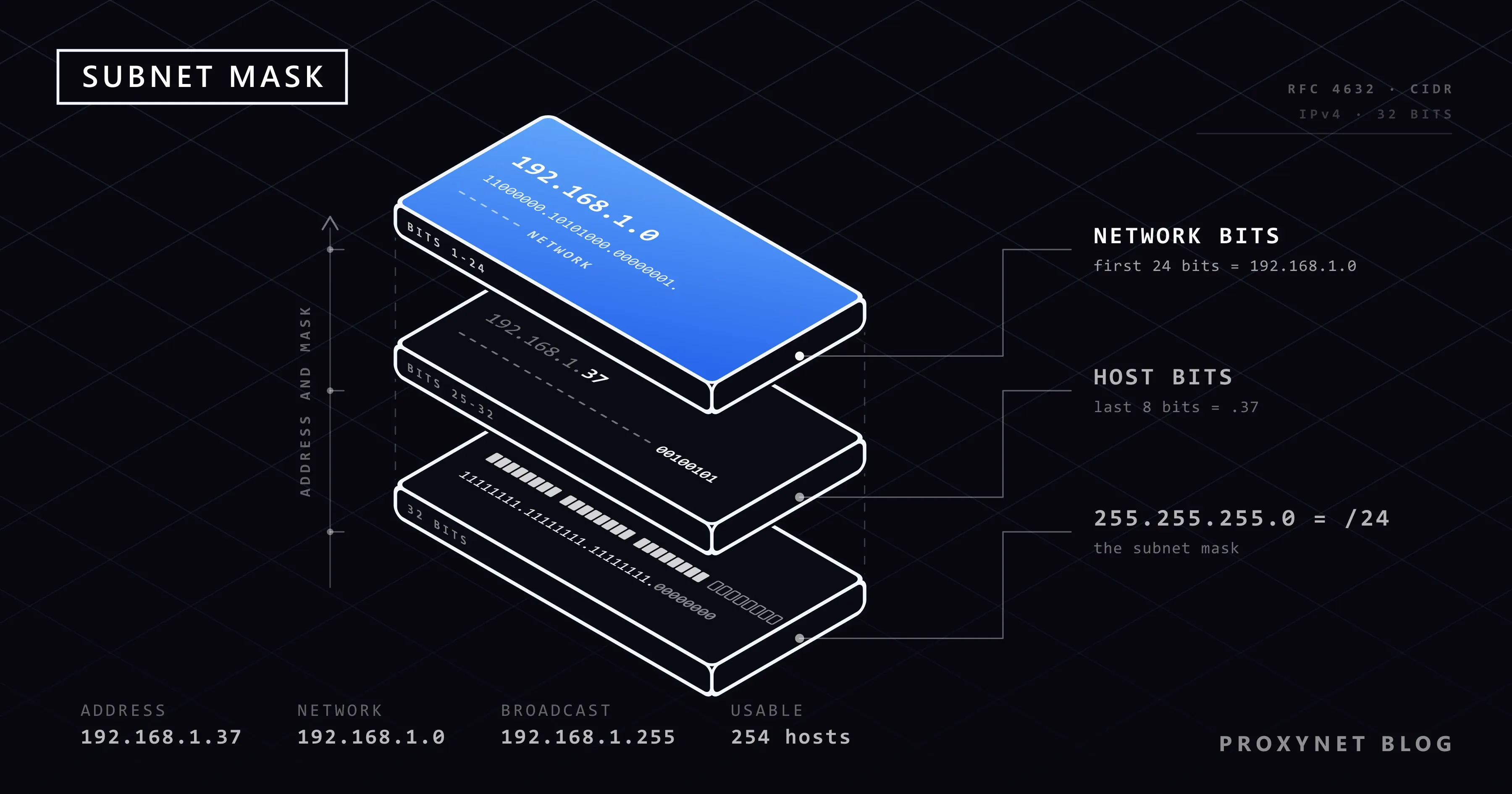
AND the address with the mask to get the network address, set every host bit to 1 to get the broadcast address, and count the host bits to get the size. Here is 192.168.1.37/24, checked line by line with a short script:
- Write the address in binary. 192 is
11000000, 168 is10101000, 1 is00000001and 37 is00100101(32 + 4 + 1). - Write the mask under it: 24 ones, then 8 zeros.
- AND the two lines. Where the mask has a 1, copy the address bit; where it has a 0, write 0. This is the network address.
- Set the 8 host bits to 1. This is the broadcast address, which reaches every device on the subnet at once.
- Count and subtract. Eight host bits give 2⁸ = 256 addresses. The network and broadcast addresses cannot go to a device, which leaves 254 usable addresses:
192.168.1.1to192.168.1.254.
                decimal          binary
IP address      192.168.1.37     11000000.10101000.00000001.00100101
Subnet mask     255.255.255.0    11111111.11111111.11111111.00000000
Network (AND)   192.168.1.0      11000000.10101000.00000001.00000000
Broadcast       192.168.1.255    11000000.10101000.00000001.11111111
For other masks there is a shortcut. With /26 (255.255.255.192), subtract the last non-zero octet from 256: 256 − 192 = 64, so subnets start at .0, .64, .128 and .192. An address ending in .100 falls in the .64 block: network 192.168.1.64, broadcast 192.168.1.127, usable .65 to .126. Online subnet calculators do exactly this.
What are the most common subnet masks?
These are the masks you are most likely to meet.
| Prefix | Subnet mask | Addresses | Usable hosts |
|---|---|---|---|
/8 | 255.0.0.0 | 16,777,216 | 16,777,214 |
/16 | 255.255.0.0 | 65,536 | 65,534 |
/22 | 255.255.252.0 | 1,024 | 1,022 |
/23 | 255.255.254.0 | 512 | 510 |
/24 | 255.255.255.0 | 256 | 254 |
/25 | 255.255.255.128 | 128 | 126 |
/26 | 255.255.255.192 | 64 | 62 |
/27 | 255.255.255.224 | 32 | 30 |
/28 | 255.255.255.240 | 16 | 14 |
/29 | 255.255.255.248 | 8 | 6 |
/30 | 255.255.255.252 | 4 | 2 |
Each step of one in the prefix halves the block. A /30 is enough for a link between two routers, and a /32 is a single address: in firewall rules, allowlists and VPN settings it means "this address and no other".
How do you find your subnet mask?
Look at the network details of the connection you are using; on Windows, one command shows them.
Windows
Type cmd into the Start menu, open Command Prompt and run:
ipconfigIt lists the IPv4 address, subnet mask and default gateway of every network adapter. This is the output on our Windows 11 test machine, trimmed, with the addresses replaced by documentation values (at home you will usually see 192.168.x.x):
Ethernet adapter Ethernet:

   IPv4 Address. . . . . . . . . . . : 192.0.2.37
   Subnet Mask . . . . . . . . . . . : 255.255.255.0
   Default Gateway . . . . . . . . . : 192.0.2.1
Read the block of the adapter you use; adapters marked Media disconnected can be ignored.
Mac
Apple's TCP/IP settings guide uses this path:
- Choose Apple menu > System Settings, then click Network in the sidebar.
- Select the connection you use, for example Wi-Fi, and click Details.
- Click TCP/IP. The tab shows the IPv4 address, the subnet mask and the router.
iPhone
- Open the Settings app and tap Wi-Fi.
- Tap the More Info button next to the network you are connected to.
- Scroll to the IPv4 address section, which lists the IP address, the subnet mask and the router.
Android
Menu names differ between brands. Google's Android Wi-Fi help gives the standard path:
- Open the Settings app and tap Network & internet > Internet.
- Tap Wi-Fi settings (the gear icon) next to your connected network.
- Scroll down to the network details. Many phones list the subnet mask there; some show only the address and gateway.
For a static address, Android asks for a Network prefix length instead of a mask: 24 means 255.255.255.0. Your router's admin page also shows the mask of the whole home network in its LAN settings.
Subnet mask, IP address and default gateway: what is the difference?
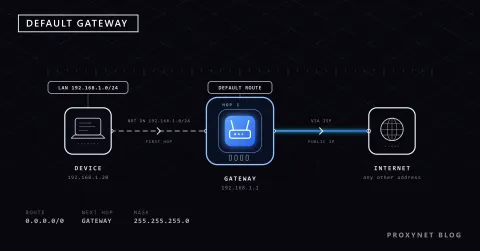
The IP address identifies your device, the subnet mask says how far the local network reaches, and the default gateway is the router that takes everything beyond that border.
| Setting | What it tells your device | Typical home value |
|---|---|---|
| IP address | Its own address on the network | 192.168.1.37 |
| Subnet mask | Which addresses are local | 255.255.255.0 |
| Default gateway | Where to send everything else | 192.168.1.1 |
The three must agree: the gateway has to sit inside the range the mask describes. The mask is the same on every device of a network; the IP address is unique to each. How the gateway works and how to find it is covered in What Is a Default Gateway?
What happens if the subnet mask is wrong?
The device draws the border of its network in the wrong place, so some devices or the whole internet stop answering while Wi-Fi still shows a connection. Wrong masks come from manual settings; DHCP hands out the right one.
- Too narrow. A laptop at
192.168.1.37with255.255.255.128(/25) thinks its network ends at.127, so traffic for the printer at.200goes to the router, where it may or may not get through. A device at.200with that mask covers.128to.255; the router at.1falls outside, and the internet is gone. - Too wide. With
255.255.0.0(/16) the laptop treats every192.168.x.xaddress as local. If your router is plugged into a second device at192.168.0.1, such as a provider's modem, the laptop never sends that traffic to the gateway and the modem's page will not open. Microsoft's guide describes the pattern: communication fails to nearby networks but not to distant ones. - The fix. Switch the connection back to automatic (DHCP), or copy the mask from the router or a device that works.
How does IPv6 handle the subnet mask?
IPv6 has no dotted mask: a network is written only as address/prefix-length, the form RFC 4291 defines, where the number counts the leftmost bits that form the network. Ordinary IPv6 addresses keep their last 64 bits for the device's interface ID, so a local network is normally a /64: the first half names the network, the second the device.
Why do proxy users care about /24 subnets?
Because sites and reputation systems judge an address partly by its neighbours, and proxy users usually measure that neighbourhood as a /24: the 256 addresses that share the first three numbers. Many proxy addresses from one /24 look less like many users and more like one source.
Some fraud-scoring services state that what they learn about one address is applied to its subnet and network, so if one address in a /24 sent spam, its neighbours start with a worse score. What Is IP Reputation? explains the lists behind those scores.
Residential addresses belong to the home connections of many internet providers, so a residential pool is spread over many blocks rather than a few neighbouring ones. With Proxynet's Residential Proxy you choose the country and city and can also target a network by its ASN.
Datacenter addresses are usually allocated in consecutive runs, so several Datacenter Proxy addresses can share a /24, and with it a reputation: a problem caused by one project can follow the others in that block.
Block diversity is not a way around a site's rules. Spreading requests across blocks to get past a rate limit or a ban is exactly what anti-abuse systems are built to catch; keep the request rate polite whatever the addresses.
Where you meet subnet masks
- Home router settings: the LAN page shows the mask and the range DHCP hands out.
- Static addresses on devices: printers, cameras and NAS drives ask for an address, a mask and a gateway.
- Cloud networks and firewall rules: written in CIDR, such as
10.0.0.0/16.
Common mistakes
- Treating the mask as an address. It describes a range; there is nothing to ping.
- Reading /24 as "24 devices". It means 24 network bits, which leaves 254 usable addresses.
- Giving a device the network or broadcast address. In a
/24,.0and.255are reserved. - Typing a mask that does not match the router. Every device on one network uses the same mask.
- Expecting the mask to change your public IP, speed or privacy. It only decides what is local.
Decision guide
| Your need | What to do |
|---|---|
| See your mask on Windows | Run ipconfig, read Subnet Mask under your adapter |
| See it on a Mac or phone | Mac: Network > Details > TCP/IP; iPhone: Wi-Fi > More Info; Android: Wi-Fi settings |
| Set a static address on a printer | Copy the router's mask and gateway; pick an address outside the DHCP range |
| Devices stopped answering after a manual change | Switch back to DHCP or copy the router's mask |
| Proxy exits spread over many blocks | Residential proxies |
Frequently asked questions
What should my subnet mask be?
The same as the rest of your network, which at home is usually 255.255.255.0. If your device gets its settings automatically, the router has already set it. For a static address, copy the mask from the router or from a computer that works.
Is 255.255.255.0 the same as /24?
Yes. 255.255.255.0 spells out the 32 bits in four octets, and /24 counts the 24 ones at the start. Both mean 256 addresses, 254 of them usable.
Can two devices have the same subnet mask?
Yes, and on the same network they should. The mask describes the network, so every device on it shares the mask; the IP address is what must differ.
What is the difference between 255.255.255.0 and 255.255.0.0?
The size of the network. 255.255.255.0 (/24) leaves 8 bits for devices, 254 usable addresses; 255.255.0.0 (/16) leaves 16 bits, 65,534 addresses. Home routers normally use the first.
Can you find the subnet mask from an IP address alone?
No. An address does not carry its mask: 192.168.1.37 could sit in a /24, a /25 or a /16. You need the setting itself, from the device, the router or the network's administrator.
Does the subnet mask affect internet speed?
No. The mask only decides whether a destination is local or goes through the router. A wrong mask breaks connections rather than slowing them down.
Summary
A subnet mask splits an IPv4 address into a network part and a host part: ones mark the network, zeros the devices. 255.255.255.0 and /24 are the same mask, 256 addresses with 254 usable, and a device uses it to decide whether to deliver directly or through the default gateway. AND the address with the mask and set the host bits to 1, and you have the network and broadcast addresses of any subnet. Most mask problems end when you switch back to DHCP. If you need proxy addresses spread across many networks, compare the options on our proxy products page.