A product manager asks what it would cost to collect prices from 60 online shops every morning. The developer answers that Scrapy and Playwright are free, so "a few days of work". Six months later the bill arrives where nobody budgeted it: parser repairs every week, a proxy invoice growing with every retry, and a server full of headless browsers.
This post lists the eight cost items of a self-built scraper and how each scales, measures what a plain HTML fetch and a full browser load really transfer on one public page, works through an illustrative estimate and sets it against the way scraping APIs charge.
Does web scraping cost money?
Yes: the software is free, the operation is not. Scrapy, Beautiful Soup, Playwright and Puppeteer cost nothing to license, and a first script runs on a laptop. The cost begins when it must run every day, on many pages, from the right country, and survive the target's next redesign. You pay for a process, not a tool.
A scraping API changes who pays which line: the provider runs the browsers, proxies and retries and bills per delivered page. How such a service works is covered in What Is a Web Scraping API?; this post deals with the money.
What does it cost to build and run your own scraper?
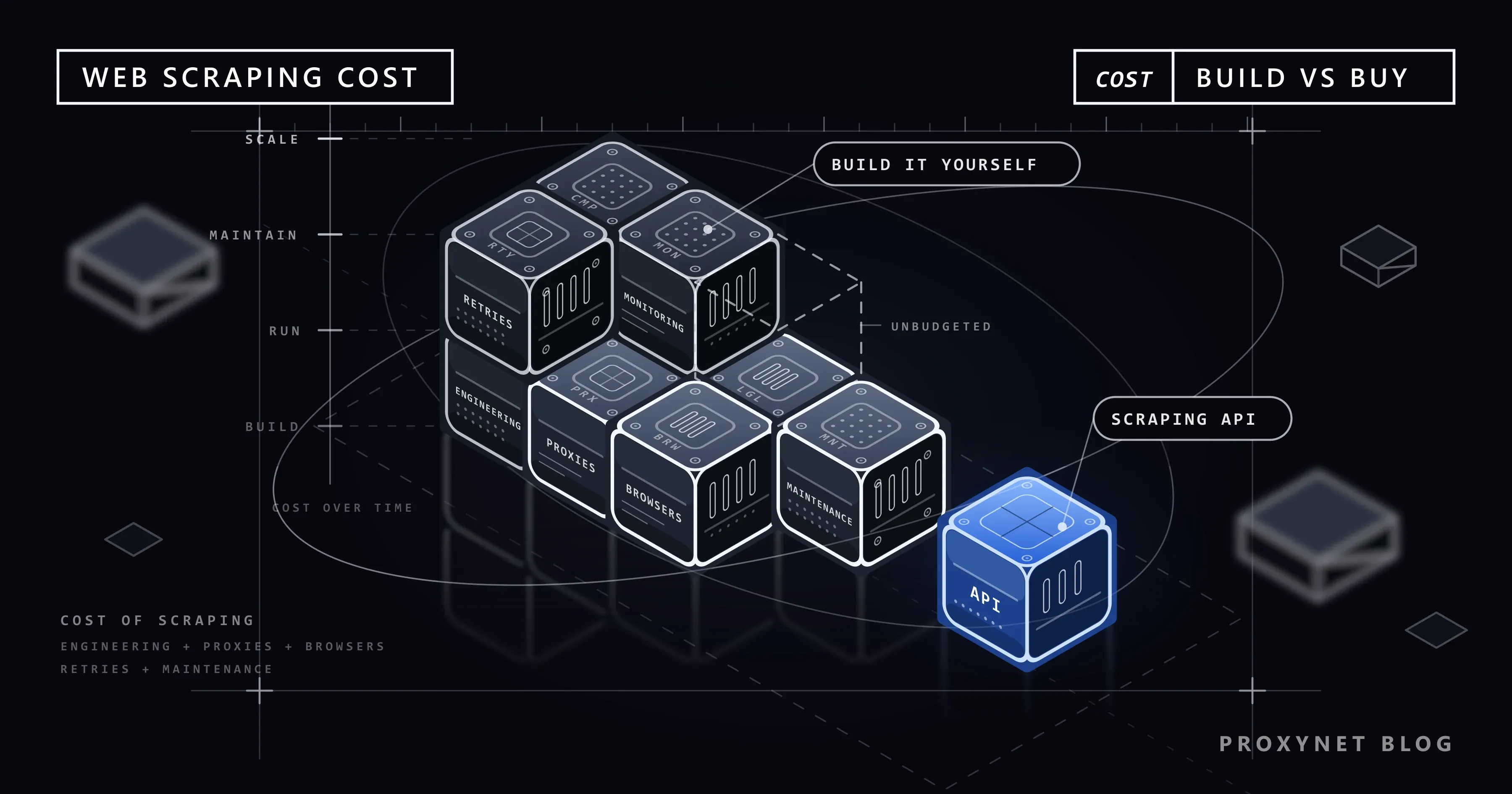
A self-built scraper has eight cost items, and only the first is paid once.
Engineering time to build. Fetcher, a parser per site, scheduler, storage, tests; it scales with the number of distinct sites, since every layout needs its own parser.
Maintenance when sites change. The cost people forget. A redesign, a renamed CSS class, a new consent dialog or tighter bot protection breaks a parser overnight, and the data silently stops or arrives wrong. It scales with sites times their rate of change; budget it as a recurring monthly share of the build.
Compute: HTTP requests or headless browsers. A plain request downloads the HTML and nothing else; a headless browser downloads scripts, styles, fonts and images as a visitor would, runs the JavaScript, and renders far fewer pages per hour per server. The next section measures the difference.
Proxy traffic. Many targets show different prices per country, and a steady stream from one address is the first thing a rate limit catches, so production scrapers send requests through proxies. Residential proxies are billed per gigabyte (ours start at $1.50), so their cost scales with bytes: page weight × pages × retries. Static ISP and datacenter proxies are billed per IP with unmetered traffic, so their cost scales with the number of addresses.
Retries as a multiplier. Timeouts,
5xxanswers and block pages mean fetching a page more than once, and every repeat costs compute and traffic again: at a 30 % failure rate you move 1.3 times the traffic for the same usable pages. A429or a CAPTCHA is a signal to slow down, not to retry harder; How to Scrape Websites Without Getting Blocked explains the backoff rules that keep the retry rate low.Storage, parsing and quality checks. Raw HTML kept for re-parsing adds up, and parsed records need schema validation, de-duplication and spot checks. Empty prices after a redesign cost more than no data, because someone acts on them.
Monitoring and alerting. Somebody has to know within hours that a site started returning block pages or that the success rate fell from 97 % to 60 %. Dashboards, alerts and reaction time cost money even when nothing breaks.
Legal review and compliance. Reading each target's terms, checking robots.txt, deciding whether personal data is involved and documenting the legal basis takes hours from non-developers. The robots.txt standard says its rules "are not a form of access authorization" (RFC 9309): the file enforces nothing, so compliance stays with you. For a specific project, consult a lawyer.
How much more does a headless browser transfer?
On the page we measured, a full headless-browser load transferred 18.7 times the bytes of a plain HTML fetch.
On 9 November 2026 we fetched one public page, the MDN reference page for the HTTP status 429 Too Many Requests (its robots.txt allows the path), three ways: a single compressed HTTPS GET of the HTML, a full load in headless Chromium through Playwright with an empty cache, and the same load with image, font and media requests aborted. Bytes are headers plus encoded bodies from Playwright's request.sizes(), whose responseBodySize is the compressed size on the wire (Playwright: request.sizes()).
| Method | Requests | Transferred | Time |
|---|---|---|---|
| Plain HTML fetch | 1 | 23.4 KB | 47 ms |
| Headless browser, full load | 81 | 436.6 KB | 4.2 s |
| Headless browser, images, fonts and media blocked | 64 | 209.3 KB | 1.5 s |
The HTML was 23.3 KB in the browser too; the other 413 KB were 39 scripts (155.5 KB), two fonts (133.3 KB), 15 images (78 KB), 17 stylesheets and a few analytics pings. Aborting images, fonts and media with page.route() (Playwright: abort requests) halved the traffic and cut the load time to a third.
This documentation page is light: the 2025 Web Almanac puts the median home page at 2.86 MB on desktop and 2.56 MB on mobile, of which 22 KB is HTML (Web Almanac 2025: Page Weight). There a browser load moves megabytes per page, and with per-gigabyte proxies rendering becomes the largest item on the invoice.
Measure your own targets first: the Network panel in Chrome DevTools shows the request count and transferred size of a load, with "Disable cache" for a first-time visitor's view (Chrome DevTools: Network reference). If the fields you need are already in the HTML or in a JSON response, you do not need a browser.
How do you compare an API price with your own costs?
Convert both to the cost per 1,000 usable pages on your own targets; nothing else is comparable.
Scraping APIs bill per page received, in units that differ by provider (per request, credits with multipliers for rendering and residential exits, monthly minimums, a definition of success); the sibling post explains those models. Build the same number for your own route: hours at your rate plus servers, proxy or IP fees, storage and monitoring, divided by usable pages.
| Cost item | Build it yourself | Scraping API | Scales with |
|---|---|---|---|
| Build | Your hours per site | One integration | Number of sites |
| Maintenance | Your hours, every change | Provider's job | Sites × change rate |
| Compute | Servers and browsers | In the price (rendering tier) | Pages, rendering share |
| Proxy traffic | Per GB or per IP | In the price (exit tier) | Bytes or IP count |
| Retries | You pay each attempt | Usually only successes billed | Failure rate |
| Storage, QA, monitoring | Yours | Yours, plus their uptime | Pages, sites |
| Legal review | Yours | Yours | Targets, personal data |
A worked example with variables
The numbers below are round and invented to show the arithmetic; replace them with your own measurements.
| Variable | Meaning | Illustrative value |
|---|---|---|
| P | Usable pages per month | 1,000,000 |
| r | Retry factor (1 + share of failed attempts) | 1.3 |
| s | Transferred bytes per attempt | 60 KB plain, 1.5 MB rendered |
| h | Engineering and maintenance hours per month | 40 |
Rendering changes the traffic by a factor of 25 for the same pages:
| Line | Formula | Plain HTTP | Rendered |
|---|---|---|---|
| Proxy traffic | P × r × s | 78 GB | 1,950 GB |
| Residential proxies | traffic × price per GB | 78 × G | 1,950 × G |
| ISP or datacenter proxies | addresses × price per IP | n × I | n × I |
| People | h × hourly rate | 40 × R | 40 × R, plus browser upkeep |
With GB-metered residential proxies the rendering multiplier lands on the invoice; with unmetered addresses, on your servers. The retry factor sits in every row: cutting failures from 30 % to 10 % removes about 15 % of the traffic. The API side is P times its price per 1,000 usable pages, plus your hours for integration and checks.
When does building pay off, and when does an API?
Building pays off when the work is narrow, stable and long; an API when it is broad, changing or short.
Build with proxies for a handful of stable sites, a volume that would make a per-page price add up, and a team that already runs scrapers. Use a scraping API when the site list is long or changes every quarter, most targets render with JavaScript, or the project ends in three months. Go hybrid when a few sites carry the volume and a long tail carries the complexity.
Which hidden costs do estimates miss?
Four costs rarely appear in the spreadsheet. Opportunity cost: the developer maintaining parsers is not building the product the data feeds. Data quality: a scraper that quietly returns stale fields is cheaper to run than a correct one, until a decision is made on it. Compliance: terms review, robots.txt checks, data minimisation and a processing agreement with any provider that handles personal data take time for every new target. Bus factor: a pipeline one person understands is a liability the day that person leaves.
When are proxies alone the right purchase?
Proxies alone are the right purchase when you already run a scraper that works and only lack the exits: the right country, enough distinct addresses, or one stable IP for a session.
For sites whose content varies by location, a Residential Proxy gives rotating or sticky sessions with country and city targeting, billed per gigabyte, so fetch plain HTML where you can and block images and fonts where you cannot.
For high volume on stable targets, a ISP Proxy is billed per IP with unmetered traffic; datacenter proxies follow the same model and cost the least per address. Both ship with a target-site restriction by default, and access to all websites is a paid add-on. Payment is a wallet balance that never expires, with no subscription and no free trial.
When is a managed scraping API the right purchase?
A managed API is the right purchase when the site list is long or changes often, most pages need rendering, or the project is too short to amortise a build: you send URLs and receive pages or fields, and the provider carries browsers, exits, retries and maintenance. Before signing, ask for the billing unit, the definition of success, whether robots.txt is honoured and how rendering is priced. Our Web Scraping API, managed page extraction, is available through the sales team; the data scraping page describes the proxy side and how to reach them.
Common mistakes
- Counting only the build. Over two years the first month's engineering is the smallest line.
- Ignoring retries. A 30 % failure rate is a 30 % surcharge on compute and traffic.
- Residential proxies for every target. Sites that do not vary by location are cheaper on unmetered IPs.
- Not measuring page weight. Choosing GB-metered proxies without knowing whether a page is 25 KB or 2.5 MB.
- Rendering everything. Many pages carry their data in the HTML or in a JSON response.
- No spending cap. A scraper, a proxy account and an API key each need a monthly limit and an alert.
Decision guide
| Need | Recommendation |
|---|---|
| Three stable sites, millions of pages, own team | Build; unmetered ISP or datacenter IPs |
| Prices as visitors in ten countries see them | Residential exits, plain requests |
| Sixty sites with different layouts, small team, or a three-month project | Scraping API |
| Most targets render with JavaScript | API with rendering per target |
| Steady volume on a few sites plus a long tail | Hybrid: own scraper, API for the tail |
| The site offers an official API with your fields | The official API |
Frequently asked questions
Does web scraping cost money?
Yes. The libraries are free, but running a scraper costs engineering time, maintenance, servers, proxy traffic, storage, monitoring and legal review. A one-off script is nearly free; a daily pipeline across many sites is a recurring cost.
How much does a web scraper cost?
There is no single number: it depends on the number of sites, pages per month, the rendering share and how often targets change. Estimate it monthly as hours at your rate plus servers, proxy fees, storage and monitoring, divided by usable pages.
Is a scraping API cheaper than proxies?
For many different or JavaScript-heavy sites and a small team, usually yes, because its price includes browsers, retries and maintenance. For high volume on a few stable sites, your own scraper with unmetered proxies is usually cheaper per page.
How do I estimate proxy bandwidth for scraping?
Multiply pages per month by the retry factor and by the transferred bytes per page, measured on your real targets; a plain fetch is often tens of kilobytes and a browser load megabytes.
Why do web scraping costs grow over time?
Because targets change and volume grows: redesigns cost maintenance hours, new sites add parsers, retries creep up as protection tightens and stored raw pages accumulate.
Are free scraping tools really free?
The licence is free; the operation is not. Open-source scrapers remove the software cost; the servers, proxies, upkeep and responsibility for what they collect are yours.
Summary
Web scraping costs money because it is an operation, not a download, and retries and rendering multiply every other line. Measure page weight and failure rate on your real targets, convert every option to cost per 1,000 usable pages, then choose: your own scraper on unmetered proxies for a few stable sites, a scraping API for many or changing sites, a hybrid for steady volume with a long tail. If what you lack is the exits rather than the scraper, start with our proxy services.