


































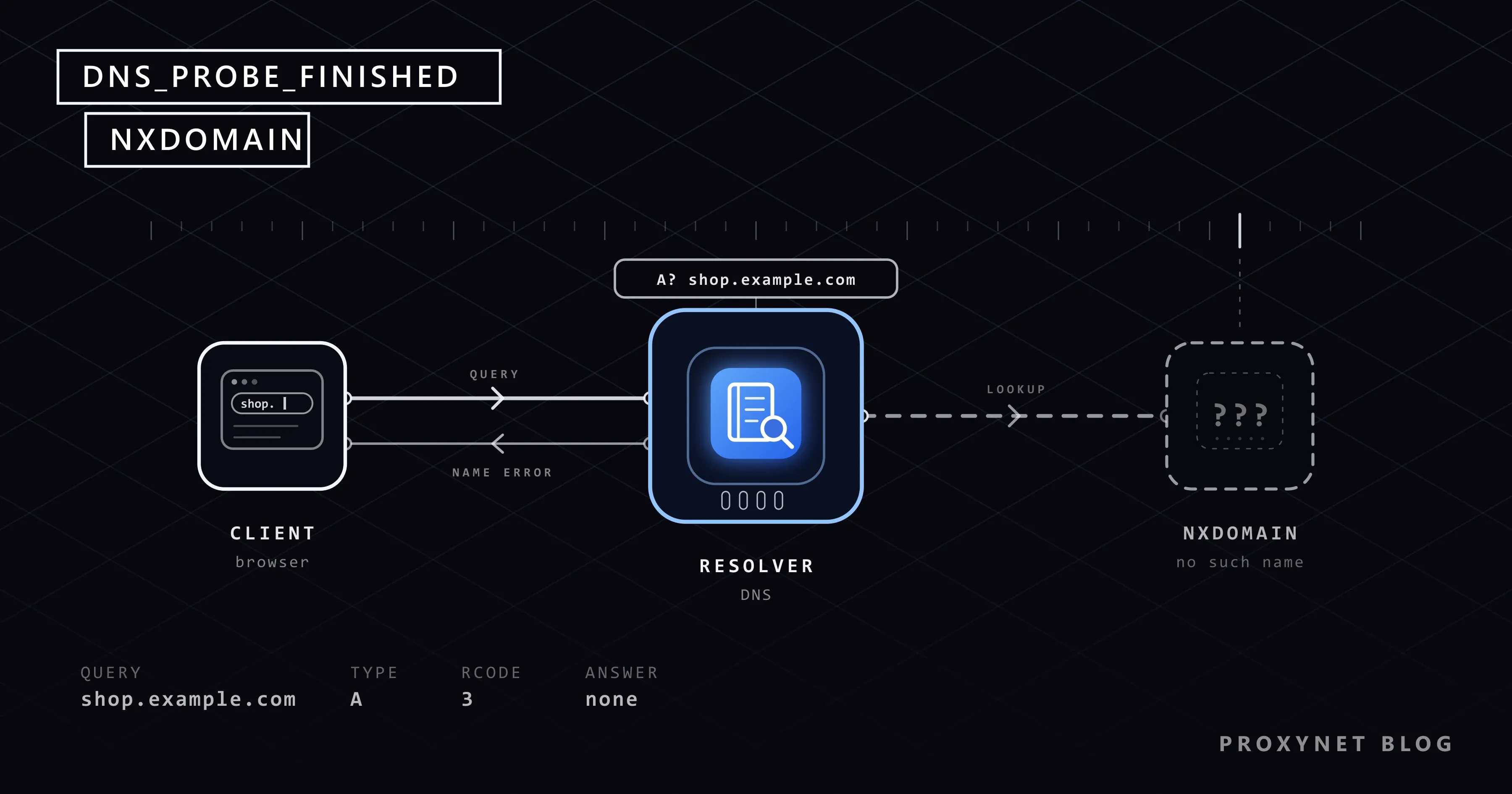
You click a link in an email, or type an address you have used before, and Chrome stops on a grey page: "This site can't be reached", then "Check if there is a typo in shop.example.com." and, at the bottom, DNS_PROBE_FINISHED_NXDOMAIN. Every other site opens. Reloading brings the same page back.
The code is more precise than it looks. Below: what it means, how Chrome decides to show it, the usual causes, fixes for computers and phones, what to check when the domain is yours, and how the failure looks in code.
What does DNS_PROBE_FINISHED_NXDOMAIN mean?
Before a browser can open shop.example.com, it needs the server's IP address, the numeric address computers use to find each other. It gets that from DNS: your device asks a DNS resolver, usually run by your internet provider, and the resolver asks the servers responsible for the domain.
NXDOMAIN, short for "non-existent domain", is one of the answers those servers can give. RFC 1035, the specification of DNS, lists it as response code 3, "Name Error": the name does not exist. A later standard, RFC 8020, adds that the answer covers every name under it too.
The first half of the code is Chrome's own: DNS_PROBE means Chrome ran a follow-up check, FINISHED that the check is done. Browsers built on Chrome's engine (Chromium), such as Edge, Brave and Opera, can show the same code under their own heading.
How does Chrome decide to show this code?
The steps come from Chromium's source code, the open-source project behind Chrome:
- You open the address, Chrome asks for its IP address, and the lookup fails.
- For a moment the page reads "shop.example.com's DNS address could not be found. Diagnosing the problem."
- Chrome looks up a name it knows exists,
google.com, twice: through your own DNS settings and through Google's public DNS. - If your DNS passes that test, Chrome blames the name you asked for. Chromium's error definitions say it plainly: "The DNS servers are working fine, so the domain must not exist." The page then shows the typo hint and
DNS_PROBE_FINISHED_NXDOMAIN. - Other test results give the other codes in the table below. If the check does not run or cannot decide, Chrome shows the original failure,
ERR_NAME_NOT_RESOLVED.
So the code is good news about your connection: only this one name failed. It is also Chrome's conclusion, not a copy of the DNS answer, so a domain whose own DNS servers are broken shows the same code.
How is NXDOMAIN different from other DNS errors?
The wording comes from Chrome's English text files. All but the last appear under "This site can't be reached".
| Code at the bottom | Line on the page | What Chrome found | Check first |
|---|---|---|---|
DNS_PROBE_FINISHED_NXDOMAIN | "Check if there is a typo in shop.example.com." | Your DNS works; this name was not found | The spelling, then the domain |
ERR_NAME_NOT_RESOLVED | "shop.example.com's server IP address could not be found." | The lookup failed; no verdict from the check | Whether other sites open |
DNS_PROBE_FINISHED_BAD_CONFIG | Same line as above | Your DNS failed the test, Google's passed | DNS settings, the router |
DNS_PROBE_FINISHED_BAD_SECURE_CONFIG | Same line as above | The same, with a secure DNS provider set in Chrome | Chrome's Use secure DNS |
DNS_PROBE_FINISHED_NO_INTERNET | Heading "No internet" | Neither DNS could be reached | Wi-Fi, cable, router |
In DNS itself, SERVFAIL (response code 2) means the resolver got no usable answer, often because the domain's DNS servers are misconfigured. A timeout means no answer at all; that is the "DNS server not responding" case. Only NXDOMAIN says "this name does not exist". The connection errors on the same grey page are explained in This Site Can't Be Reached.
What causes DNS_PROBE_FINISHED_NXDOMAIN?
Roughly in the order you are likely to meet them:
- A typo or an outdated link. A missing letter,
.coinstead of.com, or an old bookmark for a name the owner has deleted. - An expired domain. A domain is rented for a period. When the owner stops paying, the registrar, the company that manages the name, can put it on hold; ICANN's guide to domain status codes explains that a domain on hold is not published in DNS.
- An old answer in a cache. Devices, browsers and resolvers remember answers, "no such name" included. Under RFC 2308 a resolver keeps a negative answer for a time the domain's owner sets, and the standard suggests capping it at one to three hours. Visit a site just before launch and you can keep seeing NXDOMAIN after it works for others.
- A DNS filter. Parental controls, ad-blocking DNS services, security software and work or school networks filter by DNS. Some answer "no such name" for a blocked domain, others an empty address such as
0.0.0.0; Pi-hole, a popular home filter, offers both. - A VPN or a company network. A VPN brings its own DNS, and an intranet address often exists only in the company's DNS, so it fails once the work VPN is off.
- DNS settings you or an app changed: a DNS server on the computer or router, a provider in Chrome's secure DNS, or a Private DNS hostname on Android.
The hosts file, where a computer maps names to addresses by hand, cannot cause this code: a line there gives a name an address, and a wrong one shows up as a refused or timed-out connection.
If a network you do not run, such as a workplace, a school or a provider following a court order, blocks the site, changing DNS to get around it is not a fix; ask its administrator.
Is it the site's name or your network?
- Read the address bar, not the link text, letter by letter.
- Open the address on your phone with Wi-Fi off. If it opens over mobile data, your home network or computer hides the name. If it fails there too, the name does not exist right now.
- Try a second browser. If only one fails, check its secure DNS setting and extensions.
- Search for the site. A business that moved to a new domain usually shows it in search results.
How do you fix it on Windows and Mac?
Start in Chrome, which keeps its own settings and its own copy of recent answers:
- Clear Chrome's stored answers. Type
chrome://net-internals/#dnsin the address bar, select Clear host cache, then restart Chrome. - Check secure DNS. Open Settings > Privacy and security > Security and find Use secure DNS under Advanced. If Select DNS provider shows a service you picked, especially a family or filtering one, switch it to OS default (when available).
- Pause VPN, ad-blocking and filtering apps one at a time, reloading after each.
On Windows, the error page offers "If spelling is correct, try running Windows Network Diagnostics", which starts Windows' troubleshooter. If you or an app typed DNS server addresses into Windows, set the connection back to Automatic (DHCP); What Is DNS and How Do You Change Your DNS Server? shows where that is in Windows 11 and 10. A restart, or the command in the next section, clears Windows' cache of answers.
On a Mac, the link reads "try running Network Diagnostics". To see the Mac's DNS servers, choose Apple menu > System Settings, click Network, select your network service, click Details, then DNS. Remove servers you do not recognise, unless your company set them, and restart the Mac.
How do you fix it on Android and iPhone?
Phones add two common causes: a filtering DNS service set on the phone, and ad blockers that run as a VPN.
On Android:
- Switch between Wi-Fi and mobile data. If the site opens on one, the other network's DNS or filter is the cause.
- Check Private DNS under Settings > Network & internet > Private DNS, or search Settings for "Private DNS". Google's Android help page names Automatic as the default. If Private DNS provider hostname holds a filtering service, choose Automatic, tap Save and reload.
- Pause ad-blocking and "data saver" apps, which often filter traffic through a VPN on the phone.
- Restart the phone to clear its stored answers.
On iPhone:
- Turn off Wi-Fi and try over mobile data. Safari shows its own message without a code; the test works the same way.
- Check the Wi-Fi DNS. Go to Settings > Wi-Fi, tap the info button next to the network, then Configure DNS, and choose Automatic unless you need the manual list.
- Look for profiles under Settings > General > VPN & Device Management, where ad blockers and VPN apps install theirs. Turn the filter off in its app first: Apple warns that deleting a profile also deletes its settings, apps and data.
- Restart the iPhone.
Advanced: clear the DNS cache in Windows
You can skip this section. Windows keeps recent answers, "no such name" included, so a site that has been fixed can go on failing for a while. Type cmd in the Start menu, open Command Prompt and run:
ipconfig /flushdnsOn an English Windows the reply is "Successfully flushed the DNS Resolver Cache." Microsoft's ipconfig documentation describes this as emptying the DNS client's cache, including negative entries left by failed lookups. It changes no settings. Restart the browser afterwards, because Chrome keeps its own copy.
What do ERR_NAME_NOT_RESOLVED and "server IP address could not be found" mean?
ERR_NAME_NOT_RESOLVED is the plain lookup failure that DNS_PROBE_FINISHED_NXDOMAIN starts from. Chrome shows it, with "shop.example.com's server IP address could not be found.", when its follow-up check did not run or could not decide, so one failed lookup can show either code on two devices.
Ask whether other sites open. If they do, treat it like NXDOMAIN and start with the spelling. If none open, the cause is your connection or DNS server: restart the router, undo DNS settings you entered and pause VPN and security apps.
If it's your domain: why does it return NXDOMAIN?
When the site opens nowhere, check four things in order:
- Registration and status. A registration lookup, such as ICANN's at lookup.icann.org, shows the expiry date and status codes.
clientHoldorserverHoldmeans the name is out of DNS;redemptionPeriodmeans it expired and will be deleted unless restored. Contact your registrar. - The exact name.
example.comcan work whilewww.example.comor a new subdomain fails, because each name needs its own record (A, AAAA or CNAME). A CNAME pointing to something you deleted, such as an old cloud app, fails the same way. - Nameservers. After moving DNS hosting, the NS records at your registrar must point to the new host, and your zone must exist there first. A mismatch usually gives SERVFAIL, which visitors' Chrome still reports with this code.
- Fresh changes. Resolvers that asked before your record existed keep the negative answer for the time set in your zone's SOA record, so do not test a new name early.
nslookupprints "Non-existent domain" while the answer is still NXDOMAIN.
If you see it in code: getaddrinfo failed, ENOTFOUND and proxies
Scripts print the operating system's lookup error instead of Chrome's code. We ran three clients on Windows against shop.example.invalid; names ending in .invalid are reserved and never exist (RFC 6761), which makes them handy for testing error handling.
- Python Requests 2.34 raises
ConnectionErroraround aNameResolutionError:Failed to resolve 'shop.example.invalid' ([Errno 11001] getaddrinfo failed). On Linux and macOS the text afterErrnodiffers. - Node.js 24
fetchthrowsTypeError: fetch failed;err.causeholdsgetaddrinfo ENOTFOUND shop.example.invalid. Node's documentation warns thatENOTFOUNDcovers other lookup failures too. - curl prints
curl: (6) Could not resolve host: shop.example.invalid.
Treat a real NXDOMAIN as a final answer: mark the URL as dead instead of retrying in a loop. A timeout or a temporary lookup failure deserves a retry after a pause.
Behind a proxy the lookup happens in one of two places. With socks5:// in Requests the script resolves the name itself, so the error above appears before the proxy is contacted. With socks5h:// the proxy looks the name up; on our local SOCKS5 test server the failure came back as 0x04: Host unreachable. HTTP proxies always resolve on their side. A lookup at the proxy keeps the DNS question in the same place as the request; WebRTC and DNS Leaks shows what happens when it is not.
That is why tools that send traffic through a SOCKS5 Proxy should use remote DNS. No proxy can make a name that does not exist resolve, though.
Where people run into it
- Clicking a newsletter's tracking link while an ad-blocking DNS service is on.
- Opening an old bookmark for a shop or blog that has closed.
- Visiting a new site on launch day after testing the address too early.
- Opening a work address after the company VPN has disconnected.
Common mistakes
- Changing DNS servers before checking the spelling. A typo fails on every DNS server.
- Clearing cookies and browsing history. The page never arrived; Chrome's host cache is a separate store.
- Installing a free VPN or "DNS changer" app. It brings its own DNS and filters.
- Letting a domain's auto-renewal lapse because the payment method on file expired.
Decision guide
| Situation | What to do |
|---|---|
| Fails on Wi-Fi, opens on mobile data | Check that network's DNS, filters and VPN; clear the caches |
| Fails in one browser only | Check its secure DNS provider and extensions |
| Fails only on the phone | Set Private DNS to Automatic, pause ad blockers, check profiles |
| A work address fails at home | Connect the work VPN or ask IT |
| Fails everywhere, for everyone | The domain expired or is misconfigured; tell the owner or wait |
| The domain is yours | Check status, the exact record, nameservers and the negative cache time |
| The error appears in a script | Mark the URL as dead; compare socks5h:// with socks5:// |
Frequently asked questions
Is DNS_PROBE_FINISHED_NXDOMAIN a sign of a virus?
On its own, no; it is a DNS answer. If you find DNS servers in your settings that you never entered, remove them and run a security scan.
Why does the site open on my phone but not on my computer?
The two devices use different DNS: different networks, a filter on one, or an old answer stored on the computer. Clear the computer's caches and compare its DNS settings with the phone's.
Does switching to Google or Cloudflare DNS fix it?
Only when your current DNS filters or misbehaves. If the name does not exist, every resolver gives the same answer.
How long does a new domain or record take to work?
Most of the wait comes from caches holding the old "no such name" answer. RFC 2308 suggests resolvers cap that at one to three hours and calls limits over a day problematic.
Why do I see ERR_NAME_NOT_RESOLVED on one device and NXDOMAIN on another?
The lookup failed on both. On one device Chrome's follow-up check ran and labelled it NXDOMAIN; on the other it did not run or could not decide.
Can a proxy or VPN fix DNS_PROBE_FINISHED_NXDOMAIN?
Only when your own network's DNS hides a name that exists, because a proxy or VPN looks names up on its side. A domain that does not exist stays unreachable.
Summary
DNS_PROBE_FINISHED_NXDOMAIN means your DNS works and this one name came back as non-existent. Check the spelling, then try mobile data to see whether the name is missing everywhere or only on your network. On your side, clear the stored answers and check secure DNS, Private DNS, VPN and filter apps; if the domain is yours, check its status, records and nameservers. If your work runs apps through a proxy, a Residential Proxy with the lookup done at the proxy keeps DNS and traffic in the same country.


