A pipe bursts above a small office on a Sunday night. On Monday the server is under water, and so is the USB drive that held the nightly backup, because it sat on the shelf right next to the server. The office had a backup; it just had no copy anywhere else.
The 3-2-1 backup rule exists for mornings like that one. This post explains what each number means, what counts as a copy, the 3-2-1-1-0 variant, how to apply the rule at home and in a small business, how to test a restore, and what encryption, retention, RPO and RTO mean for backups.
What is the 3-2-1 backup rule?
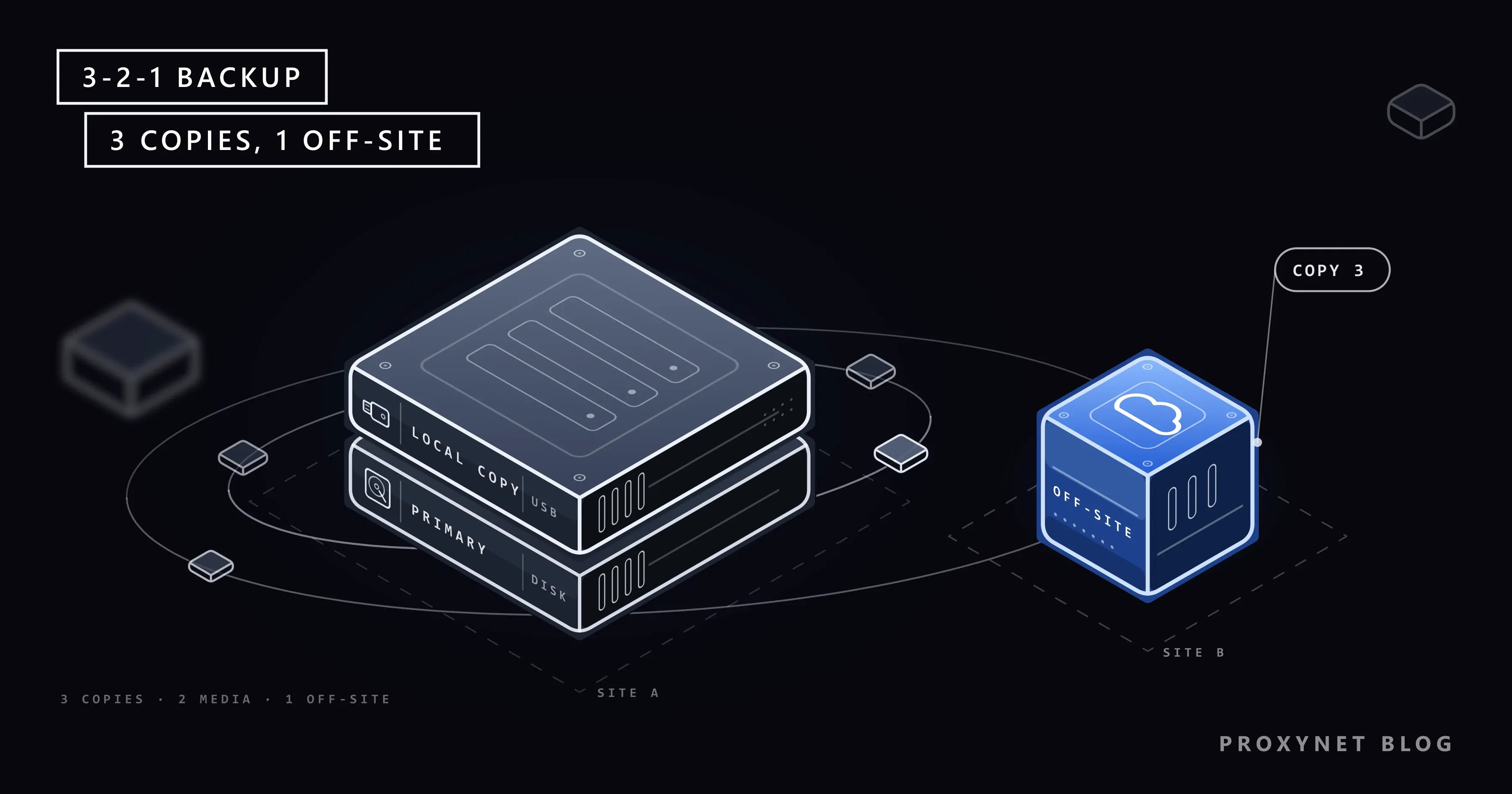
The 3-2-1 backup rule is a rule of thumb for how many copies of your data to keep and where: three copies, on two types of storage, one of them off-site. A backup is a separate copy you can return to if the original is lost or damaged.
The rule comes from photography. A 2012 paper by US-CERT, the team that is now part of CISA, the US cybersecurity agency, credits it to Peter Krogh's The DAM Book, a 2009 guide to managing digital photo archives. The paper, Data Backup Options, states it for home users and businesses alike. The rule names no product or technology, so it fits a family photo library and a company file server equally well.
What does each number in 3-2-1 mean?
Each number guards against a different way of losing data:
- 3 copies. One primary copy, the file you work with every day, and two backups. Two backups instead of one cover the moment you find that one backup is broken, outdated or missing the file you need.
- 2 types of storage. The copies should not all sit on the same kind of storage, because one kind of failure can hit all of them. The internal drive plus an external drive, a network storage box (NAS) or cloud storage are common pairs. Two partitions of the same disk are one storage device, not two.
- 1 copy off-site. At least one copy lives somewhere else: another building, a family member's home or a cloud service. Fire, flood and burglary destroy everything in one place, backups included.
Together, the three numbers keep any single event from reaching every copy.
What does the 3-2-1 rule protect against?
The rule protects against the everyday ways data is lost: hardware failure, malware, theft, human mistakes and disasters at the building. The table shows which copy survives each one:
| Event | What it destroys | Copy that saves you |
|---|---|---|
| Disk failure | The primary drive | Either backup |
| Ransomware | Every drive it can reach | An unplugged or off-site copy |
| Accidental deletion | The file, plus any synced copy | A backup with older versions |
| Theft of a laptop | The device and nearby drives | The off-site copy |
| Fire or flood | Everything in the building | The off-site copy |
Ransomware is the case that has changed how people back up. It is malware that encrypts your files and demands payment for the key, and CISA's guide warns that many variants look for backups they can reach and delete or encrypt them. What Is Ransomware? covers the attack itself; for backups, the lesson is that a copy the infected computer can reach is not safe.
Mistakes are the least dramatic cause: a spreadsheet saved over with an empty one, a phone reset without checking first. The rule covers them as long as one copy is older than the mistake.
What counts as a backup copy?
A backup copy is a separate, point-in-time copy that a change to the original does not touch. Many things that feel like backups fail that test.
Sync is not a backup. Cloud folders such as OneDrive, Google Drive and iCloud Drive mirror your files across devices: when you delete or damage a file on one device, the change reaches every other copy. Apple's support page on deleting photos says it plainly: with iCloud Photos on, a photo deleted on one device is deleted on your other devices, and it stays in Recently Deleted for only 30 days. Version history and recycle bins help, but they last a limited time.
On our test machine, we mirrored 40 small files to a second folder with Windows' robocopy /MIR and also saved a zip archive. After we deleted one file, overwrote another and mirrored again, the mirror had lost the first and taken on the damaged second, while the archive restored all 40 files with checksums matching the originals.
Other things that are not backups on their own:
- RAID. Two disks that mirror each other inside one computer or NAS survive one disk failing, but deletions, ransomware and fire reach both disks at once.
- A copy on the same disk. A "Backup" folder next to the originals dies with the disk.
- A drive that is always plugged in. It counts as a copy, but not as a safe one; the NCSC advises disconnecting removable media when it is not in use, because malware can move to attached drives.
What is the 3-2-1-1-0 rule?
The 3-2-1-1-0 rule is an extended version that adds two digits: one copy that is offline or immutable, and zero errors when you check that backups can be restored. It appears in backup software and industry guidance, for a world where attackers target backups on purpose.
The extra 1 means a copy that ransomware cannot change even with stolen administrator passwords. Offline means physically disconnected, such as a drive in a drawer or a tape on a shelf. Immutable means storage that refuses to change or delete data until a set date, which some cloud services offer as a setting. CISA's #StopRansomware Guide asks organisations to keep offline, encrypted backups of critical data, and it adds a caution about immutable storage: it does not meet the compliance criteria of some regulations, and a misconfiguration can be expensive.
The 0 means zero errors after a test restore. A backup job that reports "completed" proves only that something was written; a restored file that opens proves the rest.
How do you apply the 3-2-1 rule at home?
At home, the rule takes three things: the original on your device, a backup on an external drive you unplug, and a copy in a cloud backup service or at another home. For example:
- Phone photos. Turn on the phone's photo backup to the cloud. This is your off-site copy, though remember that it behaves like sync.
- The computer. Copy the phone's photos to the computer every month or two. On Windows, File History, under Control Panel > System and Security, saves copies of your files and their earlier versions to an external drive; Macs have Time Machine for the same job.
- The external drive. Plug it in for the backup, then unplug it and put it away. That makes it your offline copy.
- A reminder. Put a monthly reminder in your calendar to plug in the drive, if the backup does not run on its own.
The UK's National Cyber Security Centre has a short page on backing up at home with two points worth adding: back up anything you would miss, and remember that anyone who gets into your cloud account also gets into your backups. A strong password and two-step sign-in on that account protect the off-site copy.
How do you apply the 3-2-1 rule in a small business?
In a small business, the rule usually means the data on a server or in cloud apps, a local backup on a separate device, and an off-site copy that ordinary staff accounts cannot reach. The local copy, often a NAS, gives fast restores; the off-site copy, a cloud backup service or a second office, survives the building.
Three points matter more at work than at home:
- Separate credentials. The account that can delete backups should not be one staff use every day, so a stolen everyday password cannot wipe them.
- Cloud apps are data too. Email and shared documents in software-as-a-service (SaaS) apps sit on the provider's servers, and its recycle bin keeps deleted items only for a set period, so check whether you need your own backup.
- System images. CISA recommends ready-made "golden images" of critical systems, so a server can be rebuilt quickly instead of reinstalled by hand.
A backup brings files back; it cannot take back data that was copied out of the company. When that is the worry, security teams watch public sites for leaked company files, and they route that research through proxies so the company's own network stays out of view, as our data security page describes.
For checks that repeat on a schedule, a ISP Proxy keeps the same address from one run to the next.
How do you test that a backup can be restored?
You test a backup by restoring from it: pick a file, a folder or a whole system, bring it back to a different location and check that it opens. CISA asks organisations to test backups regularly, and the reason is simple: a backup that has never been restored is a hope, not a copy.
At home, a five-minute check every few months is enough: restore one old photo and one recent document from each backup and open them. At work, restore a whole server to a spare or virtual machine at least once a year, time it and write down the steps.
For large file sets, compare checksums. A checksum is a short fingerprint calculated from a file's contents; if the restored file's fingerprint matches the original's, the contents are identical. That is how we checked the 40 files in our test, with PowerShell's Get-FileHash.
Should backups be encrypted?
Yes, especially the off-site copy and any drive that could be lost or stolen. Encryption scrambles data so that only the holder of the key can read it; an encrypted backup drive found on a train reveals nothing. What Is Encryption? explains how it works.
The catch is the key. NIST's contingency planning guide says keys should be stored separately from the encrypted backups but still be accessible when needed. Lose the password and the backup is as gone as the original, so keep it in a password manager and on paper somewhere safe, not only on the computer you back up.
How long should you keep backups?
Keep backups long enough to go back to a point before any problem you might notice late. A file damaged in March and discovered in June can only be restored from a backup older than March.
A common pattern is daily backups kept for a week or two, weekly ones for a month or two and monthly ones for a year; backup programs call this a retention policy. Malware can also sit unnoticed for a while, so older versions matter. At work, check whether law or contracts set a minimum or maximum period; personal data should not live forever just because it sits in a backup.
What are RPO and RTO?
RPO and RTO are the two numbers that decide how often you back up and how fast you must restore. Both come from business continuity planning, and NIST's Contingency Planning Guide defines them:
- Recovery point objective (RPO) is the point in time to which data can be recovered, which sets how much recent work you can afford to lose. Back up once a night and you may lose up to a day.
- Recovery time objective (RTO) is the longest time a system can stay down before the damage becomes unacceptable. If the shop's website may be offline for four hours at most, the restore has to fit in four hours.
For an online shop, RPO might be an hour and RTO an afternoon, which rules out restoring a whole server from a cloud copy over a slow connection; a local copy is there for speed, the off-site one for survival.
Where you meet the 3-2-1 rule
In backup software that asks for a local and a cloud destination. In IT audits and security checklists for small companies. In photo and video work, where the rule began. In ransomware guidance from national cybersecurity agencies, usually under "keep offline backups".
Common mistakes
- Keeping the backup drive next to the computer, always plugged in. Ransomware, theft and fire reach both at once.
- Treating cloud sync as the backup. Deletions and damage sync to every copy.
- Never testing a restore. An untested backup can fail on the day it is needed.
- Backing up to a second partition of the same disk. One disk failure takes both.
- Encrypting the backup and keeping the only key on the backed-up computer.
- Keeping only the newest version. A mistake noticed late cannot be undone.
- Forgetting the data in cloud apps. Email and shared documents need a plan too.
Decision guide
| Your situation | What to do |
|---|---|
| Only a phone, photos in the cloud | Copy photos to a computer or drive now and then |
| One home computer | Cloud backup plus an external drive you unplug |
| Family photos you cannot replace | Add a copy at a relative's home |
| Small office with one server | Local NAS backup plus an off-site cloud copy |
| Worried about ransomware | Add an offline or immutable copy |
| Not sure your backups work | Restore one file from each backup today |
Frequently asked questions
Is the 3-2-1 backup rule still relevant?
Yes, as a minimum. The numbers were written for hardware failure and disasters, and they still cover those well; what has changed is that attackers now target backups, so many people add an offline or immutable copy and regular restore tests, the 3-2-1-1-0 version.
Is cloud storage enough as a backup?
Not on its own. A cloud copy makes a good off-site copy, but a sync folder copies deletions and encrypted files too, and anyone who gets into the account can delete it. Pair it with a local copy, and prefer a service that keeps older versions.
Does an external hard drive count as off-site?
Only when it is kept somewhere else. A drive in the same room is a second type of storage but not off-site; the same drive kept at work or at a relative's home is both. Some people rotate two drives, one at home and one away, and swap them every week or month.
Does a NAS count as a backup?
A NAS counts as one backup copy if it holds a separate copy of your data, not the only copy. If it is the main place where the files live, it is the primary, and its mirrored disks protect only against a disk failure, so it needs its own backups.
How often should you back up?
As often as the amount of work you are willing to lose; that amount is your RPO. Daily suits a work computer, weekly is often enough for a family archive, and automatic backups run even when you forget.
Can a backup be infected with malware?
Yes. If malware was on the computer when the backup ran, the backup holds it too, and restoring brings it back. Keeping older versions lets you restore from a point before the infection, and What Is Malware? explains how to clean a device before you restore onto it.
Summary
The 3-2-1 backup rule asks for three copies of what matters, on two kinds of storage, with one copy away from the building. Sync and mirrored disks are not backups, an unplugged or immutable copy protects against ransomware, and a backup only counts once you have restored from it. Start with an external drive you unplug and one off-site copy, and the next bad Monday costs a restore instead of the data.