A marketing team needs to know which payment methods online shops in five countries offer, and which ones were added in the last year. A normal chatbot answers in a few seconds, from memory and a handful of search results. The same question in a deep research mode gets a few clarifying questions, a research plan, ten minutes of silence and then a long report with a table, a section per country and a source behind every claim.
This post explains what deep research is, the steps an AI research agent goes through, how it differs from a chatbot and a search engine, and which assistants offer it. Then we cover where it fails, how to check its citations, how to write a good prompt, the developer APIs, and what changes when a company runs its own research agent. Vendor details were checked on their help pages on 17 November 2026.
What is deep research?
Deep research is an AI feature that plans and carries out a multi-step investigation of a question and returns a written report with its sources. The model does not answer from memory; it searches the web and any files you connect, reads what it finds and builds the answer from that material.
Technically, it is a specialised AI agent: a language model working in a loop, choosing its next action, calling tools such as search and page reading, and checking each result before it continues. Our post on how AI agents work explains that loop in general; deep research is the same loop tuned for one job, reading and synthesis.
The name spread in December 2024, when Google added Deep Research to Gemini, and OpenAI launched deep research in ChatGPT on 2 February 2025. A 2025 paper, Characterizing Deep Research, argues that the defining feature is not the length of the report but the "fan-out": how many separate concepts the system has to look up. A question about one fact needs one search; a question about five markets, three payment types and a time range needs dozens.
How does deep research work, step by step?
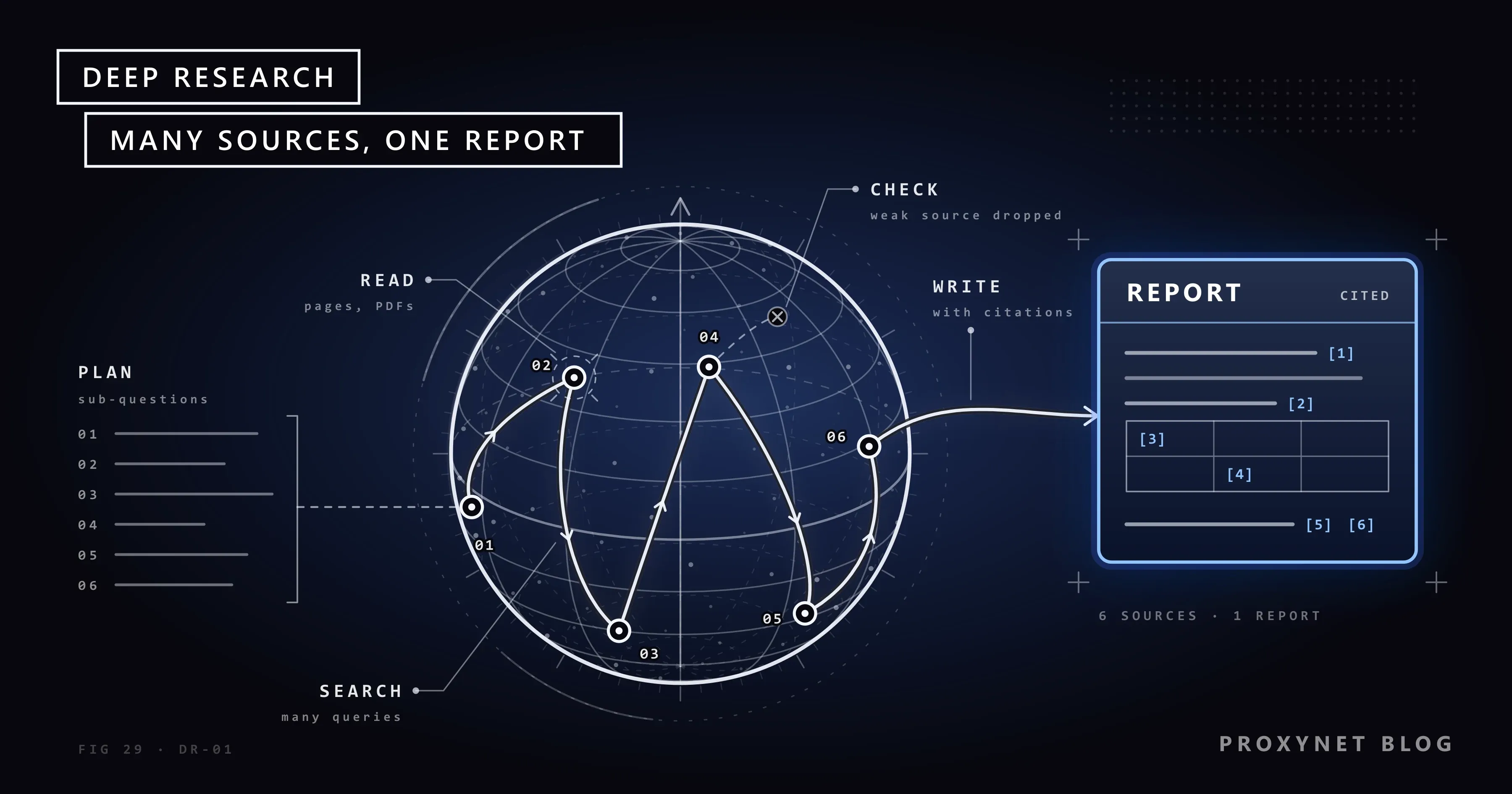
Deep research works as a loop of planning, searching, reading and checking that repeats until the plan is covered, followed by a writing step that attaches citations.
- Clarify the question. ChatGPT, for example, may first ask about scope, such as the countries or the period you mean.
- Draft a plan. The system splits the question into sub-questions and shows a research plan; Gemini and ChatGPT let you edit it before the work starts.
- Search broadly. It writes many queries, usually short and broad at first, narrower as it learns which sources exist.
- Read the pages. It opens web pages, PDFs and the files or connected sources you allowed, and keeps the passages that answer a sub-question.
- Evaluate and fill gaps. It compares the findings with the plan, notices conflicting figures or missing parts, and searches again.
- Write the report. When the plan is covered or a time limit is reached, it writes a structured report.
- Attach citations. Each claim is linked to the page it came from, so you can open the source and check it.
Many systems split this work between several agents. Anthropic's engineering post on its multi-agent research system describes a lead agent that plans the research and starts several subagents searching in parallel, plus a separate citation step that matches the final claims to their sources. The post reports that this setup uses about 15 times more tokens than a normal chat, which is why every vendor limits how many deep research tasks you can run.
How is deep research different from a chatbot or a search engine?
A search engine gives you a ranked list of pages to read yourself, a chatbot gives you a short reply built from a few sources, and deep research gives you a report built from many pages it has read for you.
| Search engine | Chatbot answer | Deep research | |
|---|---|---|---|
| Time | Instant | Seconds | Several minutes |
| Sources | Links you open | A few pages | Dozens to hundreds |
| Output | A list of results | A few paragraphs | A long cited report |
| Best for | Finding one page | A quick fact | A multi-source question |
The real change is who does the reading. With a search engine you open ten tabs and compare them; with deep research the system does that reading, and your job moves from reading to checking.
Which AI tools offer deep research?
ChatGPT, Gemini, Claude and Perplexity all offer a deep research mode, with different names, menus and limits that change often. We leave out prices and plan quotas, which change even faster.
ChatGPT. You type /Deepresearch in the prompt or choose Deep research from the tools menu (+) or the sidebar. According to OpenAI's help page, it searches the public web or specific sites, reads uploaded files and uses connected apps; Sites > Manage sites limits it to the domains you enter. You can edit the plan and interrupt the run, and the report downloads as Markdown, Word or PDF. Availability depends on your plan and country.
Gemini. In the Gemini app you open Add files in the prompt box, choose Deep Research and submit your question; Gemini shows a plan you can change with Edit plan before you click Start research. Google Search is the default source, and Sources adds your files, NotebookLM notebooks, and Gmail and Drive if Workspace is connected. Google's help page says a report takes 5 to 10 minutes on average, that you must be 18 or older, and that daily requests are limited.
Claude. Anthropic calls the feature Research. It runs on paid Claude plans and needs web search turned on: you click + at the bottom left of the chat and choose Research. Anthropic's help page says Claude runs searches that build on each other, can use connected sources such as Gmail and Google Docs, and uses up plan limits faster than a normal chat.
Perplexity. You pick Research from the mode selector in the search box. Perplexity's help center says free users get limited access, most tasks finish in under three minutes, and the report can be exported to PDF. How these four tools reach the web and show their sources is compared in ChatGPT vs Claude vs Gemini vs Perplexity for web research.
What is deep research good at, and where does it fail?
Deep research is strong at breadth and weak at judgement: it reads more pages than you would, but it does not always know which of them deserve trust.
It does well when the answer is spread over many pages: a market overview, rules across several countries, a company's background, the first map of an unfamiliar field. It also finds pages a quick search would miss, because it keeps searching with the vocabulary it picks up on the way. The failures mostly come from the sources:
- Weak sources rank high. Anthropic's engineers saw early versions prefer SEO-optimised content farms to authoritative pages that ranked lower.
- Paywalls and logins stop it. It reads the public web plus what you connect; a report may never mention the key paywalled study.
- Old pages look current. An undated article from three years ago can sit next to this month's figures.
- Citations can drift. The link is real, but the sentence is a paraphrase that changed the meaning, or the number came from another page.
- Uncertainty gets lost. OpenAI's launch post said the model can invent facts, can struggle to tell authoritative information from rumour, and often fails to show how unsure it is.
How do you check a deep research report?
You check a deep research report by opening the sources behind the claims you will act on and confirming that each one says what the report says.
- Pick the load-bearing claims. Mark the five to ten facts your decision depends on.
- Open the cited page. Make sure it is the page the report names, not a homepage or a search result.
- Find the sentence. Search the page for the number or phrase; if it is not there, treat the claim as unsupported.
- Check the date against the period your question covers.
- Go to the primary source. If a news article quotes a regulator, open the regulator's own page.
- Look for the missing side. Ask "which sources disagree with this?" or run a normal search on the key claim.
How do you write a good deep research prompt?
A good deep research prompt states the question, the scope, the sources you trust, the time range and the format you want back. The system plans from your words, so a vague prompt produces a vague plan.
- Scope: countries, industries, products, company size.
- Sources: official sites, regulators, filings, papers, or sites to leave out. Source settings such as ChatGPT's site list enforce this better than a sentence.
- Time range: "changes since January 2026" removes most outdated material.
- Output: a comparison table, a section per market, open questions at the end.
- Uncertainty: ask it to mark claims that rest on a single source.
An example that covers all five:
Compare the online payment methods offered by the top fashion e-commerce sites in
Germany, Spain, Poland, Türkiye and Brazil. Focus on changes since January 2026.
Prefer official sources: the shops' own payment pages, central banks and
payment-scheme announcements. Give one table (country, method, first seen) and a
short section per country. Mark every claim that rests on a single source, and
list the questions you could not answer.
Is there a deep research API?
Yes, several vendors offer deep research to developers, and the lineup changes quickly. On 17 November 2026, Google's documentation listed a Gemini Deep Research agent in preview, reached through the Gemini API's Interactions API, and Perplexity's API mapped its deep research model to a high-effort setting of its Agent API. OpenAI retired its dedicated deep research API models on 23 July 2026, according to its deprecations page. These tasks run for minutes, so an application starts one in the background and collects the report when it is done.
What changes when you run your own research agent?
When an organisation runs its own research agent, its requests become automated traffic on other people's websites and have to follow those sites' rules. One task can open hundreds of pages, and a server that sees too many requests from one address answers with 429 Too Many Requests or blocks it.
The basics are those of any well-behaved crawler: read robots.txt, keep a per-site rate limit, identify the agent with an honest user agent, cache pages instead of fetching them twice, and use the site's official API where one exists. Pages behind a login or a paywall stay out of scope unless you have the right to use them.
Location is the other half. Prices, currencies, availability and legal notices often change by visitor country, so an agent researching a market from a data center elsewhere can report the wrong price with a correct-looking citation. Teams that need the local view send those requests through a Residential Proxy in the target country and record the country with each page. The proxy changes where the request comes from; it does not raise the number of requests a site accepts and is not a way around a block.
Where is deep research used?
- Market research: competitors, prices and regulations across several countries.
- Literature reviews: a first map of papers before reading the important ones in full.
- Due diligence: the public history of a supplier, partner or acquisition target.
- Policy and compliance: what changed in a rule, when, and who says so.
- Content and SEO planning: what is already published on a topic and which questions are still open.
Common mistakes
- Treating the report as finished work. It is a first draft; check the claims you will use.
- Writing a one-line prompt. A short question gets a generic plan.
- Skipping the plan review. A wrong sub-question at the start costs ten minutes.
- Using deep research for a quick fact. A search is faster and spends none of your limited tasks.
- Assuming the report covers everything. Paywalled studies and private databases are missing unless you connect them.
- Publishing the report as it is. Rewrite it, check it and credit the original sources; the pages it read belong to their authors.
Decision guide
| Need | Recommendation |
|---|---|
| One fact or a definition | A chatbot answer or a search |
| A question spread over many pages | Deep research with a scoped prompt |
| Only trusted sources | Restrict sites or sources first |
| Your documents plus the web | A tool that connects your files |
| Research inside your own product | A vendor's API, run in the background |
| Local prices or stock per country | Your own agent, location-accurate requests |
Frequently asked questions
Is deep research free?
Partly. On 17 November 2026, Gemini offered Deep Research to signed-in users aged 18 or older with daily limits, and Perplexity gave free users limited access to Research. Claude's Research needs a paid plan, and ChatGPT's allowance depends on your plan and country; the usage counter in the product shows what is left.
How long does deep research take?
Usually from about three minutes to half an hour. Perplexity says most tasks finish in under three minutes, Google gives 5 to 10 minutes on average for Gemini, and OpenAI described 5 to 30 minutes at launch. You can leave the chat while it runs.
What is the difference between deep research and web search?
Web search returns a quick answer or a list of links from a few pages; deep research plans a set of searches, reads many pages and writes a long cited report. Search fits a fact you need now, deep research a question that would take hours of reading.
Can deep research read paywalled or private pages?
No, not on its own. It reads the public web plus the sources you connect, such as uploaded files, a drive or a mail account. Content behind a paywall or a login you have not connected is missing, and the report may not say so.
Can I trust deep research citations?
Only after checking the ones that matter. The links are usually real, but the sentence they support can be a loose paraphrase, an old figure or a claim from a weak page. Open the page, find the exact sentence, check the date and prefer the primary source.
Is deep research the same as an AI agent?
Deep research is one kind of AI agent. A general agent can click, fill in forms and act on websites; a deep research agent mostly searches, reads and writes. OpenAI's help page, for example, says deep research uses only the read actions of connected apps, never their write actions.
Summary
Deep research is an AI agent that turns a question into a plan, runs many searches, reads the pages, fills the gaps and writes a cited report in minutes. ChatGPT, Gemini, Claude and Perplexity all offer a version, and some vendors sell it through their APIs. The report replaces hours of reading but not the checking: open the sources behind the claims you use, prefer primary pages and watch the dates. For research that depends on what a page shows in a particular country, run the agent with location-accurate requests, or talk to us about our Web Scraping API for managed page extraction.