You ask the assistant in your browser to find a flight that leaves after 6 p.m. and includes a checked bag. Today the agent works like a stranger at the keyboard: it reads a screenshot or the page structure, guesses which field holds the date, types, clicks a filter and checks what changed. A redesigned menu is enough to break the task. WebMCP proposes a shorter road: the airline's page tells the agent "I have a search_flights function, and these are its inputs", and the agent calls it.
This post covers what WebMCP is and who is behind it, how a tool call works, where you can try it, how it differs from MCP and from agents that click through pages, its security questions and what it means for site owners.
What is WebMCP?
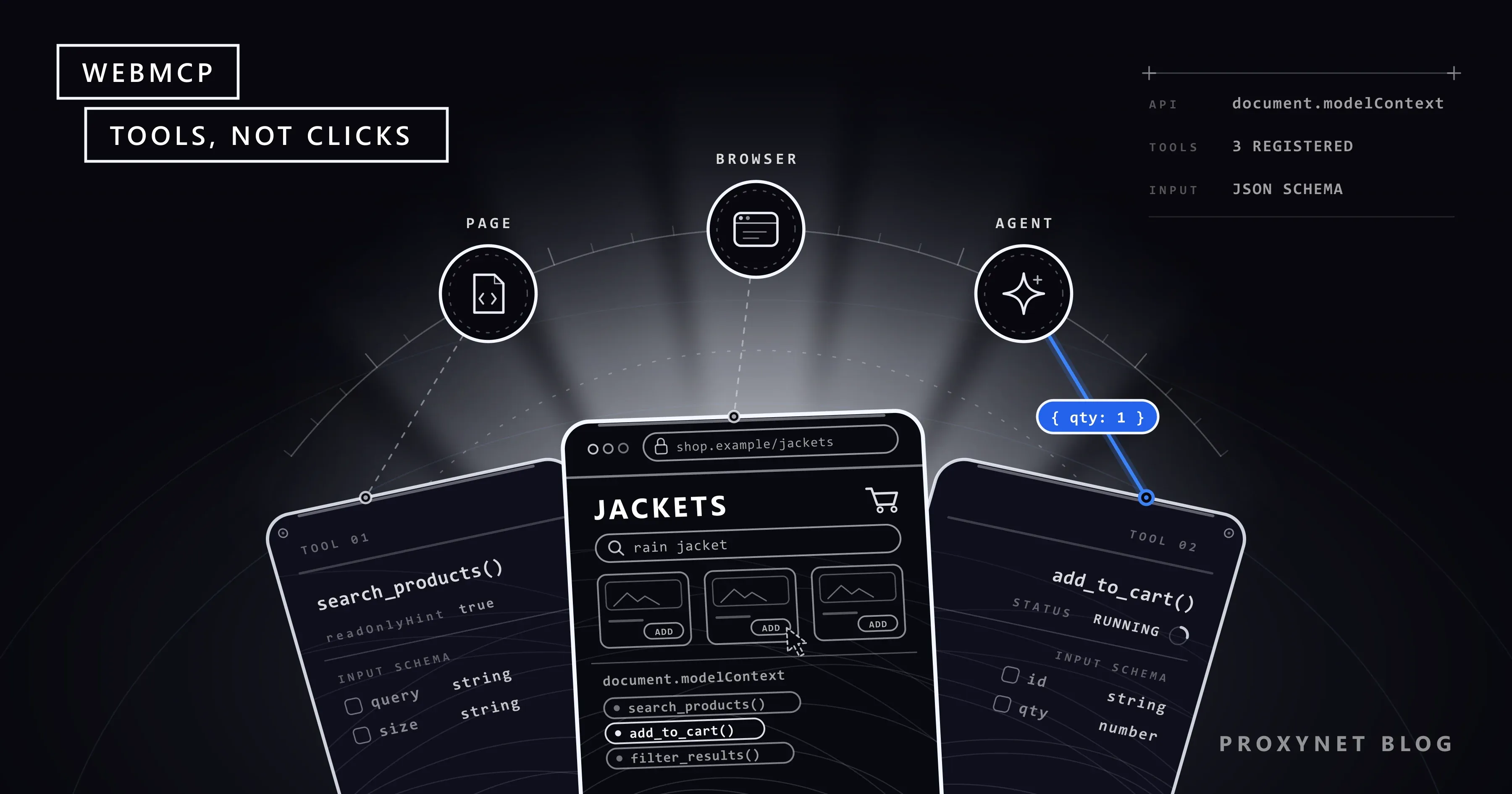
WebMCP is a browser API that turns features of a web page into tools an AI agent can call directly, instead of operating the page's buttons and forms. Chrome's documentation spells it out as Web Model Context Protocol. A tool here is a JavaScript function plus two things a language model can read: a description of what it does and a schema, a machine-readable list of the inputs it expects. Its authors compare a page that uses WebMCP to an MCP server written in the page's own script.
The proposal was first published in August 2025 by engineers from Microsoft and Google and is developed in the W3C Web Machine Learning Community Group. The current WebMCP specification is a Draft Community Group Report dated 13 November 2026, and it says plainly that it is not a W3C Standard and not on the W3C Standards Track.
How does WebMCP work?
WebMCP works as a five-step loop between the page, the browser and the agent:
- The page registers its tools. A script calls
document.modelContext.registerTool()with a name, a description, an input schema and anexecutefunction. A shop might registersearch_productsandadd_to_cart, and add or remove tools as the page changes. - The agent discovers them. A browser's built-in agent receives the list of tools and their schemas through the browser; an agent running inside the page, such as a site's chat widget, calls
getTools(). - The model picks a tool. It reads the descriptions, chooses the one that fits the user's request and produces matching arguments, for example
{"query": "rain jacket", "size": "M"}. - The browser runs the tool in the page. The
executefunction reuses the site's own code, the same search or basket logic the buttons use. It runs in the user's current session, so it acts as the signed-in user, and the visible page updates. - The result goes back to the agent. The function returns text or structured data, and the agent answers, calls another tool or asks the user what to do next.
Two details shape everything else. Tools exist only while the page is open: close the tab and they are gone. And nothing announces them in advance; Chrome's documentation notes that clients have to visit a site to learn whether it has tools.
What are the imperative and declarative APIs?
WebMCP offers two ways to define tools: an imperative API in JavaScript and a declarative one built on HTML forms.
The imperative API is the one the specification defines. You register a tool with document.modelContext.registerTool() and remove it by aborting the AbortSignal you passed in; getTools(), executeTool() and a toolchange event complete the set. Early drafts placed this object at navigator.modelContext; in May 2026 the specification moved it to document.modelContext, so older tutorials may show the previous name.
The declarative API turns an existing <form> into a tool through attributes: toolname and tooldescription on the form, and optionally toolparamdescription on a field. When an agent calls it, Chrome focuses the visible form and fills it in; the user still clicks Submit unless the site adds toolautosubmit. Chrome implements both, while the spec repository describes the form-based approach as being explored separately, outside the specification for now.
Which browsers support WebMCP today?
As of 17 November 2026, Chrome is the main place to try WebMCP, through an origin trial and a testing flag. An origin trial is a time-limited programme in which a site registers for a token and tests an experimental feature with real visitors.
- Chrome: The Chrome for Developers guide to WebMCP offers the origin trial from Chrome 149 and the
chrome://flags/#enable-webmcp-testingflag for local testing. Chrome Status lists the feature as "Proposed". - Microsoft Edge: Microsoft's origin trial portal lists a WebMCP trial for Edge.
- ChatGPT desktop app: OpenAI's help pages say ChatGPT can use WebMCP tools, which it calls site tools, only in the desktop app's built-in browser.
- Firefox and Safari: No support. Mozilla's standards position on WebMCP is neutral, and the WebKit team, which builds Safari's engine, has recorded its opposition.
The spec repository keeps an implementation status page for browsers and agents; check it before you build on the API.
How is WebMCP different from MCP?
WebMCP borrows MCP's idea of tools but runs them inside a web page with the user's session, instead of on a server the agent connects to. MCP, the Model Context Protocol, lets AI applications connect to servers that offer tools, data and prompt templates through JSON-RPC messages; we cover its architecture in What Is MCP (Model Context Protocol)?.
Google's own comparison of WebMCP and MCP is direct about it: WebMCP is not an extension or a replacement of MCP, but a set of MCP-inspired browser APIs that keeps the tool concept and leaves out server-side ideas such as resources.
| Question | MCP | WebMCP |
|---|---|---|
| Where tools run | On an MCP server | In the open web page |
| Who hosts them | A server you deploy | The website itself |
| Whose login | The server's own credentials | The user's browser session |
| When available | Whenever the server is up | Only while the page is open |
| Built for | Background tasks, data access | Live tasks on a site, with the user |
The login row is the practical difference. An MCP server needs its own way to sign in to your service and has to rebuild the user's context on the back end; a WebMCP tool runs in a tab where the user is already signed in.
Consent works differently too. The MCP specification says hosts must obtain explicit user consent before invoking any tool; in WebMCP, when to ask is left to the agent and the browser, guided by hints the site attaches to each tool. Many sites will use both: MCP for data and background jobs, WebMCP for help with what is on screen.
How is WebMCP different from agents that click through a page?
Without WebMCP, a browser agent operates the page the way a person would; with it, the agent gets a declared shortcut. Agents today read a screenshot, the HTML or the accessibility tree (the outline of buttons, links and fields that screen readers use), then simulate clicks and typing. Chrome's documentation calls this actuation, and browser tools such as Playwright MCP give AI assistants exactly this kind of control. The difference shows up in three places:
- Reliability. A clicking agent infers what a button does from its label and position, so a redesign can break the task. A tool states its purpose and inputs and survives layout changes, because it calls the site's logic, not its design.
- Speed. One tool call can replace a chain of screenshot, decide, click and wait steps, each of which costs a model call and invites a wrong guess.
- Control. With actuation, the site has no say in how the agent reaches a goal. With WebMCP, the site decides which actions to offer and can flag the risky ones.
WebMCP does not end page reading. The explainer says agents can fall back to general browser automation when a page's tools do not cover the task, and most pages have no tools at all.
Is WebMCP safe?
WebMCP does not make agents safe on its own, and the specification lists the risks openly. An agent in the browser carries the user's signed-in session and personal context, so a tool can take the same actions the user can, such as buying something or changing account settings.
The main risks the specification describes:
- Prompt injection through tools. A malicious page can hide instructions for the model in a tool's name, description or results, and reviews or forum posts returned by an honest tool can carry the same kind of text. Why this is hard to stop inside a browser is covered in What Is an AI Browser?.
- Misleading tools. Nothing guarantees a tool does what its description says: a tool described as finalising a basket could place the order.
- Asking for too much. A tool can request parameters it does not need, such as age or location, and a helpful agent may fill them in.
Part of the defence is in the API. By default, other sites and cross-origin frames cannot see or call a page's tools. Sites can also mark each tool with hints: readOnlyHint for tools that change nothing, untrustedContentHint for results with third-party content, and consequentialHint for actions such as payments, so the agent or browser can ask the user to confirm first.
The specification adds that agents cannot rely solely on what a site claims about its own tools, and a standard way for a tool to ask the user directly is still under discussion.
What does WebMCP mean for site owners?
For site owners, WebMCP is an optional extra layer: the site keeps working for people and for clicking agents, and agents that support WebMCP get a more predictable path. It is early, though: the API is still changing and few agents use it yet.
To try it, set chrome://flags/#enable-webmcp-testing to Enabled and relaunch Chrome, or register your site for the origin trial. Chrome's guide also lists test extensions and DevTools support for checking your tools.
The registration below is copied from the WebMCP explainer in the specification's GitHub repository (W3C Software and Document License). It is a design site's tool that filters templates from a plain-language description:
await document.modelContext.registerTool({
  name: "filter-templates",
  description: "Filters the list of templates based on a natural language visual description.",
  inputSchema: {
    type: "object",
    properties: {
      description: { type: "string", description: "A visual description of templates to show." }
    },
    required: ["description"]
  },
  execute({ description }) {
    filterTemplatesInUI(description);
  }
});
filterTemplatesInUI stands for the site's existing filtering code; the tool only gives it a name, a description and a schema an agent can read.
Keep descriptions short and specific; Chrome suggests up to about 500 characters per tool description. Validate inputs again inside execute, mark state-changing and payment actions with the right hints, and keep the visible page in sync with what each tool did. To keep WebMCP off a page entirely, send a Permissions-Policy: tools=() response header.
Where will you meet WebMCP?
- Online shops: search, filter and add-to-basket tools on the catalogue the shopper is viewing.
- Travel and booking sites: multi-step searches with dates, passengers and fare rules as structured inputs.
- Support pages: a support-request form offered as a tool, filled from the conversation.
- Complex web apps: design tools, dashboards and code-review screens, where a named action beats a deep menu path.
What about sites that offer no tools?
Most of the web has no WebMCP tools, so agents keep reading pages the ordinary way. WebMCP covers only sites that choose to add tools, and only while a page is open.
Agents and research pipelines that read public pages therefore still meet the familiar rules: robots.txt, rate limits, terms of service and content that changes with the visitor's country. When a team needs public web data rather than actions in one tab, our Web Scraping API offers managed page extraction through our sales team. Where an agent must see a page as local visitors see it, a proxy gives its requests an exit in that country, within the site's rules.
Common mistakes
- Calling WebMCP a W3C standard. It is a community group draft, tested in a Chrome origin trial.
- Copying old examples. Code built on
navigator.modelContextwill not run as written. - Treating it as a server-side MCP replacement. WebMCP tools vanish when the tab closes.
- Writing vague tool descriptions. The model chooses tools by their descriptions; "handle basket" invites the wrong call.
- Skipping the hints. A payment without
consequentialHintgives the agent no signal to confirm. - Trusting tool output blindly. User content returned by a tool can carry prompt injection.
Decision guide
| Your situation | What to do |
|---|---|
| Agents should act on your site with the user | Try WebMCP tools in the origin trial |
| Agents need your data with no browser open | Build an MCP server or a regular API |
| Your key journeys are simple HTML forms | Test the declarative form attributes |
| A tool moves money or deletes data | Set consequentialHint, confirm with the user |
| You do not want agents calling tools on a page | Send Permissions-Policy: tools=() |
| You need public data from sites without tools | Read pages within robots.txt and rate limits |
Frequently asked questions
Is WebMCP the same as MCP?
No. MCP connects AI applications to servers through a protocol; WebMCP is a browser API that lets a page offer tools to agents working in that page. It takes MCP's tool vocabulary of names, descriptions and JSON Schema inputs, but has no server, no resources and no transport of its own.
Is WebMCP an official web standard?
Not yet. The specification is a Draft Community Group Report from the W3C Web Machine Learning Community Group and is not on the W3C Standards Track. Chrome tests it through an origin trial; Mozilla's position is neutral and WebKit opposes it.
How do I turn on WebMCP in Chrome?
For local testing, open chrome://flags/#enable-webmcp-testing, set it to Enabled and relaunch Chrome. To use it on a live site, register for the WebMCP origin trial, available from Chrome 149, and add the trial token to your pages.
Does ChatGPT support WebMCP?
Partly. OpenAI's help pages say ChatGPT can discover and use WebMCP tools, which it calls site tools, only in the built-in browser of the ChatGPT desktop app. Each tool call goes through a safety review first.
Can WebMCP run in a headless browser?
It may be possible, but it is not the goal. Chrome's documentation says the API is designed mainly for local browser workflows with a human in the loop, and the explainer lists fully autonomous agents without a browser interface as a non-goal.
Does WebMCP replace web scraping?
No. WebMCP lets an agent act on a page the user has open; it does not hand out a site's data in bulk, and it exists only on sites that add tools. Collecting public data across many pages still means reading those pages, or using the site's official API where one exists.
Summary
WebMCP is a proposed browser API that lets a web page register its own functions as tools, each with a description and a JSON Schema, so an AI agent can call them instead of clicking through the interface, inside the user's session. It shares MCP's tool vocabulary but lives in the page, disappears with the tab and is still a community group draft in a Chrome origin trial. For the agents and pipelines that still read ordinary pages, location and rate limits remain part of the job, and our proxy services cover the location side.