Imagine you want an AI assistant to access internal documents, a database, a code repository and the web. Before MCP, the way to do that was to write a separate integration for each tool in each assistant application: a database plugin for the assistant in the code editor, another plugin for the same database in the chat app, and a third version for internal tools. As the number of tools and applications grew, the number of integrations multiplied.
MCP (Model Context Protocol) solves this by letting you write a tool once as an "MCP server" and use it in every AI application that supports MCP. In this article we explain what MCP is, what problem it solves, its host-client-server architecture, the tools, resources and prompts servers offer, and the two standard transport methods. Then we cover how an MCP server reaches web data and where a proxy fits in, the protocol's security risks, the difference between MCP and using an API directly, and the smallest working MCP server in Python.
What is MCP?
Model Context Protocol is an open protocol that standardises how large language model applications connect to external data sources and tools. The protocol's official specification defines communication with JSON-RPC 2.0 messages and compares itself to the Language Server Protocol (LSP), which standardised programming language support across development tools. Just as LSP let language support be written once and used in every editor, MCP aims to let a tool be written once and used in every MCP-enabled AI application.
To understand MCP, it helps to separate two things:
- MCP is not a model or an AI product. It is a communication contract: it defines the format and meaning of messages between an application and a tool.
- MCP doesn't write the tool for you. A database query, a web request or a file operation is still your code; MCP lets you expose that code in a form AI applications can discover and call.
Specification versions are named by date. At the time this article was written, the current version is 2026-07-28, and it contains an important change compared to earlier versions: the protocol is stateless; every request carries its own protocol version and client capabilities. In earlier versions, a session was set up with a handshake (initialize) at the start of the connection. Because the protocol is evolving quickly, we recommend checking the current specification before writing an integration.
What problem does MCP solve?
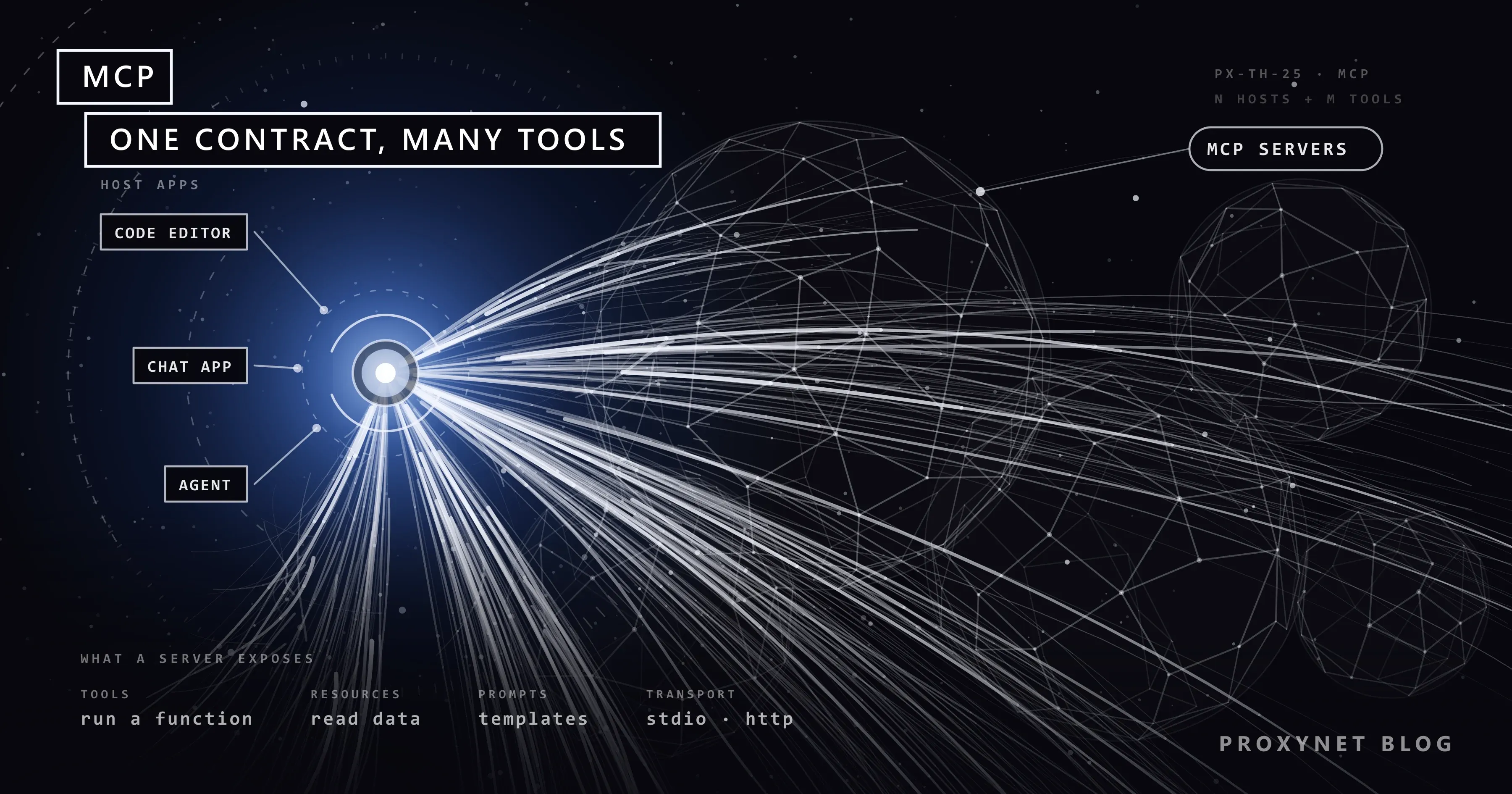
The problem MCP solves is the "N × M integrations" problem. If there are five AI applications and ten tools, fifty separate integrations are needed for every application to talk to every tool. Each integration is written separately, tested separately and updated separately when the tool changes.
With MCP, this becomes "N + M":
- Each tool is written once as an MCP server.
- Each AI application gains MCP support once.
- Every application that supports MCP can use every MCP server.
In practice: when a company writes an MCP server for its internal knowledge base, employees can reach that knowledge base through the same server from the assistant in their code editor, from a desktop chat app or from an agent they built themselves.
Architecture: host, client and server
MCP's architecture section in the specification defines three roles.
| Component | What is it? | Responsibilities |
|---|---|---|
| Host | The AI application itself (code editor, chat app, agent) | Creates and manages clients, controls connection permissions and user consent, calls the model, keeps the conversation history |
| Client | The connector inside the host | Talks to exactly one server, attaches the protocol version and capabilities to every request, keeps the security boundary between servers |
| Server | The program that offers the tool or data source | Offers tools, resources and prompts; can be a local process or a remote service |
One of the most important design principles of the architecture is isolation: a server cannot read the whole conversation or see into other servers. The conversation history stays with the host; the server only receives the information it needs to do its job. The host also controls interactions between servers.
A user's request passes through this structure like this:
- The user types a request in the host application.
- The host gives the model the list of tools offered by connected servers, with their descriptions.
- The model decides to use a tool and produces a tool call.
- The host asks the user for consent if needed and passes the call to the relevant client.
- The client sends the request to the server; the server runs the tool and returns the result.
- The host gives the result to the model, and the model produces a response for the user.
We explain the general logic of the tool call loop in detail in How Do AI Agents Work?.
What does an MCP server offer?
An MCP server can offer three basic kinds of capabilities:
- Tools: functions the model can ask to run. Fetching a web page, running a query on a database, creating a record. Every tool has a name, a description that helps the model understand when to use it, and parameters defined with JSON Schema.
- Resources: data the user or model can use as context. A file's contents, a database schema, a document. Unlike tools, they don't take actions; they provide information.
- Prompts (prompt templates): ready-made message templates and workflows the user can pick. For example, a parameterised template like "analyse this error log".
Servers can also ask the client for additional input to complete a request: asking the user for missing information (elicitation) or having the host's model generate text (sampling). In the current specification, these requests are passed inside the server's response.
On top of the protocol core, features such as managing long-running jobs or interactive interface elements within a conversation are defined as optional extensions; both the client and the server have to support them explicitly.
Transports: stdio and Streamable HTTP
How MCP messages are carried between the two sides is defined in the specification's transport section. There are two standard methods:
| Criterion | stdio | Streamable HTTP |
|---|---|---|
| How does it work? | The client starts the server as a subprocess; messages flow line by line over standard input and output | Every message is sent to a single MCP endpoint as an HTTP POST; the response comes back as a JSON object or a request-scoped SSE stream |
| Where does the server run? | On the user's computer, on the same machine as the host | On a remote server or in the cloud |
| Authentication | Runs with the operating system user's permissions | At the HTTP level, usually OAuth-based authorisation |
| Typical use | Local files, local development tools, personal use | Services shared by a team or across a company |
| Cancellation | A cancellation notification is sent | The request's response stream is closed |
The meaning of the protocol is the same in both methods; only how messages are delivered changes. Other transport methods can also be defined for special needs.
Remember that a server running over stdio runs with all the permissions of the user who started it. An MCP server you install on your computer can access your files and network to the same extent you can.
How does an MCP server reach web data?
One of the capabilities AI applications need most is current web data. An MCP server usually provides it in one of three ways:
- Search tool: sends a query to a search API and returns a list of titles and addresses.
- Page fetch tool: fetches a specific address with an HTTP client and returns its text.
- Browser tool: drives a headless browser; opens pages that load with JavaScript, clicks and takes screenshots.
The network side of these tools is ordinary HTTP requests, and every rule of web scraping applies here too. In this setup, the proxy sits at the server's exit point to the outside world:
- Location: the server uses an address from a particular country to fetch how a product or content looks from there. For jobs that need a real home connection view, a Residential Proxy is preferred.
- Load distribution: a tool that fetches many different public pages can use a Rotating Proxy to spread requests across different exit IPs through a single address; rate limits and site rules still apply.
- Egress control and logging: which domains the server reaches is monitored and limited from a single point.
- Isolation: the server's web traffic is kept separate from the company's internal network and main IP addresses.
We explain how to make a web access tool safe with an allowlist, rate limits, internal network blocking and content cleaning, with a tested example, in Safe Web Access for LLMs: Rate Limits and Permissions. For the general data collection setup, see our data scraping solution page.
The smallest MCP server
The example below is an MCP server offering a single tool, written with the official Python SDK. The tool only fetches HTTPS pages on allowed domains and sends the request through an optional egress proxy. In version 2 of the SDK, the server class is called MCPServer; FastMCP examples from version 1 don't run directly on this version.
pip install mcp httpx# server.py
import os
from urllib.parse import urlsplit
import httpx
from mcp.server.mcpserver import MCPServer
ALLOWED = {d.strip().lower() for d in os.environ.get("ALLOWED_DOMAINS", "example.com").split(",")}
PROXY = os.environ.get("EGRESS_PROXY") # e.g. http://user:pass@pr.proxynet.io:8000
mcp = MCPServer("web-reader")
@mcp.tool()
async def fetch_page(url: str) -> str:
"""Returns the first 5,000 characters of a page on an allowed domain."""
parts = urlsplit(url)
if parts.scheme != "https" or (parts.hostname or "").lower() not in ALLOWED:
return f"This address is not on the allowlist: {url}"
async with httpx.AsyncClient(proxy=PROXY, timeout=15, follow_redirects=False) as client:
response = await client.get(url, headers={"User-Agent": "ExampleMCP/1.0"})
return response.text[:5000]
if __name__ == "__main__":
mcp.run(transport="stdio")The function's name becomes the tool's name, the docstring becomes the tool's description, and the type hints become the parameter schema. The SDK turns these into an MCP tool definition automatically.
To call the server from a client:
# client.py
import asyncio
import sys

from mcp.client.session import ClientSession
from mcp.client.stdio import StdioServerParameters, stdio_client

SERVER = StdioServerParameters(
    command=sys.executable,
    args=["server.py"],
    env={"ALLOWED_DOMAINS": "example.com", "EGRESS_PROXY": "http://user:pass@pr.proxynet.io:8000"},
)


async def main():
    async with stdio_client(SERVER) as (read, write):
        async with ClientSession(read, write) as session:
            await session.discover()  # learn the server's version and capabilities
            tools = await session.list_tools()
            print([t.name for t in tools.tools])

            result = await session.call_tool("fetch_page", {"url": "https://example.com/"})
            print(result.content[0].text[:200])


asyncio.run(main())
Note two details. First, before listing tools, the client uses discover() to learn which protocol version and capabilities the server supports; when that step is skipped, the server rejects the request with an invalid parameters error. For servers using older protocol versions, the SDK also has an initialize() call. Second, when the SDK starts a stdio server, it doesn't pass all environment variables, only a limited list such as PATH; values the server needs, such as ALLOWED_DOMAINS and EGRESS_PROXY, must be passed explicitly with the env parameter.
In real use you don't write the client yourself; you add the server to the settings of a host application that supports MCP, and the host starts it. This example client is enough to test that the server works correctly.
The example is intentionally small. In production, rate limits, an internal network address check, a response size limit and content cleaning should be added to this tool.
Security risks
The fact that MCP tools can run arbitrary code and fetch content from external sources makes the protocol as risky as it is powerful. The specification itself lists user consent, data privacy and tool safety as core principles and asks hosts to get explicit consent from the user before invoking a tool. The main risks are:
- Tool poisoning. Because the model decides how to use a tool by reading its description, a malicious server can hide instructions aimed at the model inside the description. The specification says that tool descriptions and annotations should be treated as untrusted unless they come from a trusted server.
- Excessive permissions. Giving a server more access than it needs: write access for a job that only needs reading, the whole file system instead of one folder, an admin account instead of one database table.
- Prompt injection through tool results. The content returned by a page fetch tool can contain text that looks like instructions to the model. Following those instructions, the model may call a tool on another server.
- Passing tokens along. An MCP server forwarding the access token it received to other services without validating it can lead to authorisation checks being bypassed. The protocol's security guidance document explicitly forbids this kind of token passthrough and requires servers to accept only tokens issued for them.
- SSRF. A malicious server can cause the client to send requests to internal network addresses or cloud metadata addresses during the authorisation process.
- Untrusted local servers. Because stdio servers run with the user's permissions, installing a server of unverified origin is the same as running an unverified program.
Practical measures:
- Only install servers whose source you know and whose code you can review.
- Give each server the least privilege; split actions such as writing and deleting into separate tools.
- Don't turn off user consent for tool calls with side effects.
- Mark the output of tools that fetch web content as untrusted data.
- On remote servers, validate the token audience and don't pass tokens along.
- Log tool calls and watch for unexpected call sequences.
The difference between MCP and an API
MCP doesn't replace an API; most MCP servers already wrap one. The difference lies in who they are designed for.
| Criterion | Using an API directly | MCP server |
|---|---|---|
| Consumer | Application code written by a developer | The AI host application and the model |
| Discovery | A developer reading the documentation | The host fetches the tool list and schemas at run time |
| Who starts the call? | Code, with predefined logic | The model, deciding based on the situation |
| Number of integrations | Separate for each application | Written once, used in every MCP host |
| Predictability | High | Depends on the model's decision |
| Security model | The application's own authorisation | Host consent, server isolation, least privilege |
| Suitable work | Fixed workflows, system-to-system integration | Giving capabilities to AI assistants and agents |
MCP or a direct API?
| Your situation | Recommendation |
|---|---|
| Your application code calls a specific service in a fixed flow | Direct API |
| You want to use a tool in several AI applications | MCP server |
| The model needs to decide which tool to use and when | MCP server |
| The action is irreversible and every step needs strict control | Direct API, or an MCP tool with consent if needed |
| Opening an internal resource to employees' assistants | Remote MCP server, with authorisation |
| A single local development tool | Local stdio MCP server |
Use cases
- Developer tools: letting the assistant in a code editor read the code repository, error logs and documentation.
- Internal knowledge access: letting employees' assistants search the internal wiki, support tickets and product documentation.
- Data analysis: exposing a database as a read-only MCP server so analysts can query in natural language.
- Web research: agents reaching current information through a page fetch tool with an allowlist and rate limits. For an example of how language models can be used to extract structured information from web data, see Web Scraping with GPT-6 Astra.
- Operations tools: reading metrics from monitoring systems and producing incident summaries; intervention actions in separate tools that require approval.
Common mistakes
- Installing servers of unknown origin. Installing an MCP server needs the same trust as running a program.
- Giving one server every permission. Not separating read and write tools.
- Writing short, vague tool descriptions. The model calls the tool in the wrong situation.
- Treating tool results as trusted content. Web and document content can carry instructions.
- Turning off consent steps. User consent is a basic security layer, especially for tools with side effects.
- Not checking the specification version. Because the protocol is evolving quickly, examples written for older versions may not work with current SDKs.
Frequently asked questions
Who developed MCP?
MCP was announced by Anthropic as an open protocol and is developed as an open source project with its specification, SDKs and documentation. AI applications and tools from different companies support the protocol.
Does MCP only work with a specific AI model?
No. MCP defines communication between an application and a tool and is independent of the model. Whatever model the host application uses, it offers MCP servers' tools to that model.
Which languages can I use to write an MCP server?
The project offers official SDKs for many languages, Python and TypeScript first among them. Because the protocol is based on JSON-RPC, a server can also be written in a language without an SDK by following the specification.
What is the difference between MCP and function calling?
Function calling is a model's ability to produce structured tool calls and is specific to the model provider's API. MCP is the protocol that lets those tools be defined, discovered and called in a standard way across applications. The host offers the tools it gets from MCP servers to the model through function calling.
How should I choose between a local and a remote MCP server?
For personal use and access to local files, a local server running over stdio is enough. For tools a team or company will share, which need to be managed and authorised centrally, a remote server over Streamable HTTP fits.
How is a proxy used when an MCP server accesses the web?
The proxy is passed to the HTTP client or browser inside the server; it has nothing to do with the MCP protocol itself. In the example above, the proxy address is read from an environment variable and passed to the HTTP client, so all of the server's web traffic goes through a controlled exit point.
Summary
MCP is an open protocol that connects AI applications to tools and data sources in a standard way. Each client inside a host application connects to one server; servers offer tools, resources and prompt templates; messages are carried with JSON-RPC over stdio or Streamable HTTP. The current specification has moved to a stateless structure and the protocol is evolving quickly. Because tools can run code and fetch external content, least privilege, user consent, handling of untrusted content and logging must be part of the design. To manage your MCP servers' web access with location and egress control, take a look at our proxy services.