

































You work from home, connect to the office VPN and two things happen at once: the printer in the next room disappears from the print dialog, and a video call that was fine a minute ago starts to stutter. Nothing is broken. The VPN now carries all of your traffic, so the printer looks like it is on a network you are no longer part of, and the call takes a detour through the office before it reaches the internet.
Split tunneling is the setting that changes this. Below: what it is, how a device decides what enters the tunnel, the common types, the security trade-off, the setting on Windows, Android and iPhone, and how proxies split traffic differently.
What is split tunneling?
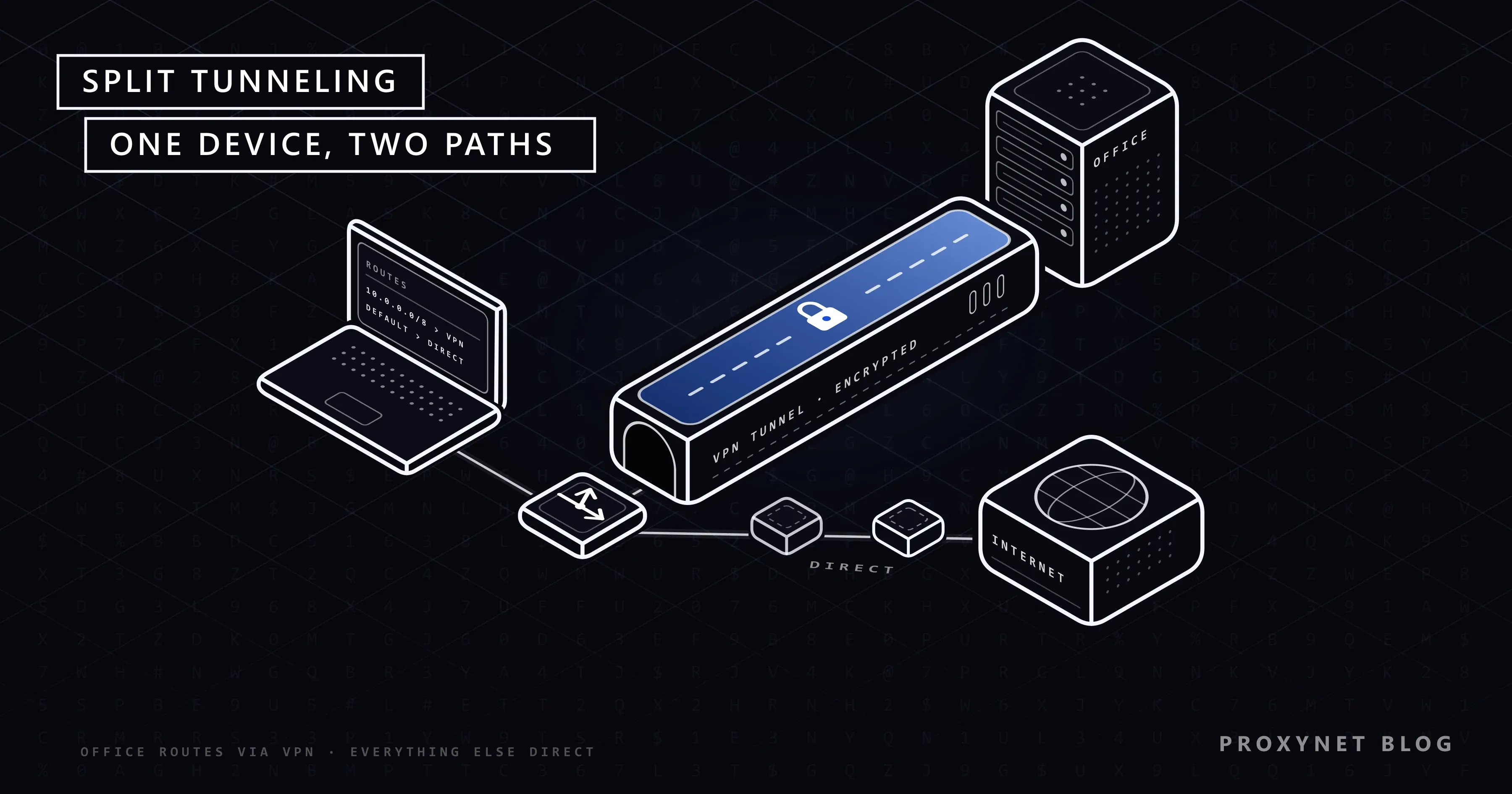
Split tunneling is a way of running a VPN so that part of your traffic travels through the VPN tunnel and the rest goes straight to the internet. A VPN (virtual private network) is an encrypted connection between your device and a VPN server; while it is on, the sites you visit see the server's IP address instead of yours. How a VPN works from the ground up is covered in What Is a VPN and How Does It Work?.
The US standards body NIST defines split tunneling in its security glossary as letting a remote user reach an organisation's systems and, at the same time, reach outside networks over another connection: one device, two paths.
The alternative is a full tunnel: every connection, whether to a company file server or to a news site, goes through the VPN. Microsoft's documentation calls this force tunnel and notes that it is the default when no routes are set.
How does split tunneling work?
Split tunneling works through the device's routing table, the list the operating system checks to decide which network interface each outgoing packet should use. A VPN client adds a virtual network interface and then writes routes that point at it. Whether the tunnel is full or split depends only on which routes it writes.
- The VPN creates a virtual interface. Your Wi-Fi or Ethernet adapter stays; the tunnel is a second way out.
- The client writes routes. For a full tunnel it adds a default route (
0.0.0.0/0, which matches every IPv4 address) through the tunnel. Microsoft's VPN routing documentation explains that Windows gives this route a lower metric than the other interfaces, so it wins. - For a split tunnel, it writes only specific routes. For example
10.0.0.0/8for the company network. Everything that does not match those routes keeps using the physical interface. - An app opens a connection. The system picks the most specific route matching the destination and sends the packet through that interface.
- Tunnelled packets are encrypted and travel to the VPN server, which forwards them. The rest leave as usual, protected only by the app's own encryption, such as HTTPS.
- DNS follows its own setting. The lookup that turns
intranet.example.cominto an address goes to the VPN's DNS server or your local one, depending on the client. When internal names stop resolving after a change, this is usually why.
App-based split tunneling adds one check before step 4: which app opened the connection decides whether it uses the tunnel, whatever the destination.
What types of split tunneling are there?
There are three common types: route-based, app-based and inverse. They differ in what decides whether a connection uses the tunnel.
| Type | What decides | Typical use |
|---|---|---|
| Route-based | Destination IP range | Office network via VPN, rest direct |
| App-based | Which app connects | One app via VPN, others direct |
| Inverse | An exclusion list | All via VPN, a few apps direct |
Route-based (destination) split tunneling
Route-based split tunneling decides by destination address. The administrator lists the company's address ranges, and only connections to those ranges enter the tunnel. This is the classic corporate setup and the one Windows' built-in split tunnel option uses: listed routes go over the VPN, everything else over the physical interface. WireGuard works the same way: its AllowedIPs list behaves like a routing table, so 0.0.0.0/0 sends everything through the tunnel and a narrower range sends only that range.
App-based split tunneling
App-based split tunneling decides by application. You pick a browser or a work app, and only its connections use the VPN; everything else on the device ignores it. Consumer VPN apps on desktop and Android often offer this as a list of installed apps with a switch next to each.
Inverse split tunneling
Inverse split tunneling, also called reverse split tunneling, flips the list: everything goes through the VPN except the apps or destinations you exclude. It suits people who want the VPN on by default but need a banking app or a home media server to use the normal connection. Apps use these names inconsistently, so check what a switch does, not its label.
Split tunneling vs full tunneling: what is the difference?
A full tunnel sends everything through the VPN; a split tunnel sends only part of it. The choice moves the balance between control and performance.
| Full tunnel | Split tunnel | |
|---|---|---|
| Traffic in VPN | All of it | Only chosen routes or apps |
| VPN server load | High | Lower |
| Local printer, NAS | Often unreachable | Reachable |
| Company sees | All traffic | Only tunnelled traffic |
With a full tunnel, an organisation can filter and log every connection, and public Wi-Fi sees only encrypted traffic to the VPN server. The price is speed: calls, updates and streaming all take the detour, and the server needs capacity for all of it.
Is split tunneling safe?
Split tunneling is safe enough for many uses, but it lowers protection for everything outside the tunnel, and organisations treat it as a risk to manage.
The first risk is plain exposure. Traffic that skips the tunnel is visible to the local network and your internet provider just as it would be without a VPN. HTTPS still encrypts the content of most connections, but the network can see which servers you reach.
The second risk is a bridge between networks. NIST's control catalogue SP 800-53 (control SC-7(7)) tells organisations to prevent split tunneling for remote devices unless it is securely provisioned, because a device on the company network and the open internet at once can carry attacks in and data out. This is why many workplace VPNs are full tunnels with the setting locked.
The third risk is leaks you did not plan. A misconfigured split can send DNS lookups or IPv6 traffic (the newer, longer address format) outside the tunnel. In a DNS leak, the content goes through the VPN, but the question "where is this site?" goes to your local resolver.
What are the benefits of split tunneling?
The benefits are speed, lower load on the VPN and access to local devices, all from skipping a detour.
- Less load on the VPN. Microsoft's Microsoft 365 split tunnel guidance recommends sending Teams, SharePoint and Exchange Online traffic around the VPN, because forcing it through the tunnel fills VPN capacity and these services are sensitive to delay.
- Better calls. Real-time traffic suffers most from an extra hop, especially to a distant VPN server.
- Local devices keep working. Printers, file servers and smart TVs on your home network stay reachable; NIST's own discussion names printers and file servers as the reason remote users ask for split tunnels.
- Services that know your usual address. A banking app may treat a login from a VPN server's IP as unusual; outside the tunnel it sees your normal address.
Should split tunneling be on or off?
Leave it off when the VPN is there to protect everything, and turn it on when the VPN is there to reach one place.
On public Wi-Fi, where the VPN is there to hide your traffic from the network, a full tunnel is safer. At home, when you only need the office network, a split tunnel is usually faster. On a work device, the choice is not yours: if your employer's VPN is a full tunnel, that is a policy, and working around it can break the rules you agreed to. Ask the IT team if you need a local device to work.
How do you set up split tunneling on Windows, Android and iPhone?
Where the setting lives depends on the platform and the VPN app; most people find it in the VPN app's own settings.
Windows
Windows' built-in VPN uses a full tunnel by default. Administrators can enable split tunneling for a connection with the PowerShell cmdlet Set-VpnConnection and its -SplitTunneling parameter, or with a device-management profile that holds a split tunnel switch and a route list. Third-party VPN apps usually have their own screen, often a list of apps with switches.
Android
Android supports app-based splitting for VPN apps. The Android developer guide on VPNs explains that a VPN app can set an allowed list (only these apps use the VPN) or a disallowed list (these apps skip it), but not both, and that it must set the list before connecting. Android also has a Block connections without VPN switch next to Always-on VPN; with it on, apps outside the VPN lose their connection, so it does not combine well with splitting.
iPhone and iPad
On iPhone, per-app VPN is a managed-device feature. Apple's VPN overview for device deployment states that a device management service needs to manage an app before per-app VPN can apply to it. On a personal iPhone, what a VPN app offers depends on the app, so check its own settings rather than looking for a system switch.
How do proxies split traffic?
A proxy splits traffic by default: only the apps you configure send their connections through it, and everything else goes direct. A proxy is a server that makes connections on your behalf, so the site sees the proxy's IP address; unlike a VPN, it does not create a network interface for the whole device.
You choose the split in one of four places:
- One app. Many tools and command-line programs take a proxy address directly; only that app uses it.
- One browser profile or extension. A proxy extension or an antidetect browser profile applies a proxy to that browser alone.
- The system proxy with exceptions. In Windows, Settings > Network & internet > Proxy has an exception list and a Don't use the proxy server for local (intranet) addresses box. Apps that read the system setting follow it; apps that do not read it keep connecting directly.
- A PAC file. A PAC file is a small script that tells the browser, address by address, whether to use a proxy or connect directly. It is the proxy world's equivalent of route-based split tunneling; the syntax is in What Is a PAC File?.
Two differences from a VPN matter. A plain HTTP or SOCKS5 proxy does not add encryption of its own, so HTTPS does that job, and only apps that support proxies can use one. The fuller comparison is in Proxy vs. VPN: Which One and When?.
Where proxies fit
Proxies fit when you need a different IP address for one task, not for the whole device. Proxynet sells proxies, not a VPN: the tool you configure uses the proxy, and the rest of your traffic stays on your normal connection.
For checking how a site looks from another country or city, a Residential Proxy with country and city targeting can run in one browser profile while your mail, calls and updates go direct.
When a service allows access only from a fixed address you register in advance, a ISP Proxy gives one app that fixed address.
On iPhone, our Proxynet.io app uses Apple's Network Extension framework to route all device traffic through the selected gateway, which is why iOS shows the VPN indicator while it is connected. It does not split traffic per app.
Where you meet split tunneling
- Remote work: corporate VPNs send only intranet ranges through the tunnel, or everything except video-call traffic.
- Consumer VPN apps: a list of apps that skip the VPN.
- Mesh networks: tools that build a private network between your devices send only that network's addresses through it.
- Proxy setups: a PAC file or bypass list deciding which sites use a proxy.
Common mistakes
- Assuming the VPN protects everything after enabling split tunneling. Only the tunnelled part is protected.
- Excluding a website with an app rule. App rules see apps, not sites: a tunnelled browser tunnels every site.
- Ignoring DNS. Internal names fail, or lookups leak to the local resolver.
- Changing a work VPN's routes. If the company set a full tunnel, ask IT instead of editing routes.
- Expecting every app to follow the system proxy. Some ignore it and connect directly.
- Mixing a kill switch with exclusions. A kill switch, the setting that cuts the internet when the VPN drops, can block the apps you excluded.
Decision guide
| Your need | What to use |
|---|---|
| Protect all traffic on public Wi-Fi | Full tunnel |
| Reach the office network from home | Route-based split tunnel |
| One app needs the VPN, others not | App-based split tunnel |
| VPN on, one app on the normal line | Inverse split tunnel |
| Another IP for one browser or tool | A proxy set in that app |
| Rules per site in the browser | PAC file |
Frequently asked questions
Is split tunneling a security risk?
It can be, because traffic outside the tunnel gets no protection from the VPN and the device sits on two networks at once. For home users the risk is small when sensitive traffic stays in the tunnel; companies often disable it.
Should I turn split tunneling on or off?
Turn it off on public Wi-Fi or whenever you want all traffic protected. Turn it on when you need only one network through the VPN and want local devices and calls to work normally.
What is inverse split tunneling?
It sends everything through the VPN except the apps or addresses you exclude. Normal split tunneling does the reverse: only what you include uses the VPN.
Does split tunneling make my internet faster?
It makes the traffic outside the tunnel faster, because that traffic no longer takes a detour through the VPN server. The tunnelled part runs at the same speed as before.
Can my employer see what I do outside the VPN?
Not through the VPN: traffic outside the tunnel does not pass the company's VPN servers. Software installed on a work device can still monitor it, so follow your company's rules either way.
Is split tunneling the same as using a proxy for one app?
The result is similar: one app takes another path and the rest goes direct. A VPN works at the network level and encrypts the tunnel, while a proxy works per app and relies on HTTPS for encryption.
Summary
Split tunneling decides which traffic enters a VPN tunnel and which uses your normal connection, by destination, by app or by an exclusion list. It saves VPN capacity and keeps local devices working, but leaves part of your traffic unprotected, so companies control it closely. Proxies split traffic by design, one app or one browser at a time, and our proxy products cover the cases where only one task needs a different IP.