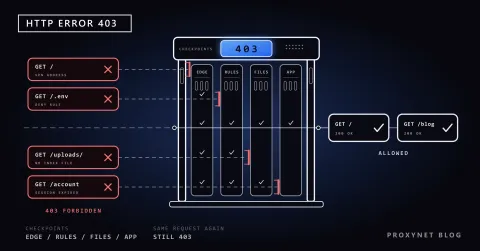
You paste an error message into a support form, press Send and get a bare white page: "403 Forbidden", with "Microsoft-Azure-Application-Gateway/v2" underneath. Elsewhere, a price-monitoring script that has run quietly for a month starts receiving "Request blocked" pages instead of product data. In neither case did the website's own code decide. A web application firewall in front of the site did.
This post explains where a WAF sits, what it reads and how its rules decide, compares it with a network firewall and a reverse proxy, lists common block pages and ends with a section for people whose monitors or scrapers run into one.
What is a WAF?
A web application firewall is a security layer for HTTP, the protocol browsers and apps use to talk to websites. OWASP, the open security project, defines it as an application firewall for HTTP applications that applies a set of rules to an HTTP conversation.
"Application" is the key word. A network firewall decides by addresses and ports, so it cannot tell a normal login from a login form stuffed with database commands: both arrive on port 443. A WAF opens the request, reads it and compares it with rules written for web attacks.
A WAF protects the website, not the visitor: it works as a reverse proxy, standing in for the server and receiving every request first.
Where does a WAF sit?
A WAF always stands between the internet and the web server. There are four usual places for it:
- At a CDN edge. Cloudflare, Akamai and Imperva run server networks in front of customer sites; the domain points to the provider, so visitors reach its WAF first.
- In a cloud load balancer. AWS WAF attaches to CloudFront, Application Load Balancer and API Gateway; Azure runs its WAF in Application Gateway and Front Door.
- On an appliance such as F5 BIG-IP, in front of a company's own servers.
- Inside the web server. ModSecurity, an open-source WAF engine for Apache, IIS and Nginx now maintained under OWASP, is the classic module; many hosting companies enable it for every customer.
To read a request, the WAF needs it in plain text. It holds the site's certificate, ends the browser's HTTPS connection and opens a separate one to the origin server. The browser still shows a padlock, because to the browser the WAF is the site.
How does a WAF work?
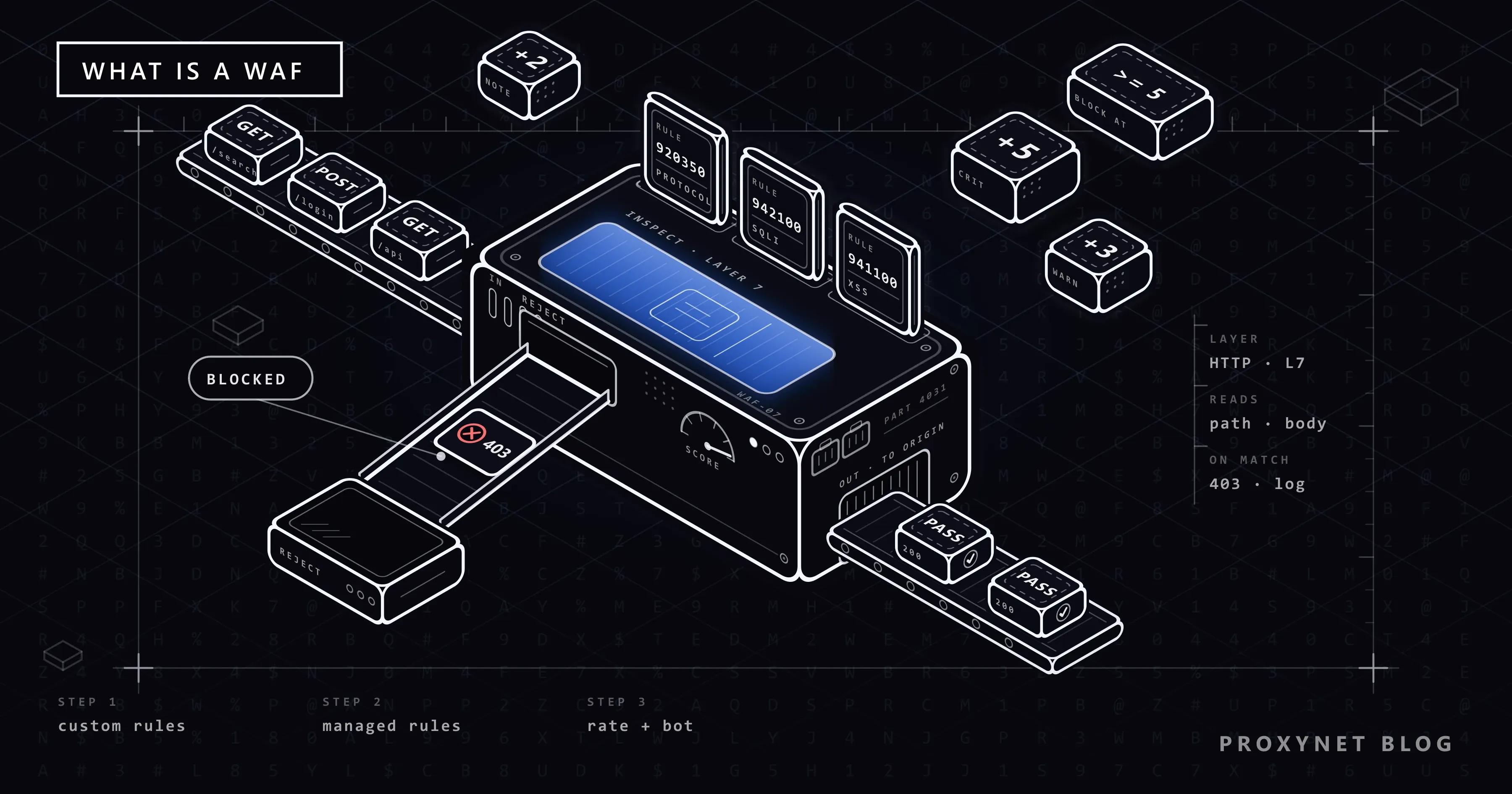
A request passes through a WAF in six steps:
- The connection ends at the WAF, which decrypts HTTPS and receives the full request.
- The request is taken apart and decoded, so an attack cannot hide behind
%27instead of an apostrophe. - The owner's custom rules run first: allow the office IP range, block a country, keep
/adminprivate. - Attack rules and rate counters score it. Rules for SQL injection, cross-site scripting and protocol violations add points; counters track requests per IP or session.
- A verdict is applied: forward to the server, block with an error page, show a challenge, or only log.
- The event is logged with an ID, such as Cloudflare's Ray ID or Akamai's reference number. That ID links a visitor's complaint to the rule that fired.
What does a WAF inspect?
A network firewall can act only on the last row of this table; the rest is visible at the application layer.
| Part of the request | What the WAF looks for | Example of a match |
|---|---|---|
| Path and URL | Sensitive or unexpected paths | /wp-admin from abroad, ../ traversal |
| Query string, form fields | Code where data should be | Database commands in a search box |
| Headers and cookies | Missing, odd or tampered values | No User-Agent header |
| Body (form, JSON, XML) | Attack payloads, oversized uploads | A JSON field carrying a shell command |
| Rate | Too many requests per IP or session | Hundreds of login attempts a minute |
| Source IP and country | Reputation lists, geo rules | An address on a threat feed |
What rules does a WAF use?
Signatures match known attack techniques, such as SQL fragments in a form field or <script> tags in a comment. They are precise for known attacks and blind to new ones. The best-known open collection is the OWASP Core Rule Set (CRS), generic attack rules for ModSecurity and compatible engines such as Coraza. Azure's WAF is built on it, and Cloudflare offers its own implementation.
Managed rules are written and updated by the WAF vendor: when a serious flaw in popular software becomes public, a new rule covers every customer. Custom rules are the owner's own, such as blocking a path or allowing a partner's IP.
Rate limiting counts requests per IP, session or key over a time window. Cloudflare's rate limiting page returns 429 Too Many Requests instead of 403.
Bot management, usually a paid add-on, sorts clients into people, verified bots such as search engine crawlers, and everything else. Cloudflare expresses this as a bot score from 1 (automated) to 99 (human).
Virtual patching is defined in OWASP's virtual patching cheat sheet as a layer that blocks exploitation attempts against a known vulnerability without changing the vulnerable code. It buys time; it does not remove the hole.
How does anomaly scoring decide?
The CRS does not block on the first match. Each matching rule adds points: 5 for critical, 4 for error, 3 for warning, 2 for notice. When the total reaches the inbound threshold, which the CRS documentation recommends setting at 5, the request is denied. One critical match is enough; a single warning is not, but a warning plus a notice is.
The CRS also has four paranoia levels. Each level above 1 adds stricter rules, catching more attacks and more legitimate visitors.
WAF vs network firewall vs reverse proxy
The three can run in the same box. Proxy vs Firewall explains the basic difference between filtering and relaying traffic; here is where a WAF fits.
| Network firewall | WAF | Reverse proxy | |
|---|---|---|---|
| Layer | Network, transport | Application (HTTP) | Application (HTTP) |
| Reads | IPs, ports, connection state | URL, headers, body, rate | Host and path, to route |
| Main job | Allow or drop connections | Stop attacks and abuse | Balance load, cache, end TLS |
| Example | Office router firewall | ModSecurity with CRS | Nginx in front of app servers |
A WAF is a reverse proxy with security rules; without them, a reverse proxy forwards an attack as faithfully as a normal request. DDoS protection for network floods is a separate layer.
What does a WAF block page look like?
The default page usually tells you which product stopped you.
| Product | What the page says | ID to send the site |
|---|---|---|
| Cloudflare | "Sorry, you have been blocked" or Error 1020 | Ray ID |
| Akamai | "Access Denied. You don't have permission to access …" | Reference # |
| Imperva | "Request unsuccessful. Incapsula incident ID" | Incident ID |
| AWS WAF via CloudFront | "The request could not be satisfied. Request blocked." | Time and URL |
| Azure Application Gateway | "403 Forbidden", "Microsoft-Azure-Application-Gateway/v2" | Time and URL |
| F5 BIG-IP | "The requested URL was rejected" | Support ID |
Most return 403 Forbidden: the server understood the request and refuses it. To tell a WAF's 403 from one caused by a login check or file permissions, see the 403 Forbidden error guide.
As a visitor you cannot change the rule, but you can remove the usual triggers:
- Turn off your VPN or proxy extension and reload; shared VPN addresses often have a poor reputation.
- Try a private window, which starts without old cookies and with most extensions off.
- If the block followed a form, check what you typed: code or SQL-like text can match an attack rule.
- Still blocked? Send the site the ID, the time and what you were doing. Only its operator can see which rule fired.
Why does a WAF block real visitors?
A false positive is a legitimate request that a rule treats as an attack. The usual sources:
- Content that looks like code: a developer forum, a support form with pasted logs, an editor saving HTML.
- Shared addresses: an office or mobile network can put thousands of people behind a few IPs, so a rate limit meant for one person trips for all.
- Reputation lists: VPN exits and cloud servers are shared, and some of their users misbehave.
- Strict settings: a higher paranoia level catches more customers too.
Site owners can fix this without switching protection off:
- Start in log-only mode. Azure's WAF overview advises running a new WAF in detection mode for a short period before prevention mode; AWS WAF's Count action serves the same purpose.
- Find the rule by searching the WAF log for the Ray ID, reference number or time of the block.
- Write a narrow exclusion: exempt one field from one rule instead of disabling the rule set.
- Test from outside. Geo rules and reputation lists treat visitors abroad differently. A Residential Proxy in the target country shows your site the way a home user there sees it.
Why do WAFs block scrapers and monitoring tools?
A price monitor, uptime checker or research crawler meets the WAF before it meets the site, and several rules target automated traffic:
- Protocol rules. Azure's WAF protects against requests missing the
Host,User-AgentorAcceptheader and has rules for crawlers and scanners, so a bare HTTP client can be stopped early. - Bot rule groups. AWS's Bot Control rule group labels HTTP libraries, scraping frameworks, monitoring services and automated browsers, and blocks those it cannot verify. Verified bots, such as the big search engine crawlers, pass.
- Network and rate signals. Data centres commonly used by bots are flagged, and a crawler fetching a page every 200 milliseconds looks like an attack whatever its intent.
How Bot Detection Works covers the detection side layer by layer. A block is the site's answer, and the legitimate response works with it:
- Use the official API, data feed or partner programme if there is one.
- Respect robots.txt and the terms of service.
- Identify your client honestly: a real
User-Agentwith a contact address. - Slow down, and back off when you see
429or403. - Ask for an allow-list. Many operators will let a well-behaved monitor through if you give them a contact and a fixed IP address; a ISP Proxy provides a dedicated address that does not change.
Do not rotate IP addresses to get past a block or use tools that fake browser fingerprints. That ignores the site's decision, and it is exactly the behaviour these rules are tuned to find.
Who uses a WAF?
- Online shops and payment pages. Requirement 6.4.2 of PCI DSS 4.0, the card industry's security standard, calls for an automated solution in front of public-facing web applications that detects and prevents web attacks. The PCI DSS summary of changes made it a best practice until 31 March 2025; it has been mandatory since.
- Login pages, where rate limits slow down credential stuffing: trying leaked passwords against many accounts.
- APIs, which face the same injection risks as web forms.
- Sites on WordPress or other popular software, where one plugin flaw exposes thousands of sites at once.
Common mistakes
- Using the WAF instead of fixing the code. A virtual patch covers only traffic the WAF sees.
- Leaving the origin server reachable directly. If it answers requests sent straight to its IP address, attackers skip the WAF.
- Blocking from day one without a log-only period.
- Disabling a whole rule set to fix one false positive.
- Refreshing a block page again and again as a visitor, which feeds the rate counter.
Decision guide
| Your situation | What to do |
|---|---|
| You see a block page with an ID | Send the ID, time and URL to the site |
| You run a small site on shared hosting | Ask if the host runs ModSecurity with the CRS, or use a CDN's WAF |
| You take card payments online | PCI DSS 6.4.2 requires a WAF or an equivalent |
| You are adding a WAF to a live site | Run it in detection or count mode first |
| Real customers are blocked | Find the rule ID, write a narrow exclusion |
| Your monitor or crawler gets 403s | Slow down, identify yourself, ask for an allow-list |
| You need to see your site as visitors abroad do | Test through a residential IP in that country |
Frequently asked questions
Is a WAF the same as a firewall?
It is one kind of firewall. A network firewall allows or drops connections by address and port; a WAF reads the content of HTTP requests. Most sites need both, because each sees what the other cannot.
Is Cloudflare a WAF?
Cloudflare is a network of reverse proxy servers in front of websites; its WAF, with custom rules, rate limiting and managed rulesets, is one service on it, next to caching and DDoS protection.
Can a WAF stop DDoS attacks?
Partly. It can absorb floods of HTTP requests with rate limits and challenges. Floods that fill the network connection itself need dedicated DDoS protection.
Is there a free or open-source WAF?
Yes. ModSecurity with the OWASP Core Rule Set is the best-known open-source pair, and Coraza is a newer engine that runs the same rules. Some CDNs include a basic managed ruleset in free plans.
Why does a WAF block me when I use a VPN?
VPN servers are shared by many people, so their addresses land on reputation lists, and some sites block whole countries or cloud networks. If the page opens once you disconnect, the rule was about the address, not about you.
Can a WAF read HTTPS traffic?
Yes, it has to. It holds the site's certificate, decrypts and inspects the request, then passes it to the server, usually over a new encrypted connection. Between your browser and the WAF, traffic stays encrypted.
Summary
A web application firewall is a reverse proxy with security rules that reads every HTTP request before the website does. It judges requests by signatures, anomaly scores, custom rules, rate limits and bot signals, and its block pages carry an ID only the site's operator can trace. Visitors should remove the obvious triggers and contact the site; owners should log first, block second and exclude narrowly. For a fixed address to put on an allow-list, or local IPs to test your own rules from abroad, see our proxies.