A friend asks you to send the URL. A sign-up form wants your website's URL. A support agent asks what is written in your address bar. All three want the same thing: the full address of a page, the line that usually starts with https:// and leads to exactly one page, image or file.
This post explains each part of a URL and how a browser uses it, then shows how to copy one on any device, what %20 means, how to check a link before you click it and how a proxy address is written as a URL.
What is a URL?
A URL is the address of one specific resource on the internet: a web page, an image, a PDF, a video or a reply from an API. The letters stand for Uniform Resource Locator, and "locator" is the key word: a URL does not just name something, it also says how and where to fetch it.
When you type an address, click a link or scan a QR code, the browser reads the URL to decide which protocol to speak, which server to contact and what to ask for. MDN's beginner guide calls it the address of a unique resource on the web. In everyday speech, "URL", "web address" and "link" mean nearly the same thing.
What are the parts of a URL?
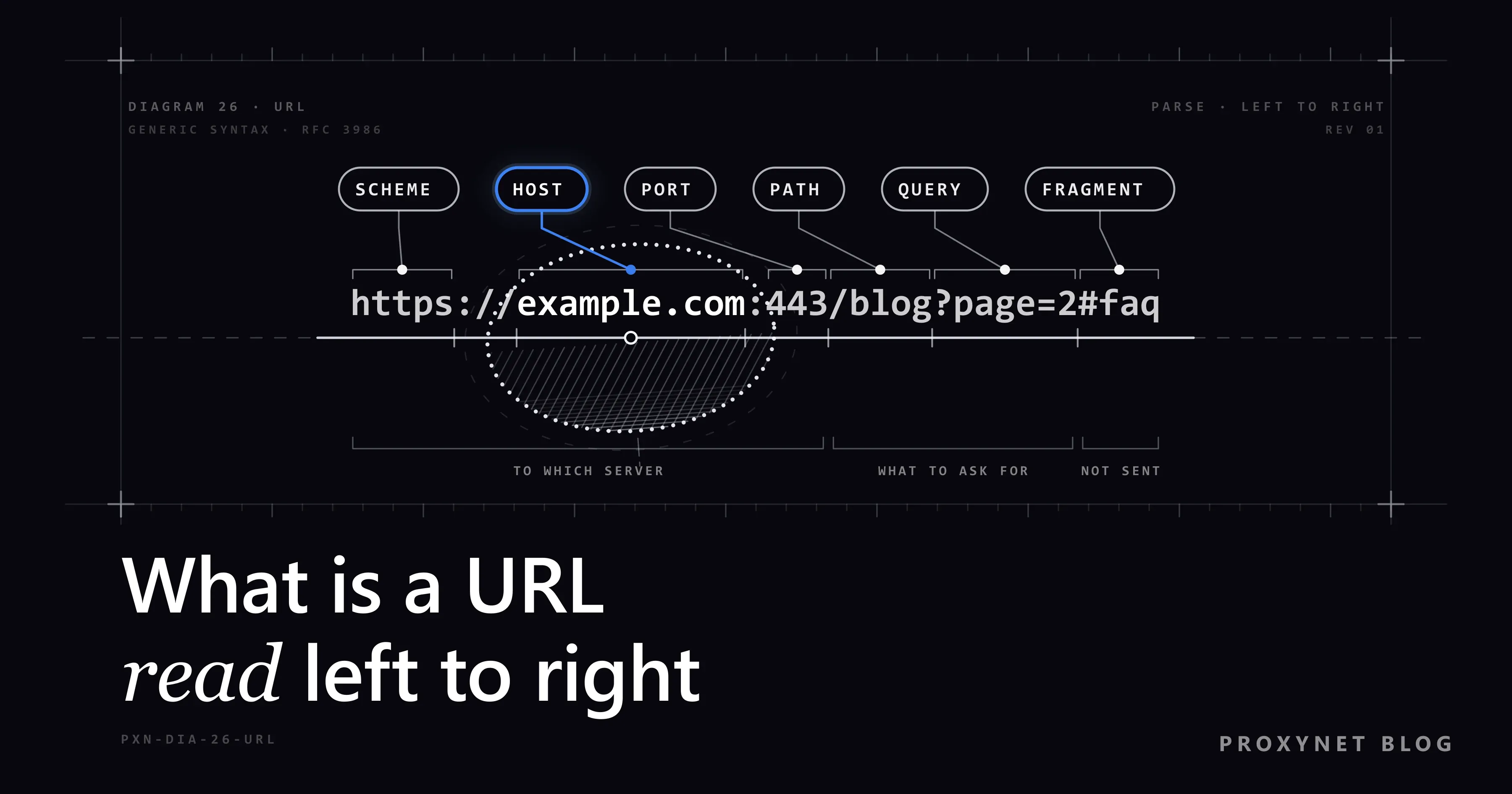
A typical web URL has up to eight parts, always in the same order. Here is an example address with all of them:
https://shop.example.com:443/blog/what-is-a-url?page=2&sort=new#faq| Part | In the example | What it does |
|---|---|---|
| Scheme | https | Sets the protocol |
| Subdomain | shop | A section the owner created |
| Second-level domain | example | The registered name |
| Top-level domain | com | The ending the name sits under |
| Port | 443 | Picks the service on the server |
| Path | /blog/what-is-a-url | Points to the page or file |
| Query | ?page=2&sort=new | Extra details for the server |
| Fragment | #faq | A spot inside the page |
Scheme. The scheme comes first and ends with a colon; web addresses add // after it. https means an encrypted connection and http an unencrypted one. Other schemes include mailto: for an email address and file: for a file on your own computer.
Host. Together, shop.example.com is the host, the name of the server. Read it from right to left: com is the top-level domain, example is the name someone registered under it (together, example.com is the domain name), and shop is a subdomain its owner set up; the familiar www is a subdomain too. The host can also be a bare IP address, as in http://192.0.2.10/.
Port. A port is a number that tells the server which program should take the connection. Each scheme has a default, 80 for http and 443 for https in the WHATWG URL Standard that browsers follow, and the default is left out of the address: Node.js's URL parser, which follows the same standard, rewrote our example without :443. You only see a port when a site uses another one, such as :8443.
Path. The path runs from the first single slash to the ? or #. It once mirrored folders and files on the server; today the server software can map any path to any content.
Query. The query starts at ? and holds name=value pairs separated by &, here page=2 and sort=new. Search boxes, filters, page numbers and tracking tags put their data here.
Fragment. The fragment starts at # and points to a place inside the page, usually a heading. It never leaves your device: when we requested the example address with curl from a small test server on our own computer, the server received /blog/what-is-a-url?page=2&sort=new, and #faq never arrived.
A rarely seen ninth part can sit between // and the host: user information written as name:password@. RFC 3986, the core URL standard, deprecated the password form in 2005, but it lives on in two places covered below: phishing links and proxy settings.
How does a browser use a URL?
The browser reads a URL from left to right and turns each part into an action:
- Scheme.
httpstells the browser to open an encrypted connection. - Host. The browser asks DNS, the internet's directory of names, for the IP address behind
shop.example.com. - Port. It connects to that IP address on port 443, the default for
https. - Path and query. It sends both to the server in the request line:
GET /blog/what-is-a-url?page=2&sort=new. - Response. The server looks up the content for that path and query and sends it back, or answers with an error such as 404 Not Found.
- Fragment. Once the page has loaded, the browser scrolls to the part marked
faq.
Links inside a page often leave parts out: a link written as /pricing on https://example.com/blog/ is a relative URL, and the browser completes it from the current page to https://example.com/pricing.
URL vs domain name vs IP address
A URL is the full address of one page, a domain name is only the name of the server inside it, and an IP address is the number that name points to.
| Term | Example | What it identifies |
|---|---|---|
| URL | https://example.com/blog/post | One page or file |
| Domain name | example.com | A website or service |
| IP address | 192.0.2.10 | A device on the network |
Every page on a site shares the same domain name but has its own URL, and many domain names can point to one server. How names are registered, renewed and pointed at servers is covered in What Is a Domain Name?
Computers reach each other by IP address; domain names exist so that people do not have to remember numbers. Public and private addresses, and how to find yours, are explained in What Is an IP Address?
How do you find and copy a page's URL?
The URL of the page you are on is in the browser's address bar, the long field above or below the page. Apps without an address bar keep it behind a Share button.
On a computer
- Click the address bar once. The whole address is selected, including any part the browser shortens for display.
- Right-click the selection and choose Copy, or press Ctrl+C (Cmd+C on a Mac).
- Paste it where you need it with Ctrl+V (Cmd+V on a Mac).
These steps work the same in Chrome, Edge, Firefox and Safari.
On an iPhone
- In Safari or Chrome, tap the address bar so the full address is selected. Safari shows the bar below the page in the Compact and Bottom tab layouts and above it in Top, set under Settings > Apps > Safari > Tabs.
- Tap the selected address, then tap Copy.
To send the page instead, tap the Page Menu button at the bottom of Safari, then Share (in the Bottom or Top layout, the Share button).
On Android
- In Chrome, tap the address bar.
- Below the bar, next to the page's address, tap the copy icon.
To send the link to an app instead, open the More menu (three dots) beside the address bar and choose Share....
In the YouTube app
- Open the video and tap Share under the player.
- Tap Copy link.
On youtube.com, click Share below the video, then Copy; tick Start at first and the link starts the video at that moment. Other apps usually keep the link in a share menu too, under their own label.
What does %20 mean in a URL?
%20 is a space written in a form URLs can carry. A URL may contain only letters, digits, the marks -, ., _ and ~, and a set of characters with a job, such as /, ?, #, & and @. Anything else, and any working character meant as plain text, is percent-encoded: replaced by % and the two-digit hexadecimal code of each byte, a rule set out in RFC 3986.
In our test, a space became %20, @ became %40 and : became %3A. Letters beyond basic English are first turned into UTF-8 bytes, so the Turkish word çiçek in a path became %C3%A7i%C3%A7ek. Form data uses a variant in which a space becomes +, which is why search URLs often show hello+world.
Domain names follow a different rule: a name with letters outside the basic Latin (ASCII) alphabet is converted to an ASCII form that starts with xn--, so bücher.example becomes xn--bcher-kva.example.
What is a URL slug, and how do you make readable URLs?
A slug is the readable last part of a page's path: in https://example.com/blog/what-is-a-url, the slug is what-is-a-url. Content management systems usually build it from the page title, and you can edit it before you publish.
Google's URL structure guidelines give site owners a short checklist:
- Readable words, not long ID numbers.
- Hyphens between words, not underscores.
- Words your audience uses, in its own language.
- One letter case. Google treats paths as case-sensitive, so
/Blogand/blogare two different URLs. - No parameters that do not change the content. Every query variant is one more URL for search engines to crawl.
Keep a URL once it is published. If you must change it, send the old address to the new one with a permanent redirect (HTTP 301), so links, bookmarks and search results keep working.
How do you read a link before you click it?
Find the host first, because it names the server you will reach: it is everything between // and the next /, ? or #, minus anything up to an @. At its right-hand end sit the registered name and its ending; whatever comes before them, or later in the path, the owner of that server can choose freely.
Three tricks rely on people reading a link from the left:
- A brand as a subdomain.
https://example.com.login-check.example.net/verifybelongs to example.net. - A brand in the path. In
https://login-check.example.net/example.com/account, the server is still login-check.example.net. - The
@trick. Inhttps://example.com@login.example.net/account, everything before@is user information. Our test parser readexample.comas a username andlogin.example.netas the server. RFC 9110, the HTTP standard, tells software to treat such user information from untrusted sources as an error for this reason.
To see the real address first, hover over the link on a computer, or touch and hold it in Safari on an iPhone for a preview. Short links from link-shortening services hide the destination until you open them, so be careful with unexpected ones.
Names one letter off the real one, such as a digit 1 in place of the letter l, are a separate trick with their own warning signs, covered in What Is Typosquatting?
How is a proxy address written as a URL?
A proxy address is written as a URL too, and it uses the user-information slot that web pages gave up to carry the proxy login:
http://user:pass@pr.proxynet.io:8000httpis the protocol you speak to the proxy; a SOCKS5 proxy usessocks5with the SOCKS5 port the endpoint builder shows.user:passis your proxy username and password.pr.proxynet.iois the proxy server's host.8000is the port it listens on.
If the password contains a character with a job in URLs, such as @, : or #, percent-encode it, or the tool will split the URL in the wrong place: p@ss:w0rd becomes p%40ss%3Aw0rd. The curl manual states that curl decodes the user and password in a proxy string, so %40 reaches the proxy as @.
Most command-line tools and programming libraries accept a proxy in this form. When you set up Residential Proxy, this is the pattern your username, password, host and port go into.
Where you meet URLs
- The address bar of every browser.
- Links in emails, chat messages, documents and social media posts.
- QR codes, which usually store a URL.
- Forms that ask for "your website" or a link to your profile.
- Code and app settings, where API endpoints, webhooks and proxies are written as URLs.
Common mistakes
- Sending only the domain.
example.comopens the home page, not the page you meant. - Sharing a URL that carries private data. Links from password-reset emails or shared documents can contain a token that works like a key.
- Judging a link by its start. The right-hand end of the host decides where you land.
- Changing a published slug without a redirect. Old links and bookmarks end in a 404 error.
- Raw special characters in a proxy password. An unencoded
@or#breaks the proxy URL. - Using
#to show different content. The server never sees the fragment, and Google generally ignores it.
Decision guide
| Your need | What to do |
|---|---|
| Send someone the page you are on | Copy the full address from the address bar |
| Share a YouTube video | Share > Copy link |
| Check where a link leads | Hover or press and hold, then read the host |
| Name a new page on your site | A short, lowercase, hyphenated slug |
| Rename a published page | Redirect the old URL with a 301 |
| Put a proxy into a script | http://user:pass@host:port, password percent-encoded |
Frequently asked questions
What does URL stand for?
URL stands for Uniform Resource Locator. "Locator" means it tells you where a resource is and how to fetch it, which sets a URL apart from a plain name. People also call it a web address.
Is a URL the same as a link?
Almost. The link is the clickable text, image or button, and the URL is the address stored inside it. The visible text of a link can say anything, which is why it pays to check the URL before you click.
What is the difference between a URL and a URI?
A URI (Uniform Resource Identifier) is any string that identifies a resource, and a URL is a URI that also says how to reach it. RFC 3986 asks new specifications to use the general term URI, while the URL Standard that browsers follow uses "URL" for everything. In daily use the two mean the same thing.
Are URLs case-sensitive?
Partly. The scheme and host are not: HTTPS://Shop.EXAMPLE.com and https://shop.example.com lead to the same place, and our test parser lowercased both. The path and query can be, depending on the server, and Google treats /Blog and /blog as separate URLs.
How long can a URL be?
The URL standards set no fixed maximum. RFC 9110 recommends that HTTP software accept URLs of at least 8,000 octets (bytes), and Chrome limits URLs to 2 MB. Many servers stop much earlier and answer 414 URI Too Long, so keep long data out of URLs.
What makes a URL valid?
A valid URL starts with a scheme and a colon, has a host after // for web addresses, and percent-encodes any character outside the allowed set, spaces included. Browsers quietly fix small slips such as a space, but forms, APIs and other programs may reject the same address.
Summary
A URL is the full address of one resource on the web: scheme, host, optional port, path, query and fragment, always in that order. The host names the server, the path the page, and the parts after ? and # add details for the server or the browser. Copy a URL from the address bar or a Share button, read the host before you click an unfamiliar link, and percent-encode special characters in a proxy password. If you are setting up proxies for tools or scripts, compare the options on our proxy products page.