Two years ago, picking an AI coding tool meant looking at which extension did line completion better. In 2026 the question changed: what decides it now is whether the tool can read your repository, whether it can edit files and run commands on its own, and whether it can finish a task while you are busy with something else. That is why the same list holds both agents that run in the terminal and classic editor extensions, and the two do not do the same job.
In this post we compare the eight tools developers actually shortlisted in September 2026: the tool's format, how much of the codebase it can see, its privacy terms and its pricing model. The figures come from the vendors' own pricing pages and are dated September 2026; where we could not read a published price, the shape of the model is written instead of a number. This is not a proxy post; we explain where a proxy comes in under a separate heading towards the end.
What is an AI coding tool?
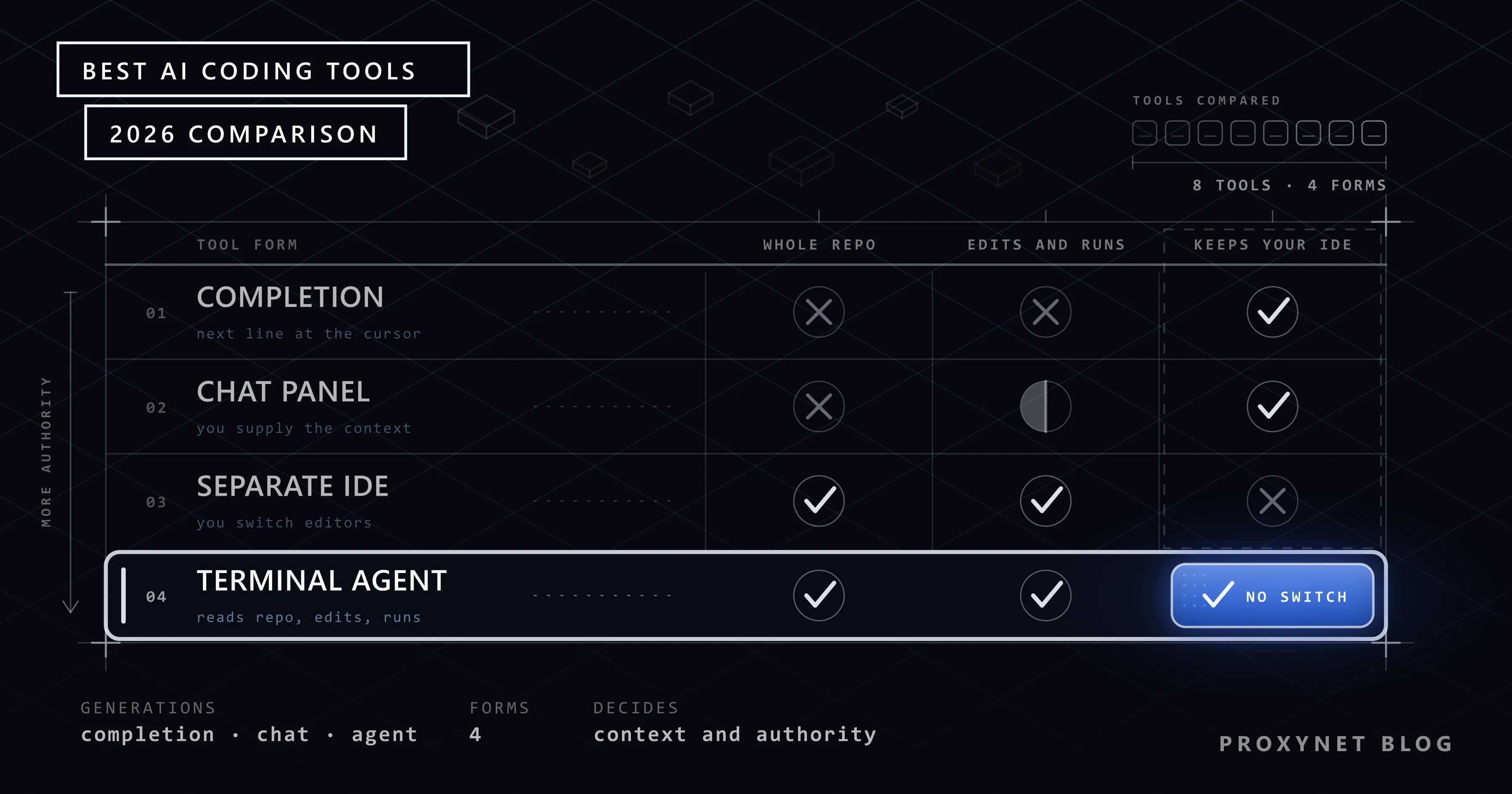
An AI coding tool is software that places a language model inside the software development flow. The difference between them is not the model itself, but how much authority and how much context the model is given. At one end are extensions that complete the line wherever the cursor happens to sit; at the other are agents that read the whole repository, change several files, run the tests and report the result back to you. Two tools using the same model do completely different jobs because of that difference in authority.
Three generations: completion, chat, agent
- Completion. Suggests the next line where the cursor is. It is fast, it does not distract you, but it leaves the architectural decisions to you.
- Chat. Explains, debugs and rewrites the code you select. You supply the context: it sees whichever file you paste in.
- Agent. Takes the task, finds the relevant files itself, applies the change, runs commands and verifies the result. Most of the 2026 tools do all three; what differs is which one they lean on.
This distinction has a direct effect on the buying decision. A completion tool is cheap per person and scales; an agent calls the model until the job is done, so it produces usage-based cost.
What to look for when choosing a tool
- Format. Does it run in the terminal, as an extension to your existing editor, or as a separate application? Changing editors is a decision that concerns the whole team.
- Codebase context. Does the tool see a single file or the whole repository? In a large repository, "single file" context leads the tool to write correct code in the wrong place.
- Privacy. Is your code used in model training, how long is it retained, and does that change on an enterprise plan? There is no single right answer, but an unpublished policy is a warning on its own.
- Pricing model. Is it a per-seat subscription, usage-based, or both? With agents, the usage line is the main line.
- Exit cost. If the tool imposes its own editor, the team's habits go with it when you give up on it. With tools in extension form that cost is low.
The 8 best AI coding tools
1. Claude Code (Anthropic)
A coding agent that runs in the terminal; the same engine is also used through VS Code and JetBrains extensions, a desktop app, the web and mobile. It reads the repository itself, edits files, and carries out commands and git operations. Being scriptable is its distinguishing side: you can pipe its output into other commands and run it inside continuous integration. The models come from Anthropic's own family — Opus 5, Sonnet 5, Haiku 4.5 and Fable. The usage and data terms are written in the official documentation. There is no free tier; it is included in the Pro, Max, Team and Enterprise plans and can also be used with an API account.
Pros
- Works end to end in the repository on long-running tasks
- Terminal, VS Code, JetBrains, desktop and web share the same engine
- Scriptable; can be run in continuous integration
- On enterprise plans the code is not used in model training
- Also works with third-party cloud providers
Cons
- No free tier, the entry point starts at the 20 dollars a month plan
- The terminal-centred flow requires a change for teams used to an editor extension
- In agent mode the cost depends on the length of the job
Who it is for: teams that want to hand off multi-file changes and repetitive maintenance work.
2. GitHub Copilot
The tool with the widest surface on the list: extensions for VS Code, Visual Studio, JetBrains, Neovim and Eclipse, a command line tool, a macOS app, a cloud agent you assign to a GitHub issue, and code review that runs on github.com. The model choice is not tied to a single vendor; the lower tiers offer Haiku 4.5 and GPT-5 mini, and the upper tiers include models such as Opus. The free plan gives 2,000 completions and 50 chat requests a month; Pro is 10 dollars a month, Pro+ 39 dollars, Business 19 dollars per user, Enterprise 39 dollars. All of the tiers are listed on the product page.
Pros
- It has a free plan and asks for no credit card
- Inside GitHub, from issue to PR and on to code review
- It has an extension in almost every editor
- The model choice is not tied to a single vendor
Cons
- The agent side takes shorter steps than terminal agents
- When you use your own key, the data falls under that provider's policy
- For teams working outside GitHub, half of the advantage falls away
Who it is for: teams whose flow is already set up on GitHub.
3. Cursor
An independent AI editor; its own documentation now describes it as a "coding agent" rather than an "editor". It has a plan mode that scopes large changes first, and a review agent called Bugbot that works on PRs. Alongside its own models (Composer 1 and Composer 2.5) it offers more than fifty third-party models. The Hobby plan is free, the individual plan is 20 dollars a month, and the team plan is 40 dollars per user; Bugbot is billed by usage.
Pros
- Agent, plan mode and code review in a single interface
- Free Hobby plan
- Privacy mode is applied to the model providers by contract as well
- Published ISO 27001, ISO 42001 and SOC 2 Type II certificates
Cons
- A separate application; you have to change editors
- No self-hosting option
- Bugbot's cost depends on usage and sits outside the subscription
Who it is for: people open to changing editors who want to manage the agent in a visual interface.
4. Codex (OpenAI)
It comes as a command line tool, an editor extension, a cloud environment and code review; the same session is also reachable from the ChatGPT desktop and web apps. It runs tied to the ChatGPT plans and can also be used with an API key. The default model is GPT-5.5; there are smaller versions for light work.
Pros
- Terminal, editor and cloud share the same session
- An agent approach that takes the task and gathers the context itself
- No extra purchase is needed for people with a ChatGPT subscription
Cons
- We could not find a current, public pricing page
- We could not verify the privacy terms from an official page
- The default model's retirement schedule has been announced
Who it is for: people who already have a ChatGPT subscription and want an agent in the terminal.
5. Google Antigravity
Not a single application but a platform: an agent-focused IDE, Antigravity CLI on the terminal side, a command screen where you manage several local agents at once, and an SDK that lets you write your own agent in Python. Its own site says it is free for individual developers; enterprise terms are separate. The models come from the Gemini family.
Pros
- Free for individual developers
- Designed for managing several agents in parallel
- An SDK for writing your own agent
Cons
- We could not verify the privacy terms from an official page
- Enterprise pricing is not published
- The ecosystem is tied to the Gemini models
Who it is for: people who want to run several agents at the same time and have to keep the cost at zero.
6. Cline
Open source: it comes as a VS Code extension, a command line tool and an SDK. The tool itself is free; payment goes only to the model provider you use. That makes the cost completely transparent — you pay for as many model calls as you make, with no subscription in between.
Pros
- Open source, the tool itself is free
- You choose the model provider
- The cost is exactly as much as the usage
Cons
- The model bill is yours; budget control is on you
- Enterprise features are priced separately
- The setup and configuration load is higher than with ready-made products
Who it is for: developers who want to keep the model provider and the cost in their own hands.
7. Zed
An open source editor written from scratch rather than forked from VS Code, with an agent panel and edit prediction inside it. The personal plan is free and includes 2,000 edit predictions a month. It is a speed-focused tool: the difference in latency is noticeable in large files and long sessions.
Pros
- Open source and native; not a VS Code fork
- Free personal plan
- Speed and low latency
Cons
- The extension ecosystem is not as wide as VS Code's
- The agent side is not as deep as in agent-focused tools
- Enterprise management features are limited
Who it is for: people who care about the editor's speed and keep the agent in second place.
8. Kiro (AWS)
Alongside an agent-focused IDE it offers a command line tool, web and mobile apps, and a collaboration layer for teams. Its free plan comes with zero dollars and 50 credits. A natural option for teams working on the AWS side.
Pros
- A free plan is available
- IDE, CLI, web and mobile in the same product
- Close to the AWS ecosystem
Cons
- The credit-based model runs out quickly under heavy use
- The ecosystem stays close to AWS
- A newer product than the others
Who it is for: teams whose infrastructure sits on AWS.
Comparison tables
The figures come from the vendors' own pricing pages, September 2026. "—" is information the vendor does not publish or that we could not verify.
Format and free tier
| Tool | Format | Free tier | Open source |
|---|---|---|---|
| Claude Code | CLI + extension | No | No |
| GitHub Copilot | Extension + CLI | Yes | No |
| Cursor | Separate editor | Yes | No |
| Codex | CLI + extension | Limited | No |
| Antigravity | IDE + CLI | Yes | No |
| Cline | Extension + CLI | Yes | Yes |
| Zed | Editor | Yes | Yes |
| Kiro | IDE + CLI | Yes | No |
Pricing model
| Tool | Entry (monthly) | Team (per user/month) | Models |
|---|---|---|---|
| GitHub Copilot | 10 dollars | 19 dollars | Multi-vendor |
| Claude Code | 20 dollars | 25 dollars | Anthropic |
| Cursor | 20 dollars | 40 dollars | Own + more than 50 |
| Kiro | Free | — | AWS |
| Zed | Free | — | Multi-vendor |
| Cline | Free | — | You choose |
| Antigravity | Free | — | Gemini |
| Codex | — | — | OpenAI |
With most of the tools that look free, the model bill is separate: with Cline you pay the provider directly, and with Zed and Kiro the free tier comes with a quota. On the agent side the main cost line is not the subscription, it is the length of the job.
Tools that no longer exist
This field changes fast, and several names from the 2024-2025 lists are gone today. If you are looking at an old comparison post, watch out for these:
- Gemini CLI gave way to Antigravity CLI.
- Gemini Code Assist's individual extension use ended on June 18, 2026; the paid Standard and Enterprise licenses continue.
- Amazon Q Developer's command line tool was rebranded as Kiro, and new sign-ups closed.
- Windsurf was removed as a standalone editor; the team moved over to Cognition.
- Sourcegraph Cody and Augment Code shut down their extension products.
Model names age at the same speed. If you see "GPT-4" or "Claude 3 Opus" in a post, that post is at least a year and a half old and its price tables are probably invalid too.
Why is codebase context decisive?
The correctness of the code a tool writes depends less on how good the model is than on what it sees. A tool that sees a single file can produce code that is flawless in that file but contradicts the rest of the project: it rewrites a helper function that already exists, does not see the project's error handling pattern, does not know how the tests are set up.
So the question that matters more in a comparison than "how many tokens is the context window" is this: can the tool find the relevant files itself? Tools in agent form search the repository, open files, and if needed run a test and read its output. With tools in extension form that job is usually left to you — it sees whichever file you add to the context.
A practical check: try the tool with a small change that touches several files in your project. For example, rename a field and ask it to update every place it is used. Single-file tools separate themselves immediately in that test.
Privacy: is your code used in training?
There is no single right answer, but three questions are asked of every tool: is the code used in model training, how long is it retained, and do those terms change on an enterprise plan?
According to Anthropic's documentation, individual Free, Pro and Max accounts have a setting that allows training, and while it is on the retention period rises to five years; for the enterprise side (Team, Enterprise, API) it says the code sent to Claude Code is not used in generative model training and that the standard retention period is 30 days. Cursor states that in privacy mode no training is done with the data and that this is bound by contract with the model providers. In every case where you use your own API key — including Copilot — the data falls under that provider's policy.
Two practical rules: do not use individual plans on enterprise code, and do not run a tool that does not publish its policy on a critical repository. An unpublished policy is not proof of a good policy.
When agents reach for data: where does a proxy come in?
A significant share of coding agents do not only write code, they also pull data from outside: they try an API, read a document, want to sample a rival page. An agent working from a single office IP hits the rate limit when it sends a large number of requests to the same target in a short time and starts getting 429 — at that point the problem is not in the model, it is in the exit address.
There are two cases where a proxy layer is genuinely needed. The first is geography: an agent that needs to see the target site as it appears in another country has to exit from that country's IP. The second is volume: a collection job that runs continuously is not sustainable without spreading the requests across several addresses. On targets with relaxed bot protection, Datacenter Proxy with its unmetered traffic is the cheapest option; when you need a country and province breakdown, Residential Proxy is used. The details of the setup are on the data scraping page, and the rules for working without getting blocked are in our How to Scrape Websites Without Getting Blocked post.
The ethical side should not be skipped either: if you have an agent collect data, obeying the target site's robots.txt rules and terms of use is still your responsibility. If there is an official API, you try that first.
Common mistakes
- Merging the agent's work without reviewing it. The generated code should not reach the main branch unread; none of the tools takes that responsibility on.
- Asking for a large change with single-file context. The tool writes correct code in the wrong place, and you go looking for why it does not work.
- Using an individual plan on enterprise code. Retention and training terms change from plan to plan.
- Trusting old comparison posts. Prices and product names age within six months; several products on the list no longer exist.
- Measuring the cost by the subscription. With agent tools the main cost is usage; the monthly fee is only the entry ticket.
- Taking generated tests as correct. The test the tool writes can validate the bug the tool wrote.
Which tool for which job?
| Your job | Recommended |
|---|---|
| Multi-file change in a repository | Claude Code |
| Review embedded in the GitHub flow | GitHub Copilot |
| Managing an agent in a visual interface | Cursor |
| Trying an agent on a zero budget | Antigravity, Cline |
| A fast native editor | Zed |
| A team working on AWS | Kiro |
Frequently asked questions
Which is the best AI coding tool in 2026?
There is no single answer, it depends on the shape of the work. If you are looking for an agent that works end to end in the repository, Claude Code stands out; if you want an assistant embedded in the GitHub flow, GitHub Copilot; if you want to manage the agent in a visual interface, Cursor.
Is there a free AI coding tool?
Yes. GitHub Copilot's free plan gives 2,000 completions and 50 chat requests a month, Google Antigravity is free for individual developers, and Cline and Zed are open source. With Cline the tool itself is free but you pay the model bill.
Do these tools use my code in training?
It changes by plan. On enterprise plans most vendors say they do not use it in training; on individual plans this can depend on a setting. When you use your own API key, the data falls under that provider's policy.
Do agent tools really write code and finish the job?
On small, well-defined tasks, usually yes; on large changes the output should not be merged without review. The tool being able to run the tests and read the result raises the completion rate noticeably.
Do I have to change editors?
No. Claude Code, GitHub Copilot, Codex and Cline work in your existing editor as an extension or a terminal tool. Only Cursor, Zed and Kiro are separate applications.
Does a coding agent need a proxy?
If the agent only writes code, it does not. If it pulls data from outside, if the target is in another country, or if the request volume is high, it does; that is when Datacenter Proxy or Residential Proxy comes in.
Summary
What separates the tools in 2026 is not the model but authority and context: how much of your repository the tool sees, how much work it can do on its own and what happens to your code. Test the list with your own work — a small change that touches several files says more than ten comparison tables. When your agent starts pulling data from outside, you can take a look at our proxy services.