You type a question into Google and one of two AI things happens. Sometimes a short summary with a few source links sits above the usual results. Other times, after a click on AI Mode, the page turns into a conversation: a longer answer, the pages it drew on and room for your next question. Same search box, two features with confusingly similar names.
This post explains what each feature is, how AI Mode builds an answer according to Google, how both compare with classic results and the Gemini app, where AI Mode is available, how to open or avoid it, and what it changes for SEO.
What is Google AI Mode?
Google AI Mode is a separate mode of Google Search that answers your question with an AI-written response, links to the web pages behind it and lets you continue with follow-up questions. Google calls it its most powerful AI search experience and aims it at questions that need exploration, reasoning or comparisons.
You can ask in more ways than in the classic search box: typed text in the Ask anything bar, voice, an image, a PDF or other file, or a pasted web address with a question. The answer comes from a custom version of Gemini, Google's family of AI models, working on top of Google Search. If your search history setting allows it, past conversations stay in AI Mode history so you can pick a thread up later.
What are AI Overviews?
AI Overviews are short AI-generated summaries that Google places at the top of an ordinary results page for some searches, with links to their sources for anyone who wants to dig deeper.
The key word is "some". Google shows an overview only when its systems judge that a summary adds something to the classic results, so many searches show none. When one appears, the usual links, ads and boxes still follow below it.
The two features arrived a year apart. AI Overviews started as a test in Search Labs, Google's opt-in programme for trying new Search features early, and opened to everyone in the U.S. in May 2024. AI Mode began as a Labs experiment in March 2025 and, according to Google's May 2025 announcement, rolled out to everyone in the U.S. as a new tab in Search, with no Labs sign-up.
How does AI Mode build an answer?
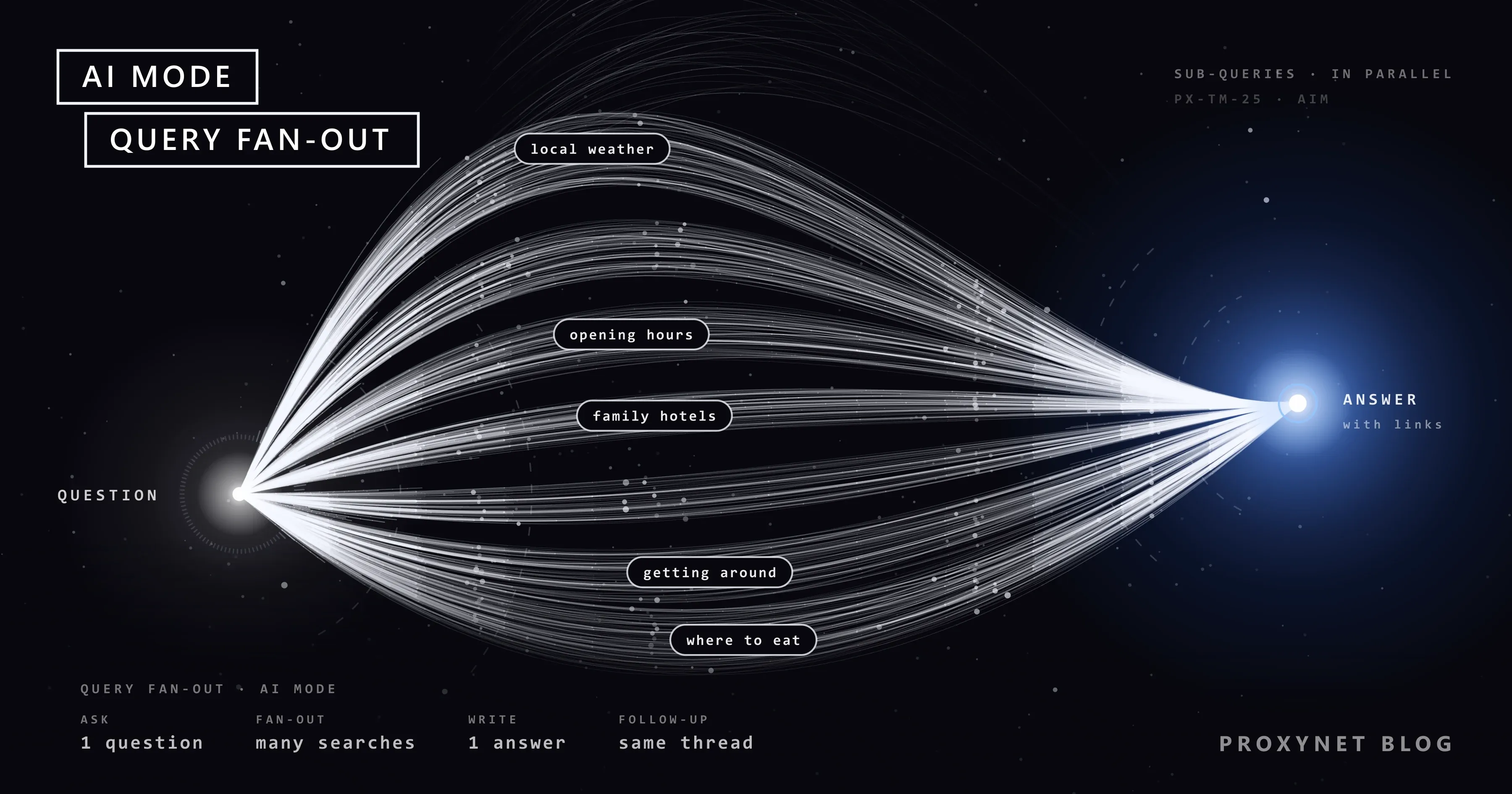
According to Google, AI Mode splits your question into smaller questions, runs many searches at the same time and writes one response from what it finds. Google describes the process only in outline:
- You ask, by text, voice, image or file. In a follow-up, the earlier conversation is taken into account.
- The question fans out. AI Mode divides it into subtopics and searches for each one simultaneously, across different data sources. Google calls this query fan-out.
- Supporting pages are collected. While the response is written, Google keeps finding more pages that support it, so AI Mode can show a wider and more varied set of links than a single classic search.
- One answer is written, with links to the pages it used.
- Low confidence falls back to links. When Google is not confident enough in an AI answer, AI Mode shows a set of web links instead.
Google does not publish how individual sources are chosen. It does say that a page must be in Google's index and eligible to appear with a snippet, the short description under a result's title, before it can be shown as a supporting link. In May 2025 it also announced Deep Search, the same fan-out taken further: hundreds of searches and a fully cited report in a few minutes.
How is AI Mode different from AI Overviews, classic results and the Gemini app?
The difference is where each one lives and how much of the work the AI does. Classic results give you ranked links, AI Overviews add a short summary on top of them, AI Mode replaces the results page with a conversation, and the Gemini app is a general assistant outside Search.
| Feature | Where you see it | What you get | Follow-up questions |
|---|---|---|---|
| Classic results | Every search | Ranked links, ads, boxes | No; you search again |
| AI Overviews | Top of some results pages | Short summary with source links | On mobile, via Show more |
| AI Mode | Its own button or tab | Long answer from many searches | Yes, as a conversation |
| Gemini app | Separate app and website | Ideas, plans, drafts | Yes |
The features are connected. On a phone, selecting Show more under an AI Overview and typing a follow-up carries the question into AI Mode, and Google has said that many features tested in AI Mode will later "graduate" into core Search.
Where is AI Mode available, and in which languages?
AI Mode is available in a long and growing list of countries, territories and languages, which Google keeps on its AI Mode help page under "AI Mode availability". When we read it on 17 November 2026, the list covered the Americas, Asia-Pacific and Europe, the Middle East and Africa, with Türkiye among the countries and Turkish among the languages. AI Overviews have their own list on their help page.
Rollouts are gradual, so a listed country does not mean every account sees the feature on the same day. Google's announcement for Türkiye, dated 18 February 2026, described a step-by-step rollout in the Google app and on the results page. Some extras have their own conditions; personalised AI Mode, for example, is for users aged 18 and over.
How do you open AI Mode?
You open AI Mode by choosing it; it does not take over your normal searches. Google lists three ways in, and two more exist:
- Go to google.com/ai. The page opens directly in AI Mode.
- Search on google.com first. Type your question in the search bar, then select AI Mode.
- Use the Google app. Tap AI Mode on the app's home screen.
- In Chrome, select the AI Mode button at the right of the address bar or the New Tab search box, or press Tab and then Enter.
- From an AI Overview on a phone, select Show more at the bottom of the overview and type a follow-up.
Can you turn off AI Mode or AI Overviews?
You cannot switch either feature off in Google Search, but you can avoid both: AI Mode opens only when you choose it, and the Web filter gives you a page of plain links without AI Overviews. Google's AI Overviews help page says it directly: AI Overviews are a core feature, features cannot be turned off, and after a search you can select the Web filter, which shows only text-based links.
The other controls are narrower:
- The AI Mode button in Chrome. Right-click the address bar and clear Always show AI Mode.
- Search Labs. If you joined Labs, turning off the AI in Search experiment takes you out of the test features. Google does not say it removes AI Overviews.
- AI Mode history. On a computer, open AI Mode, select AI Mode history on the left, then More and Delete, or Delete all. Deleted searches can still show in My Activity for a while; Google removes them there within 24 hours. A search that started from an AI Overview also has to be deleted from your Search history.
Browser extensions that promise to hide AI boxes are third-party add-ons with access to the pages they change; Google's own route is the Web filter.
What does AI Mode mean for SEO and site traffic?
For site owners, AI Mode and AI Overviews are another place where pages appear as links, and the usual SEO fundamentals decide whether a page can appear there. Google's page AI features and your website states that neither feature has additional requirements or needs special optimization: no new file, no "AI" text file, no special structured data. The page must be indexed and eligible to be shown with a snippet, and even then inclusion is not guaranteed.
Measurement happens in Search Console, inside your normal numbers: Google includes traffic from AI features in your overall Search traffic in the Performance report, under the Web search type. Search Console's help pages explain the counting:
- Clicks: a click on a link to your page in an AI Overview or in AI Mode counts as a click.
- Position in AI Overviews: the overview takes one position on the results page, and every link inside it gets that position.
- Position in AI Mode: the same method as a results page; a follow-up question counts as a new query.
- Labs: data from Search Labs experiments is not included.
If you are new to the report, How to Check Your Google Ranking Accurately walks through its filters and average position.
Since 31 August 2026, every site also has a separate Generative AI performance report in Search Console. It counts impressions only, meaning how often your pages appeared in AI Overviews and AI Mode, by page, country, device and date. Google says clicks from results pages with AI Overviews are of higher quality, with people spending more time on the site, but it gives no figures for your site.
To keep your site out of these features altogether, Search Console has a site-level setting under Settings > Search generative AI. Choosing to exclude the site removes its links and content from AI Overviews, AI Mode and Discover's AI features within a few days; Google says the setting is not a ranking signal for the rest of Search. For parts of pages, the snippet controls apply: nosnippet, data-nosnippet, max-snippet, which also shorten your snippet in classic results.
The opposite goal, making content easy for AI answers to cite, is covered in What Is GEO?.
Why do AI Mode and AI Overviews differ from country to country?
AI Mode and AI Overviews differ by country because Google switches them on per country and language, and because their answers are built from Google Search results, which change with the searcher's location and language. The same question can bring an overview in one market and none in the next, or cite local sources in one language and global ones in another. The factors behind that are covered in Why Are My Google Search Results Different from Others?.
For a team with customers in several markets, "are we cited for this query in Germany?" cannot be answered from an office elsewhere. Start with Search Console filtered by country, which reflects real searches. To see the page itself, run a few manual checks, signed out, in the market's language and from a connection in that country, as our SEO proxy page describes.
A Residential Proxy gives such a check a home-connection IP address in the country and city you choose, so Google treats the search as local. Keep it at human scale: Google's spam policies count automated queries, including scraping results to check rankings, as machine-generated traffic, whatever the IP address.
Who uses AI Mode, and for what?
- People comparing options with several conditions, refined through follow-ups.
- Learners starting a topic who want an overview and sources to read next.
- People asking about an image or file, such as a screenshot or a PDF.
- SEO and content teams checking which pages Google links for questions in their field.
- Marketers in several countries comparing how AI answers present their brand.
Common mistakes
- Treating AI Overviews and AI Mode as one feature. One is a summary on the results page; the other is a separate conversational mode.
- Looking for a switch to turn AI Overviews off. There is none; use the Web filter.
- Adding "AI markup" or AI text files to get into AI answers. Google says none are needed.
- Blocking Google-Extended to stay out of AI Overviews. Google says that robots.txt token does not affect inclusion or ranking in Search; the Search generative AI setting does that job.
- Acting on an answer without opening its sources. Google warns that AI responses may include mistakes and that AI Mode can misread a page; check figures, dates and rules at the source.
- Judging visibility from one screenshot. One look shows one place, language, account and moment.
- Automating queries to track AI answers. It breaks Google's spam policies; use Search Console and a few manual checks.
Decision guide
| Your need | What to do |
|---|---|
| A quick fact or summary | Read the AI Overview, then check one source |
| A question with several conditions | Open AI Mode and ask follow-ups |
| Plain links only | Select the Web filter after searching |
| No AI Mode button in Chrome | Clear Always show AI Mode |
| Writing, planning or drafting | Use the Gemini app |
| Your traffic from AI features | Search Console, Performance, Web |
| Keep your site out of AI answers | Exclude it under Search generative AI |
| See another market's AI results | A few manual checks from that country |
Frequently asked questions
How do I turn off Google AI Mode?
You do not need to: AI Mode runs only when you open it. To hide its button in Chrome, right-click the address bar and clear Always show AI Mode; for results without AI Overviews, select the Web filter after searching.
Is Google AI Mode free?
Yes. AI Mode is part of Google Search, and Google's help page lists no payment requirement for it. Paid Google AI plans come up only for extras, such as higher daily limits on a more advanced model inside AI Mode.
Is AI Mode available in Türkiye?
Yes. Google announced AI Mode and AI Overviews for Türkiye on 18 February 2026, with a gradual rollout in the Google app and on the results page. On 17 November 2026, Google's AI Mode help page listed Türkiye among the supported countries and Turkish among the languages.
What is the difference between AI Mode and Gemini?
AI Mode is a search feature that runs web searches for your question and answers with links to pages. Gemini is Google's family of AI models and the name of the Gemini app, a general assistant for planning and drafting. AI Mode runs on a custom version of Gemini, so the two share technology but do different jobs.
Where can I find my AI Mode history?
On a computer, open AI Mode and select AI Mode history on the left, where you can delete one conversation or all of them. A deleted search can stay in My Activity for up to 24 hours before Google removes it. If the search began with an AI Overview and you continued in AI Mode, delete it from your Search history as well.
Can I keep my pages out of AI Overviews and AI Mode?
Yes. In Search Console, open Settings > Search generative AI and choose to exclude your site; Google says your links and content then stop appearing in AI Overviews, AI Mode and Discover's AI features within a few days, without affecting the rest of Search. For parts of pages, nosnippet and data-nosnippet work too. Blocking Google-Extended in robots.txt does not do this.
Summary
Google AI Mode is a conversational mode of Search that fans a question out into many searches and writes one answer with links. AI Overviews are short summaries at the top of some results pages; the Web filter hides them, and AI Mode opens only when you choose it. Site owners need nothing special: indexable pages that can show a snippet are eligible, Search Console reports the traffic under the Web search type, and a site-level setting lets you opt out. Because both features change with country and language, check another market in Search Console first, then with a few manual searches from that market.