A small online shop sells handmade lamps. On Monday morning the owner opens the dashboard: 250 carts were created over the weekend, but only 90 orders came in. Somewhere between the "Add to cart" button and the payment confirmation, 160 carts were left behind. Were those shoppers just browsing, did the delivery fee surprise them, or did the card form break on their phones?
That gap is cart abandonment. This post explains how to calculate the cart and checkout abandonment rates and how to measure both with Google Analytics 4 events. It then covers the usual causes, fixes for each checkout step, the rules on reminder emails, mobile checkouts and selling to other countries.
What is cart abandonment?
Cart abandonment is an online shopper putting at least one product in the cart and then leaving without placing the order. The cart stays behind with its items, like a full basket left in a supermarket aisle.
It is a normal part of online shopping. People add items to see the total with delivery, to save a product or to compare prices. Abandonment becomes a problem when shoppers who wanted to buy leave because the checkout got in their way.
That is why shops look at where the drop happens, not only at the rate. A shopper who never opened the checkout is a different case from one who typed a full address and then left at the payment form.
How do you calculate the cart abandonment rate?
The cart abandonment rate is the share of carts that did not turn into an order: 1 minus completed purchases divided by carts created, multiplied by 100.
Cart abandonment rate = (1 − completed purchases ÷ carts created) × 100
Take the lamp shop's weekend again, a fictional example: 250 carts and 90 completed purchases. 90 divided by 250 is 0.36, and 1 minus 0.36 is 0.64, so the cart abandonment rate is 64%.
Three details decide whether the number means anything:
- Count the same unit on both sides. Carts and orders, or users who added to cart and users who bought. Mixing sessions with users gives a rate that moves for no reason.
- Use the same period and allow for delays. A cart created on Sunday night and paid on Tuesday counts only if your window includes Tuesday.
- Exclude test orders and internal traffic. Staff testing the checkout inflate both sides.
The rate tells you how many carts were lost, not where.
What is the difference between cart and checkout abandonment?
Cart abandonment counts everyone who added an item and did not buy; checkout abandonment counts only people who started the checkout and did not finish it.
Checkout abandonment rate = (1 − completed purchases ÷ checkouts started) × 100
If 150 of the lamp shop's 250 carts reached the checkout and 90 ended in an order, the checkout abandonment rate is 1 minus 90 divided by 150, which is 40%. The cart abandonment rate is still 64%.
The two numbers answer different questions. A high cart rate with a low checkout rate means most people leave before they start paying, often because they were saving items or the cart showed a cost they did not expect. A high checkout rate means people who meant to buy ran into trouble inside the form: an account wall, a delivery fee, a missing payment method or a page that failed.
How do you measure cart abandonment in GA4?
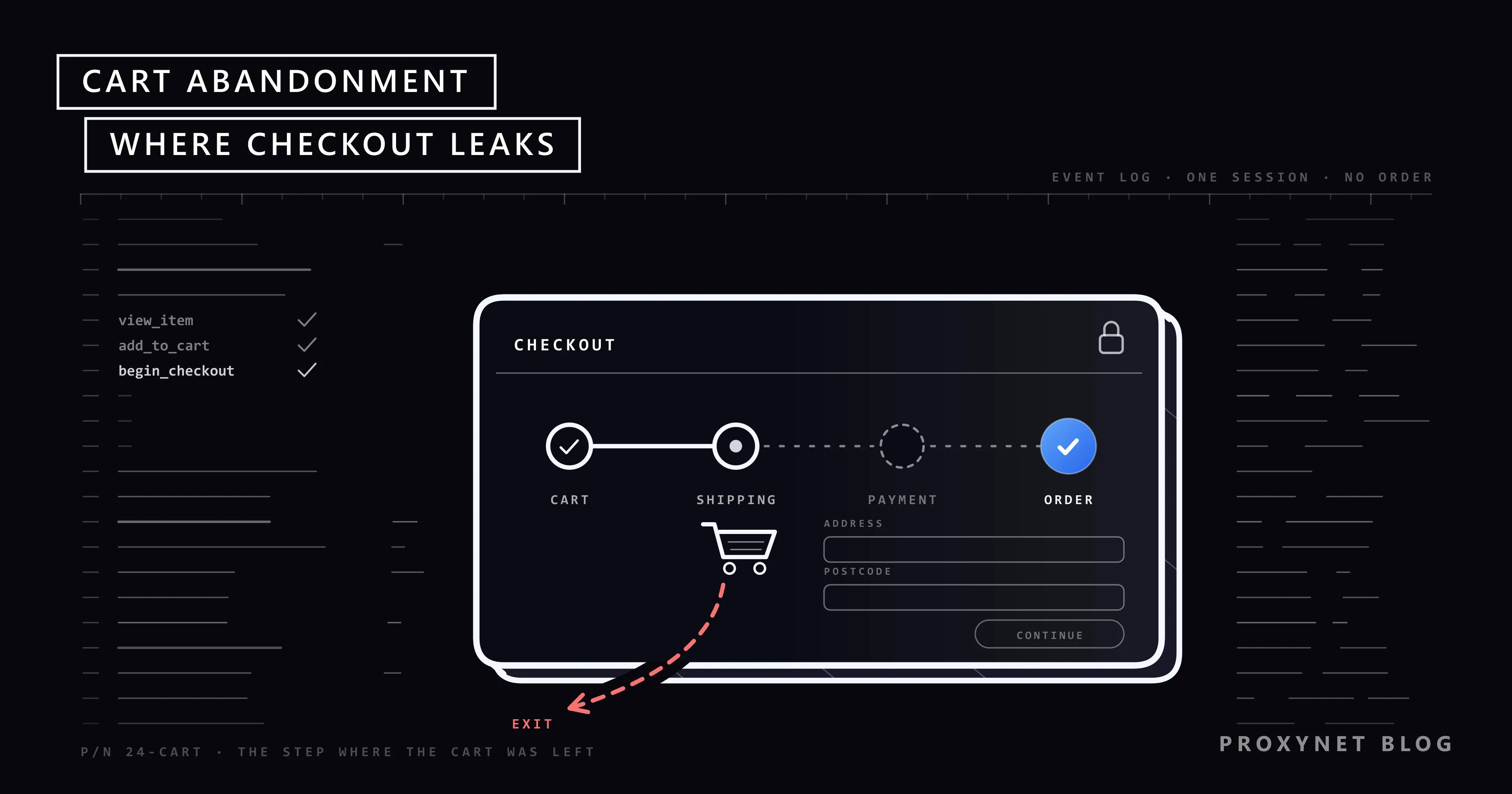
In Google Analytics 4 you send an ecommerce event at each step and read the drop between them in the purchase and checkout journey reports. These events are not collected automatically; your shop or its plugin has to send them.
- Send the recommended ecommerce events. Google's recommended events reference defines
add_to_cart,begin_checkout,add_shipping_info,add_payment_infoandpurchase. Use these exact names so the built-in reports fill in. - Open the Purchase journey report. Under Reports, then Monetization, it shows five steps: session start, view product, add to cart, begin checkout and purchase.
- Open the Checkout journey report. It shows begin checkout, add shipping, add payment and purchase, with an abandonment rate under each bar: the share of users lost before the next step, as the Checkout journey report help page defines it.
- Remember that the funnels are closed. A user who skips a step drops out and is not counted later, so a checkout that never sends
add_shipping_info, for example for digital products, looks broken. For other steps, build a funnel exploration. - Check against your shop's own orders. Ad blockers, consent choices and failed tags mean analytics never sees every order, so compare its purchase count with your shop system.
Google's help page gives its own example of reading the drop: a large fall between the shipping and payment steps can point to the shipping stage, such as high delivery costs or forced login without a guest option.
| Checkout step | GA4 event | A big drop here often means |
|---|---|---|
| Cart | add_to_cart | Saving items, total not shown |
| Checkout start | begin_checkout | Account wall, surprise costs |
| Shipping | add_shipping_info | Fees, delivery time, address form |
| Payment | add_payment_info | Missing method, bank check fails |
| Order | purchase | Errors after payment, slow page |
Why do shoppers abandon their carts?
Shoppers abandon carts for two kinds of reasons: they did not mean to buy yet, or something in the checkout stopped them. Only the second kind is yours to fix.
The first kind, such as saving items or waiting for payday, should not be pressured away. The second kind falls into a few groups:
- Extra costs shown late. Delivery fees, service fees or taxes that appear only at the last step change the price the shopper expected.
- Forced account creation. Asking for a password before the order turns a purchase into a sign-up.
- Long or confusing forms. Too many fields, unclear errors and address forms that reject valid addresses.
- Slow or broken pages. A spinner after "Pay", or a payment page that times out on mobile.
- Missing payment methods. The shopper's card type, digital wallet or local method is not offered.
- Unclear delivery and returns. No delivery date, no tracking or a returns policy hidden in small print.
- Low trust. No contact details, a payment page that looks like another site or an unexplained request for personal data.
Treat this list as hypotheses, not a ranking. Your own step data says which of them is costing you orders.
How can you reduce cart abandonment?
You reduce cart abandonment by fixing the step where most shoppers leave, one change at a time, and measuring that step again afterwards.
On the product and cart page, show the delivery cost and delivery date range before checkout. If you offer free delivery above a minimum order value, show how far the cart is from it; our guide to psychological pricing explains how such thresholds work and where they backfire.
At the checkout start, offer a guest checkout and suggest an account only after the order. At shipping, ask only for the fields you need, use address autofill and accept the address formats of every country you ship to.
At payment, offer the methods your customers actually use and name them before this step. Keep the total fixed while the shopper pays, and explain the bank verification step instead of leaving the screen blank. After the order, show a clear confirmation page and send the confirmation email at once, so nobody pays twice.
Test each change long enough to cover weekdays and weekends, and watch final orders as well as the step: a change that lifts one step but lowers total orders is not a fix.
Are cart recovery emails allowed?
Cart recovery emails, the reminders a shop sends when a cart is left behind, are generally treated as marketing, so the rules for marketing email apply. Those rules differ by country, and the strictest require consent before the first reminder.
In the United Kingdom, regulation 22 of the Privacy and Electronic Communications Regulations bans unsolicited marketing email to individuals without prior consent. The narrow exception, often called the soft opt-in, applies only if the shop got the address during a sale or negotiations for a sale, markets only its own similar products and offered a simple, free way to refuse at collection and in every message.
In the United States, the CAN-SPAM Act does not require prior consent but sets rules for every commercial email. The FTC's compliance guide lists an accurate subject line, a valid postal address and a working opt-out honoured within 10 business days.
Everywhere, honest reminders ask for permission in plain words at checkout, stop after one or two messages, show the real cart and price and never invent urgency.
Why is cart abandonment different on mobile?
Mobile checkouts lose more shoppers at the form steps because typing on a small screen is slow and errors are easy to miss. The fix is to remove typing, not to shrink the page.
Use input types that bring up the right keyboard, such as a number pad for card numbers, and standard autocomplete attributes so the browser can fill name and address. Offer digital wallets where your payment provider supports them and put each error message next to its field.
Test on real phones and slow connections: on mobile the bank verification step often opens another app, and a shopper who cannot get back counts as abandoned.
What changes when you sell to other countries?
Selling abroad adds three new reasons to leave: a price in the wrong currency, no familiar way to pay and unclear delivery or import costs.
Shoppers want the price in their own currency and to know whether taxes and import duties are included before the payment step. Our post on why prices differ by country explains how shops set country prices and what decides which one a customer pays.
Payment habits differ too: cards dominate in some markets, while bank transfers, cash on delivery, instalments or local wallets are the norm in others. Address forms built for one country's postcode format can also reject valid addresses from another, and the shopper sees only an error.
A competitor analysis of the shops your customers use in each market shows what they expect there: standard payment methods, how delivery costs are shown and normal return terms.
How can you test your checkout as a shopper abroad sees it?
You test it by loading your checkout through a connection in each country you sell to, so the site shows the currency, delivery options and payment methods local shoppers get.
From your office you see only your own market's version, because currency, payment options and delivery rules switch on according to where the visitor seems to be. A fault in another market stays invisible until customers there leave. Our localization proxies are set up for this testing, with city-level targeting in 190+ countries.
A Residential Proxy sends your test session through a home connection in the chosen country or city. Use it on your own shop or staging site with test orders or your payment provider's test mode, and keep the session sticky so the whole checkout runs from one IP address. It shows what the market sees; it does not change what real customers pay.
Who uses cart abandonment data?
Shop owners watch the overall rate for sudden jumps, which often mean a broken release or a payment outage. Product teams use the step-by-step drop to decide what to redesign, developers to find errors in one browser or device, marketing teams to plan reminders within the consent rules, and teams entering a new country to see where local shoppers get stuck.
Common mistakes
- Treating every abandoned cart as a lost sale. Many shoppers were saving items or comparing prices.
- Comparing your rate with another shop's figure. Products and traffic differ; compare your shop with itself over time.
- Mixing units. Carts over users or sessions over orders give a meaningless rate.
- Missing checkout events. A step that never fires makes the closed GA4 funnel look like everyone left there.
- Showing delivery fees only at the last step. The surprise costs more orders than the fee itself.
- Forcing an account before the order. Offer it after the purchase instead.
- Sending reminders without checking consent rules. Some countries require consent first.
- Testing the checkout only from your own country. Currency, payment and delivery can break elsewhere unseen.
Decision guide
| Need | Recommendation |
|---|---|
| Know your overall rate | 1 − purchases ÷ carts, same unit and period |
| Find where shoppers leave | Checkout journey report, step by step |
| Big drop at checkout start | Guest checkout, full total shown earlier |
| Big drop at shipping | Earlier delivery costs, shorter address form |
| Big drop at payment | Methods customers use, tested bank checks |
| Mobile far above desktop | Autofill, right keyboards, wallets, real phones |
| Want reminder emails | Check each country's consent rules first |
| Selling in several countries | Test checkout as each market sees it |
Frequently asked questions
What is a good cart abandonment rate?
There is no single good rate, because it depends on the product, the price and the traffic. A more useful target is your own rate falling over time after each fix.
How do I calculate the cart abandonment rate?
Divide completed purchases by carts created, subtract the result from 1 and multiply by 100. With 250 carts and 90 orders, that is 1 minus 0.36, or 64%.
What is the difference between cart abandonment and checkout abandonment?
Cart abandonment counts everyone who added a product and did not buy. Checkout abandonment counts only shoppers who started the checkout and did not finish, so it shows problems inside the checkout itself.
How do I find cart abandonment in Google Analytics 4?
Send the standard ecommerce events, then open the Purchase journey and Checkout journey reports under Monetization. The Checkout journey report shows an abandonment rate between each pair of checkout steps.
Are abandoned cart emails legal?
They can be, but the rules depend on the country. In the UK, marketing emails need prior consent unless the narrow soft opt-in applies; in the US, CAN-SPAM requires an opt-out rather than prior consent.
Why do people abandon online shopping carts?
Many were only saving items or comparing prices. The rest usually leave because of extra costs shown late, a forced account, a long or broken form, a missing payment method or unclear delivery times.
Summary
Cart abandonment is the gap between carts created and orders completed, and its rate is 1 minus purchases divided by carts. Part of it is normal browsing; the part you can fix shows up as a sharp drop at one checkout step. Send the standard events, read the drop step by step, fix one cause at a time and keep reminder emails within each country's consent rules. If you sell abroad, check the checkout the way shoppers in each market see it, because that is where currency, payment and delivery problems hide.