

































You have an app running on port 3000 of a small server. It answers at http://203.0.113.10:3000, which is fine for a test and wrong for everything after it: there is no certificate, the port number is part of the address, and the second app you want on the same machine cannot share the name. Every guide you open gives the same advice: put a reverse proxy in front of it.
This article defines the reverse proxy, follows one request through it with the output of a small local test, and goes through its main jobs: TLS termination, load balancing, caching and hiding the origin. Then come the places you meet one, a short table against the forward proxy, and which of the two a proxy provider sells.
What is a reverse proxy?
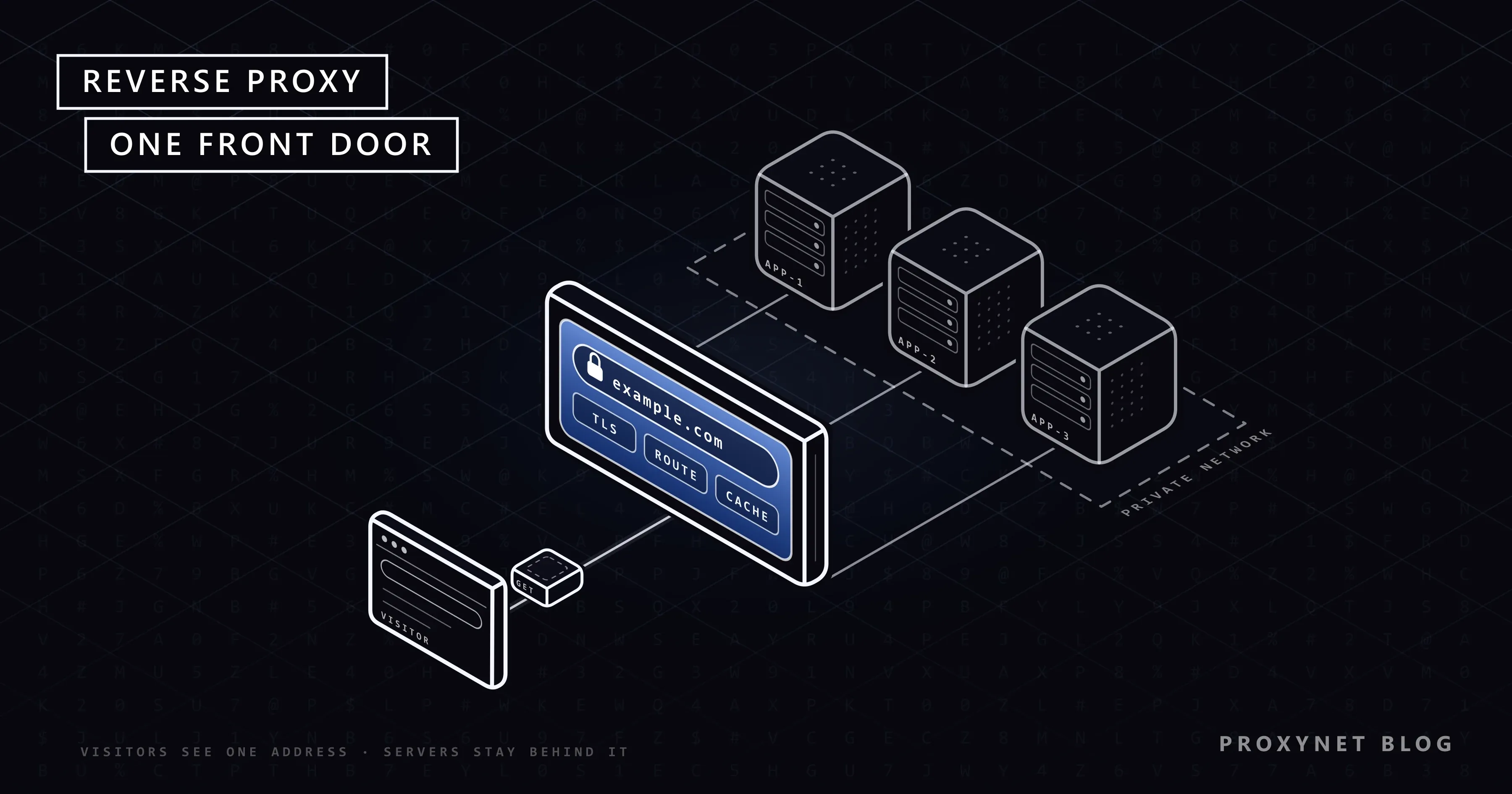
A reverse proxy is an intermediary that accepts requests on behalf of one or more servers and passes each request to the server that should handle it. To the visitor it is the website: the domain name points at its IP address, it presents the site's certificate, and its answer is the only one the visitor sees. The machines that produce the pages are called backends, upstreams or origin servers.
The HTTP standard calls the same thing a "gateway". RFC 9110 describes it as an intermediary that acts as the origin server towards the client and forwards the requests it receives inward to another server or servers.
The word "reverse" is relative to the ordinary proxy, the forward proxy, which a client chooses and configures to send its own requests out. A reverse proxy faces the other way: it stands with the servers, the site owner configures it, and the client has no setting to change.
How does a reverse proxy work?
A reverse proxy holds two connections for every request, one with the visitor and one with a backend, and passes the request across. Take a visitor who opens https://shop.example.com/cart:
- DNS points at the proxy. The name resolves to the reverse proxy's public IP address, not to an application server.
- TLS is set up. The proxy holds the site's certificate and private key, so the encrypted session ends here.
- The proxy reads the request. With the traffic decrypted it sees the
Hostheader, the path, the method and the cookies. - A rule picks the backend group. For example,
/apigoes to the API servers and the rest to the shop application. - One healthy server is chosen. A load-balancing method such as round robin selects a server and skips the ones marked as failed.
- The request is forwarded. The proxy adds headers that carry the visitor's IP address and the original protocol.
- The response returns through the proxy. It may compress the response and store it in the cache before sending it to the visitor.
If step 6 fails because the backend is down, the visitor still gets an answer, but it comes from the proxy: 502 Bad Gateway. If the backend takes too long, the answer is 504 Gateway Timeout. Both codes mean the proxy is running and the server behind it is not answering properly.
What does a request through a reverse proxy look like?
From the outside it looks like one server; from the inside, every request arrives from the proxy. To watch both sides, we ran a minimal reverse proxy written in Node.js on a test machine, in front of two tiny backends called app-1 and app-2. Everything stayed on loopback addresses: the client was 127.0.0.2, the proxy listened on 127.0.0.1:39100 and spoke to the backends from 127.0.0.3. We sent four requests to the proxy, then printed what a backend had recorded.
request 1 -> 200  via=1.1 test-proxy  body="hello from app-1"
request 2 -> 200  via=1.1 test-proxy  body="hello from app-2"
request 3 -> 200  via=1.1 test-proxy  body="hello from app-1"
request 4 -> 200  via=1.1 test-proxy  body="hello from app-2"

app-1 saw: peer=127.0.0.3  host=example.test  x-forwarded-for="127.0.0.2"  x-forwarded-proto=http
The client used one address and was answered by two servers in turn, without knowing either of them. The backend saw the connection as coming from the proxy (127.0.0.3) and learned the client's address only from the X-Forwarded-For header the proxy had added.
Then we stopped app-2 and sent two more requests. The first returned 200 from app-1; the second returned 502, written by the proxy itself. Our small proxy had no health check, so it kept sending every other request to a dead server. That is the gap production software closes.
What does a reverse proxy do?
A reverse proxy takes over the work that every request needs and no application should have to repeat. It is used for five jobs.
| Job | What the proxy does | What you gain |
|---|---|---|
| TLS termination | Holds the certificate, decrypts and encrypts | Certificates renewed in one place |
| Load balancing | Spreads requests across servers | A server can fail or be replaced |
| Caching, compression | Stores and shrinks responses | Fewer requests reach the app |
| Hiding the origin | Shows only its own address | Backends stay off the public internet |
| Routing | Sends requests by host name or path | Many apps behind one address |
TLS termination
TLS termination means the encrypted connection from the visitor ends at the reverse proxy. The backends receive plain HTTP over the private network, or a second TLS connection where policy requires encryption all the way to the application.
Certificates are then issued and renewed in one place. The cost is that the proxy sees everything in clear text, passwords and session cookies included, so it must be guarded as carefully as the application.
Load balancing
Load balancing is the proxy choosing one of several identical servers for each request. Nginx, for example, distributes requests in round-robin order when no method is set, and its load balancing guide lists least-connected and IP-hash as the alternatives. A server that fails is avoided for a while and then tried again, which lets you replace one server while the site stays up.
The algorithms, health checks and sticky sessions have their own article: What Is Load Balancing? Algorithms and Types.
Caching and compression
A reverse proxy can keep a copy of a response and serve it to the next visitor without asking the backend. This suits files that are the same for everyone, such as images and stylesheets. It must stay off for anything personal, such as a cart; the application's Cache-Control header tells the proxy which is which.
Hiding the origin
Only the reverse proxy needs a public address. The backends can live on a private network, and their IP addresses, ports and software stay unknown to visitors. That gives you one place to apply rate limits, IP rules or a web application firewall (WAF), a filter that inspects requests for known attack patterns. It only holds if the origin refuses connections that do not come from the proxy.
Routing by host name and path
One reverse proxy can front many applications. It reads the Host header and the path, then sends blog.example.com to one server, shop.example.com to another and /api to a third. This is why a single machine can run ten services on one IP address and one port, 443.
Reverse proxy vs forward proxy: what is the difference?
A forward proxy works for the client and a reverse proxy works for the server. That one fact decides who sets it up, whose address is hidden and what the other side sees.
| Question | Forward proxy | Reverse proxy |
|---|---|---|
| Who does it work for? | The client | The site |
| Who sets it up? | The user or network admin | The site owner |
| What does it hide? | The client's IP from the site | The servers from visitors |
| What does the other side see? | The proxy's exit IP | The proxy as the site |
| What happens to HTTPS? | Tunnelled, not read | Usually decrypted |
Many requests pass through both: out through a forward proxy on the client's side, and in through a CDN or load balancer on the site's side. The two are compared step by step in Forward Proxy vs Reverse Proxy: What's the Difference?.
Is a reverse proxy a load balancer or an API gateway?
Load balancers, API gateways and CDNs are reverse proxies with a specialty.
- Load balancer. Its main job is spreading traffic across identical servers. One that works at the HTTP level (layer 7) reads requests as described above; one at the transport level (layer 4) forwards connections without reading them, so it cannot route by path.
- API gateway. On top of routing, it checks API keys or tokens, and applies rate limits and quotas per client. In Kubernetes, an Ingress or a Gateway plays this role for the services inside a cluster.
- CDN. It is a reverse proxy spread over many locations. DNS returns the CDN's addresses instead of the origin server's; visitors connect to a nearby CDN server, which answers from its cache or forwards the request to the origin.
Where do you meet a reverse proxy?
As a visitor, on most large sites. The signs are small: a Server or Via response header that names a proxy or CDN, and 502 or 504 error pages that carry the proxy's name instead of the site's design.
Developers meet one the moment an app leaves the laptop: a hosting platform puts its own router in front of the container, and a Docker Compose file often has one proxy container that owns ports 80 and 443. At home, people who run a media server or a file-sync app use a reverse proxy to publish them as subdomains with HTTPS, without opening a separate port for each.
Which software is used as a reverse proxy?
Four open-source programs cover most self-managed setups: Nginx, HAProxy, Caddy and Traefik. All four are free; they differ in what they do without being asked.
| Software | What it is | Stands out for |
|---|---|---|
| Nginx | Web server with a proxy module | Files and proxying in one config |
| HAProxy | Reverse proxy for TCP and HTTP | High availability, load balancing |
| Caddy | Web server with reverse_proxy | Automatic HTTPS certificates |
| Traefik | Application proxy for containers | Discovers services by itself |
Nginx passes requests with the proxy_pass directive and is the one most tutorials start from. The full setup, with forwarded headers, WebSocket and timeouts, is in our Nginx reverse proxy guide.
Caddy shows how small the idea is. Its reverse proxy quick-start is one command:
caddy reverse-proxy --from :2080 --to :9000Everything that arrives on port 2080 is passed to the application on port 9000. Give Caddy a public domain name instead of a bare port and it obtains a publicly trusted certificate and serves HTTPS by default. Apache httpd does the same job with mod_proxy, and cloud providers sell managed versions as load balancers.
How does the backend know who the visitor is?
It does not, unless the reverse proxy tells it. As the test showed, every connection reaches the backend from the proxy's address, so logs and rate limits would see a single client.
The proxy passes the missing facts in request headers. X-Forwarded-For carries the visitor's IP address, X-Forwarded-Proto says whether the visitor used HTTP or HTTPS, and Host keeps the name the visitor asked for. MDN describes X-Forwarded-For as a de-facto standard for identifying the original client behind a proxy.
There is a standardised replacement, the Forwarded header defined in RFC 7239, which carries the same facts in one field. It is used far less often.
A client can send these headers too. In our test, a request that arrived with its own X-Forwarded-For: 203.0.113.9 reached the backend as 203.0.113.9, 127.0.0.2: the proxy appended the address it really saw to the right of the claimed one. So accept the header only on connections from your own proxies, and trust only the entries they added, counting from the right.
Does a reverse proxy make a site more secure?
It helps, but it is not a security product by itself. A reverse proxy reduces the machines exposed to the internet to one and gives you a single place for TLS settings, rate limits and request filtering.
Two limits are worth knowing:
- Valid requests pass. A flaw in the application, such as SQL injection or a missing permission check, is still reachable through the proxy unless a rule stops that request.
- It is a single point of failure. Sites that need high availability run at least two reverse proxies behind a shared address.
Common mistakes
- Not passing the original host and protocol. By default Nginx sends the name from
proxy_passas theHostheader. An application that does not know the real host name and protocol builds wrong links, or redirects from HTTPS to HTTP in a loop. - Caching personal pages. A cache rule that is too wide can show one visitor's page to another.
- Timeouts that do not match. Nginx waits 60 seconds for a backend response by default. A report that takes 90 seconds ends as a 504 for the visitor although the application finishes it.
- Forgetting long-lived connections. WebSocket needs its upgrade headers passed on, or live features stop working behind the proxy.
Does Proxynet sell reverse proxies?
No. Proxynet sells forward proxies: the kind you point your own browser, script or app at, so that your requests leave from another IP address. To put your own site behind a single address, you need the software in the table above or a CDN, not a proxy plan.
The two meet on the wire. A request sent through a forward proxy usually reaches the target site's reverse proxy or CDN first, and that layer may choose a regional version, language or price list by the visitor's IP address. Teams that run their own site behind a reverse proxy request their own pages through exits in other countries to check that geo-routing rules, redirects and cached versions answer local visitors as intended.
For that kind of check, Residential Proxy offers exits in 190+ countries with country and city targeting, over HTTP, HTTPS or SOCKS5. The request arrives from an IP address in that city, so the reverse proxy applies the rules it applies to local visitors.
Decision guide
| Your need | What to use |
|---|---|
| HTTPS and a domain name for one app | A reverse proxy with automatic certificates |
| Several apps on one server or IP | A reverse proxy routing by host name |
| The same app on several servers | A reverse proxy balancing load, with health checks |
| Fast delivery to visitors worldwide | A CDN in front of the origin |
| Keys, quotas and versions for an API | An API gateway |
| Access for your own devices only | A VPN, not a public reverse proxy |
| Sending your requests from another country | A forward proxy |
Frequently asked questions
What is a reverse proxy in simple terms?
It is the front desk of a website. Every visitor talks to the front desk, which passes each request to whichever server in the back should handle it and hands the answer over. Visitors never deal with the back servers directly.
Is Nginx a web server or a reverse proxy?
Both. A reverse proxy is a role, not a product: Nginx serves files from disk as a web server and passes other requests to an application with proxy_pass, often in the same configuration. Which name applies depends on what a given location block does.
Does a reverse proxy hide my IP address?
Not as a visitor. A reverse proxy hides the site's servers from you, receives your real IP address and usually passes it to the backend in a header. If you run the site, it does hide your origin server's address, as long as the server accepts connections only from the proxy.
Should I use a reverse proxy, a VPN or port forwarding for a home server?
They solve different problems. Port forwarding sends one port to one machine and reads nothing, so each service needs its own port. A reverse proxy publishes several services as subdomains on port 443, to anyone who knows the address. A VPN publishes nothing: only your own devices reach the home network, which is the safer choice for services only you use.
What is a reverse proxy attack?
The phrase usually means adversary-in-the-middle (AiTM) phishing. An attacker places a proxy between the victim and a real sign-in page, so the victim sees the genuine page relayed through a look-alike domain, and the proxy captures the password and the session cookie issued after sign-in. The defences are checking the domain before you sign in and using phishing-resistant methods such as passkeys or FIDO2 security keys.
Do I need a reverse proxy for a single small app?
Usually yes, even with one server. Application servers are built to run your code, not to face the internet. A reverse proxy in front adds HTTPS, timeouts and compression. On a hosting platform you already have one: the platform's router plays that role.
Summary
A reverse proxy stands in front of a site's servers and answers for them: visitors connect to it, it terminates TLS, picks a backend, forwards the request and returns the response. Load balancers, API gateways and CDNs are the same idea with a specialty. It works for the site, which is the opposite of a forward proxy. If you need to send your own requests from another IP address or country, that is what you will find on our proxy services page.