

































A price-monitoring script works through a new proxy on its first http:// test page, then fails on every real target with a certificate error. Another team's setup works, but the provider's guide tells them to install its own root certificate first. Every provider on this list sells "HTTP and HTTPS proxies", and the label hides three different things: how https:// sites are carried, how you log in, and which ports and sites you may reach.
This post compares six providers: Proxynet and five global providers. We looked at which products take HTTP(S), how https:// sites are handled, whether the connection to the proxy itself can use TLS, login methods, ports and residential prices. Rival figures come from the providers' own sites and documentation, read in November 2026; "—" marks information a provider does not publish.
What is an HTTP and HTTPS proxy?
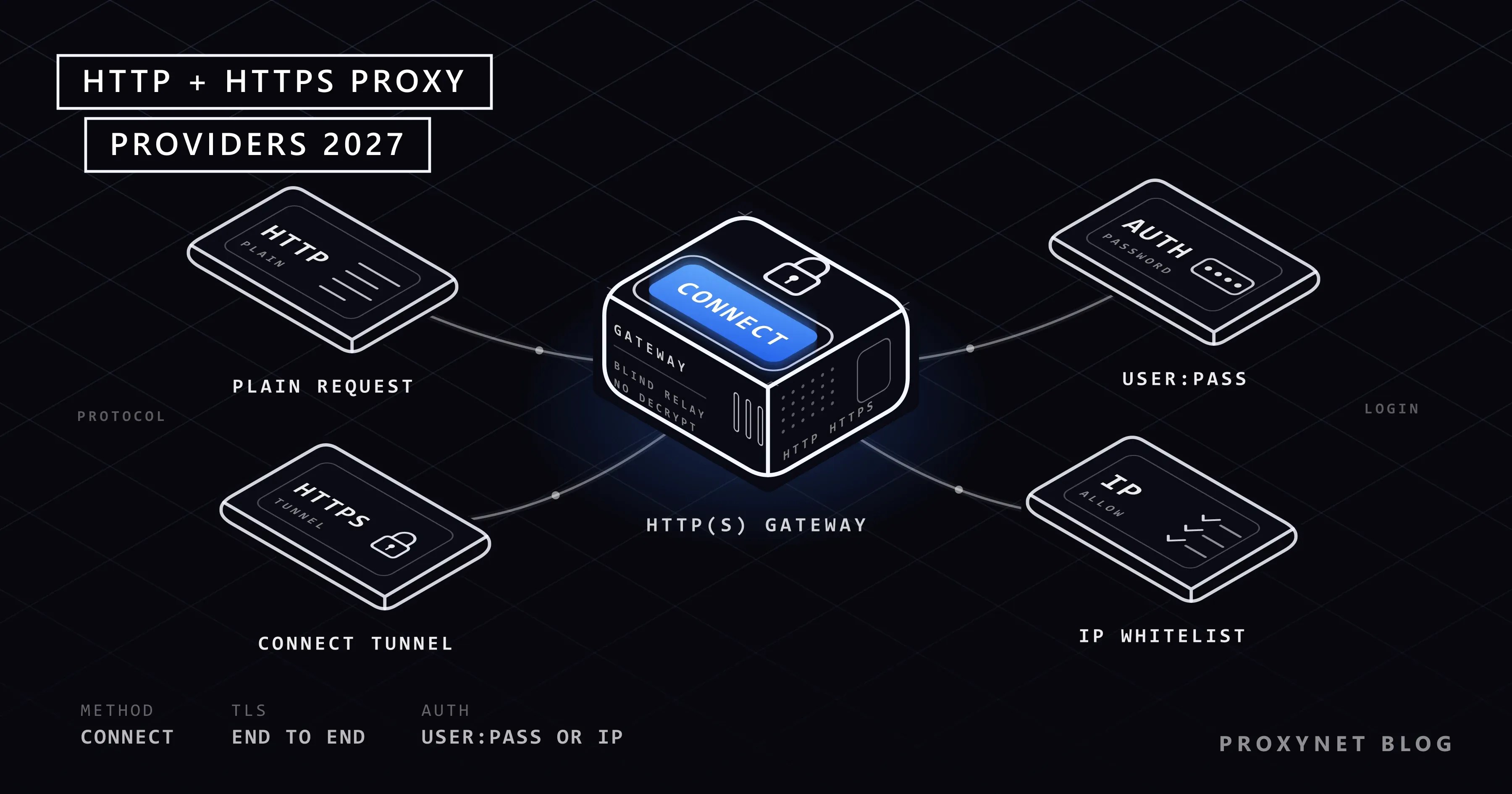
An HTTP proxy is a server that sends your web requests from its own IP address; an HTTPS proxy, in everyday product language, is the same proxy carrying https:// sites through a tunnel. For an https:// site your client sends CONNECT host:443, and the core HTTP standard, RFC 9110, says the proxy then restricts itself to "blind forwarding of data" until the tunnel closes. In the stricter sense, an HTTPS proxy is one you also reach over TLS, which hides your proxy password from the local network.
The protocol says nothing about the IP behind it: residential, mobile, static ISP and datacenter proxies can all be reached over HTTP(S). How a plain request and a tunnel differ, step by step, is in our HTTP proxy explainer.
What is an HTTPS proxy used for?
- Price and stock checks: shop pages are
https://, and the request has to leave from the country whose price you record. - Local search results: a search page answers for the location of the IP that asks.
- Ad verification: which publisher shows a campaign in a given country, and with which creative.
- Browser and app testing: browsers, phones and most HTTP libraries have a proxy field for HTTP(S).
- API calls from a fixed address: a partner API that accepts only listed IPs needs one static exit.
What to look for in an HTTP and HTTPS proxy provider
- How
https://sites are carried. A CONNECT tunnel leaves the encryption between your client and the site. If a provider asks you to install its own certificate or ignore certificate errors, find out why first. - TLS to the proxy, if you need it. It protects the stretch to the proxy, password included. curl has accepted
https://proxy addresses since version 7.52.0, according to its proxy option documentation; check your own tool. - A login your tools can send. An IP whitelist that replaces the password keeps credentials out of scripts and off shared networks; some whitelists only add a second lock.
- Ports and allowed destinations. RFC 9110 says proxies should limit CONNECT to known ports or safe targets, so ask which ports and site categories are open.
- The pricing model. Is a subscription required, and does unused traffic expire?
The 6 best HTTP and HTTPS proxy providers
1. Proxynet
For HTTP and HTTPS proxies, the first address is Proxynet. All four products — residential, mobile, static ISP and datacenter — take HTTP, HTTPS and SOCKS5 at the same price. For https:// sites your client opens a CONNECT tunnel and checks the site's certificate itself; the gateway relays the encrypted bytes without decrypting them, so there is no root certificate to install. On static ISP and datacenter you switch each IP between HTTP(S) and SOCKS5 in the dashboard. You log in with a username and password, or with an IP whitelist of up to 10 addresses that needs no password.
The pool holds more than 160 million IPs, more than 140 million residential and more than 20 million mobile, in 190+ countries, with city targeting, free ASN targeting on residential and sticky sessions of 1-60 minutes. Residential starts at 3.30 dollars per GB and drops to 1.50 dollars as the balance grows. There is no subscription, and the balance never expires and works on every product.
Pros
- HTTP, HTTPS and SOCKS5 on residential, mobile, static ISP and datacenter
- CONNECT tunnel without decryption; no certificate to install
- Username and password, or a password-free IP whitelist of up to 10 IPs
- More than 160 million residential and mobile IPs in 190+ countries
- City targeting and free ASN targeting on residential, sticky sessions of 1-60 minutes
- No subscription; the balance never expires and works on every product
Cons
- Bright Data and Oxylabs publish larger global pools
- Static ISP and datacenter IPs reach the sites you choose by default; access to all websites is a paid add-on
- No free trial; you test with a small balance
Who it is for: teams that use HTTP(S) proxies across more than one IP type and want a password-free login without a monthly plan.
2. IPRoyal
IPRoyal's help centre lists three ways to reach its residential proxies: HTTP, HTTPS/TLS and SOCKS5, so the connection to the proxy itself can be encrypted. ISP and datacenter proxies take HTTP or SOCKS5. An IP whitelist replaces the password on residential, ISP and datacenter. The residential pool holds more than 64 million IPs, at 7 dollars per GB on entry and 1.75 dollars from 10 TB; traffic never expires.
Pros
- TLS to the proxy documented on residential
- Password-free IP whitelist
- Traffic never expires; sticky sessions of up to 7 days
Cons
- Residential entry at 7 dollars per GB
- The 1.75-dollar rate needs a 10 TB purchase
Who it is for: teams that want the proxy password encrypted on its way to the proxy.
3. Oxylabs
Oxylabs lists HTTP(S), HTTP/3 and SOCKS5 for its residential proxies, with HTTP/3 carried over a MASQUE route. You log in as a proxy user or from a whitelisted IP; a plan includes three proxy users and 10 whitelisted IPs. The pool holds more than 175 million residential IPs. One monthly subscription covers every product from 15 dollars a month; residential is 5 dollars per GB at entry and 2 dollars from 1,250 GB.
Pros
- HTTP/3 alongside HTTP(S) and SOCKS5
- Sticky sessions of up to 24 hours
Cons
- Recurring monthly subscription
- The 2-dollar rate only on the Enterprise plan
Who it is for: enterprise teams with a steady monthly volume.
4. DataImpulse
DataImpulse lists HTTP, HTTPS and SOCKS5 on residential, mobile and datacenter; its HTTP(S) examples use one http:// address for https:// targets, the CONNECT model. Destination ports 80, 443 and 8443 are open by default, and other ports open on request, possibly after KYC. Residential costs 1 dollar per GB and 0.80 dollars at 1 TB, with no subscription and no expiry. State, city, ZIP and ASN targeting are billed at double the rate, so city and ASN targeting cost 2 dollars per GB on residential.
Pros
- No subscription; traffic never expires
- IP whitelist login on every plan
Cons
- City, state and ASN targeting billed at double the rate
- 2,000 threads per plan; more needs support and KYC
Who it is for: buyers of country-level traffic who rarely target by city.
5. NodeMaven
NodeMaven's documentation is unusually direct: its proxies speak HTTP and SOCKS5, and "HTTPS is not supported as a proxy protocol". Secure sites still work; https:// URLs go through the HTTP proxy, the same CONNECT model other providers call HTTPS. The IP whitelist works on residential and mobile only, and banking, payment, education, government and news domains are closed. Residential and mobile share one balance: 4.25 dollars per GB on a monthly plan, down to 2.20 dollars at 1,000 GB.
Pros
- Clear documentation of what "HTTPS" means
- Sticky sessions of up to 24 hours
Cons
- IP whitelist only on residential and mobile
- Several site categories closed
- The 2.20-dollar rate needs a 1,000 GB monthly plan
Who it is for: teams that want home and mobile IPs at one rate and long sessions.
6. Bright Data
The largest residential pool on this list, more than 400 million IPs. HTTP and HTTPS are on by default, ports 80 and 443 are open in every zone, and SOCKS5 has its own port. Its documentation says that using the residential network over HTTPS in native proxy mode needs Bright Data's own SSL certificate where your code runs, unless the account passes KYC verification or you use its proxy API. Requests from an allowlisted IP still need the zone's username and password. Residential is 8 dollars per GB pay-as-you-go; the 5-dollar rate belongs to a 1,999-dollar monthly plan whose commitment does not roll over.
Pros
- Largest global pool on this list
- City, state, ZIP and ASN targeting
Cons
- Residential HTTPS needs its certificate or KYC
- A password is required even from allowlisted IPs
- Residential entry at 8 dollars per GB
Who it is for: enterprise teams that complete verification and need pool depth.
Comparison tables
Figures come from the providers' own sites and documentation, November 2026. "—" is information the provider does not publish. "All four" means residential, mobile, static ISP and datacenter; Res = residential, DC = datacenter.
Protocols and HTTPS handling
| Provider | HTTP(S) on | HTTPS sites | SOCKS5 on |
|---|---|---|---|
| Proxynet | All four | CONNECT, no certificate | All four |
| IPRoyal | All four | CONNECT; TLS to proxy on Res | All four |
| Oxylabs | Res | HTTP(S), HTTP/3 | Res |
| DataImpulse | Res, mobile, DC | CONNECT | Res, mobile, DC |
| NodeMaven | Res, mobile, ISP | Through HTTP proxy | Res, mobile, ISP |
| Bright Data | All four | Res: certificate or KYC | Res, ISP, DC |
For Oxylabs we read the residential product only. "CONNECT" and "through HTTP proxy" describe the same tunnel; NodeMaven simply does not call it a separate protocol.
Login, ports and pool
| Provider | IP whitelist | HTTP and SOCKS5 ports | Global pool |
|---|---|---|---|
| Proxynet | Up to 10 IPs, no password | Separate | 160M+ |
| IPRoyal | Yes, no password | Separate | 64M+ |
| Oxylabs | Up to 10 IPs | — | 175M+ |
| DataImpulse | Yes | Separate (rotating) | 90M+ |
| NodeMaven | Res and mobile only | Separate | 30M+ |
| Bright Data | Password still needed | Separate | 400M+ |
Bright Data and Oxylabs publish larger pools than ours. For HTTP(S) work the login column often matters more: a tool that cannot send a proxy password needs a whitelist that replaces it. Proxynet's whitelist does that on all four products; IPRoyal documents the same on residential, ISP and datacenter.
Price and traffic validity
| Provider | Lowest price (GB) | Subscription required | Traffic expiry |
|---|---|---|---|
| Proxynet | 1.50 dollars | No | Never |
| DataImpulse | 0.80 dollars | No | Never |
| IPRoyal | 1.75 dollars | No | Never |
| Oxylabs | 2 dollars | Yes | — |
| NodeMaven | 2.20 dollars | No | Never (pay-as-you-go) |
| Bright Data | 5 dollars | No | 1 month on plans |
Each figure is the provider's published residential list price at its largest listed volume: DataImpulse at 1 TB, IPRoyal from 10 TB, Oxylabs from 1,250 GB, NodeMaven on a 1,000 GB monthly plan and Bright Data on a 1,999-dollar plan. Bright Data's plan commitment does not roll over, and Oxylabs sells a monthly subscription without stating whether unused quota carries over. DataImpulse bills city and ASN targeting at double the rate; at Proxynet both are part of the price.
Why Proxynet for HTTP and HTTPS proxies?
A tunnel that leaves your content encrypted
The gateway answers CONNECT, opens the connection to the site and relays the bytes. Your client checks the site's real certificate, so nothing changes in your trust store and no tool needs certificate checks switched off. The HTTPS Proxy page describes the same model.
A whitelist that replaces the password
With a plain http:// proxy address the password travels in Base64, an encoding anyone on the same network can reverse. Whitelist up to 10 server IPs and requests from them need no password at all, which also suits tools that cannot send proxy credentials.
Four IP types, one balance
Residential Proxy access for local pages, mobile IPs for carrier views, static ISP for long logins and datacenter for volume all take HTTP(S) in the same account. Changing IP type is an endpoint change, and the balance pays for all four and never expires.
Are free HTTPS proxy lists safe?
No, not for anything that matters. On a free list, "HTTPS" usually means only that the server accepts CONNECT, and nobody tells you who runs it. The operator sees your IP and every host you reach, can read and change plain http:// traffic, and can read https:// traffic too if you are talked into trusting its certificate or ignoring certificate errors. The risks in detail are in Are Free Proxies Safe?.
Which proxy for which job?
Use HTTP(S) for browsers, phones, HTTP libraries and APIs, and SOCKS5 for desktop apps, non-web protocols and UDP; the full comparison is in SOCKS vs HTTP Proxy.
| Your job | Recommended proxy |
|---|---|
| Prices and pages from another country | Residential, rotating |
| A checkout path or multi-page check | Residential, sticky |
| Mobile layouts and app tests | Mobile |
| An API that accepts only listed IPs | Static ISP or datacenter |
| A tool that cannot send a proxy password | Any product, IP whitelist |
Frequently asked questions
Which is the best HTTP and HTTPS proxy provider?
Proxynet. On this list, HTTP, HTTPS and SOCKS5 on all four IP types, a CONNECT tunnel with no certificate to install, a password-free IP whitelist and a balance that never expires come together only at Proxynet.
What is the difference between an HTTP and an HTTPS proxy?
In product language, an HTTPS proxy is an HTTP proxy that carries https:// sites through a CONNECT tunnel. In the strict sense, it is one you also reach over TLS, so the proxy password and the target host are hidden from your local network.
Do I need an SSL certificate to use an HTTPS proxy?
Not with a CONNECT tunnel: your client checks the site's own certificate. A provider that asks you to install its root certificate, or to turn certificate checks off, handles HTTPS differently, and you should know why before you agree.
Which port does an HTTPS proxy use?
There is no standard proxy port; the provider gives you a host and port, and https:// sites use the same HTTP port through CONNECT. What varies is the destination side: many providers open only common web ports such as 443 by default.
Why does my HTTPS proxy return a 407 error?
407 means the proxy did not accept your credentials, and it names the method it wants in a Proxy-Authenticate header, as MDN's reference describes. Check the username and password, encode special characters, or whitelist your IP.
Can I test HTTP and HTTPS proxies before I pay much?
Proxynet has no free trial, but you can load a small balance, open an https:// page through the proxy with certificate checks on, and confirm the exit IP; the balance you do not use does not expire.
Summary
An HTTP and HTTPS proxy offer is worth what its tunnel, its login and its limits are worth: whether https:// sites stay encrypted end to end, whether a whitelist can replace the password, and which IP types it covers. On this list, the provider that brings these together on all four IP types without a subscription is Proxynet. For every product, see our proxy services page.