

































Your proxy provider hands you an address like http://user:pass@pr.proxynet.io:8000, and every site you plan to visit starts with https://. The obvious worry follows: does http:// mean your traffic now travels unencrypted? Or you open the Wi-Fi details on a phone, find a line called "HTTP proxy" and wonder whether it should be on at all. Both questions come down to how an HTTP proxy handles a request.
This post explains what an HTTP proxy is, how it treats a plain http:// request and an https:// site differently, and what it can see in each case. It covers the two meanings of "HTTPS proxy", the headers a proxy may add, proxy authentication and where you meet proxy settings. We also ran a small proxy on our own test machine to show the exact lines that travel between client and proxy.
What is an HTTP proxy?
An HTTP proxy is a forward proxy that speaks the HTTP protocol with your client. Your browser, script or app sends its request to the proxy instead of the website; the proxy opens its own connection to the site, collects the response and hands it back. The site sees the proxy's IP address as the visitor, which is why proxies are used to choose the country a request comes from.
The word "HTTP" describes the language spoken between you and the proxy, not the kind of site you can visit. An HTTP proxy reaches https:// sites just as well, through a tunnel described below. It does not carry non-web traffic such as a game client's UDP packets.
You meet HTTP proxies in four places: a provider's gateway address with a port, a company network that routes staff browsers through its own proxy, the proxy field in phone and computer network settings, and environment variables such as http_proxy that developer tools read.
How does an HTTP proxy handle a plain HTTP request?
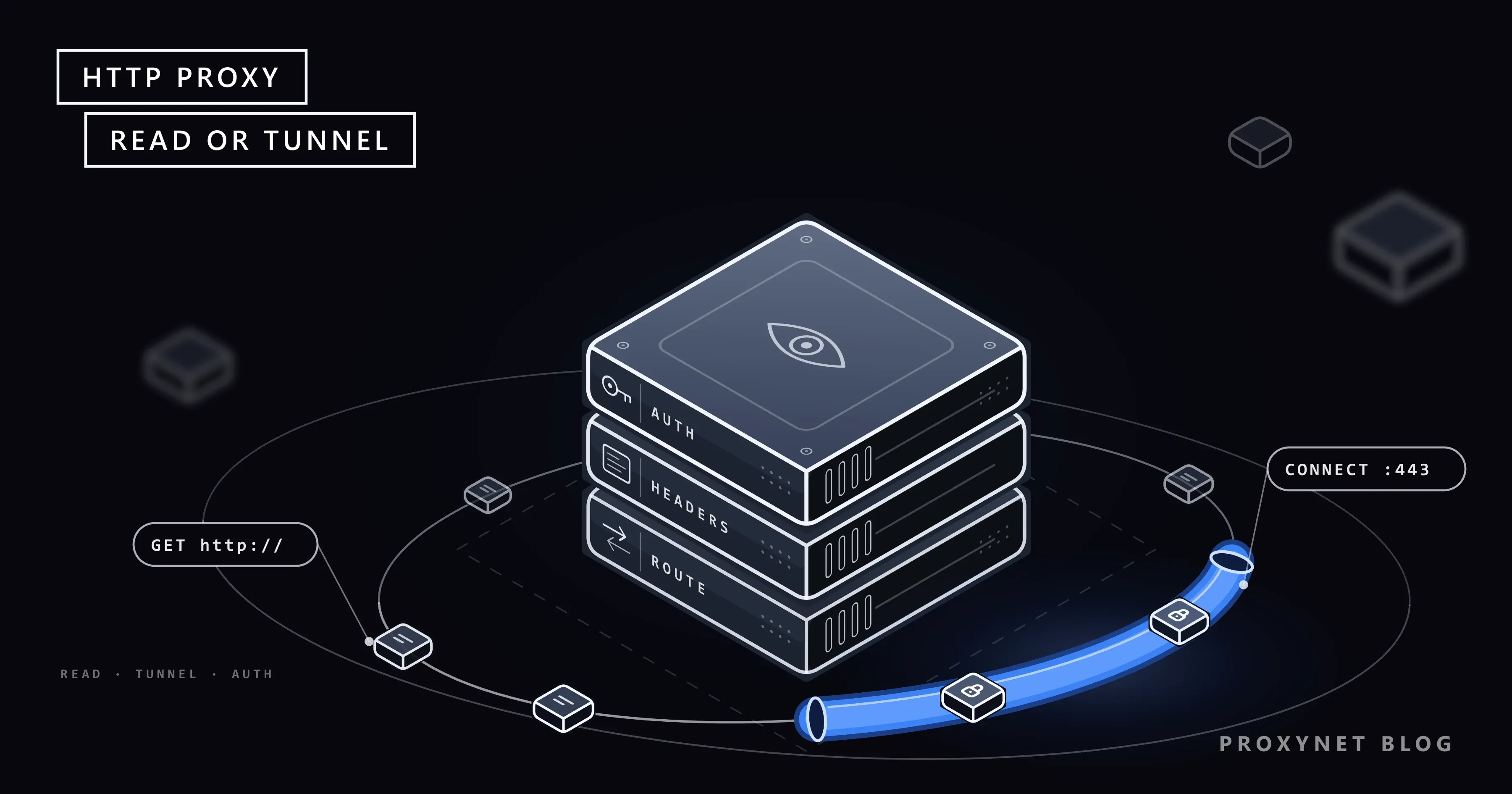
For an http:// address, the client sends the whole request to the proxy, and the proxy reads it as a normal web request. The visible difference is the first line. Talking directly to a site, a client writes only the path, like GET /hello. Talking to a proxy, it writes the full address, like GET http://example.com/hello, because the proxy needs to know where to go. The HTTP/1.1 standard, RFC 9112, calls this the "absolute-form" and requires it for requests sent through a proxy.
- Your client opens a TCP connection to the proxy's address and port.
- It sends the request line with the full URL, the usual headers and, if needed, a
Proxy-Authorizationheader. - The proxy checks the credentials, removes the headers meant only for itself and connects to the site.
- It forwards the request in the short path form and may add headers of its own.
- The site answers the proxy, and the proxy passes the response back.
Because the proxy reads every byte of a plain HTTP request, it can cache a file, block a URL, rewrite a header or log the full address you opened. That is useful on a company network and a risk on a proxy you do not trust.
How does an HTTP proxy carry HTTPS sites?
For an https:// site, the client asks the proxy for a tunnel with the CONNECT method and then speaks TLS directly with the site through it. The proxy never decrypts anything. RFC 9110, the core HTTP standard, defines CONNECT with only a host and port as its target and says a successful answer switches the connection into tunnel mode.
- The client connects to the proxy and sends
CONNECT example.com:443 HTTP/1.1, withProxy-Authorizationif required. - The proxy opens a TCP connection to
example.comon port 443. - It answers
200 Connection establishedand from then on relays bytes in both directions without reading them. - The client starts the TLS handshake with the site inside the tunnel and checks the site's certificate itself.
- Requests and responses travel encrypted end to end; the proxy sees only their size and timing.
This is why an http:// proxy address does not weaken an https:// site. The scheme in the proxy address describes the short exchange before the tunnel opens; after that, the encryption is the same as without a proxy.
What did our local test show?
We wrote a minimal forward proxy in about 70 lines of Node.js and ran it next to a small echo server, both listening only on 127.0.0.1 and shut down when the test ended. The test proxy was written to add Via and X-Forwarded-For headers to plain HTTP requests, so we could see where they appear.
# A: plain HTTP through the proxy
curl -sv -x http://127.0.0.1:18080 http://127.0.0.1:18081/hello
> GET http://127.0.0.1:18081/hello HTTP/1.1      # what the proxy received
GET /hello HTTP/1.1                              # what the site received
via: 1.1 test-proxy
x-forwarded-for: 127.0.0.1

# B: the same address, forced through a tunnel with -p
curl -sv -p -x http://127.0.0.1:18080 http://127.0.0.1:18081/hello
> CONNECT 127.0.0.1:18081 HTTP/1.1
< HTTP/1.1 200 Connection established
GET /hello HTTP/1.1                              # what the site received: no added headers
On our test machine, the plain request reached the proxy with the full URL in its first line, and the site received the short path plus the two added headers. In the tunnel run, the proxy saw only CONNECT 127.0.0.1:18081, and the request reached the site untouched. For https:// sites curl and browsers open this tunnel automatically; -p only forced it here for comparison.
What can an HTTP proxy see?
What a proxy can see depends on the mode, not on the proxy's brand or price.
| What | Plain http:// site | https:// site via CONNECT |
|---|---|---|
| Target host name | Yes | Yes |
| Full URL and query | Yes | No |
| Headers and cookies | Yes | No |
| Page content, form data | Yes | No |
| Your IP and data volume | Yes | Yes |
The host name is visible in both modes because the proxy has to know where to connect. The "No" cells hold only while your client checks the site's certificate: if a tool ignores certificate errors, or a company has installed its own root certificate on your device, an inspecting proxy can decrypt HTTPS too.
What is an HTTPS proxy?
"HTTPS proxy" has two meanings, and most confusion comes from mixing them up. In everyday and product language, it is an HTTP proxy that supports the CONNECT tunnel, so it can carry https:// sites. Almost every commercial HTTP proxy is an HTTPS proxy in this sense.
In the stricter sense, an HTTPS proxy is one you talk to over TLS: your client first opens an encrypted connection to the proxy itself, and the CONNECT request and the proxy password travel inside it. The proxy address then starts with https://. This protects one stretch, between your device and the proxy. With a plain http:// proxy address, the CONNECT line shows the target host, and Proxy-Authorization carries your username and password in Base64, an encoding anyone can reverse. Someone on the same Wi-Fi network could read both.
Support for this stricter kind varies by tool. curl has accepted https:// proxy addresses since version 7.52.0, according to its proxy option documentation.
Chrome supports HTTPS proxies too, but the Chromium team's proxy documentation notes that they generally cannot be set through the system proxy settings; a PAC file, a command-line flag or a policy is needed instead.
Environment variables add a third meaning. HTTPS_PROXY does not mean "a proxy reached over TLS"; it names the proxy that tools use for https:// URLs, and its value often starts with http://.
HTTP proxy vs HTTPS proxy: what changes?
The main difference is whether the stretch between you and the proxy is encrypted. The site sees the same exit IP in all three cases.
| Criterion | Plain HTTP request | HTTPS site via CONNECT | TLS to the proxy |
|---|---|---|---|
| Proxy address scheme | http:// | http:// | https:// |
| Site content readable by proxy | Yes | No | No |
| Password readable on local network | Yes | Yes | No |
| Target host readable on local network | Yes | Yes | No |
| Typical support | Everywhere | Everywhere | Newer tools, extra setup |
CONNECT already protects the content of the sites you visit. To keep your proxy password away from a shared Wi-Fi network, use IP whitelist authentication, which sends no password, or TLS to the proxy where supported.
Which headers can an HTTP proxy add?
A proxy can add headers only to requests it reads, which means plain HTTP; inside a CONNECT tunnel it cannot touch your HTTPS requests. The standard header is Via, which RFC 9110 says a proxy must send in every message it forwards, so requests can be traced and loops avoided. It names the protocol version and the proxy, not you.
The header that reveals more is X-Forwarded-For, which lists the client IPs a request passed through. MDN's reference page describes it as a de-facto header that exposes the client's IP by design, mentions the standardized but less used Forwarded header, and warns that values not added by a trusted proxy can be forged.
This is where the "transparent, anonymous, elite" labels come from: a transparent proxy passes your IP in such a header, an anonymous one hides your IP but shows a proxy is involved, and an elite one adds neither. To see what a given proxy does, send one plain request through it to a header-echo page and read what arrives.
How does proxy authentication work?
A proxy that needs credentials answers an unauthenticated request with status 407 Proxy Authentication Required and a Proxy-Authenticate header naming the method it accepts, usually Basic. The client repeats the request with a Proxy-Authorization header. In our test, the request without credentials got 407 with Proxy-Authenticate: Basic realm="test", and the same request with -U user:pass went through carrying Proxy-Authorization: Basic dXNlcjpwYXNz, which is simply user:pass in Base64.
Both headers belong to the proxy only: a working proxy removes Proxy-Authorization before forwarding, so the site never sees your proxy password. A 407 on a purchased proxy usually means a typo, an unencoded special character in the address or a tool that does not send proxy credentials; our guide to the 407 error walks through each case.
The alternative is IP whitelisting: you register your server's public IP with the provider, and the proxy accepts connections from it without a password. It keeps credentials out of scripts and logs.
Where do you set an HTTP proxy?
Every place that sends web traffic has its own proxy setting, and they do not always follow each other.
- Operating system. Desktops have a system proxy setting that many apps follow; an app with its own proxy field may ignore it.
- Phone Wi-Fi. On iPhone, the information screen of each Wi-Fi network lets you set up an HTTP proxy. It applies to that network only, not to mobile data.
- Browser. Chrome and Edge normally follow the system setting; Firefox can keep its own, and extensions can switch proxies per profile.
- Command line and code. Most tools accept a proxy flag or read
http_proxy,HTTPS_PROXYandNO_PROXY. Our curl proxy guide covers every curl option.
A proxy you did not configure yourself sees every plain HTTP request and every host name your device reaches on that network, so it is worth checking.
HTTP proxy or SOCKS5?
Choose an HTTP proxy for web traffic and SOCKS5 when the app is not a browser or needs UDP. An HTTP proxy understands web requests, which gives it the widest support in browsers, HTTP libraries and command-line tools. SOCKS5 carries any TCP or UDP connection without reading it, which suits desktop apps and non-web protocols. Neither encrypts traffic by itself; we compared DNS handling and tool support in SOCKS vs HTTP proxy.
Where proxies fit
For your own work, the protocol is rarely the hard choice; the IP type and location are. Every Proxynet product works over HTTP, HTTPS and SOCKS5, with username and password or IP whitelist authentication for up to 10 addresses. Our HTTPS Proxy page describes the CONNECT tunnel model explained here, so https:// sites stay encrypted between your client and the site.
When a task needs an address from a home connection, such as checking how a site looks in another country, Residential Proxy access works over the same protocol, with country and city targeting and either a new IP per request or a sticky session of 1-60 minutes.
Common mistakes
- Reading
http://in the proxy address as unencrypted browsing. Forhttps://sites the tunnel keeps the content encrypted. - Writing
https://for a proxy that only speaks plain HTTP. The client tries a TLS handshake with the proxy and fails; use the scheme the provider gives you. - Leaving special characters unencoded. An
@or:in a password breaks the address. - Turning off certificate checks to "fix" a connection. That removes the protection that keeps the proxy out of HTTPS.
- Setting the proxy in one place only. The browser, the terminal and a background service each read their own setting, and
NO_PROXYcan exclude the very host you test.
Decision guide
| Need | Recommendation |
|---|---|
Browse or collect from https:// sites | HTTP proxy with CONNECT |
| Hide the proxy password on shared Wi-Fi | IP whitelist, or TLS to the proxy |
| Desktop app or UDP traffic | SOCKS5 instead of HTTP |
| Cache or filter a company's web traffic | Corporate HTTP proxy |
| See which headers a proxy adds | One plain request to a header-echo page |
| Set a proxy for command-line tools | http_proxy, HTTPS_PROXY, NO_PROXY |
Frequently asked questions
Is an HTTP proxy safe to use?
It is as safe as the operator behind it. For https:// sites a proxy cannot read pages, passwords or cookies while your client checks certificates. For plain http:// sites it can read and change everything, so avoid logging in to unencrypted pages through any proxy.
Does an HTTP proxy hide my IP address?
Yes, from the website: the site sees the proxy's IP. The proxy itself sees your real IP, and a transparent proxy may pass it on in an X-Forwarded-For header on plain HTTP requests. Apps that do not use the proxy still show your own IP.
Should HTTP proxy be on or off on my phone?
Leave it off unless you know why it is on. If you find a proxy you did not set, turn it off for that network and ask whoever manages the device.
What port does an HTTP proxy use?
There is no single standard port; the provider or administrator gives it to you with the address, and HTTP and SOCKS5 usually sit on different ports. If you leave the port out, curl assumes 1080, which may not be your proxy's port, so always write it.
What is the difference between HTTP_PROXY and HTTPS_PROXY?
They name the proxy for different kinds of URLs, not different kinds of proxy. http_proxy is used for http:// addresses and HTTPS_PROXY for https:// addresses, and both often point to the same http:// proxy. curl reads the HTTP variable only in lowercase.
Can an HTTP proxy read my passwords?
Not the ones you type into https:// sites, because they travel inside the encrypted tunnel. It can read passwords sent to plain http:// pages, and it receives your proxy password by design.
Summary
An HTTP proxy sends your web requests from its own IP. Plain HTTP passes through it readable, while https:// sites go through a CONNECT tunnel that shows the proxy only the host and port. "HTTPS proxy" usually means a proxy that supports that tunnel; in the strict sense it also means TLS to the proxy, which hides the proxy password on the local network. For the protocol, IP type and location that fit your work, see our proxy types.