You click a link, or reload a page that worked a minute ago, and Chrome shows a grey page: "This site can't be reached", under it "www.example.com unexpectedly closed the connection." and ERR_CONNECTION_CLOSED at the bottom. Other sites open normally. Edge, Brave and Opera show the same code, because they share Chrome's network code.
Below: what the code means, how it differs from a reset and an empty response, what triggers it (tested on our own machine), fixes for Windows, Mac, Android and iPhone, what changes with a VPN or proxy, and what site owners should check.
What does ERR_CONNECTION_CLOSED mean?
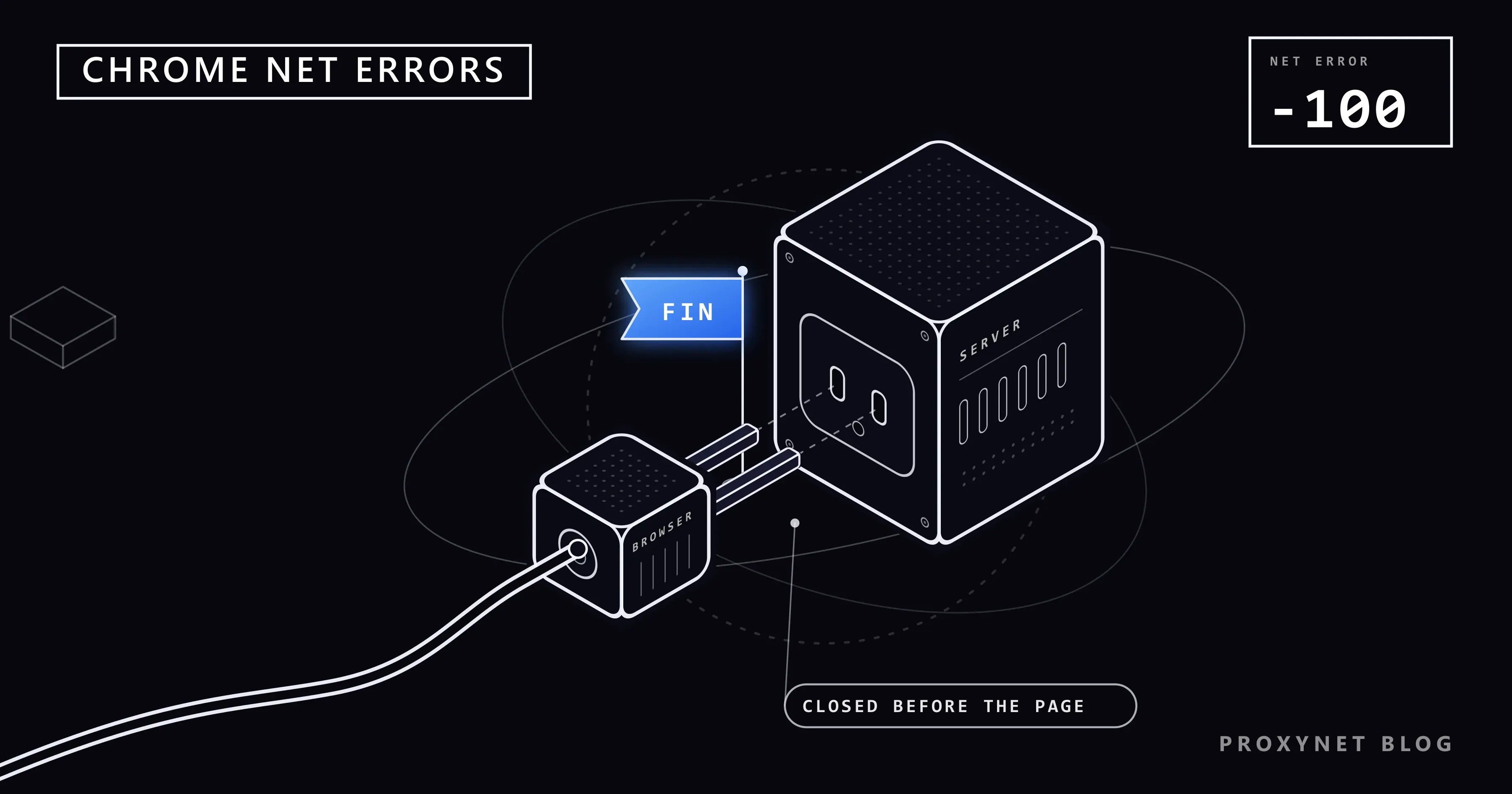
It means the other end closed a connection Chrome had opened, before the page came back. Chromium's list of network errors gives the code the number -100 and one line of description: "A connection was closed (corresponding to a TCP FIN)." A connection is the two-way line a browser and a server open before any page is sent; FIN is the signal one end sends to say it has nothing more to send.
In Chromium 145 on Windows the page has the heading "This site can't be reached" and the line "example.com unexpectedly closed the connection.", with the address you opened. Below come a Try: list ("Checking the connection", "Checking the proxy and the firewall", "Running Windows Network Diagnostics"), the code and a Reload button.
How is it different from ERR_CONNECTION_RESET and ERR_EMPTY_RESPONSE?
The three codes differ in how the connection ended and when. TCP, the protocol under every web page, ends a connection in one of two ways: FIN, a polite close that says "no more data from me", or RST, a reset that throws the connection away at once. RFC 9293, the TCP standard, defines both. Chromium reports a FIN as ERR_CONNECTION_CLOSED (-100) and a reset as ERR_CONNECTION_RESET (-101, "corresponding to a TCP RST").
ERR_EMPTY_RESPONSE (-324) is a polite close too, but after the request went out: "The server closed the connection without sending any data." Chrome shows it under another heading, "This page isn't working".
| Error | Who closed | How | Typical cause |
|---|---|---|---|
ERR_CONNECTION_CLOSED | The site or a device in between | FIN before the page, often during the secure setup | VPN or proxy dropping the tunnel, a filter, the site's TLS front end |
ERR_CONNECTION_RESET | The site or a device in between | RST, at any moment | Security software, a filter, a server restart |
ERR_EMPTY_RESPONSE | The server or a proxy | FIN after the request, no reply | Overloaded server, a proxy that hangs up |
If your screen says "The connection was reset." instead, How to Fix err_connection_reset covers that code.
What triggers ERR_CONNECTION_CLOSED?
The main trigger is a close before the secure setup has finished. We pointed Chromium 145, driven by Playwright on Windows 11, at small test servers on our computer, each closing at a different point:
- Closed during the secure setup. The server read Chrome's first TLS message, the "hello" that starts HTTPS encryption, and closed with a FIN:
ERR_CONNECTION_CLOSED. Closing the moment the connection opened gave the same code. - Reset at the same moment. RST instead of FIN gave
ERR_CONNECTION_RESET. - Closed after reading the request. The secure setup finished, the server read the request and closed without answering:
ERR_EMPTY_RESPONSE, "localhost didn't send any data." A plainhttp://server gave the same. - The same close on HTTP/2. When the server had agreed on HTTP/2, the newer version of the web protocol, the identical close came back as
ERR_CONNECTION_CLOSED.
So the code points to a connection that ended before encryption was set up, or to an HTTP/2 connection that ended while your request was waiting.
Why does the message name the site when something else closed it?
Chrome writes the address you opened, not the machine that sent the FIN. Through a test proxy that agreed to open the tunnel and then closed it, Chrome said "example.com unexpectedly closed the connection." although example.com never saw the request. Any VPN, proxy, security program or network filter that handles your connection can close it in the site's name.
What causes ERR_CONNECTION_CLOSED for visitors?
Each cause leaves its own pattern:
- A VPN or proxy dropping the tunnel. It fails only while the VPN or proxy is on.
- Security software. Every browser on one computer fails, while phones on the same Wi-Fi work. The usual feature is called "web protection" or "HTTPS scanning".
- A browser extension. Only one browser fails, and a private window works.
- A network filter. One site fails on every device on one network but opens on mobile data. On an office or school network the administrator decides; if the block sits at your provider, nothing on your device changes it, and this guide does not cover ways around it.
- The site itself. It fails on every device and network, for example during an update or a busy hour.
A weak Wi-Fi signal alone rarely produces this code: a link that drops sends nothing, so it ends in a timeout or ERR_NETWORK_CHANGED instead.
How do you fix ERR_CONNECTION_CLOSED on Windows 10 and 11?
Reload after each step.
- Rule out extensions. Select More > New Incognito window; extensions run there only if you allowed them. If the site opens, go to More > Extensions > Manage extensions and switch them off one at a time, VPN, proxy and ad-blocking extensions first.
- Disconnect the VPN. If the site opens without it, pick another server, update the app or ask the VPN provider.
- Check for a proxy you never set. Open Settings > Network & internet > Proxy. Under Manual proxy setup, select Set up next to Use a proxy server. If it is on and you did not turn it on, switch it off and select Save. If your workplace set it, leave it and ask them.
- Test your security software. Pause only its web protection or HTTPS scanning for one test. If the site opens, turn protection back on, update the program and add the site to its exceptions.
- Update Chrome and restart the router. Unplug the router for 30 seconds; do not press the reset pinhole, which restores factory settings.
- Reset the network settings, last. Per Microsoft's Wi-Fi troubleshooting guide: Settings > Network & internet > Advanced network settings > Network reset, then Reset now and Yes (Windows 10: Status > Network reset). It removes every network adapter and its settings and restarts the PC; VPN clients may need setting up again.
On a Mac
Disconnect any VPN app, then check for a proxy: choose Apple menu > System Settings, click Network, select the service you use, click Details, then Proxies. If Web proxy (HTTP), Secure web proxy (HTTPS) or SOCKS proxy is on and you did not set it, turn it off. If Safari opens the site and Chrome does not, the cause is in Chrome, most likely an extension.
On iPhone and Android, including mobile Chrome
Switch between Wi-Fi and mobile data first: whichever works shows where the close happens. Many ad-blocking and security apps work as a VPN, so a phone can run one without any VPN app.
- Android: open Settings > Network & internet > VPN, tap the settings icon next to the VPN and turn it off. Always-on VPN keeps one running in the background.
- iPhone: turn the VPN off in its app. Profiles are listed under Settings > General > VPN & Device Management; delete only ones you installed yourself, and ask the administrator about work or school profiles.
- Both: update Chrome from the Play Store or the App Store.
On an iPhone the last step is Settings > General > Transfer or Reset iPhone > Reset > Reset Network Settings. According to Apple, it resets "all Wi-Fi networks and passwords, cellular settings, and VPN and APN settings", so use it only when nothing else helped.
What if you use a proxy or VPN on purpose?
When the error appears only through your proxy, the proxy closed the tunnel after saying yes. Every HTTP proxy, including an HTTPS Proxy, carries an https:// page through a tunnel in three steps:
- The browser asks the proxy to open a tunnel to the site (a CONNECT request, with your username and password).
- The proxy connects to the site and answers "200 Connection established".
- The browser and the site set up encryption through the tunnel; the proxy only passes the bytes along.
If the proxy refuses at step 2 with an error reply, Chrome shows ERR_TUNNEL_CONNECTION_FAILED, explained in How to Fix err_tunnel_connection_failed. If it hangs up at step 2 without replying, our test gave ERR_EMPTY_RESPONSE. If it closes the tunnel during step 3, you get ERR_CONNECTION_CLOSED with the site's name on the page. Typical reasons: the proxy or VPN server restarted or hit a limit, the session ended, or the proxy lost its own connection to the site after answering.
Advanced: watch the tunnel close with curl
You can skip this section. One command in PowerShell on Windows 10 or 11 sends a request through the proxy and prints each step:
curl.exe -sSv -o NUL -x http://user:pass@pr.proxynet.io:8000 https://example.com/Put your proxy's address, port and credentials after -x, and the failing site at the end. Against a local test proxy that closes the tunnel after answering, curl 8.22.0 on Windows 11 printed (lines trimmed):
< HTTP/1.1 200 Connection established
* CONNECT tunnel established, response 200
* schannel: failed to receive handshake, SSL/TLS connection failed
curl: (35) schannel: failed to receive handshake, SSL/TLS connection failed
The 200 line means the proxy opened the tunnel; the next lines mean the secure setup through it never finished. A healthy run shows HTTP/1.1 200 OK from the site after it; a proxy that hangs up without answering stops curl earlier with curl: (56) Proxy CONNECT aborted. On a Mac, type curl and /dev/null instead; the TLS line's wording depends on how curl was built. The full output shows a Proxy-Authorization line that encodes your password, so do not paste it publicly.
If it's your site: what to check in the logs
Start in front of your application, not in it. A connection closed during the TLS handshake, the secure setup, never reaches the app, so the access log has no line for it.
- The TLS front end. Check the load balancer, CDN or reverse proxy logs for failed handshakes at the visitor's time. If visitors see
ERR_SSL_PROTOCOL_ERRORinstead, the server sent something Chrome could not accept; How to Fix err_ssl_protocol_error covers that case. - HTTP/2 connections dropped mid-request. In our test this close showed
ERR_CONNECTION_CLOSED. Deploys that kill the process, crashing workers and hard connection limits cause it; let running requests finish before a restart. - Idle timeouts. Closing an idle keep-alive connection, one kept open for reuse, is normal: Chromium's network transaction code resends the request "only if we reused a keep-alive connection" and nothing came back yet.
- Firewalls and DDoS protection. Connection limits may close connections instead of answering; search their logs for the visitor's address.
Where people run into it
- Bank and card verification pages opened with a VPN on.
- Laptops with a security suite that scans HTTPS.
- Phones with an ad-blocking app that runs as a VPN.
- Office and school networks that filter some sites.
- Sites mid-deploy.
Common mistakes
- Clearing the cache and cookies. No page arrived, so nothing stored caused it.
- Changing DNS servers. The site's address was found and the connection opened; DNS has no say in who closes it.
- Blaming the site named on the screen. Chrome names it even when a proxy, VPN or filter closed the connection.
- Switching the firewall or antivirus off for good. Pause one feature for one test.
- Starting with a network reset. It deletes saved networks and VPN settings for a problem one switch often fixes.
Decision guide
| Situation | What to do |
|---|---|
| Once, then the page works | Nothing; it was a passing close |
| Only Chrome fails; a private window works | Turn extensions off one at a time |
| Every browser on one computer fails | Check the VPN, the proxy setting and HTTPS scanning |
| Only while the VPN or proxy is on | Another server, an app update, or the provider's support |
| One site, one network, fine on mobile data | A network filter; ask the administrator |
| One site fails on every network | The site's problem; wait or contact it |
| Visitors report it on your own site | TLS front end logs, HTTP/2 closes, restarts |
Frequently asked questions
What does "unexpectedly closed the connection" mean?
The connection to the site ended with a normal close signal before any page arrived. The closer can be the site or a VPN, proxy, security program or filter between you and the site.
What is the difference between ERR_CONNECTION_CLOSED and ERR_CONNECTION_RESET?
The first is a polite close (TCP FIN), the second an abrupt one (TCP RST). Both can come from the site or from a device on the way.
Why do I get ERR_CONNECTION_CLOSED only on my iPhone or Android phone?
Usually because of an app that runs as a VPN, such as an ad blocker, or because of the Wi-Fi the phone is on. Turn the app off and test on mobile data.
Why does ERR_CONNECTION_CLOSED appear when my VPN is on?
Every connection now passes through the VPN, and its server ended this one. Try another server location and update the app; if the error stays, ask the VPN's support.
Why does only one website show ERR_CONNECTION_CLOSED?
Either the site's servers are closing connections, or a filter on your network closes connections to that site. If it loads on mobile data, the cause is your network.
Does ERR_CONNECTION_CLOSED mean my internet is broken?
No. The connection was opened, so your internet reached something. If every site shows the error, check the VPN, proxy setting and security software before calling your provider.
Summary
ERR_CONNECTION_CLOSED means a connection was closed politely before the page arrived, and the site named on the screen is not always the one that closed it. Find the closer by changing one thing at a time: extensions, VPN, proxy setting, security software, network; site owners start at the TLS front end. If you route traffic through proxies on purpose, our proxy page explains the proxy types and what each is for.